
Malicious npm Packages Deliver Windows RAT Disguised as PostCSS Tools


 8 min. read
  Published on
Security researchers found a new npm malware campaign that targets Windows developers through packages disguised as PostCSS-related utilities.
The main package, postcss-minify-selector-parser, posed as a plausible CSS selector parsing tool and depended on the real postcss-selector-parser package. According to JFrog Security Research, the package ultimately led to a multi-stage Windows remote access trojan capable of stealing Chrome credentials, running commands, transferring files, and maintaining persistence.

Access content across the globe at the highest speed rate.
70% of our readers choose Private Internet Access
70% of our readers choose ExpressVPN

Browse the web from multiple devices with industry-standard security protocols.

Faster dedicated servers for specific actions (currently at summer discounts)
The campaign also involved two related packages, postcss-minify-selector and aes-decode-runner-pro. JFrog said all three were tied to the same npm publisher and led to the same Windows payload chain.
Fake PostCSS Packages Hid a Windows Malware Chain
The attack started with a package name that looked close enough to legitimate development tooling to pass a quick review. The malicious package used familiar terms such as postcss, selector, parser, and css, making it appear related to normal frontend build work.
The real postcss-selector-parser package is a widely used selector parsing library in the JavaScript ecosystem. Attackers abused that trust by choosing a similar-looking name and by making their package depend on the legitimate library.
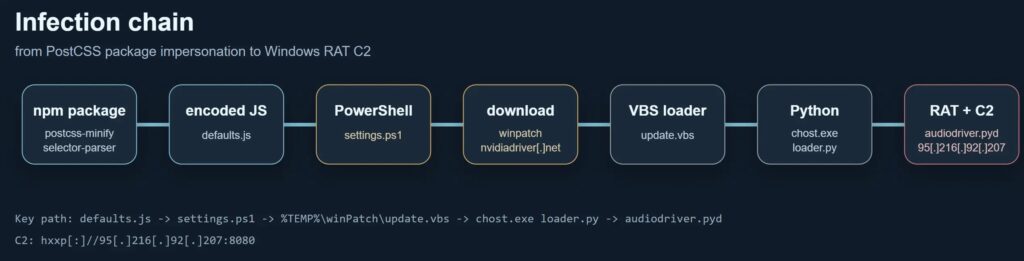
JFrog found that the malicious package did not simply behave like a normal parser. When imported, its entry point loaded another file containing an encoded payload, which decoded into a JavaScript dropper and then launched a PowerShell downloader.
| Package | Role in the campaign | JFrog Xray ID |
|---|---|---|
| postcss-minify-selector-parser | Main malicious package impersonating PostCSS-related tooling | XRAY-1002983 |
| postcss-minify-selector | Related package that depended on the malicious parser package | XRAY-1003986 |
| aes-decode-runner-pro | Related decoder-style package that led to the same payload chain | XRAY-989675 |
How the RAT Infection Works
Once the hidden code ran, a PowerShell stage downloaded a ZIP archive from a domain made to look like a driver or Windows patch delivery site. It then extracted the archive into the Windows temporary directory and launched a VBS bootstrapper.
The final implant was not a simple script. JFrog said the downloaded bundle contained a bundled Python runtime, a Python loader, and several Nuitka-compiled Python extension modules.
The RAT then contacted its command-and-control server over HTTP. Its traffic used encrypted POST packets with RC4 or ARC4 wrapping and MD5 checksum material, making network inspection harder for defenders.
- Downloads a Windows payload from a lookalike driver domain.
- Extracts the payload under the Windows TEMP directory.
- Runs a VBS bootstrapper to start the malware.
- Launches a bundled Python-based RAT.
- Communicates with the attacker’s C2 server over encrypted HTTP.
Registry Persistence Keeps the RAT Alive
The malware adds persistence through the Windows Run registry key using the value name csshost. This allows the RAT to relaunch after a reboot.
It also stores victim tracking data and host configuration in files under the Windows TEMP location. That gives the malware a persistent identity for the infected machine and helps it reconnect to the attacker’s infrastructure.
JFrog’s analysis says the RAT supports remote shell execution, file upload and download, host profiling, randomized wait commands, exit handling, and virtual machine checks. The VM checks use signals such as WMI queries, running processes, and MAC address prefixes linked to VMware, VirtualBox, Hyper-V, KVM, and QEMU.
| Capability | Impact |
|---|---|
| Remote shell | Lets attackers run commands on the infected Windows host |
| File transfer | Supports upload and download through the C2 channel |
| Registry persistence | Restarts the malware after reboot |
| Host profiling | Collects system information before or during attacker control |
| VM detection | Helps the malware avoid sandbox and analysis environments |
Chrome Credentials Were a Major Target
The RAT included a module designed to steal Google Chrome data. JFrog said the module referenced Chrome profile files, the Login Data database, Windows decryption APIs, and newer Chrome app-bound encryption logic.
This matters for developers because browsers often store more than ordinary website passwords. They may also contain access to cloud dashboards, source code platforms, project management tools, payment portals, and other sensitive services.
The malware also referenced output-style filenames such as gather.tar.gz, pwd.txt, and chrome_logins_dump.txt. JFrog said gather.tar.gz appeared to be used as an in-memory archive name for collected Chrome extension data.
Independent Advisories Flag the Packages as Malicious
The malicious package postcss-minify-selector-parser is also tracked in the OSV database as MAL-2026-5737. The advisory says the package impersonates the widely used postcss-selector-parser library and uses an opaque encrypted payload that gets decrypted and executed.
Security intelligence listings from Hacktron also flag postcss-minify-selector as malicious. Its report says the package name resembles the legitimate cssnano plugin naming pattern and pulls in the malicious sibling parser package.
The OSV advisory is especially useful for defenders because it describes the opaque-blob execution pattern, where encrypted code gets decrypted and evaluated with access to host Node.js capabilities.
What Developers Should Do Now
Developers who installed postcss-minify-selector-parser, postcss-minify-selector, or aes-decode-runner-pro should remove them immediately and inspect their full dependency trees.
Teams should also search Windows endpoints for the files, directories, registry entries, and network indicators linked to the campaign. Any browser-stored credentials, API tokens, cloud keys, npm tokens, Git credentials, or developer secrets used on affected systems should be treated as compromised.
JFrog’s remediation guidance recommends removing the packages, blocking the listed indicators, checking Windows endpoints for payload paths, reviewing the Run registry key, and rotating credentials from affected developer machines.
- Remove the three suspicious npm packages from affected projects.
- Inspect package-lock, yarn.lock, pnpm-lock, and CI dependency logs.
- Search for TEMP payload paths and the csshost registry value.
- Block the reported C2 IP address and payload delivery domain.
- Rotate browser-stored passwords and developer tokens from affected machines.
- Audit npm scripts and dependency updates before merging new build-tool packages.
Indicators of Compromise
Security teams can use the following indicators for threat hunting. These values should support a wider investigation, not replace endpoint review and credential rotation.
| Type | Indicator | Description |
|---|---|---|
| IP address | 95[.]216[.]92[.]207 | C2 server IP address |
| Domain | nvidiadriver[.]net | Payload delivery domain |
| URL | hxxp[:]//95[.]216[.]92[.]207:8080 | C2 communication endpoint |
| URL | hxxp[:]//nvidiadriver[.]net/verv1432/winpatch-xd7d[.]win | Payload download URL |
| File path | %TEMP%\winPatch.zip | Downloaded malware archive |
| File path | %TEMP%\winPatch\update.vbs | VBS bootstrapper |
| File path | %TEMP%\.store | Persistent victim UUID storage |
| File path | %TEMP%\.host | Host configuration storage |
| Registry key | HKCU\Software\Microsoft\Windows\CurrentVersion\Run\csshost | RAT persistence entry |
| File name | win-driver-xd7d/chost.exe | Renamed Python launcher |
| File name | win-driver-xd7d/loader.py | Python loader script |
| File name | win-driver-xd7d/api.cp310-win_amd64.pyd | HTTP C2 packet exchange module |
| File name | win-driver-xd7d/audiodriver.cp310-win_amd64.pyd | Main RAT orchestration module |
| File name | win-driver-xd7d/auto.cp310-win_amd64.pyd | Chrome credential theft module |
| File name | win-driver-xd7d/command.cp310-win_amd64.pyd | Host actions and shell execution module |
| SHA-256 | 164e322d6fbc62e254d73583acd7f39444c884d3f5e6a5d27db143fc25bc88b3 | audiodriver.cp310-win_amd64.pyd |
| SHA-256 | 50ffce607867d8fa8eaf6ef5cd25a3c0e7e4415e881b9e55c04a67bcddb74fdf | api.cp310-win_amd64.pyd |
| SHA-256 | 17832aa629524ef6e8d8d6e9b6b902a8d324b559e3c36dbd0e221ab1690be871 | auto.cp310-win_amd64.pyd |
| SHA-256 | c8075bbff748096e1c6a1ea0aa67bb6762fdd7551427a12425b35b94c1f1ecf2 | command.cp310-win_amd64.pyd |
| SHA-256 | f6669bd504ce6b0e303be7ee47f2ebbc062989c88c41f0a3f436044a24869798 | config.cp310-win_amd64.pyd |
| SHA-256 | 282b9bc318ad1234cbd1b86424b784299b8be31545802a7c6b751166b814b990 | util.cp310-win_amd64.pyd |
Why This Attack Matters
This campaign shows how attackers can hide a full Windows RAT behind a small package that looks like normal build tooling. It also shows why developers should treat lookalike packages as a real supply chain risk, especially when they execute hidden or encoded code.
The legitimate postcss-selector-parser listing remains the trusted package developers should compare against when reviewing similar names. The malicious packages used naming and dependency tricks to exploit that trust.
Hacktron’s advisory also shows why transitive dependencies matter. Even if a developer installs a package that looks useful, a suspicious dependency can still silently start the malicious chain.
FAQ
JFrog linked the campaign to postcss-minify-selector-parser, postcss-minify-selector, and aes-decode-runner-pro. The packages were tied to the same npm publisher and led to the same Windows payload chain.
The malware downloads and launches a Windows RAT. It can communicate with a C2 server, run shell commands, upload and download files, persist through the Windows registry, profile the host, check for virtual machines, and steal Chrome credentials.
The package looked like a normal PostCSS-related utility but contained an encoded payload. When imported or executed through certain paths, that payload decoded and launched a PowerShell downloader that fetched the Windows malware bundle.
Developers should remove the packages, inspect dependency trees, check Windows systems for the listed files and registry key, block the campaign’s network indicators, and rotate browser-stored credentials, API keys, npm tokens, Git credentials, and other secrets used on affected machines.
No. The campaign impersonated the legitimate postcss-selector-parser package by using a similar-looking name and dependency relationship. Developers should verify exact package names and maintainers before installing build dependencies.


Read our disclosure page to find out how can you help VPNCentral sustain the editorial team Read more


Improve this guide

User forum
0 messages