
Hackers Use Fake Cisco AnyConnect and Google Update Installers to Drop SharkLoader Malware


 8 min. read
  Published on

A new malware campaign called StrikeShark is using fake Cisco AnyConnect and Google Update installers to deliver SharkLoader, a previously undocumented loader that deploys Cobalt Strike Beacon on compromised Windows systems.
Kaspersky researchers detailed the campaign in a Securelist report, saying the attackers targeted diplomatic, government, software development, and other organizations across Asia, Europe, Latin America, and the Middle East.

Access content across the globe at the highest speed rate.
🔥 Save 81% + 2 bonus months! 🔥
70% of our readers choose Private Internet Access
70% of our readers choose ExpressVPN
2
Browse the web from multiple devices with industry-standard security protocols.
🔥 Save 73%! 🔥

Faster dedicated servers for specific actions (currently at summer discounts)
🔥 Save 69%! 🔥
The campaign matters because SharkLoader hides behind trusted-looking software, runs its final payload in memory, and uses multiple evasion techniques to make detection harder for security teams.
StrikeShark uses fake installers and exposed servers
StrikeShark did not rely on one infection method. Researchers observed attackers exploiting public-facing systems and also using custom droppers disguised as legitimate software installers.
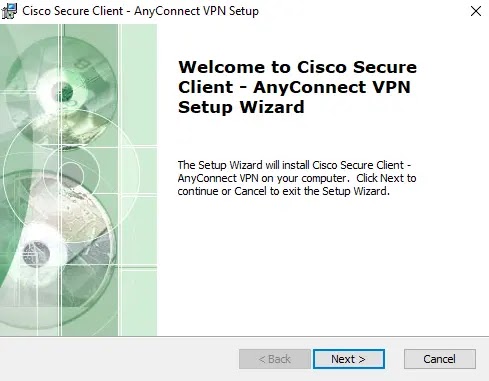
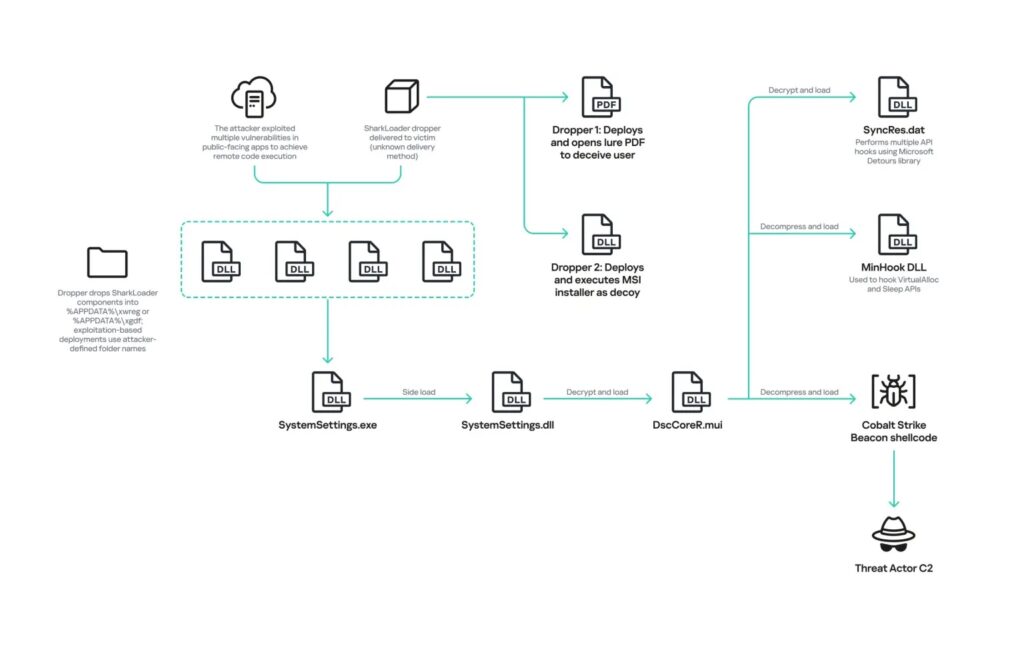
Some droppers used filenames such as GoogleUpdateStepup.exe, AutoUpdate.exe, and AnyConnect-win-4.10.04071-predeploy-k9exe. In one analyzed case, the dropper contained a real Cisco AnyConnect VPN installer, which ran normally while SharkLoader components installed silently in the background.
A separate Kaspersky announcement said victims included diplomatic entities in Indonesia, government agencies in Taiwan, software development companies, and organizations in Hong Kong, Lebanon, Syria, Colombia, North Macedonia, Nepal, and Serbia.
| Delivery route | What researchers observed | Risk |
|---|---|---|
| Fake software installers | Google Update, AutoUpdate, and Cisco AnyConnect-themed droppers | Victims may believe they installed a trusted program |
| Decoy documents | PDF lures opened during malware deployment | The visible document distracts from background installation |
| Exploited servers | Public-facing enterprise apps and network appliances abused | Attackers can enter networks without user interaction |
How the Cisco AnyConnect lure worked
In the Cisco-themed sample, the dropper unpacked a legitimate VPN installer into the user’s AppData folder and launched it. That helped create the impression that the file behaved exactly as expected.
At the same time, the dropper wrote SharkLoader files into separate AppData directories. Researchers saw components placed in paths such as %APPDATA%\xwreg and %APPDATA%\xgdf.
The dropper then copied the legitimate Windows SystemSettings.exe file from C:\Windows\ImmersiveControlPanel and used it to load a malicious DLL named SystemSettings.dll.
SharkLoader relies on DLL side-loading
DLL side-loading works when attackers place a malicious library where a trusted executable will load it. In this campaign, SystemSettings.exe helped load SystemSettings.dll, which acted as the main SharkLoader component.
Microsoft’s Dynamic-Link Library best practices warn that DLL initialization carries strict limitations because Windows holds the loader lock while running DllMain.
Kaspersky said SharkLoader uses a technique known as Perfect DLL Hijacking to manipulate loader behavior and continue execution from inside the DLL loading path.
- SystemSettings.exe was abused as a legitimate side-loading target.
- SystemSettings.dll carried the main SharkLoader logic.
- DscCoreR.mui contained encrypted Cobalt Strike Beacon-related components.
- SyncRes.dat or SyncRest.dat handled multiple API hooks in observed samples.
The malware runs Cobalt Strike Beacon in memory
SharkLoader’s main goal is to deploy Cobalt Strike Beacon. Cobalt Strike is a commercial adversary simulation framework, and its official website describes it as a tool for red teams to emulate advanced threat behavior.
Attackers often abuse leaked or cracked Cobalt Strike builds because Beacon can provide post-exploitation access, command execution, lateral movement support, and covert communication with a command server.
In StrikeShark, SharkLoader decrypts the DscCoreR.mui module with Blowfish, loads another encrypted component, and executes Beacon directly in memory instead of writing the final payload to disk.
| Component | Role in the infection chain |
|---|---|
| SystemSettings.exe | Legitimate Windows executable abused for DLL side-loading |
| SystemSettings.dll | Main SharkLoader DLL |
| DscCoreR.mui | Encrypted module containing Beacon-related code and MinHook |
| SyncRes.dat / SyncRest.dat | Encrypted module used to install Windows API hooks |
Persistence used scheduled tasks and registry keys
In dropper-based infections, the malware created two scheduled tasks. One task ran every five minutes to maintain persistence, while another ran every second right after deployment and was removed after a short delay.
The long-running task launched SystemSettings.exe from the malware working directory, which triggered the malicious DLL side-loading chain again.
In a separate case involving an organization in Hong Kong, attackers manually created a registry Run key named MFUpdate to launch SystemSettings.exe when the user logged in.
SharkLoader tries to blind security monitoring
The malware does more than launch Beacon. Kaspersky’s StrikeShark analysis said SharkLoader installs many Windows API hooks and uses techniques designed to weaken logging and detection.
One decrypted module redirects calls such as EtwEventWrite, EventWriteEx, and EventWrite so they return empty or harmless values. That can reduce visibility for tools that depend on Windows event tracing.
The malware also spoofs parent process IDs. As a result, malicious child processes can appear as though they were launched by svchost.exe rather than by SharkLoader or Beacon.
Attackers also exploited known vulnerabilities
The campaign was not limited to fake installers. Researchers saw attackers exploit internet-facing applications, including Microsoft Exchange ProxyLogon, Openfire CVE-2023-32315, and GeoServer CVE-2024-36401.
They also identified activity involving other known flaws in products such as Microsoft SharePoint, Fortinet FortiOS, Cisco IOS XE, F5 BIG-IP, Apache Shiro, Hikvision devices, Zimbra Collaboration Suite, and React Server Components.
Kaspersky assessed with medium confidence that the operators mostly used publicly available proof-of-concept exploit code rather than custom exploit development. The StrikeShark warning also described the campaign as broad, with victims across multiple countries and sectors.
Post-compromise activity focused on reconnaissance and credential theft
After compromise, the attackers ran system discovery commands such as systeminfo, ipconfig /all, and tasklist /svc. They also enumerated Active Directory environments in some intrusions.
Researchers observed credential theft activity against LSASS and use of ntdsutil to extract Active Directory password hashes. These steps can help attackers escalate privileges and move laterally through a Windows network.
The attackers also used post-exploitation tools, including FScan, Searchall, Pillager, and SharpGPOAbuse. Kaspersky noted that some tools were associated with Chinese-speaking developers, but it did not attribute the campaign to a known threat group.
What defenders should monitor
Security teams should treat fake update and VPN installer activity as a high-priority signal, especially when it creates files under unusual AppData paths.
They should also monitor for suspicious scheduled task creation, copied SystemSettings.exe files, unexpected SystemSettings.dll files, and Cobalt Strike-style network behavior.
Because the malware hides its final stage in memory, organizations need endpoint visibility that can detect DLL side-loading, suspicious API hooking, parent process spoofing, and event logging tampering.
- Patch internet-facing systems, especially Exchange, SharePoint, Fortinet, Cisco IOS XE, Openfire, GeoServer, and F5 BIG-IP.
- Block known StrikeShark indicators, including connect-microsoft[.]com, ms-record[.]com, ms-record[.]top, and ms-tray[.]top.
- Hunt for SystemSettings.exe running from AppData, ProgramData, or vendor-looking folders outside normal Windows paths.
- Review scheduled tasks named like OneDrive or Microsoft update jobs but launching unusual binaries.
- Monitor LSASS access, ntdsutil usage, SharpGPOAbuse activity, and suspicious Cobalt Strike Beacon behavior.
Known indicators of compromise
| Type | Indicator | Context |
|---|---|---|
| MD5 | C559CC68986933200FD5D9E4388E2F58 | Installer sample |
| MD5 | B3352B42432DEDC4A519F011DC8B5D5A | Dropper sample |
| MD5 | 24FCEBDEECBA65004FDB0923763D74FD | Dropper sample used in Taiwan case analysis |
| MD5 | 9C872A0D5D5A38950E8B9AC9B488BE3F | SharkLoader DLL |
| MD5 | AA3086BE652C8B20B0B29B2730D57119 | SharkLoader DLL |
| Domain | connect-microsoft[.]com | Command-and-control domain |
| Domain | ms-record[.]com | Command-and-control domain |
| Domain | ms-record[.]top | Command-and-control domain |
| Domain | ms-tray[.]top | Command-and-control domain |
The main defense lesson from StrikeShark is simple: trusted-looking installers do not guarantee trusted behavior. Fake Cisco AnyConnect and Google Update files can give attackers a convincing first step, while SharkLoader handles the stealthy execution chain behind the scenes.
Organizations should combine patch management, application control, endpoint detection, script monitoring, and memory-based threat hunting. The same Microsoft DLL guidance that helps developers avoid unsafe behavior can also help defenders understand why DLL abuse remains so useful to attackers, while the Cobalt Strike platform remains a frequent target for abuse because of its powerful post-exploitation features.
FAQ
SharkLoader is a custom malware loader identified by Kaspersky in the StrikeShark campaign. It loads and executes Cobalt Strike Beacon on compromised Windows systems, often through DLL side-loading and in-memory execution.
Attackers used custom droppers disguised as trusted installers, including Cisco AnyConnect and Google Update-themed files. In one case, a real Cisco AnyConnect installer ran normally while SharkLoader components installed silently in the background.
SharkLoader installs components such as SystemSettings.dll, DscCoreR.mui, and SyncRes.dat or SyncRest.dat. These components help decrypt, load, and execute Cobalt Strike Beacon directly in memory.
Kaspersky reported victims across Indonesia, Taiwan, Hong Kong, Lebanon, Syria, Colombia, North Macedonia, Nepal, Serbia, and other locations. Targets included diplomatic entities, government agencies, software development companies, and other organizations.
Organizations should monitor for suspicious SystemSettings.exe execution from unusual folders, unexpected SystemSettings.dll files, new scheduled tasks, AppData malware directories, Cobalt Strike-like traffic, LSASS access, and attempts to disable Windows event logging.


Read our disclosure page to find out how can you help VPNCentral sustain the editorial team Read more


Improve this guide




User forum
0 messages