
WhatsApp Starts Warning Users Before Chats With Unknown Phone Numbers


 6 min. read
  Published on
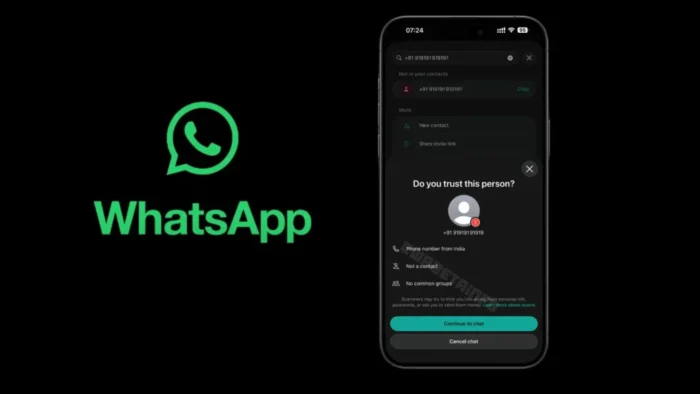
WhatsApp is rolling out a new warning that appears before users start a chat with an unfamiliar phone number. The feature is designed to make people pause before messaging someone who may be using a scam number or pretending to be a trusted contact.
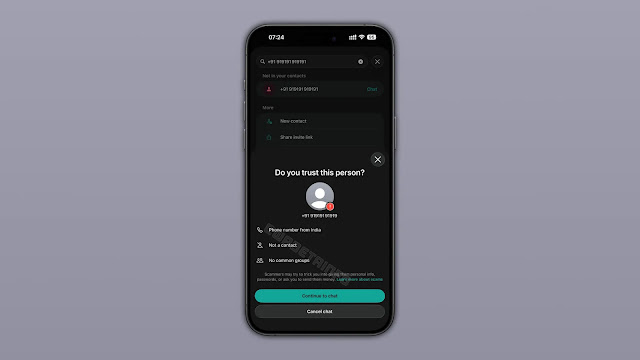
According to WABetaInfo, the warning is appearing on both Android and iOS. It can show the country where the phone number is registered, whether the number is saved in the user’s contacts, and whether the user shares any WhatsApp groups with that number.

Access content across the globe at the highest speed rate.
70% of our readers choose Private Internet Access
70% of our readers choose ExpressVPN

Browse the web from multiple devices with industry-standard security protocols.

Faster dedicated servers for specific actions (currently at summer discounts)
The change matters because many scams start with a simple unknown number. A fraudster may claim to be a friend, relative, delivery agent, employer, or support representative. By placing a warning before the conversation begins, WhatsApp gives users a chance to verify the person before sharing information or sending money.
How the new WhatsApp warning works
The warning appears when a user tries to start a conversation with a phone number they have not messaged before. Instead of immediately opening the chat, WhatsApp can show a confirmation screen asking whether the user trusts the person behind the number.
The screen gives users a choice to continue or cancel the chat. WABetaInfo reports that the other person does not receive a notification if the user cancels. That detail is important because it removes social pressure from the decision.
The feature does not mean every unknown number is dangerous. It also does not block the chat automatically. Instead, it adds context before the user makes a decision.
| Warning detail | Why it helps |
|---|---|
| Registered country | Helps users notice if a number does not match the person’s claimed location. |
| Saved contact status | Shows whether the number is already known to the user. |
| Shared groups | Gives users another clue about whether the person has a real connection to them. |
| Continue or cancel option | Lets users stop before the conversation begins. |
Why WhatsApp is adding more anti-scam friction
Meta had already said it was exploring new ways to warn people before they engage with someone outside their contacts. In an August 2025 update, Meta said scammers often move targets across apps and private messaging services to avoid detection.
The company also said WhatsApp detected and banned more than 6.8 million accounts linked to scam centers in the first half of 2025. Meta said many of those accounts were connected to organized scam operations, including schemes involving fake earnings, cryptocurrency, and upfront payments.
The new warning fits into that wider effort. Rather than waiting for a suspicious message, link, or payment request, WhatsApp now adds a safety check at the start of the contact process.
What users should do when the warning appears
WhatsApp users should not treat the warning as a simple pop-up to dismiss. The details on the screen can help identify common impersonation attempts, especially when a person claims to have changed numbers or says they need urgent help.
The official WhatsApp Help Center says suspicious messages may include requests for money, personal details, verification codes, or urgent action. Unknown numbers that pressure users to act quickly should be treated carefully.
Users can take a few simple steps before continuing:
- Check whether the country shown matches the person’s story.
- Call the person using a number already saved in your contacts.
- Ask a mutual contact to confirm the new number.
- Do not share one-time passwords, banking details, or account codes.
- Cancel the chat if the warning details do not make sense.
The warning will not catch every scam
The feature adds a useful layer of protection, but it cannot replace user judgment. A scammer may still avoid the warning if the number is already saved as a contact. A legitimate user who recently changed phone numbers may also trigger the warning.
WhatsApp’s own guidance on suspicious messages advises users to pause, question, and verify before responding. The WhatsApp safety guidance also recommends stopping the conversation, blocking suspicious senders, and reporting harmful activity when needed.
This makes the new warning more of a decision aid than a complete scam filter. It gives people more information at the right moment, but the safest response still depends on verification outside the chat.
How it compares with other WhatsApp safety tools
WhatsApp already has tools for blocking, reporting, privacy controls, and warnings tied to certain account risks. The new unknown-number warning is different because it appears before a user opens a new conversation with a stranger.
The WhatsApp Help Center advises users to report and block suspicious contacts when they receive questionable messages. The new warning moves part of that protection earlier, before the user starts exchanging messages.
That earlier timing could reduce the success of “new number” scams. These scams often rely on speed and familiarity. A short pause can make the user notice details they may otherwise ignore.
| Safety feature | When it helps |
|---|---|
| Unknown-number warning | Before starting a chat with an unfamiliar number. |
| Block and report | After receiving suspicious messages or calls. |
| Privacy settings | Before unwanted contacts can see profile details. |
| Two-step verification | When protecting the account from takeover attempts. |
Rollout status on Android and iOS
The warning is rolling out to WhatsApp users on Android and iOS. As with many WhatsApp features, availability may vary by account, region, and app version.
Users who do not see the feature yet should update WhatsApp from the App Store or Google Play and check again later. Rollouts often happen gradually, so the feature may not appear for everyone at the same time.
The update gives WhatsApp users another reason to slow down when dealing with unknown numbers. The safest rule remains simple: verify the person before trusting the chat, especially when money, passwords, documents, or urgent requests are involved. The WhatsApp safety guidance also points users toward blocking and reporting when a message feels suspicious.
FAQ
It is a safety warning that can appear before a user starts a chat with an unfamiliar phone number. It gives extra context, such as the number’s registered country and possible shared groups, before the user chooses whether to continue.
Yes. The warning is rolling out on both Android and iOS, although availability may vary depending on region, account, and app version.
No. The other person does not receive a notification if you cancel the chat from the warning screen.
No. The warning does not prove that a number is unsafe. It only means WhatsApp is giving extra context because the number is unfamiliar. Users should verify the person before continuing.
Read the details carefully, check whether the country and contact information make sense, and verify the person through another trusted channel before replying. Cancel the chat if anything seems suspicious.


Read our disclosure page to find out how can you help VPNCentral sustain the editorial team Read more


Improve this guide


User forum
0 messages