
Browser-Only Ransomware Can Abuse Chrome File System Access API to Encrypt Android Photos


 8 min. read
  Published on
Security researchers have demonstrated a browser-only ransomware technique that can encrypt Android photos after a user grants a website folder access in Chrome.
The attack does not require an Android app, APK installation, root access, or a browser exploit. According to Check Point Research, the risk comes from social engineering and a legitimate browser permission exposed through the File System Access API.

Access content across the globe at the highest speed rate.
70% of our readers choose Private Internet Access
70% of our readers choose ExpressVPN

Browse the web from multiple devices with industry-standard security protocols.

Faster dedicated servers for specific actions (currently at summer discounts)
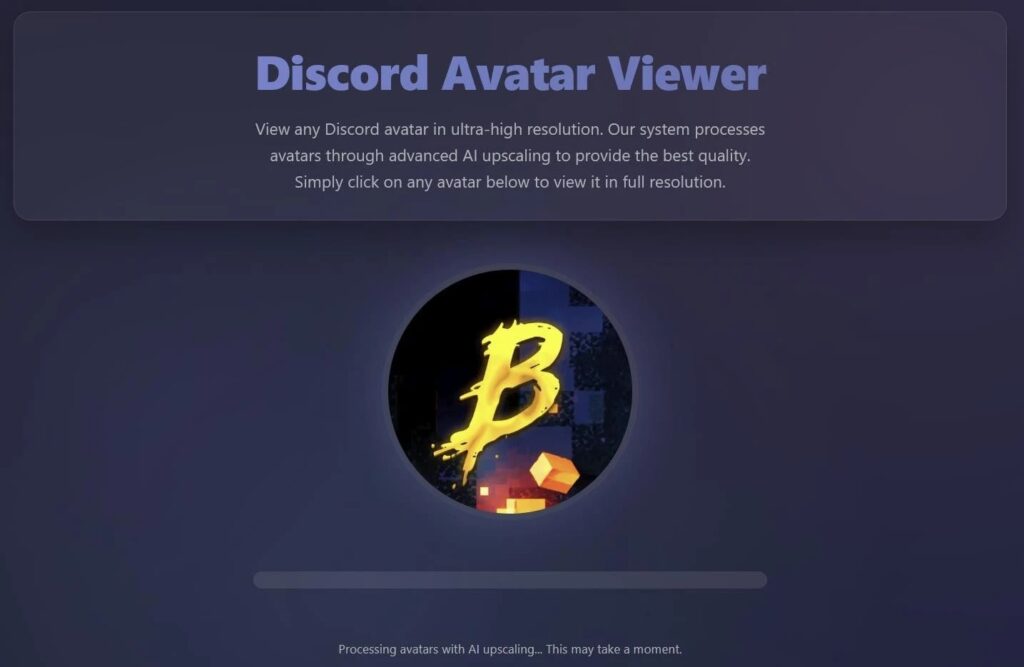
The technique was built around a fake AI photo or avatar upscaler. A victim is asked to choose a folder so the site can save an “enhanced” image, but the web page can then read, modify, encrypt, or overwrite files inside the selected directory.
How the browser-only ransomware technique works
The attack starts with a normal-looking web page. It may claim to improve a profile photo, upscale an image, or generate an AI-enhanced avatar.
When the user clicks through the workflow, the page asks for access to a file or folder. The File System Access specification says the API lets web apps interact with files on a user’s local device after permission is granted.
Once the user approves folder access, the page can enumerate files in that selected folder. In the proof of concept, the page targets image directories and encrypts pictures during what appears to be routine processing.
| Attack stage | What the victim sees | What can happen behind the page |
|---|---|---|
| Lure | A fake AI avatar or photo upscaler | The site prepares a file-access request |
| Permission request | A browser prompt asking for folder access | The site receives a handle to the selected folder |
| Fake processing | A progress screen or photo enhancement message | Files in the selected directory can be read and modified |
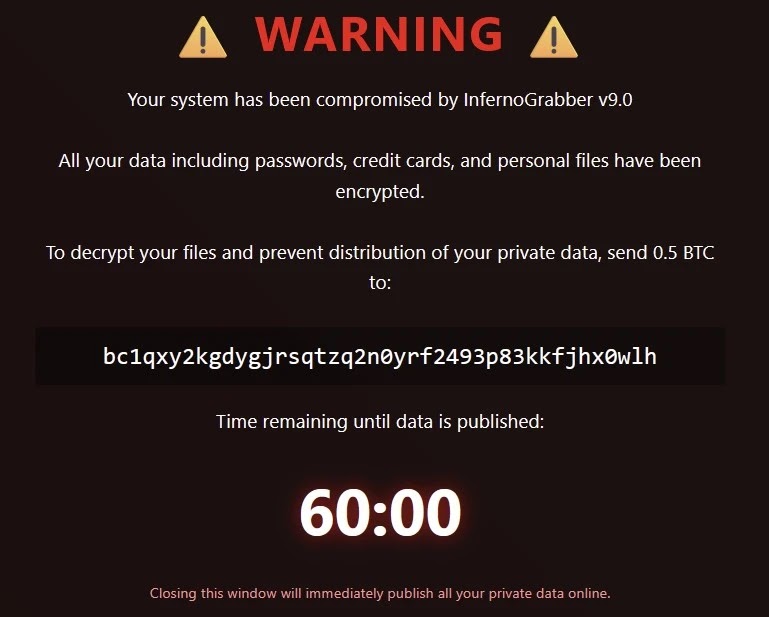
| Impact | A ransom-style overlay or warning | Photos may be encrypted, overwritten, or exfiltrated |
Why Android photo folders are a major target
The Android risk is serious because photo folders often contain much more than casual pictures. Many users store identity documents, banking screenshots, receipts, work images, recovery codes, medical records, and years of private memories in the same gallery ecosystem.
Check Point said Chrome 132 brought File System Access support to Android and WebView. A Chromium blink-dev post from November 2024 also described the API as enabled for Android and WebView in M132.
Researchers later tested the concept on several Android devices and said Chrome 148 allowed selection of the photo directory, including the root of the DCIM folder. The attack surface is narrower than full disk access, but the selected photo directory can still hold highly sensitive data.
What makes this different from normal ransomware
Traditional ransomware usually depends on a malicious file, installed app, exploit, or compromised endpoint. This browser-only method shifts the execution environment into the browser itself.
The website does not need to break out of the browser sandbox. It uses a real web platform feature after the user approves access, which makes the prompt the key security decision.
That also makes detection more complicated. A user may not think of opening a web page as running malware, especially when the page never asks them to install anything.
- No APK installation is required on Android.
- No root access is required.
- No browser vulnerability is required.
- The page relies on user-approved folder access.
- The lure can look like a normal photo editing or AI upscaling tool.
The AI-generated sample behind the discovery
The original sample found by researchers was called InfernoGrabber v9.0. It was built as a Python Flask application serving a Discord-themed front end that posed as an avatar AI upscaler.
Check Point said the sample appeared during a review of nearly 3,000 files attributed to DeepSeek over the past year. The file that stood out used the SHA-256 hash 07c39f79ab92fb21557b82283472dce1c112f577d796111fb752c3c6d84c86b5.
The sample did not reliably deliver every malicious function it claimed. However, one part mattered: it connected a ransomware-style goal with browser file picker methods that can request access to local files and folders.
| Item | Details |
|---|---|
| Name used in sample | InfernoGrabber v9.0 |
| Primary lure | Fake Discord-themed AI avatar upscaler |
| Sample type | Python Flask application with embedded HTML and JavaScript |
| Key API abused | File System Access API |
| Observed real-world use | No confirmed in-the-wild campaign reported by the researchers |
File System Access API is legitimate but sensitive
The File System Access API exists for useful reasons. Web-based editors, developer tools, image tools, and productivity apps may need to open and save local files with user approval.
Chrome has also been refining the permission experience. A Chrome for Developers post explains how persistent read and write access can reduce repeated prompts for trusted apps while still giving users ways to revoke access.
The risk appears when an unfamiliar site uses a convincing workflow to make broad folder access feel normal. A photo editor asking for a temporary output folder is different from a random website asking for access to a main photo library.
The browser risk was already known
The underlying browser issue did not appear out of nowhere. The File System Access API documentation itself includes security considerations related to malware and ransomware.
Academic researchers also studied this class of attack before. The USENIX Security paper Ransomware over Modern Web Browsers examined how malicious web applications could abuse browser file access to encrypt local files.
The new concern is how AI-assisted code generation can connect a vague malicious request to a real browser capability. This lowers the knowledge barrier for attackers who may not know that the API exists.
Android users should treat folder prompts carefully
Users should treat browser folder-access prompts as high-risk decisions, especially on Android. A prompt that allows file editing can give a site meaningful control over the selected folder.
Chrome users can review and revoke file access through browser controls and site settings. The Chrome permission guidance notes that access can be removed from the browser interface when a site no longer needs it.
Users should also avoid giving unknown AI tools access to folders containing personal photos, IDs, financial documents, or work material. A temporary empty folder is safer when testing an unfamiliar web tool.
- Do not grant folder access to unknown photo editors or AI upscalers.
- Use a temporary folder instead of the main Pictures, Videos, or DCIM directory.
- Keep offline and cloud backups of important photos.
- Update Chrome and Android regularly.
- Review site permissions after using browser-based editing tools.
- Prefer trusted apps or established services for sensitive images.
What security teams should take from the research
Enterprise security teams should not treat the browser as a low-risk execution space. Modern web APIs can provide access to local resources when users approve permissions.
The USENIX research and the latest proof of concept both show why file-access prompts need clearer user education, stronger monitoring, and tighter policy controls in managed environments.
Organizations using managed Chrome or Chromium-based browsers should review whether they can restrict risky file access features, monitor unusual browser data flows, and warn users about granting write access to sensitive folders.
| Audience | Recommended action |
|---|---|
| Mobile users | Decline folder access from unknown sites and keep backups of photos. |
| Parents and families | Teach users not to approve broad folder prompts for AI photo tools. |
| IT admins | Review managed browser policies for file system access controls. |
| Security teams | Monitor browser-based uploads, unusual file access, and suspicious AI-themed lures. |
| Developers | Request the narrowest folder access needed and explain why access is required. |
Why this matters now
The research shows how a legitimate browser feature can become risky when paired with social engineering and AI-assisted development. The problem is not a simple Chrome bug that users can understand as a normal malware infection.
It also shows why permission prompts now carry more weight. Granting a website access to a folder can become similar to letting software work directly on local files.
For Android users, the safest approach is simple: do not give unfamiliar websites access to photo folders. For organizations, browser permissions deserve the same level of policy review as app permissions and endpoint controls.
FAQ
Browser-only ransomware is a ransomware technique that runs inside a web browser instead of using an installed app or native executable. In this case, the attack relies on a user granting folder access through the File System Access API.
No. The technique does not require exploiting a Chrome vulnerability. It abuses a legitimate browser feature after the user grants a website permission to access and edit files in a selected folder.
Yes. Check Point demonstrated that the technique can target Android photo directories when a user selects a folder such as Pictures or DCIM and grants a malicious web page file editing access.
Researchers said they had not found evidence that this exact browser-native ransomware pattern had been adopted in widespread real-world campaigns at the time of analysis. The published case focused on an incomplete AI-generated sample and a controlled proof of concept.
Android users should avoid granting folder access to unknown websites, use temporary folders for online tools, keep backups of important photos, update Chrome and Android, and review site permissions after using browser-based editors.


Read our disclosure page to find out how can you help VPNCentral sustain the editorial team Read more


Improve this guide


User forum
0 messages