
Microsoft Device Code Phishing Attack Steals Tokens Through Legitimate Login Page


 8 min. read
  Published on
A Microsoft device code phishing campaign is abusing a legitimate sign-in flow to steal account tokens without sending victims to a fake Microsoft login page. According to a Securelist report, attackers used the real Microsoft authentication page to convince victims to approve access that had been started by the attacker.
The technique targets Microsoft’s Device Authorization Grant, also known as device code flow. Microsoft explains in its device authorization grant documentation that the flow helps users sign in to devices such as smart TVs, IoT hardware, and printers by entering a short code on another device with a browser.

Access content across the globe at the highest speed rate.
🔥 Save 81% + 2 bonus months! 🔥
70% of our readers choose Private Internet Access
70% of our readers choose Private Internet Access
2
Browse the web from multiple devices with industry-standard security protocols.
🔥 Save 73%! 🔥

Faster dedicated servers for specific actions (currently discounted)
🔥 Save 69%! 🔥

In this attack, that same convenience becomes the weak point. The victim enters a one-time code on a genuine Microsoft page, completes normal sign-in and multi-factor authentication, and unknowingly grants the attacker access tokens that can be used against Microsoft 365 services.
How the Microsoft device code phishing attack works
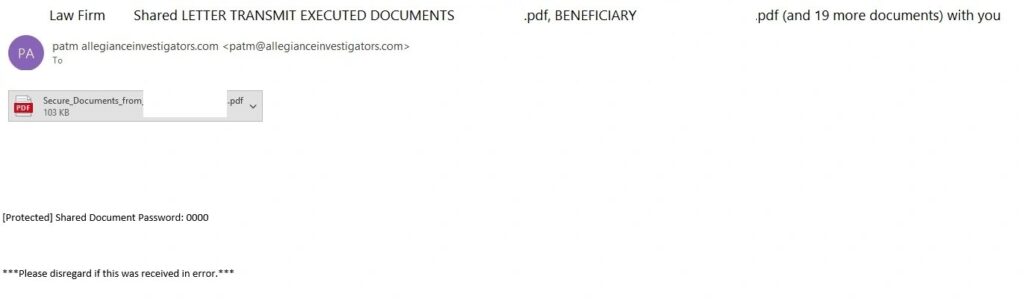
The campaign observed by Kaspersky ran from early April to mid-May 2026. It began with an email styled as a law firm notice and included a password-protected PDF attachment. The PDF showed document links that led the victim through a chain of redirects and eventually to a phishing page built to look like a corporate legal portal.
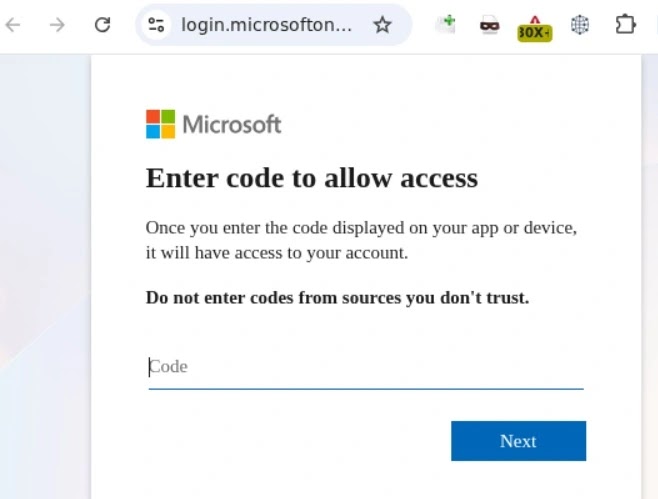
The phishing page used CAPTCHA checks, likely to reduce automated analysis by security tools. After passing those checks, the victim saw a one-time code and instructions to copy it. That code had already been generated by the attacker’s application through Microsoft’s legitimate device code flow.
When the victim clicked the code, the page copied it to the clipboard and redirected the user to Microsoft’s real sign-in page. The Kaspersky Securelist analysis says the attacker could then receive access tokens, refresh tokens, and ID tokens after the victim approved the sign-in.
| Attack stage | What the victim sees | What the attacker gains |
|---|---|---|
| Phishing email | A legal notice with a protected PDF | Initial user engagement |
| Fake document portal | A page asking the user to view files | Control over the next redirect |
| One-time code screen | A code to copy and enter | A victim linked to the attacker’s device flow request |
| Real Microsoft login | A genuine Microsoft authentication page | Approved OAuth tokens after sign-in |
Why the real Microsoft login page makes this dangerous
The attack is effective because it breaks one of the most common anti-phishing habits: checking whether the login page is real. In this case, the final login page is real. The malicious step happens before the victim reaches Microsoft’s authentication page.
Microsoft’s OAuth 2.0 device code flow guide says a device receives a user code and a verification URI, then polls the token endpoint while the user signs in. Attackers abuse that model by generating the code themselves and persuading the victim to authorize it.
Once the victim approves the request, the attacker can gain access without knowing the password. In the campaign described by Kaspersky, the stolen tokens could allow access to mailbox data, OneDrive files, and Microsoft Teams conversations.
What makes device code phishing different
Traditional phishing usually tries to steal a password on a fake page. Device code phishing does not need to do that. It convinces the user to approve a sign-in that the attacker already started.
- The victim may stay on a legitimate Microsoft sign-in page.
- Multi-factor authentication can still be completed by the victim.
- The attacker receives tokens instead of the password itself.
- Refresh tokens may help the attacker maintain access after the first sign-in.
- Security awareness advice based only on checking domains becomes less reliable.
Microsoft classifies device code flow as a higher-risk authentication method in its Conditional Access authentication flows guidance. The company says organizations should allow device code flow only where necessary and block it wherever possible.
Brazil variant shows the method can shift quickly
Kaspersky also reported a modified version aimed at users in Brazil. That version did not rely on the same password-protected PDF lure. Instead, it used a link routed through Cacoo, a legitimate online diagramming service owned by Nulab, before redirecting users toward the same device code phishing process.
This matters because the attack is not tied to one template. Threat actors can change the email theme, language, region, attachment type, or redirect chain while keeping the core trick intact.
For users, the warning sign is not only a suspicious website. Any unexpected request to enter a Microsoft device login code should be treated as dangerous, even if the browser shows a legitimate Microsoft domain.
How users can avoid Microsoft device code phishing
Users should never enter a device login code from an email, PDF, chat message, or unexpected website. A device code should only be entered when the user personally starts a sign-in on a device they control, such as a TV, Teams room device, printer, or command-line tool.
Before clicking document links, users should also inspect the final destination and watch for redirect parameters. Attackers often place trusted domains at the start of the chain and then send users to a phishing page later.
- Do not approve a Microsoft device login request you did not start.
- Do not enter a device code delivered through email or chat.
- Check whether a document request makes sense for your role.
- Report legal notices, invoices, or HR files that arrive unexpectedly.
- Contact the sender through a known channel before opening protected attachments.
What organizations should do now
For businesses, the priority is to decide whether device code flow is actually needed. Microsoft’s Conditional Access policy guidance recommends getting as close as possible to a unilateral block on device code flow, while first auditing existing usage in report-only mode.
Microsoft also says administrators can use the authentication flows condition to target device code flow in Conditional Access. Its authentication flows documentation recommends filtering sign-in logs for device code flow events to understand current use before enforcement.
Organizations that rely on shared Teams hardware should handle exceptions carefully. Microsoft’s Teams device code flow guidance recommends a default-block approach with tightly managed exception groups for legitimate Teams device resource accounts.
| Control | Why it helps |
|---|---|
| Audit device code flow usage | Shows whether the organization has legitimate use cases before blocking |
| Use report-only Conditional Access | Tests policy impact before enforcement |
| Block device code flow by default | Reduces token theft paths for Microsoft 365 accounts |
| Limit exception groups | Prevents broad access for accounts that do not need the flow |
| Monitor sign-in logs | Helps identify unusual device code activity and locations |
Recommended Microsoft Entra defenses
Administrators can create a Conditional Access policy that blocks device code flow for all users, all resources, or a narrower validated scope. Microsoft advises excluding emergency access accounts to prevent lockouts, then moving from report-only mode to enforcement after review.
For Teams rooms and shared devices, administrators should not create broad permanent exceptions. The Microsoft Teams devices documentation says exception membership should stay limited to genuine Teams device resource accounts and remain monitored.
Security teams should also watch for DeviceCodeSignIn activity, unusual locations, unexpected Microsoft 365 access, and token activity that does not match normal user behavior. Email filtering remains important, but identity logs will often show the most useful evidence after a device code phishing attempt.
Bottom line
This Microsoft device code phishing attack shows why a real login page does not always mean a safe login request. The page may be genuine, but the code may belong to an attacker’s session.
For users, the safest rule is simple: never enter a Microsoft device code unless you personally started the sign-in on a device you trust. For organizations, Microsoft’s block authentication flows guidance gives administrators a practical path to audit, restrict, and block device code flow where it is not needed.
FAQ
Microsoft device code phishing is an account takeover technique where attackers trick users into entering a one-time device login code on a legitimate Microsoft authentication page. The victim completes the sign-in, but the attacker receives the approved tokens.
Not necessarily. In the reported campaign, victims were redirected to Microsoft’s real authentication page. The phishing happened earlier, when attackers convinced victims to enter a code generated by the attacker’s application.
Multi-factor authentication may still appear during the process, but it does not fully stop this attack if the victim approves the device login request. The victim is effectively authorizing the attacker’s session.
Users should not enter the code. A Microsoft device login code should only be used when the user personally starts a sign-in on a device they control. Unexpected codes should be reported to the organization’s security team.
Organizations can audit device code flow usage, use Conditional Access in report-only mode, block device code flow where it is not needed, limit exceptions to approved device accounts, and monitor sign-in logs for unusual device code activity.


Read our disclosure page to find out how can you help VPNCentral sustain the editorial team Read more


Improve this guide




User forum
0 messages