
Attackers Abuse OpenAI Organization Invites in Poisoned Tenant Campaign


 10 min. read
  Published on
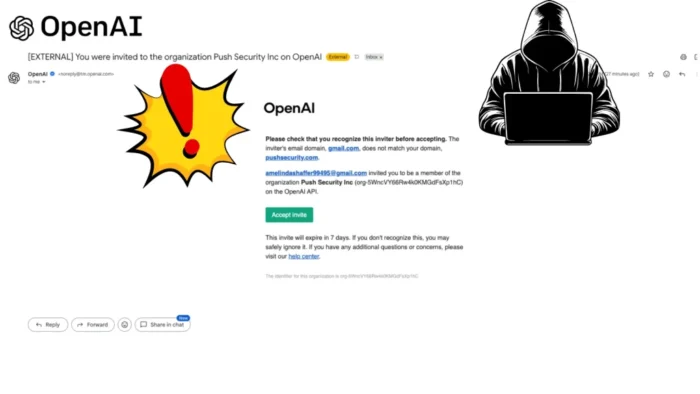
Attackers are abusing OpenAI organization invitations to create convincing poisoned-tenant attacks, according to new research from Push Security. The tactic does not rely on spoofed email or a fake OpenAI domain. Instead, the attacker creates a real OpenAI organization with a target company’s name and invites employees through OpenAI’s own notification system.
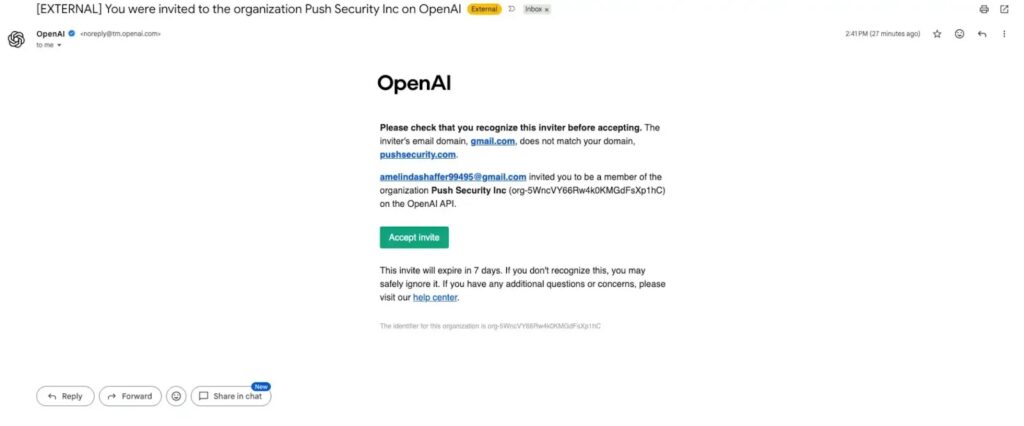
In its OpenAI poisoned tenant report, Push Security said several team members received invitations to join an organization named “Push Security Inc.” The emails came from OpenAI’s legitimate notification address, passed standard email authentication checks, and looked like routine organization invites.

Access content across the globe at the highest speed rate.
70% of our readers choose Private Internet Access
70% of our readers choose ExpressVPN

Browse the web from multiple devices with industry-standard security protocols.

Faster dedicated servers for specific actions (currently at summer discounts)
The goal is not instant password theft. The bigger risk is long-term data harvesting. If an employee joins the attacker-controlled organization and begins using it for work, the attacker may gain visibility into sensitive prompts, files, API usage, billing activity, and project-level work depending on the permissions and product surface involved.
How the OpenAI Invite Attack Works
The attack starts with a fake organization that uses the target company’s name. The invitation then reaches employees through a real OpenAI email flow, which makes it harder for traditional email filters to flag the message as malicious.
Push Security said the OpenAI email did include a warning that the inviter’s email domain did not match the recipient’s corporate domain. That warning matters, but it appears as a single line inside an otherwise legitimate-looking platform email.
After a researcher accepted one invite, the account was added to the fake organization with one click and no extra credential prompt. Push also found that invited users had been assigned the Owner role, and the attacker had attached a payment card to the account.
| Attack stage | What happens | Why it is effective |
|---|---|---|
| Fake organization | The attacker creates an OpenAI organization using the target company name | The name makes the tenant look familiar to employees |
| Legitimate invite email | OpenAI sends a real platform invitation to the employee | Email authentication checks can pass because the sender is legitimate |
| One-click acceptance | The user joins the attacker-controlled organization | The workflow feels like normal SaaS collaboration |
| Data harvesting | The attacker waits for the user to use the workspace or API | Prompts, uploads, usage data, and project activity may become valuable |
Why This Is a Poisoned Tenant Attack
A poisoned tenant attack happens when an attacker creates a SaaS organization, workspace, or tenant that impersonates a real company. The attacker then invites employees into that environment and waits for them to treat it as a legitimate business resource.
This is different from a normal phishing email. The link can point to a real SaaS platform, the message can come from a real platform domain, and the user may not see an obvious fake login page.
Push Security first discussed poisoned tenants in 2023 and now says the same concept has appeared in a real OpenAI-targeted incident. The company’s research write-up says the attacker targeted specific employees, used company branding through the organization name, and created a setup that looked ready for work.
What Data Could Be Exposed
The data risk depends on how the user uses the attacker-controlled environment. If the user only joins and leaves, exposure may remain limited. If the user begins using the organization for real work, the risk grows quickly.
OpenAI’s platform RBAC documentation explains that organization and project roles govern what users can do across the API and dashboard. The same documentation lists permissions covering usage, files, prompts, projects, keys, and other resources.
OpenAI also states in its managed account data access guidance that an administrator may be able to access, export, audit, retain, delete, or control data tied to a managed ChatGPT account, depending on configuration and applicable law.
- Prompts entered into the wrong organization or workspace.
- Files uploaded for analysis, coding, research, or business work.
- Source code pasted into chats or API calls.
- Usage and activity metadata.
- API activity and project-level resources.
- Shared workspace content, if users rely on the fake environment.
OpenAI Roles Make the Risk More Serious
The attacker in the Push incident gave invited users Owner privileges, which could make the fake organization look less restricted and more believable. It also reduces friction for users who try to inspect settings, billing, or team access.
OpenAI’s workspace role guidance says Owners have full access, including billing, identity management, and workspace configuration, while Admins manage users and groups and Members have no admin privileges.
This matters because attackers do not need to steal credentials immediately if they can convince users to work inside the wrong tenant. The poisoned tenant becomes the collection point.
| Role or control area | Security relevance |
|---|---|
| Owner role | Can make the fake workspace appear fully usable and reduce suspicion |
| Usage visibility | Can reveal who is active and how the tenant is being used |
| Project access | Can expose files, prompts, keys, and API resources depending on permissions |
| Billing setup | Can remove payment friction that might otherwise trigger internal questions |
This Builds on Earlier OpenAI Invite Abuse
This is not the first time attackers have abused OpenAI’s organization and invitation features. In January 2026, Kaspersky reported a scam that placed deceptive text, fraudulent phone numbers, and links inside OpenAI organization names.
In that earlier campaign, attackers used organization invites mainly as a delivery channel for scam content. The newer poisoned-tenant pattern is more subtle because the fake organization itself becomes the trap.
The two cases point to the same security problem. Collaboration features can be abused when platforms let anyone create an organization with a trusted-looking name and invite employees at other companies.
SaaS Notification Abuse Is Expanding
The OpenAI invite issue also fits a wider trend in SaaS abuse. Attackers increasingly use legitimate platform notification systems to deliver social engineering messages from trusted infrastructure.
Cisco Talos described this pattern as attackers weaponizing SaaS notification pipelines across platforms such as GitHub and Jira. Talos called the approach Platform-as-a-Proxy because attackers make legitimate platforms send the email for them.
These emails can satisfy SPF, DKIM, and DMARC checks because they come from the real provider. That weakens the value of sender authentication as the only decision point for trust.
| Traditional phishing | Poisoned tenant or SaaS notification abuse |
|---|---|
| Often uses spoofed or lookalike sender domains | Uses real SaaS notification infrastructure |
| Often sends users to a fake login page | May send users to a real platform workspace or organization |
| Email security may flag suspicious infrastructure | Email authentication can pass normally |
| The goal is often immediate credential theft | The goal may be long-term access to activity and data |
How Attackers Could Escalate the Attack
Push Security warned that a poisoned OpenAI organization could become a starting point for more social engineering. Once an employee trusts the workspace, the attacker could send shared chats, request integrations, or push users toward other attacker-controlled services.
The risk grows when AI tools connect to third-party apps, files, code repositories, calendars, and cloud storage. A fake workspace can become a staging area for OAuth abuse, malicious shared content, or indirect prompt injection.
OpenAI’s audit log API documentation shows that organizations can track events such as invites sent, invites accepted, user changes, role assignments, API key actions, and project updates. Defenders should look for similar visibility in every AI and SaaS platform they allow employees to use.
What Organizations Should Do Now
Security teams should not treat an email as safe only because it comes from a legitimate SaaS sender. In this attack pattern, legitimacy of infrastructure is part of the lure.
Companies should monitor which external organizations or workspaces employees join, review OpenAI organization usage, and create clear internal guidance on approved AI workspaces. Employees should know which OpenAI organization belongs to the company and how to report suspicious invitations.
Admins should also use least privilege. The OpenAI RBAC guide recommends starting with the minimum permissions needed, reviewing roles regularly, removing unused roles and keys, and validating access with non-owner accounts.
- Tell employees not to accept unexpected OpenAI organization invitations.
- Verify the inviter domain, organization name, and expected company workspace before joining.
- Publish the official company OpenAI workspace or organization name internally.
- Monitor invite activity, workspace switches, and unusual API usage where possible.
- Use SSO, SCIM, domain verification, and role-based access controls for managed workspaces.
- Block or quarantine suspicious external SaaS invites when the sender domain and target domain do not match.
What Employees Should Watch For
Employees should treat unexpected OpenAI invitations the same way they treat unexpected file-share or workspace invites. A real platform email can still lead to an attacker-controlled environment.
The clearest warning sign in the Push case was a domain mismatch between the inviter and the recipient’s company domain. Users should also look for unfamiliar senders, unexplained Owner privileges, unexpected billing information, and a workspace that internal IT has not announced.
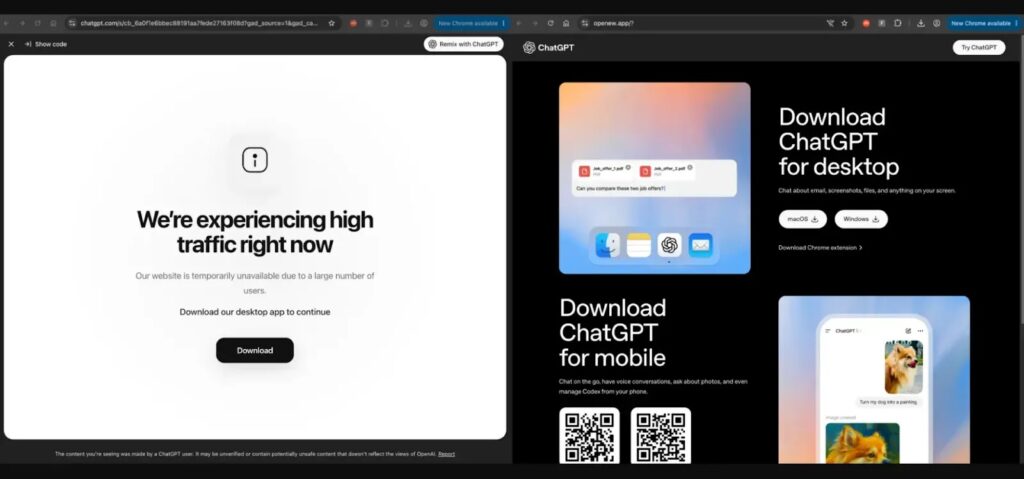
Kaspersky’s OpenAI teamwork feature warning also recommended treating unsolicited invitations with suspicion, inspecting links carefully, and avoiding phone numbers or instructions included inside suspicious platform-generated emails.
Vendor Controls Need to Improve
The incident highlights a gap in modern SaaS security. Many platforms make collaboration easy, but not all of them strongly verify whether an organization name belongs to the company being impersonated.
Push Security argued that vendors should consider stronger protections, including domain verification before using a company name, more prominent cross-domain invite warnings, and enterprise controls that restrict which external organizations employees can join.
OpenAI’s role documentation, the audit log API, and the managed account data guidance all show why organizations need governance around AI workspaces. These platforms now hold business-critical data, so their invitation flows need the same scrutiny as identity systems, file-sharing tools, and code platforms.
Bottom Line
The OpenAI poisoned-tenant campaign shows how attackers can exploit trust in legitimate AI platforms without using classic spoofing or malware. The email can be real, the platform can be real, and the organization can still belong to an attacker.
Cisco Talos’ SaaS notification pipeline research shows the same direction across other collaboration tools. Attackers increasingly abuse trusted platforms as delivery systems, so defenders need visibility into SaaS membership, tenant ownership, AI usage, and external workspace joins.
FAQ
An OpenAI poisoned tenant attack happens when an attacker creates an OpenAI organization or workspace that impersonates a real company and invites employees to join it. If users trust the fake environment and use it for work, the attacker may gain visibility into sensitive activity and data.
Not necessarily. In the Push Security incident, the invitations came through OpenAI’s legitimate notification system. That is why the attack is hard to spot with traditional email authentication checks alone.
If employees use the attacker-controlled organization for work, attackers may gain access to prompts, uploaded files, usage and activity metadata, API activity, project resources, and other sensitive business data depending on permissions and product settings.
Employees should check whether the inviter domain matches their company, confirm that the workspace was announced internally, verify the sender and organization name, and report unexpected OpenAI organization invitations to IT or security before accepting.
Companies should publish approved AI workspace names, monitor external SaaS invitations, restrict unapproved workspace joins where possible, use SSO and SCIM for managed access, enforce least privilege, review audit logs, and train employees that legitimate platform emails can still lead to attacker-controlled tenants.


Read our disclosure page to find out how can you help VPNCentral sustain the editorial team Read more


Improve this guide


User forum
0 messages