
Windows Adds Microsoft Execution Containers to Secure AI Agent Workflows


 10 min. read
  Published on
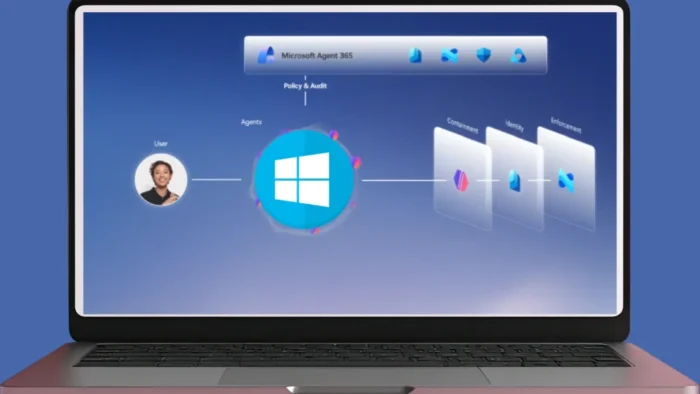
Microsoft has introduced Microsoft Execution Containers, or MXC, as an early preview security layer for AI agents on Windows and Windows Subsystem for Linux. The goal is to let developers define what an AI agent can access while Windows enforces those limits at runtime.
The company described MXC in its Windows platform security for AI agents announcement, where it said agent behavior is different from traditional application behavior because agents can dynamically generate code, read files, call tools, and chain operations in response to prompts.

Access content across the globe at the highest speed rate.
70% of our readers choose Private Internet Access
70% of our readers choose ExpressVPN

Browse the web from multiple devices with industry-standard security protocols.

Faster dedicated servers for specific actions (currently at summer discounts)
MXC is designed to reduce the risk of giving agents broad access to a user’s session. Instead of relying only on the agent to behave correctly, developers can place agent actions inside policy-driven containment boundaries.
What Microsoft Execution Containers do
MXC gives developers a unified way to run untrusted or AI-generated code inside controlled environments. The open-source Microsoft MXC repository describes it as a sandboxed code execution system for model output, plugins, and tools across Windows, Linux, and macOS.
The main idea is simple: the developer defines the policy, and the execution layer applies it through available isolation mechanisms. A policy can limit file access, network access, user interface access, and other system capabilities depending on the platform and backend.
This matters because AI agents often need to do useful work on real files or projects. MXC gives developers a way to grant only the access needed for a specific task, rather than handing the agent full control over the user’s environment.
| MXC area | What it controls | Why it matters |
|---|---|---|
| Filesystem policy | Read-only and read-write paths | Limits which files an agent can view or change |
| Network policy | Outbound access and host filtering where supported | Reduces data leakage and unwanted network calls |
| UI policy | Clipboard, display, and GUI access controls | Helps separate agent activity from the user’s desktop |
| Lifecycle controls | Provision, start, execute, stop, and deprovision steps | Supports both short tasks and longer-running sandboxes |
Why Windows needs agent containment
AI agents are moving beyond chat. They can now inspect code, run shell commands, modify files, query services, open tools, and automate multi-step workflows. That creates a new security problem for enterprise devices.
A normal app usually has predictable behavior written by a developer. An agent may generate actions at runtime based on a prompt, a file, a terminal output, or a tool response. That makes least-privilege access harder to enforce without help from the operating system.
Microsoft’s Build 2026 Windows developer update says MXC gives developers a policy-driven execution layer where they can declare what an agent may access, including files and network resources, while Windows enforces the boundaries.
- AI-generated code may touch files the user did not intend to share.
- Agent tools may call local services or internal network resources.
- Prompt injection can try to make an agent ignore instructions.
- One agent task can trigger several downstream operations.
- Enterprises need logs, identity, policy, and central management for agent activity.
MXC uses a composable sandbox model
Microsoft is presenting MXC as a composable sandbox system. That means the isolation level can change based on workload risk instead of forcing every agent into one fixed sandbox type.
For lightweight coding or tool execution, process isolation may be enough. For stronger separation, session isolation can run agents in a different Windows session away from the user’s desktop, input devices, and clipboard.
The MXC project lists several containment backends, including process containers, Windows Sandbox, LXC, Bubblewrap, Seatbelt on macOS, isolation sessions, WSLC, Hyperlight, and micro-VM-related options. The repository also warns that MXC remains an early preview and that current profiles should not yet be treated as final security boundaries.
| Containment option | Use case | Status or note |
|---|---|---|
| Process isolation | Short local agent tasks and controlled command execution | Useful for lightweight containment |
| Session isolation | Agents that need stronger separation from the user session | Available through Windows Insider workstreams |
| Linux containers via WSL | AI development workflows that depend on Linux tooling | Part of the broader MXC and WSL roadmap |
| Micro-VMs | Higher-risk workloads needing hardware-backed separation | Roadmap capability |
| Windows 365 for Agents | Cloud-hosted agent work in a managed Cloud PC | Generally available, with deeper MXC integration planned |
GitHub Copilot already uses sandboxing for local command execution
GitHub has also started using the same security direction for agentic coding. Its GitHub Copilot sandbox announcement says local sandboxing is built on Microsoft MXC technology for a consistent isolation experience across macOS, Linux, and Windows.
Inside a Copilot CLI session, developers can enable sandboxing so shell commands run with restricted access to the filesystem, network, and system capabilities. This helps users test agent-generated code without giving Copilot unrestricted access to the machine.
The feature currently focuses on shell command execution initiated by Copilot. GitHub says it lays the foundation for broader CLI-level isolation as agentic workflows mature.
Cloud and local sandboxes give teams more control
GitHub’s Copilot sandbox documentation explains that local sandboxes run on a developer’s machine with restricted access, while cloud sandboxes run inside isolated ephemeral Linux environments hosted by GitHub.
This gives teams two options. They can keep work local when they need machine-level context, or they can move higher-risk or compute-heavy work into an isolated cloud session.
Enterprise teams can also configure local sandbox policies through Microsoft Intune and other mobile device management platforms. That makes agent execution a managed endpoint policy issue, not only a developer preference.
- Local sandboxing limits what Copilot commands can reach on the user’s device.
- Cloud sandboxing runs tasks away from the local machine.
- Policies can control filesystem access, network access, and system capabilities.
- Organizations can centralize enforcement through endpoint management tools.
- Developers can test agentic workflows with a smaller blast radius.
Identity and manageability are central to Microsoft’s plan
Containment alone does not solve the agent security problem. Microsoft also wants each agent action to have a clear identity so companies can separate human activity from agent activity.
The Windows development announcement says Windows can assign agents a local identity or a cloud-provisioned identity backed by Microsoft Entra. That identity can then support auditing, attribution, policy enforcement, and least-privilege access.
Microsoft is also connecting MXC with Agent 365, Intune, Defender, Entra, and Purview. The company’s broader aim is to let IT teams observe, govern, and secure agents across endpoints and cloud environments.
Agent 365 and Defender extend protection beyond the sandbox
The Microsoft Security Build 2026 update says Agent 365 will help security teams track agent sprawl, discover unmanaged local agents, enforce policy, and connect runtime controls with Defender, Entra, Intune, and Purview.
That matters because agents can run in many places: local terminals, desktop apps, cloud environments, development platforms, and Model Context Protocol servers. Without inventory and governance, organizations may not know which agents can access sensitive data or internal systems.
Microsoft also says Defender will provide real-time protection against prompt injection and other emerging agent threats. Those protections add another layer, but they do not remove the need for careful permission scoping and sandbox configuration.
| Security layer | Role in agent defense |
|---|---|
| MXC | Enforces containment around agent execution |
| Windows identity | Attributes agent actions to a local or cloud-backed identity |
| Intune | Applies enterprise policy to managed devices |
| Microsoft Defender | Detects malicious prompts, risky behavior, and agent-related threats |
| Microsoft Purview | Helps monitor sensitive data access and prevent data exposure |
| Windows 365 for Agents | Runs agents in managed Cloud PCs away from the user’s device |
MXC is still early preview, not a finished enterprise boundary
Developers should treat MXC as an important preview, not as a complete production-ready answer to every agent security problem. Microsoft’s own repository says the current code is published for early integration and feedback, and that some policies are expected to change as the project matures.
That distinction matters for enterprises planning AI agent rollouts. Early preview tools can help teams test policy models, validate workflows, and prepare governance, but they still need risk reviews before broad deployment in sensitive environments.
GitHub also notes in its sandbox documentation that local sandboxing support and isolation behavior vary by platform. Windows support depends on Windows Insider builds at this stage.
Why MXC matters for enterprise AI adoption
AI agents can improve developer productivity and automate complex tasks, but they also expand the attack surface. An agent that can read files, call tools, or run commands needs stronger boundaries than a normal chatbot.
MXC gives Microsoft a Windows-native answer to that problem. It moves agent safety closer to the operating system, where policies can be enforced more consistently and tied to identity, device management, and security monitoring.
The Copilot sandbox release shows how this direction can reach real developers: commands can run in a restricted local sandbox, or in a cloud sandbox when stronger separation makes more sense.
What developers and IT teams should do now
Developers should start by identifying where agents execute code, access project files, call APIs, or reach internal systems. Those are the places where containment policies will matter most.
IT and security teams should also build a policy model before agents spread across the organization. The Microsoft security update points to a future where agent inventory, sensitive data controls, prompt protection, and audit logs become standard parts of enterprise AI governance.
For now, the practical message is clear: test MXC in preview, use Copilot sandboxing where available, restrict agent file and network access, and avoid giving autonomous tools unrestricted access to production systems.
- Inventory AI agents that can execute commands or modify files.
- Separate trusted system instructions from untrusted user or web content.
- Use sandboxing for local agent command execution where available.
- Limit write access to only the project folders an agent needs.
- Block unnecessary outbound network access from agent workloads.
- Log agent actions under a distinct identity where possible.
- Review high-risk agent output before it reaches production systems.
Bottom line
Microsoft Execution Containers show where Windows security is heading as AI agents become more autonomous. Microsoft wants Windows to provide containment, identity, policy, and manageability for agents that write code, run commands, and automate work.
MXC is still in early preview, so enterprises should not treat it as a finished security boundary today. Still, it gives developers and IT teams a clear framework for the next phase of agent security: define what an agent can do, enforce those limits at runtime, and monitor every action under a governed identity.
FAQ
Microsoft Execution Containers, or MXC, are an early preview execution layer for running AI-generated code, tools, plugins, and agent actions inside policy-driven containment boundaries across Windows and WSL.
MXC is important because AI agents can generate code, run commands, read files, and call tools at runtime. MXC lets developers define what an agent can access while Windows enforces those restrictions to reduce risk.
No. MXC is available in early preview. Microsoft says developers can begin testing it, but some containment capabilities and integrations remain in preview or on the roadmap.
GitHub says local sandboxing for Copilot CLI is built on Microsoft MXC technology. When sandboxing is enabled, commands run by Copilot can have restricted access to the filesystem, network, and system capabilities.
Companies should inventory agents, restrict file and network access, use sandboxing where available, assign distinct agent identities, monitor agent actions, and require human review for sensitive workflows or production changes.


Read our disclosure page to find out how can you help VPNCentral sustain the editorial team Read more


Improve this guide


User forum
0 messages