
AnyDesk Phishing Campaign Targets Russian Aerospace Firms With Stealthy Remote Access


 8 min. read
  Published on
A new phishing campaign is targeting Russian aerospace and electronics organizations by turning AnyDesk into a hidden remote access channel. The attack uses a fake invoice, a password-protected archive, scheduled task persistence, and artifact deletion to stay quiet after infection.
The campaign was documented by Seqrite, whose researchers said the goal appears to be long-term control of compromised systems rather than immediate disruption. The attackers use trusted utilities instead of obvious custom malware, which makes the activity harder to detect through signatures alone.

Access content across the globe at the highest speed rate.
🔥 Save 81% + 2 bonus months! 🔥
70% of our readers choose Private Internet Access
70% of our readers choose ExpressVPN
2
Browse the web from multiple devices with industry-standard security protocols.
🔥 Save 73%! 🔥

Faster dedicated servers for specific actions (currently at summer discounts)
🔥 Save 69%! 🔥
The infection chain matters because it abuses a legitimate remote desktop tool. AnyDesk unattended access is designed to let authorized users connect to a remote device with a configured password. In this campaign, attackers silently set that access up for themselves.
Fake invoice email starts the attack
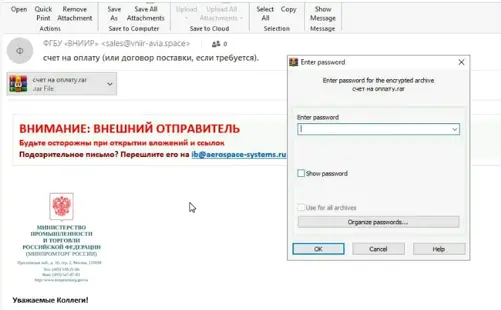
The phishing email impersonates a Russian federal research institute linked to aerospace and aviation systems. Seqrite said the message came from a recently registered lookalike domain and used an invoice-themed subject to make the email appear business-related.
The message was sent to undisclosed recipients rather than a named contact. That detail suggests a broader phishing push, not a single hand-crafted message to one person.
The attachment was a password-protected RAR archive. The password appeared in the email body, which helps the victim open the file while also making it harder for automated scanners to inspect the archive before delivery.
| Attack stage | What happens | Why it helps the attacker |
|---|---|---|
| Phishing email | Fake invoice sent from a lookalike domain | Creates trust and targets business workflows |
| Password-protected archive | Attachment opens only with a password in the message | Helps bypass email scanning |
| Installer execution | Victim opens a packaged executable | Drops files while showing a decoy PDF |
| Payload download | Scripts fetch another protected archive | Separates first-stage lure from the real tools |
| AnyDesk setup | Unattended access is configured silently | Gives the attacker remote control |
Attackers use legitimate tools to blend in
The extracted installer drops several files into a temporary folder and opens a decoy PDF to keep the invoice theme believable. Behind the scenes, batch files run one after another and download the next archive from attacker infrastructure.
That second archive contains a portable AnyDesk instance, the Blat command-line SMTP utility, a compression tool, and Tray Minimizer. Each tool has legitimate uses, but together they help the attacker configure access, hide windows, package data, and send information out.
This approach closely matches the abuse pattern described by MITRE ATT&CK remote access software, which explains how attackers can use legitimate remote access tools as an interactive command-and-control channel inside a network.
- AnyDesk provides remote access to the compromised system.
- Blat sends archived AnyDesk data through SMTP.
- Tray Minimizer hides visible windows from the user.
- Batch scripts run the setup steps and cleanup commands.
- A decoy PDF keeps the invoice lure credible.
Scheduled task persistence keeps access alive
After extraction, the malicious script waits for about a minute. This delay may help the attack avoid simple sandbox checks that only watch a sample for a short time.
The script then configures AnyDesk with a preset password and launches the portable client from ProgramData. The official AnyDesk unattended access guide says this feature lets a user connect to a remote device without someone at the other end accepting the request, once a password has been configured.
The campaign also creates a scheduled task called “Auto apdate” that runs Tray Minimizer at user logon. This follows the same persistence concept described in MITRE ATT&CK scheduled task guidance, where attackers abuse Windows Task Scheduler for initial or recurring execution.
| Persistence element | Observed behavior | Security meaning |
|---|---|---|
| AnyDesk password | Preset unattended access password is configured | Allows remote connection without user approval |
| ProgramData deployment | Portable AnyDesk package is placed under ProgramData | Blends into a common application data location |
| Scheduled task | Task launches Tray Minimizer when the user logs in | Restarts concealment after reboot or sign-in |
| Artifact deletion | Temporary scripts, archives, executables, and PDFs are removed | Reduces forensic evidence after setup |
AnyDesk data is archived and sent out
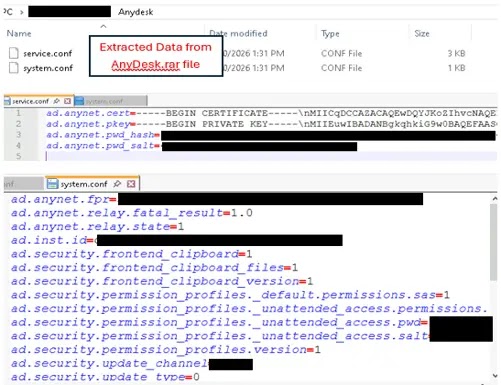
Once AnyDesk runs, the script collects configuration files, client identifiers, connection settings, logs, and certificates into a password-protected archive called AnyDesk.rar. That archive can help the attacker identify and reconnect to the infected system later.
The archive is then sent out through Blat using SMTP. This makes outbound email traffic part of the exfiltration path, rather than relying on a custom malware channel that might attract more attention.
Seqrite’s technical analysis said the combined use of unattended access, scheduled task persistence, and interface concealment allows the operator to retain long-term access and reconnect when needed.
Why the campaign is difficult to detect
The attack does not depend on a large custom malware payload. It relies on tools that administrators may already recognize, including AnyDesk and command-line utilities.
That creates a detection problem. A remote access tool may not look malicious by itself, a scheduled task may look like routine administration, and a deleted installer may leave only partial evidence behind.
The behavior aligns with living-off-the-land tradecraft. Kaspersky’s Librarian Ghouls research described a related threat group, also known as Rare Werewolf or Rezet, as relying on legitimate third-party utilities rather than custom malware binaries.
- Look for AnyDesk running from unusual paths such as ProgramData or temporary folders.
- Review newly created scheduled tasks, especially tasks with misspelled update names.
- Monitor outbound SMTP traffic from endpoints that should not send email directly.
- Flag password-protected archives attached to invoice emails.
- Check for Tray Minimizer or similar window-hiding tools on sensitive systems.
Rare Werewolf link remains suspected, not confirmed
Seqrite said the tooling, target profile, and operational pattern closely resemble campaigns associated with Rare Werewolf, also known as Librarian Ghouls. The link remains an assessment based on overlap, not a definitive attribution from the available artifacts.
The campaign’s focus on aerospace, aviation, electronics, and industrial organizations fits previous reporting on the group’s interests. Kaspersky’s Securelist report said Librarian Ghouls has targeted entities in Russia and the CIS and has used phishing emails with password-protected archives.
Seqrite also noted that it did not observe cryptocurrency mining in this specific sample. Earlier related campaigns have used miners after access was established, but this case focused on remote access, data exfiltration, stealth, and persistence.
What defenders should do now
Organizations in aerospace, aviation, electronics, manufacturing, and engineering should treat unexpected invoice emails with password-protected archives as high risk. Newly registered lookalike domains deserve special scrutiny, especially when they impersonate government or research organizations.
Security teams should also review task creation events because Windows Task Scheduler remains a common persistence method. The MITRE scheduled task entry notes that adversaries can use scheduled tasks to run programs at startup or on a schedule, including for persistence.
Remote access tools need clear allowlists and strong monitoring. The same MITRE remote access software technique explains that attackers may install or use remote access software after compromise to maintain an interactive session with a target system.
- Block or quarantine password-protected archives from unknown senders.
- Alert on newly created scheduled tasks that run from user-writable or unusual paths.
- Restrict AnyDesk and other remote access tools to approved devices and approved accounts.
- Monitor direct SMTP connections from endpoints and block unapproved outbound mail servers.
- Search for AnyDesk configuration archives, unusual ProgramData deployments, and Tray Minimizer files.
- Review endpoint logs for deletion of temporary command files, archives, and decoy documents after execution.
Bottom line
The AnyDesk phishing campaign shows how attackers can gain durable access without relying on noisy malware. A fake invoice starts the infection, legitimate tools handle access and exfiltration, and cleanup commands remove much of the evidence.
For defenders, the strongest signals are behavioral: suspicious invoice archives, unexpected remote access setup, scheduled task persistence, outbound SMTP from endpoints, and rapid deletion of staging files. Tool reputation alone will not catch this type of intrusion.
FAQ
It is a phishing campaign documented by Seqrite that uses fake invoice emails to install and configure AnyDesk for hidden unattended remote access on victim systems. The campaign also uses scheduled task persistence and deletes setup artifacts to reduce evidence.
Attackers use AnyDesk because it is a legitimate remote access tool that may already be trusted in business environments. If they configure unattended access, they can reconnect to the compromised device without requiring the user to approve each session.
The campaign creates a scheduled task named “Auto apdate” that runs Tray Minimizer at user logon. This helps keep the remote access setup hidden and active after the user signs in again.
The attackers use legitimate tools such as AnyDesk, Blat, a compression utility, and Tray Minimizer instead of obvious custom malware. They also delete temporary scripts, archives, executables, and decoy documents after setup, which reduces forensic evidence.
Organizations should block suspicious password-protected archives, monitor scheduled task creation, restrict remote access tools to approved systems, watch for outbound SMTP from endpoints, and investigate AnyDesk running from unusual folders such as ProgramData or temporary paths.


Read our disclosure page to find out how can you help VPNCentral sustain the editorial team Read more


Improve this guide




User forum
0 messages