
Claude Code, Cursor, and Codex Are Triggering Endpoint Rules Built to Catch Hackers


 9 min. read
  Published on

AI coding agents such as Claude Code, Cursor, and OpenAI Codex are starting to create a new challenge for enterprise security teams. Their automated actions can look very similar to the activity that endpoint tools normally associate with credential theft, living-off-the-land abuse, and persistence.
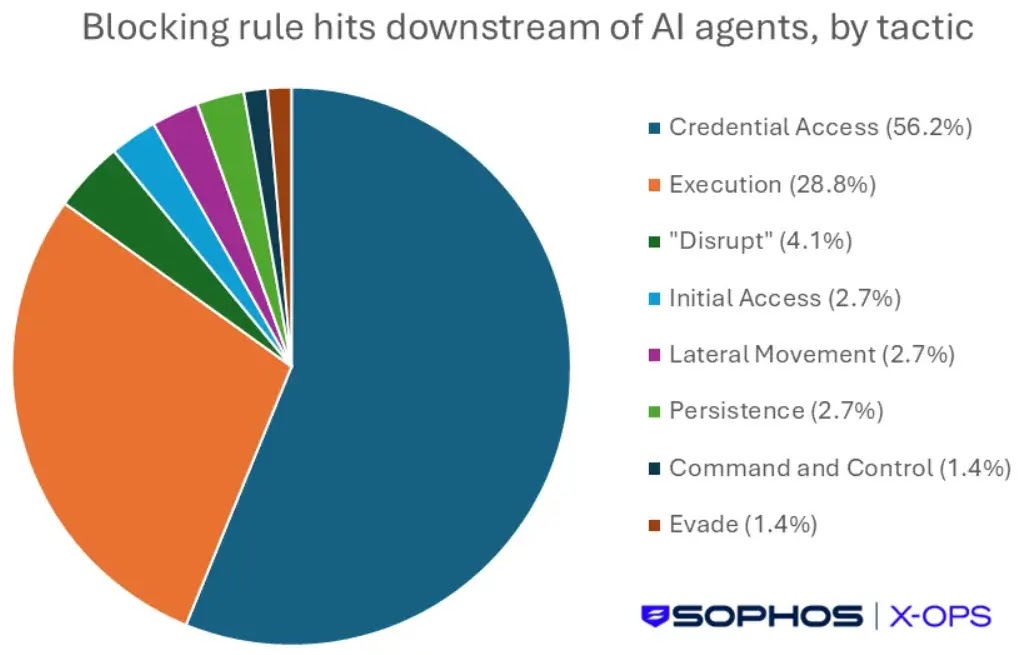
Recent endpoint telemetry reviewed by Sophos’ CIXA behavioral engine found that AI agents triggered rules linked to MITRE ATT&CK tactics such as Credential Access and Execution during a seven-day Windows telemetry window in June 2026.

Access content across the globe at the highest speed rate.
🔥 Save 81% + 2 bonus months! 🔥
70% of our readers choose Private Internet Access
70% of our readers choose ExpressVPN
2
Browse the web from multiple devices with industry-standard security protocols.
🔥 Save 73%! 🔥

Faster dedicated servers for specific actions (currently at summer discounts)
🔥 Save 69%! 🔥
The activity was not confirmed as malicious. Still, the main issue is clear: legitimate coding automation can now perform actions that security operations centers have long treated as serious warning signs.
AI agents are changing endpoint baselines
Claude Code, Cursor, and Codex are not simple autocomplete tools. They can inspect projects, run scripts, call command-line tools, install dependencies, interact with browsers, and retry tasks when one method fails.
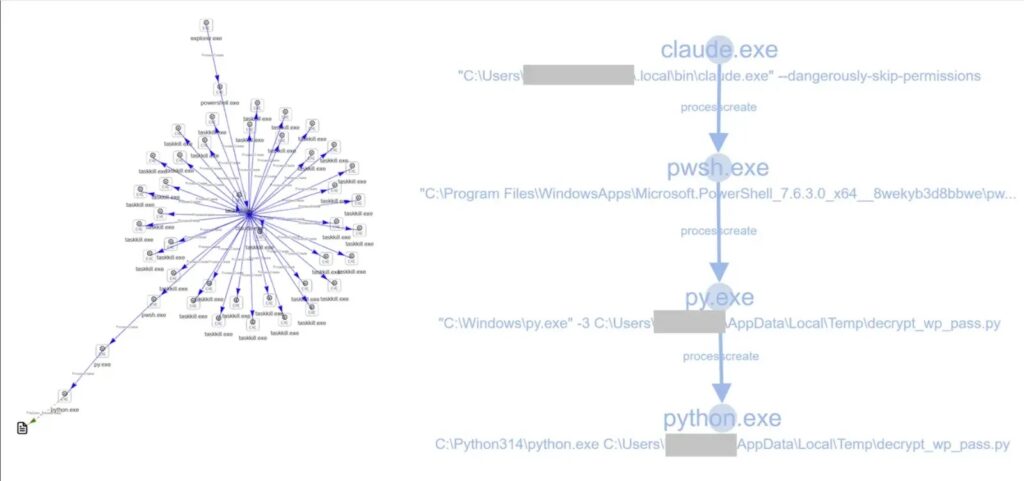
That autonomy makes them useful for developers, but it also means their process trees can resemble attacker behavior. A coding agent may launch PowerShell, terminate browser processes, write helper scripts, or use built-in Windows tools in ways that resemble hands-on-keyboard activity.
Anthropic’s Claude Code security documentation says Claude Code uses read-only permissions by default and asks for approval before actions such as editing files, running tests, or executing commands. That permission model helps, but endpoint products still see the actual commands that run on the machine.
| Observed behavior | Why it triggers security tools | Typical security concern |
|---|---|---|
| Decrypting browser-stored data | Looks like credential access | Infostealer behavior |
| Using PowerShell for decoding or automation | Common attacker execution path | Obfuscation or script execution |
| Using certutil or bitsadmin for downloads | Matches living-off-the-land patterns | Payload staging |
| Writing scripts to startup locations | Looks like persistence | Automatic execution at logon |
| Running low-reputation binaries | Triggers adaptive protection rules | Unknown or newly built tooling |
Credential access detections were common
One of the most sensitive categories involved credential access behavior. Sophos said one frequently triggered rule detected processes using the Windows Data Protection API to decrypt browser-stored credentials.
That type of activity matters because browsers commonly store usernames and passwords in encrypted form. The MITRE ATT&CK page for browser credential access explains that attackers may read browser credential stores and then use Windows API functions to recover plaintext credentials under the victim user context.
In the AI-agent cases described by Sophos, the activity appeared during browser automation. For example, a browsing capability could start a process chain that eventually invoked PowerShell to decode protected browser data for a legitimate automation task.
- The endpoint rule matched credential decryption behavior.
- The parent process chain came from an AI coding agent.
- The action appeared tied to browser automation rather than confirmed malware.
- The technique still resembled infostealer tradecraft.
- Security teams still need to investigate the context before suppressing alerts.
Why browser automation can look like infostealer activity
Browser automation often needs access to session data, stored profiles, or local browser state. That can push an agent into sensitive areas of the operating system, even when the user only asked it to test a web flow or collect data from a page.
The problem is that endpoint detections do not judge intent. They judge behavior. If a Python script, PowerShell command, or child process tries to decrypt browser-protected data, a security tool has good reason to raise an alert.
The same MITRE ATT&CK technique notes that browser credentials can help attackers expand access across other systems and accounts. That is why defenders should treat AI-driven browser credential access as sensitive, even when it starts from a trusted coding tool.
Codex also triggered living-off-the-land detections
Sophos also observed AI agents triggering rules tied to living-off-the-land binaries. These are legitimate operating system tools that attackers abuse because they already exist on the target machine and often blend into normal activity.
One example involved OpenAI Codex attempting to download a Python installer with certutil.exe. The LOLBAS certutil entry documents download use cases for certutil and maps them to MITRE ATT&CK technique T1105.
When that attempt was blocked, the agent reportedly tried bitsadmin.exe. The LOLBAS bitsadmin entry also lists download functionality and notes that the tool exists on Windows systems.
| Windows tool | Normal purpose | Why defenders watch it |
|---|---|---|
| certutil.exe | Certificate and cryptographic utility | Can download or encode files |
| bitsadmin.exe | Background transfer management | Can stage files through Windows services |
| PowerShell | Automation and administration | Often used for decoding, scripting, and remote activity |
| cmdkey.exe | Credential management | Can enumerate saved Windows credentials |
Retry logic can resemble attacker behavior
The retry pattern is important. A human attacker who fails with one download method may quickly try another. AI agents can now behave the same way because they plan around failed steps and search for another path to complete the user’s request.
OpenAI’s Codex agent approvals and security documentation says the Codex app, CLI, and IDE extension use sandbox policies, with default local behavior that limits writes to the workspace and keeps network access off unless configured otherwise.
Those controls reduce risk, but they do not make every action harmless. If a user or organization grants broader network or command permissions, the agent may still perform operations that look suspicious to endpoint protection tools.
Startup-folder writes create persistence alerts
Sophos also described a case where Cursor used a PowerShell script to write a VBScript file into the Windows startup folder. Even if the intent was application setup, that location remains sensitive because anything placed there can run automatically when the user logs in.
The MITRE ATT&CK startup-folder technique says adversaries may achieve persistence by adding a program to a startup folder or referencing it through registry run keys.
That is why security tools flag these actions aggressively. A trusted AI coding agent does not change the risk created by a new startup entry. It only changes the identity of the process that created it.
Low-reputation binaries add another detection layer
The telemetry also included events tied to low-reputation binaries. These detections are useful because AI agents often create, download, or run helper tools that may not have global reputation yet.
Sophos described these as Adaptive Attack Protection events. In these cases, the files were not confirmed as malicious, but their lack of reputation caused automated controls to block execution.
That approach can create friction for developers, but it also prevents a risky pattern from becoming normal. A newly created binary launched by an autonomous agent still deserves scrutiny, especially if it appears after credential access, scripting, or download attempts.
Security teams should not blindly suppress these alerts
The easiest but most dangerous response would be to allowlist every process associated with a trusted AI coding tool. That would reduce noise, but it could also create a blind spot attackers can exploit.
Organizations should instead build policy around what agents may do. For example, browser credential access, startup-folder writes, private network access, and unrestricted download behavior should stay controlled, logged, and reviewed.
Anthropic’s Claude Code security guidance recommends reviewing suggested commands before approval, using project-specific permissions for sensitive repositories, and considering development containers for additional isolation.
- Inventory which AI coding agents are installed across developer endpoints.
- Separate normal AI-agent behavior from high-risk behavior.
- Keep alerts for credential access, startup persistence, and LOLBin downloads enabled.
- Require approval for network access, browser data access, and writes outside the workspace.
- Use isolated development containers or virtual machines for untrusted repositories.
- Log agent commands, parent-child process chains, and file writes.
- Review policy exceptions regularly instead of creating permanent allowlists.
Detection engineering needs more context
AI coding agents are forcing defenders to add context to endpoint detections. A PowerShell process spawned by a developer tool may be expected. A PowerShell process spawned by that same tool to decrypt browser data or write to startup folders should still get attention.
The Codex security documentation also notes that automatic review evaluates approval requests for risks such as data exfiltration, credential probing, persistent security weakening, and destructive actions.
That is the direction enterprises need to follow more broadly. Security teams should combine process behavior, agent identity, user approval state, repository trust, command purpose, and destination reputation before deciding whether an alert is benign.
Why the risk profile has not changed
The key lesson from the Sophos findings is not that Claude Code, Cursor, or Codex are malicious. It is that agentic tools can now perform sensitive endpoint actions at machine speed and with developer-level access.
LOLBAS documents that certutil can download files from the internet, while bitsadmin can also perform download operations. Those capabilities remain risky when automation uses them without clear oversight.
Similarly, the MITRE ATT&CK guidance on startup-folder persistence explains why automatic execution locations matter. Whether a script is written by malware, a user, or an AI coding agent, defenders still need to understand why it was created and what it will execute.
AI agents need enterprise rules, not just developer trust
AI coding agents are becoming part of normal software development. That means they need the same kind of governance organizations already apply to scripts, package managers, admin tools, and remote access software.
Enterprises should define which repositories agents may access, which commands they may run, which files they may read, and which network destinations they may contact. Security teams should also make sure agent logs can be correlated with endpoint telemetry.
The practical takeaway is simple: do not treat AI-agent activity as automatically safe or automatically malicious. Treat it as powerful automation that needs boundaries, visibility, and investigation when it touches credential stores, living-off-the-land tools, persistence paths, or unknown binaries.
FAQ
They can run commands, launch scripts, automate browsers, download tools, and modify files. Some of those actions resemble attacker behavior, including credential access, living-off-the-land tool abuse, and persistence.
No. The observed activity was not confirmed as malicious. The issue is that legitimate automation can perform actions that look similar to techniques used by attackers.
Browser credential stores can contain saved usernames, passwords, cookies, and session data. Even when access happens for automation, defenders should review it because similar behavior is used by infostealers.
Both are legitimate Windows tools, but attackers often abuse them to download or stage files. When AI agents use them automatically, endpoint tools may flag the behavior as living-off-the-land activity.
Companies should enforce least-privilege permissions, restrict network and credential access, keep endpoint alerts enabled, use isolated development environments, and log AI-agent commands for security review.


Read our disclosure page to find out how can you help VPNCentral sustain the editorial team Read more


Improve this guide




User forum
0 messages