
PromptSpy Android Malware Uses Google Gemini to Adapt on Infected Phones


 9 min. read
  Published on

A newly documented Android spyware strain called PromptSpy uses Google Gemini during execution to help it interact with a victim’s phone screen and maintain persistence.
Security researchers described it as one of the first known Android malware examples to use generative AI as part of its runtime behavior. Instead of relying only on hardcoded screen actions, PromptSpy sends screen information to Gemini and receives instructions on what to tap or swipe next.

Access content across the globe at the highest speed rate.
🔥 Save 81% + 2 bonus months! 🔥
70% of our readers choose Private Internet Access
70% of our readers choose Private Internet Access
2
Browse the web from multiple devices with industry-standard security protocols.
🔥 Save 73%! 🔥

Faster dedicated servers for specific actions (currently discounted)
🔥 Save 69%! 🔥

The malware still behaves like a traditional Android remote access trojan in many ways. It can monitor the device screen, capture sensitive input, list installed apps, take screenshots, and give attackers remote control through a built-in VNC module.
PromptSpy uses Gemini to understand the screen
The most unusual part of PromptSpy is how it handles Android interface differences. Android devices vary heavily by version, vendor skin, screen size, and app layout, which makes hardcoded taps unreliable.
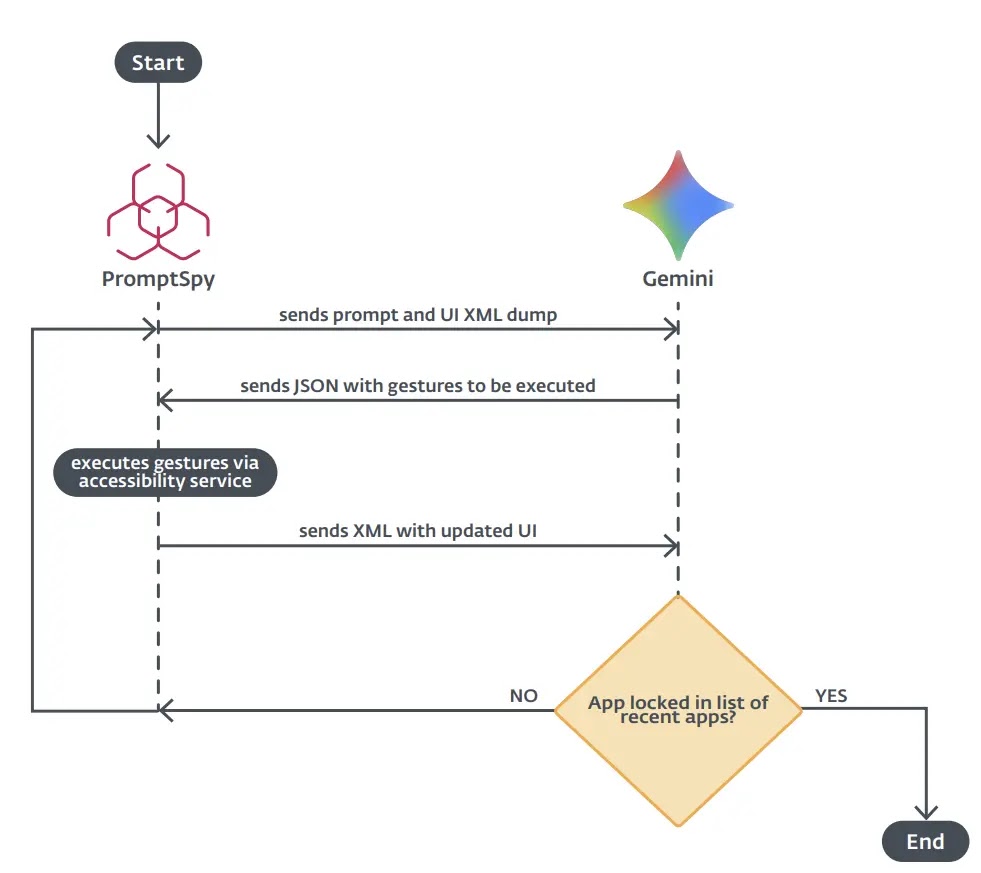
According to TechRadar’s coverage of the ESET findings, PromptSpy sends XML snapshots of the current screen to Gemini. Those snapshots include visible text, UI element types, and position data.
The malware then uses the model’s response to decide which gestures it should perform. Google’s Gemini API documentation shows that Gemini models can process prompts and return structured outputs, which explains why attackers may find this kind of workflow useful for automation.
| Component | Role in PromptSpy |
|---|---|
| Android accessibility permissions | Let the malware observe and interact with the screen |
| Gemini requests | Help interpret the current screen layout |
| XML screen data | Provides labels, elements, and coordinates |
| VNC module | Allows remote viewing and interaction |
| Command-and-control channel | Lets operators update parts of the malware configuration |
Why AI matters in this case
PromptSpy does not use AI to write itself from scratch on the phone. Its important shift is narrower but still meaningful: it uses a generative model to guide actions while the malware is running.
That gives the malware a way to adapt to different phone interfaces. If one Android skin places a control in a different location, the malware can ask Gemini to interpret the visible screen and return a new action plan.
The official Gemini API page describes Gemini as a developer platform for building with Google’s models and agents. In PromptSpy’s case, researchers say attackers abused that kind of model access for malicious screen navigation.
Accessibility abuse gives the malware control
PromptSpy relies heavily on Android accessibility capabilities. Accessibility tools exist to help people use devices and apps, but malware families frequently abuse them because they can observe screen changes and perform actions on behalf of the user.
Google’s Android AccessibilityService documentation says accessibility services run in the background and can receive callbacks when user interface events happen. The same documentation also notes that accessibility services can query active window content when granted the required capability.
That combination makes the permission highly sensitive. Once a malicious app convinces a user to enable it, the app may be able to monitor what appears on screen, react to interface changes, and automate taps or gestures.
- PromptSpy asks for powerful accessibility access.
- It captures screen structure and sends it for model-assisted interpretation.
- It performs gestures based on returned instructions.
- It uses the same access to interfere with removal attempts.
- It can support remote control through its VNC component.
The malware tries to stay pinned in recent apps
One of PromptSpy’s AI-assisted goals is persistence. Researchers said the malware tries to lock itself into the list of recent apps so users cannot easily remove it from memory by swiping it away.
This is difficult to automate across Android devices because manufacturers often change the recent apps interface. A gesture that works on one phone may fail on another.
PromptSpy addresses that problem by repeatedly checking what is visible, sending that context to Gemini, and using the model’s guidance to select the right gesture. This makes the persistence routine more flexible than a static script.
PromptSpy also blocks uninstall attempts
PromptSpy reportedly uses invisible overlays to interfere with removal. When users open the app settings page and try to tap buttons such as Stop or Uninstall, the malware can place transparent rectangles above those controls.
The technique makes the phone appear unresponsive or makes the uninstall attempt fail. The user may think they tapped the correct button, but the malware intercepted the interaction.
The same Android AccessibilityService reference explains that accessibility services can draw overlays on top of existing screen contents. That legitimate feature can become dangerous when a malicious app abuses it to block security actions.
Distribution appears limited so far
Public reporting suggests PromptSpy has not spread widely. The malware appears to have been distributed outside Google Play through a deceptive website and app branding rather than through the official Android app store.
Cinco Días reported that the malware used the name MorganArg and appeared to imitate a trusted financial brand for Spanish-speaking users, with signs pointing to a campaign aimed at Argentina.
The same reporting said PromptSpy was not found broadly in telemetry, which suggests it may have been an experimental project, proof of concept, or limited distribution attempt rather than a large-scale campaign.
| Indicator | Details |
|---|---|
| Malware name | PromptSpy |
| Platform | Android |
| Reported app names | MorganArg and MorganArgs |
| Reported distribution domain | mgardownload[.]com |
| Main abuse path | Accessibility permissions and AI-assisted screen navigation |
| Reported targeting clue | Spanish-language lure with Argentina-related branding |
What PromptSpy can steal or monitor
PromptSpy’s capabilities make it dangerous even if its AI use remains narrow. Once installed with the needed permissions, the spyware can give attackers a deep view into the infected device.
According to TechRadar, the malware can intercept credentials, capture gestures, take screenshots, record activity, and support remote viewing through a VNC module.
That makes lockscreen PINs, app activity, messages, and banking sessions potential targets. The malware’s AI component helps with persistence, but the spyware risk comes from the overall control it can gain after accessibility access is granted.
- Capture screenshots from the infected phone.
- Record screen activity or video.
- Track gestures and sensitive input.
- List installed apps.
- Enable remote interaction through VNC.
- Make normal removal harder through overlays.
Why Google Play Protect matters
PromptSpy was reportedly not distributed through Google Play, which means sideloading and third-party download sites remain a key risk factor.
Google says Google Play Protect checks apps and devices for harmful behavior, scans apps from Google Play before download, and can check apps from other sources for potentially harmful behavior.
Play Protect is not a replacement for careful installation habits, but it adds an important protection layer for Android users who may encounter harmful apps outside the Play Store.
Safe mode may help remove the app
Because PromptSpy can interfere with Stop and Uninstall buttons, normal removal may fail while the malware is active.
Cinco Días said ESET recommended removing the malicious app from Android safe mode. Safe mode prevents third-party apps from running normally, which can stop the malware from drawing overlays during removal.
Google’s Pixel safe mode guidance explains that users can reboot into safe mode to identify problem apps and then remove recently downloaded apps that cause issues.
- Restart the phone in safe mode.
- Open Settings.
- Go to Apps.
- Find the suspicious app name, such as MorganArg or MorganArgs.
- Uninstall the app while third-party app behavior is restricted.
- Restart the phone normally.
- Review accessibility permissions and revoke anything suspicious.
Users should watch accessibility permission requests
The biggest warning sign is a newly installed app asking for accessibility access without a clear need. A banking, update, utility, or document app should not normally need broad control over the screen.
Users should also avoid installing APKs from links, ads, chat messages, or websites pretending to represent banks or system updates. These lures remain common because they let attackers bypass app-store review.
Google’s Play Protect help page says the feature can warn about potentially harmful apps, deactivate or remove harmful apps, and prevent certain unverified apps that use sensitive permissions from being installed.
Why PromptSpy matters for mobile security
PromptSpy shows how mobile malware may evolve as attackers experiment with generative AI. The current use case is limited, but it points toward malware that can adapt to device screens, languages, layouts, and user actions more easily than older scripts.
The risk is not only that AI makes malware more powerful. It can also make malware less brittle. A tool that can reason about the current screen may work across more devices with less manual tuning from its operators.
Google’s safe mode instructions remain useful for users who suspect a malicious app has gained control, but prevention is still easier than cleanup. Users should keep Play Protect enabled, avoid sideloading apps from unknown sources, and treat accessibility permission requests as high risk.
FAQ
PromptSpy is an Android spyware strain that uses accessibility permissions, remote control features, and Google Gemini-assisted screen navigation to monitor infected phones and make removal harder.
PromptSpy sends information about the current Android screen to Gemini and receives instructions about which gestures or taps to perform. This helps the malware adapt to different Android interfaces.
Public reporting says PromptSpy was not distributed through Google Play. It appeared to spread through a deceptive website and app branding, which makes sideloading a key risk factor.
PromptSpy can potentially capture screenshots, record screen activity, track gestures, collect sensitive input, list installed apps, and let attackers remotely interact with the infected device.
Users may need to reboot the phone into safe mode, open Settings, find the suspicious app, and uninstall it while third-party app behavior is restricted. They should also review accessibility permissions afterward.


Read our disclosure page to find out how can you help VPNCentral sustain the editorial team Read more


Improve this guide




User forum
0 messages