
Hackers Abuse Microsoft Entra Passkey Enrollment to Hijack Enterprise Accounts


 8 min. read
  Published on
A threat actor is using voice phishing to trick Microsoft 365 users into registering attacker-controlled passkeys on their enterprise accounts, according to a new Okta Threat Intelligence report.
The campaign targets Microsoft Entra passkey enrollment, a legitimate security process designed to move users toward phishing-resistant authentication. Attackers do not break passkeys directly. Instead, they persuade employees to follow a fake enrollment flow while a live operator signs in to the real Microsoft account and registers a passkey controlled by the attacker.

Access content across the globe at the highest speed rate.
🔥 Save 81% + 2 bonus months! 🔥
70% of our readers choose Private Internet Access
70% of our readers choose ExpressVPN
2
Browse the web from multiple devices with industry-standard security protocols.
🔥 Save 73%! 🔥

Faster dedicated servers for specific actions (currently at summer discounts)
🔥 Save 69%! 🔥
Okta tracks the activity as O-UNC-066. Palo Alto Networks Unit 42 has also linked the broader Pink extortion brand to vishing-led initial access and data theft operations, according to a Unit 42 threat intelligence note.
What the attackers are doing
The attack starts with a phone call. The caller poses as IT support or a security team member and tells the employee that they need to register a new passkey for their Microsoft account.
This pretext works because Microsoft has been pushing organizations toward passwordless sign-in. Microsoft’s own registration campaign guidance explains how administrators can nudge users to set up passkeys or Microsoft Authenticator during sign-in.
The victim receives a phishing link hosted on a passkey-themed domain. The site copies Microsoft sign-in pages and can use the victim organization’s branding, which makes the process look like a normal company security update.
| Attack stage | What the victim sees | What the attacker does |
|---|---|---|
| Phone call | A caller claiming to be from IT support | Builds trust and creates urgency |
| Fake login page | A Microsoft-style sign-in page with company branding | Collects the username and password |
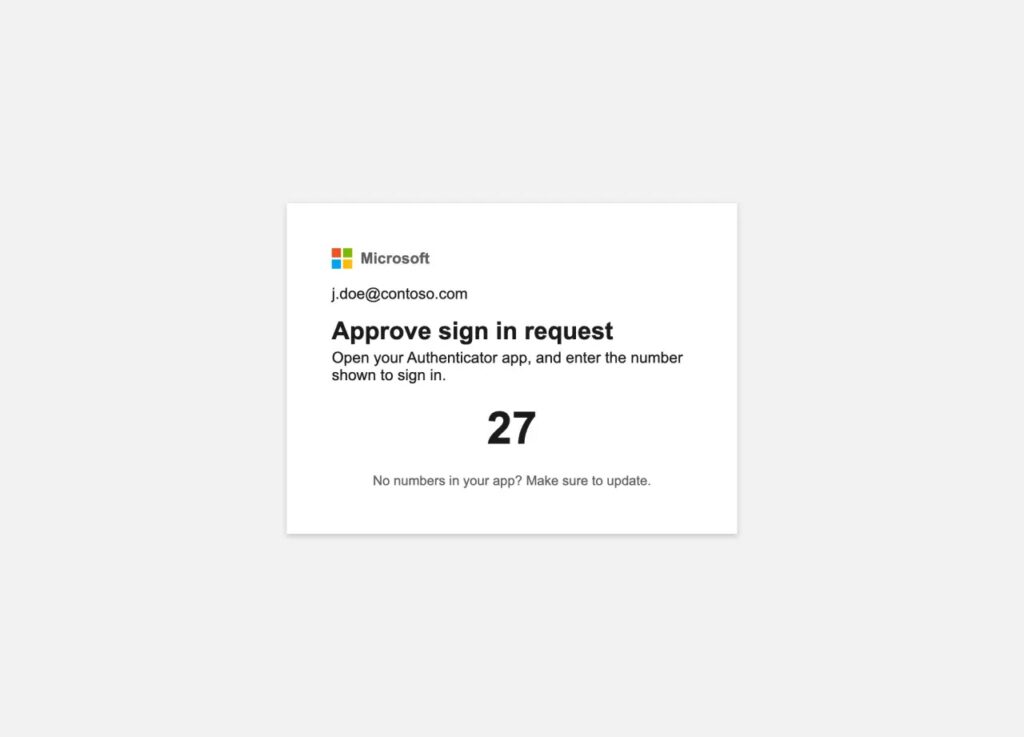
| MFA prompt | A screen matching SMS, TOTP, or push approval | Relays the MFA challenge to access the real account |
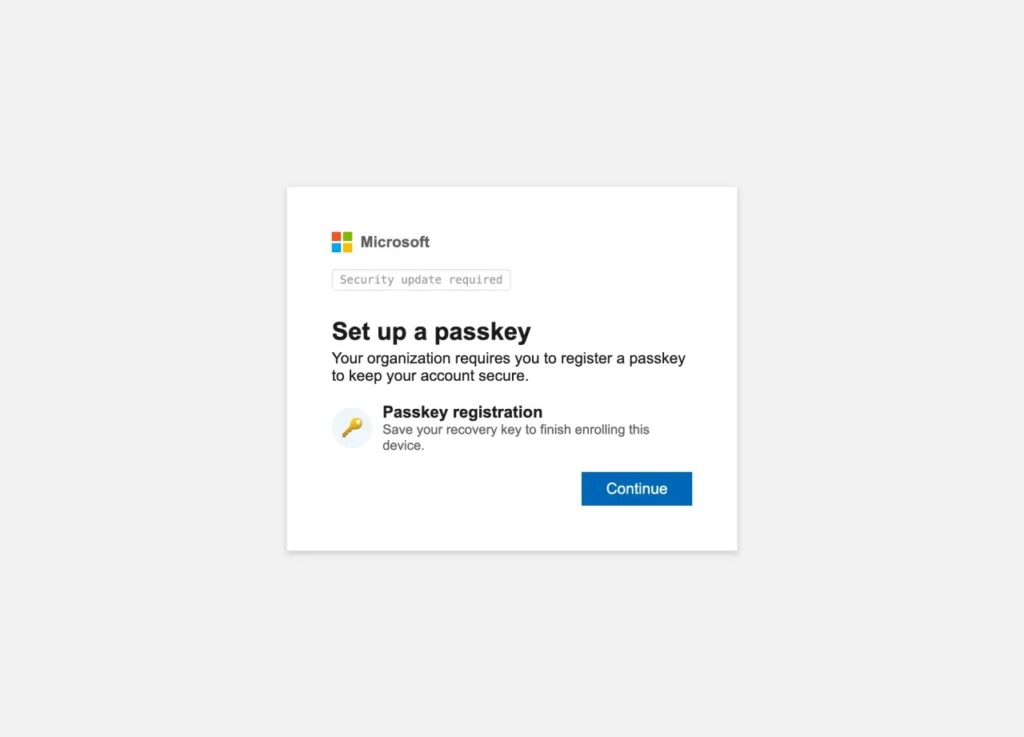
| Fake passkey setup | A passkey registration page and recovery phrase prompt | Registers an attacker-controlled passkey in the real account |
| Confirmation | A message saying the passkey was created | Leaves the victim believing the enrollment was legitimate |
Why the attack is effective
The phishing kit is not a standard transparent adversary-in-the-middle proxy. Okta says it uses an operator-controlled PHP panel where a live attacker steers the victim through each phase of authentication in near real time.
That live control matters. If the real Microsoft sign-in flow asks for an SMS code, the victim sees a fake SMS prompt. If it asks for an authenticator code or a number-matching push approval, the phishing page changes to match that method.
Microsoft describes passkeys as phishing-resistant credentials that use FIDO2 standards, WebAuthn in browsers, and CTAP for authenticator communication in its Microsoft Entra passkey documentation. This campaign works around that strength by compromising the enrollment moment, not by stealing an existing passkey secret.
The fake recovery phrase is a distraction
After the attacker gets through the login and MFA stages, the phishing site moves to a fake passkey setup screen. It asks the victim to save a recovery phrase made from BIP-39-style words.
That phrase does not apply to Microsoft Entra passkey registration. Okta says the fake phrase likely serves as a distraction while the attacker registers their own passkey in the legitimate Microsoft account.
The victim may then receive a real Microsoft email saying a new passkey was added. Because the fake site just told them the setup succeeded, they may dismiss the notification instead of reporting it.
Who is being targeted
Okta says the campaign has targeted enterprise organizations in food and beverage, technology, healthcare, automotive, construction, and aviation. The activity has been observed since April 2026.
The main goal appears to be data extortion. Okta linked the activity to a public leak site used to pressure victims, while the Pink extortion activity note from Unit 42 says the brand uses vishing for initial access and extortion.
The campaign also reflects a wider shift in enterprise intrusion activity. Many extortion groups now focus on cloud data theft and account takeover instead of deploying ransomware encryption.
Why passkey enrollment became a useful lure
Passkeys remain a strong security control when users and administrators enroll them correctly. Microsoft says passkeys can reduce prompts, remove passwords from sign-in, and provide phishing-resistant authentication through public key cryptography.
The problem comes from user confusion during enrollment. Many employees still do not know what a legitimate passkey setup flow should look like, which gives callers room to invent a convincing process.
Microsoft’s passkey registration campaign documentation also shows why this timing matters. Users can legitimately see prompts during sign-in, so attackers can imitate a familiar security nudge with less resistance.
- Passkeys protect sign-in when the real enrollment process stays under the user’s and organization’s control.
- Voice phishing can convince users to approve the attacker’s authentication attempt.
- Fake branding makes the phishing page feel internal and expected.
- A real passkey notification may look harmless if the victim believes they just completed setup.
- An attacker-controlled passkey can outlast a password reset if defenders do not remove it.
Indicators linked to the campaign
Okta listed several domains and URL paths associated with the phishing infrastructure. Security teams can use these indicators for hunting, alerting, and blocking, while recognizing that attackers may rotate infrastructure quickly.
| Type | Indicator | Purpose |
|---|---|---|
| Domain | assignpasskey[.]com | Used for per-victim phishing subdomains |
| Domain | deploypasskey[.]com | Used for per-victim phishing subdomains |
| Domain | passkeydeploy[.]com | Used for per-victim phishing subdomains |
| Domain | passkeyadd[.]com | Used for per-victim phishing subdomains |
| Domain | setpasskey[.]com | Used for per-victim phishing subdomains |
| Infrastructure | AS57724 | DDoS-Guard-hosted infrastructure observed by Okta |
| Infrastructure | AS59692 | IQWeb FZ-LLC-hosted infrastructure observed by Okta |
| URL path | /gate | Landing page and anti-analysis checks |
| URL path | /identify | Username collection page |
| URL path | /password | Password collection page |
| URL path | /backend.php | Operator backend panel |
| URL path | /passkey/register | Fake passkey registration flow |
| URL path | /done | Final fake confirmation page |
What organizations should do now
Administrators should treat unexpected passkey registration as a high-risk identity event. The key alert is not only a suspicious login, but also a new authenticator or passkey added to an account after a phone-based support interaction.
Microsoft’s passkey setup guidance notes that administrators can control whether users can register passkeys through Security info. Organizations should review those settings, especially for privileged users and sensitive departments.
Teams should also train staff to verify IT support calls through a known internal channel. A real help desk should not ask users to visit an unfamiliar passkey domain, read out MFA codes, approve unexpected number-matching prompts, or follow a caller’s live authentication instructions.
- Alert on every new passkey, authenticator, security key, and authentication method registration.
- Require phishing-resistant authentication for privileged and sensitive accounts.
- Restrict passkey registration by device compliance, trusted network, or managed-device status where possible.
- Block access from countries, ASNs, or networks where the organization does not operate.
- Review recent authenticator lifecycle events for suspicious registrations.
- Remove unknown passkeys and revoke sessions for affected accounts.
- Teach users that Microsoft passkey registration does not use BIP-39-style recovery phrases.
Response steps after a suspected compromise
If a user reports a suspicious passkey enrollment call, administrators should act quickly. An attacker may already have valid credentials, an approved MFA challenge, and a newly registered passkey.
Immediate response should include session revocation, password reset where applicable, removal of unfamiliar authentication methods, review of mailbox rules, and inspection of SharePoint, OneDrive, Teams, and email access logs.
Administrators should also review the Microsoft Entra passkey model with help desk and security teams so they understand the difference between a legitimate platform dialog and a fake website-based recovery phrase flow.
The bigger risk
This campaign shows how attackers can weaponize security change management. A new security control can become a social engineering hook when users expect enrollment prompts but do not know how to validate them.
It also shows why identity events need the same urgency as malware alerts. In a cloud-first Microsoft 365 environment, a newly added passkey or authenticator can give an attacker durable access to email, files, chats, and business applications.
Okta’s analysis of the O-UNC-066 campaign makes one point clear: phishing-resistant authentication still needs phishing-resistant enrollment, strong help desk verification, and fast detection when authenticators change.
Organizations should continue adopting passkeys, but they should secure the rollout process as carefully as the sign-in process. The Microsoft Entra configuration guidance gives administrators the controls to shape who can register passkeys and under what conditions.
FAQ
It is a voice phishing campaign where attackers impersonate IT support and trick Microsoft 365 users into visiting a fake passkey enrollment page. A live operator then uses the victim’s credentials and MFA response to register an attacker-controlled passkey on the real account.
No. The campaign abuses the enrollment process through social engineering. Passkeys remain phishing-resistant credentials when users register them through the legitimate Microsoft flow and organizations control enrollment properly.
Okta tracks the activity as O-UNC-066. The broader extortion activity is associated with Pink, a threat brand also referenced by Palo Alto Networks Unit 42.
Okta says the BIP-39-style recovery phrase does not apply to Microsoft Entra passkey registration. It likely acts as a distraction while the attacker enrolls their own passkey in the legitimate Microsoft account.
Organizations should alert on new passkey and authenticator registrations, restrict enrollment by device and network context, train users to verify IT support calls, remove unknown authenticators quickly, revoke suspicious sessions, and require phishing-resistant authentication for high-risk accounts.


Read our disclosure page to find out how can you help VPNCentral sustain the editorial team Read more


Improve this guide




User forum
0 messages