
Researcher Claims RoguePlanet Defender Patch Can Leak Data and Exhaust Disk Space


 10 min. read
  Published on
A security researcher claims Microsoft’s fix for the RoguePlanet Defender vulnerability introduced new information-disclosure and denial-of-service risks in the Microsoft Malware Protection Engine.
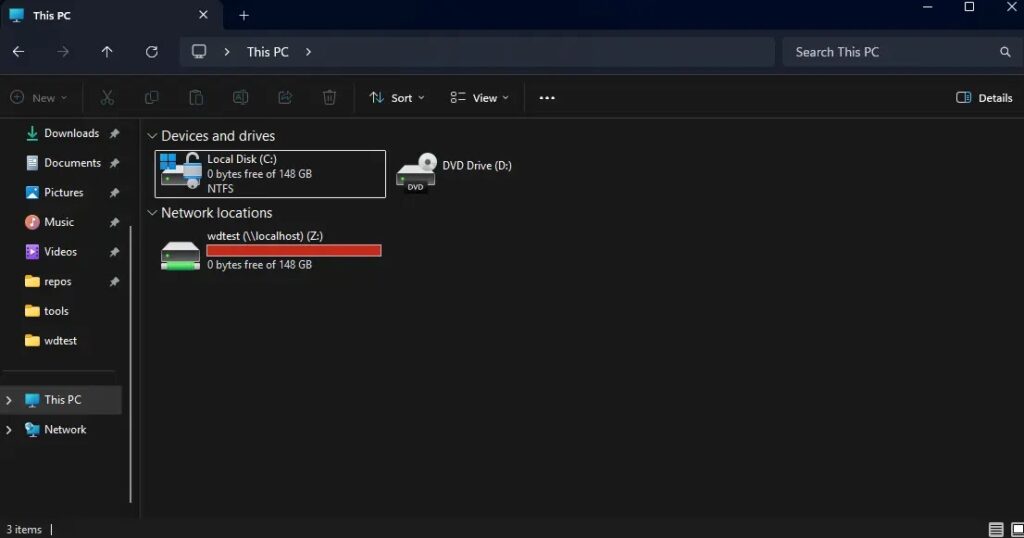
Chaotic Eclipse, also known as Nightmare-Eclipse, alleges that changes in mpengine.dll can expose eight bytes of data during certain file operations. The researcher also demonstrated a scenario in which Microsoft Defender consumed all available disk space while processing an oversized Zone.Identifier alternate data stream from an SMB share.

Access content across the globe at the highest speed rate.
70% of our readers choose Private Internet Access
70% of our readers choose ExpressVPN

Browse the web from multiple devices with industry-standard security protocols.

Faster dedicated servers for specific actions (currently at summer discounts)
Microsoft has not publicly confirmed either post-patch issue. The claims currently remain independent research findings, and there is no evidence that attackers are exploiting them in active campaigns.
Microsoft patched the RoguePlanet privilege-escalation flaw
RoguePlanet is the name given to CVE-2026-50656, a local privilege-escalation vulnerability in the Microsoft Malware Protection Engine. The engine powers scanning and malware remediation in Microsoft Defender Antivirus.
Microsoft addressed the vulnerability in Defender engine version 1.1.26060.3008. The company’s CVE-2026-50656 security advisory identifies RoguePlanet as an elevation-of-privilege issue.
The same engine release included additional defense-in-depth changes intended to strengthen Defender’s file-handling behavior. Chaotic Eclipse claims that some of those changes created new unintended conditions.
| Issue | Status | Reported impact |
|---|---|---|
| CVE-2026-50656, RoguePlanet | Confirmed and patched by Microsoft | Local privilege escalation |
| Eight-byte information disclosure | Claimed by the researcher | Small data exposure reportedly visible to drivers |
| Zone.Identifier disk exhaustion | Claimed by the researcher | Defender may consume all available disk space |
The reported information leak exposes eight bytes
Chaotic Eclipse claims the updated malware engine can leak eight bytes from memory when Defender attempts to open a specially handled file.
The researcher has not demonstrated a way for an ordinary user-mode process to retrieve the leaked bytes. Current observations reportedly show that only drivers can access the exposed data.
This limitation reduces the immediate practical impact. However, even a small kernel-visible information leak may become useful when combined with another vulnerability or exploit technique.
- The alleged leak exposes eight bytes of data.
- The researcher has not shown direct access from a standard user account.
- Current testing reportedly exposes the data only to drivers.
- Microsoft has not independently confirmed the behavior.
- No active exploitation has been reported.
Without further technical validation, it remains unclear whether the bytes contain predictable, sensitive or attacker-useful information.
Oversized Zone.Identifier data may fill the system drive
The second reported issue presents a more direct availability risk. It involves Defender’s handling of Zone.Identifier alternate data streams attached to files accessed through an SMB share.
Zone.Identifier records information about a file’s origin or security zone. Windows commonly adds this metadata to files downloaded from the internet so security features can treat them with additional caution.
Microsoft explains that NTFS files can contain multiple named streams in its file streams documentation. Each stream has its own allocation size and data length, even though it remains associated with the same visible file.
| Stream | Typical purpose |
|---|---|
| Default data stream | Stores the file’s normal visible content |
| Zone.Identifier | Records origin and security-zone information |
| Other named streams | Store additional application or filesystem metadata |
Defender reportedly caches the alternate data stream
Defender normally applies size limits when scanning or quarantining large files. These limits help prevent one object from consuming excessive memory or storage.
Chaotic Eclipse claims that functions associated with Defender’s cloud reputation and Spynet handling do not apply equivalent limits to Zone.Identifier content.
In the reported proof of concept, Defender accessed a file on a researcher-controlled SMB server and started reading an oversized Zone.Identifier stream. The system retained a local copy of the incoming data as the stream continued to grow.
- The victim system accesses a file hosted on an SMB share.
- The file has an unusually large Zone.Identifier stream.
- Microsoft Defender begins inspecting the file and its metadata.
- MsMpEng.exe writes cached stream data to local storage.
- The SMB server keeps the request active instead of completing it normally.
- Defender continues retaining data until the disk runs out of space.
The alleged behavior does not require an attacker to copy a conventional multi-gigabyte file to the victim manually. Defender’s own inspection process performs the disk writes.
The SMB server can keep the read operation open
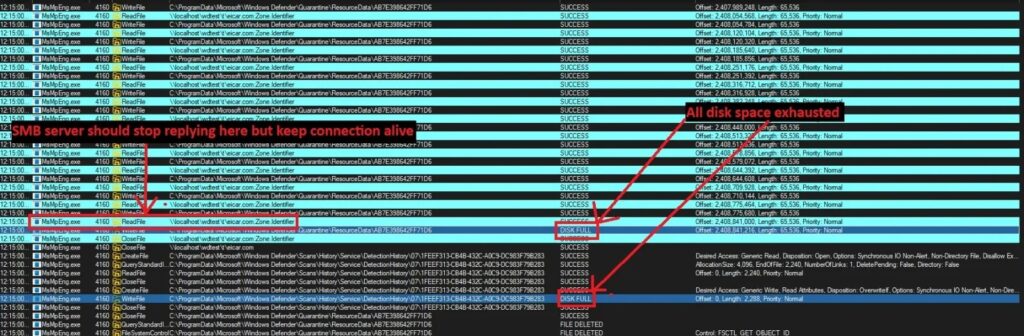
The researcher used a controlled SMB server to demonstrate the disk-consumption condition. The server reportedly supplied the large alternate data stream and then withheld a response to a later read request.
This kept the SMB session active while Defender waited for more data or for the operation to finish. Process-monitoring screenshots reportedly showed MsMpEng.exe continuing to write until Windows returned DISK FULL errors.
Microsoft recommends restricting unnecessary SMB communications in its secure SMB traffic guidance. The company advises organizations to block outbound TCP port 445 to the internet unless a legitimate service requires it.
- The malicious server controls the remote file and alternate data stream.
- The victim must access or scan content on the SMB share.
- The server can delay completion of the read request.
- Defender may retain the downloaded data on the local volume.
- The disk-consumption process continues until the connection ends or storage fills.
A full system drive can disrupt Windows operations
The reported proof of concept does not cause a traditional operating system crash. However, exhausting the Windows system volume can create serious reliability and security problems.
Applications may fail to save files or create temporary data. Windows services may become unstable, updates can fail and event logs may stop recording new activity.
Defender itself may also struggle to download updates, quarantine malware or write operational data when the disk has no remaining capacity.
| Affected function | Possible consequence |
|---|---|
| Windows Update | Updates may fail to download or install |
| Security software | Scanning, logging and quarantine operations may fail |
| Applications | Programs may fail to create temporary or saved files |
| Event logging | Security and system events may no longer be recorded |
| System services | Services may stop, hang or behave unpredictably |
| User sessions | Sign-in and profile operations may encounter errors |
Disk exhaustion may also interfere with incident response by preventing the system from preserving logs and forensic evidence.
The attack appears to require access to a malicious share
Current testing suggests that the victim system must access a file hosted on an attacker-controlled or researcher-controlled SMB server.
This introduces an interaction and network-access requirement. An attacker may need to convince a user to open a network path, place a link in a document or compromise an existing file-sharing workflow.
Authentication rules, outbound firewall policies and network segmentation may also prevent the system from reaching an untrusted SMB server.
- The attacker needs to host or control an SMB share.
- The Windows system must connect to the share.
- Defender must inspect the hosted file and alternate data stream.
- Outbound SMB controls must permit the connection.
- The server must keep the relevant read operation active.
The researcher is also testing whether WebDAV can reproduce the condition. Reported attempts currently fail with STATUS_INVALID_PARAMETER, so WebDAV has not provided a confirmed alternative attack path.
Windows 11 and Windows Server reproduced the behavior
Chaotic Eclipse said the disk-exhaustion behavior was reproduced on Windows 11 version 25H2 and Windows Server 2025.
That does not establish a complete list of affected operating systems. Microsoft Defender distributes engine updates separately from many Windows cumulative updates, so several Windows releases may run the same engine build.
Microsoft’s Defender security intelligence page lists engine version 1.1.26060.3008 as the current engine release on July 13, 2026.
Administrators can check the installed engine version through Windows Security, PowerShell or enterprise endpoint-management tools.
Updating Defender remains important
Organizations should not delay the RoguePlanet update because of the unconfirmed post-patch claims. CVE-2026-50656 allows local privilege escalation, while Microsoft has not validated the alleged data leak or denial-of-service issue.
Systems should continue receiving current Defender platform, engine and security intelligence updates. Future releases may also change or harden the behavior described by the researcher.
The Microsoft Defender update page provides the latest engine, platform and intelligence versions and includes instructions for triggering updates manually.
- Confirm that Defender engine version 1.1.26060.3008 or later is installed.
- Keep automatic security intelligence updates enabled.
- Check for newer engine releases as Microsoft updates the service.
- Do not roll back to a version vulnerable to RoguePlanet.
- Monitor Microsoft’s security advisory for additional guidance.
The Microsoft Security Response Center entry remains the authoritative source for changes to CVE-2026-50656.
Outbound SMB restrictions can reduce exposure
Organizations that do not require direct SMB connections to internet-hosted servers should block outbound TCP port 445 at network boundaries and endpoint firewalls.
Enterprises should allow SMB only to approved file servers, domain controllers and cloud storage endpoints required for business operations.
Microsoft’s SMB security recommendations call for traffic segmentation, endpoint isolation and minimal inbound and outbound access.
- Block outbound SMB connections to the public internet.
- Allow port 445 only to approved internal and cloud destinations.
- Log permitted and blocked SMB connections.
- Investigate links that direct users to unfamiliar network shares.
- Use VPNs or private connections for approved cloud file services.
Organizations should test firewall changes before broad deployment because blocking SMB can disrupt legitimate file sharing, authentication and infrastructure services.
Defenders should watch MsMpEng.exe disk activity
Security teams can monitor sudden increases in disk usage associated with MsMpEng.exe, the Microsoft Defender Antivirus service process.
A rapid loss of free storage combined with an active SMB connection and alternate data stream access deserves investigation. Administrators should also determine whether the system recently opened a file from an unfamiliar network share.
NTFS treats each named stream as having its own allocation and data size, as explained in Microsoft’s alternate file stream reference.
- Large or continuous writes from MsMpEng.exe
- A sudden decline in system-volume free space
- Long-running SMB sessions to unfamiliar servers
- Files containing unusually large Zone.Identifier streams
- Repeated DISK FULL errors involving Defender processes
- Failed security intelligence or Windows updates after disk exhaustion
Administrators should avoid immediately deleting all evidence. Capturing process activity, network connections and file metadata can help Microsoft or internal investigators determine whether the reported condition occurred.
Current evidence does not show active exploitation
No public report currently links the alleged post-patch issues to a malware campaign or real-world attack.
The eight-byte information disclosure also lacks a demonstrated standard-user retrieval method. The disk-exhaustion scenario presents a clearer operational impact, but it still requires access to specially prepared remote content.
Organizations should treat both issues as research claims pending vendor confirmation. Defensive monitoring and outbound SMB restrictions can reduce risk without removing Microsoft’s RoguePlanet security update.
FAQ
RoguePlanet is CVE-2026-50656, a local privilege-escalation vulnerability in the Microsoft Malware Protection Engine. Microsoft addressed it in Defender engine version 1.1.26060.3008.
No. Researcher Chaotic Eclipse claims the updated engine can expose eight bytes of data in certain file operations, but Microsoft has not publicly confirmed the behavior.
The reported proof of concept uses a file on an SMB share with an oversized Zone.Identifier alternate data stream. Defender allegedly caches the stream locally while the remote server keeps the read operation active.
The researcher said the behavior was reproduced on Windows 11 version 25H2 and Windows Server 2025. Microsoft has not published a confirmed list of affected versions.
No. Administrators should keep Defender updated because the engine release fixes a confirmed privilege-escalation vulnerability. They can reduce exposure to the reported disk issue by restricting outbound SMB and monitoring MsMpEng.exe disk activity.


Read our disclosure page to find out how can you help VPNCentral sustain the editorial team Read more


Improve this guide



User forum
0 messages