
Hackers Are Turning AI Gateways Into Attack Surfaces for Enterprise Networks


 14 min. read
  Published on
Attackers are targeting AI gateways because these systems often combine internet access, cloud permissions, service credentials and connections to generative AI models.
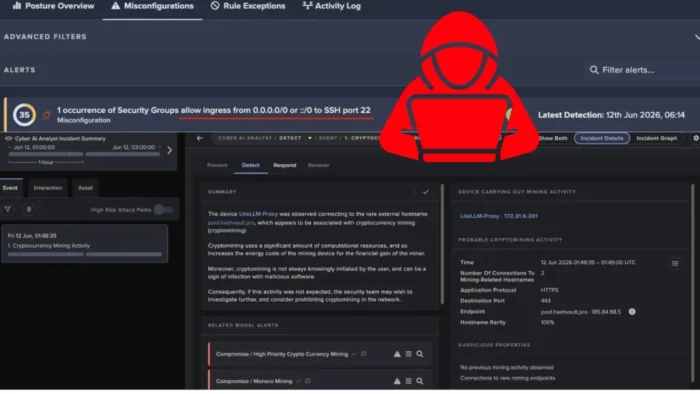
Darktrace recently investigated an Amazon EC2 instance named LiteLLM-Proxy that appeared to serve as an AI gateway for Amazon Bedrock. After a suspected compromise, the server downloaded XMRig cryptomining malware and began communicating with mining infrastructure.

Access content across the globe at the highest speed rate.
70% of our readers choose Private Internet Access
70% of our readers choose ExpressVPN

Browse the web from multiple devices with industry-standard security protocols.

Faster dedicated servers for specific actions (currently at summer discounts)
The incident shows how the compromise of one AI gateway can create risks beyond the affected server. Depending on its permissions, an attacker may gain access to cloud identities, model services, sensitive prompts and other connected resources.
What makes an AI gateway a valuable target?
An AI gateway sits between applications, users and large language models. It can route requests to different models while enforcing authentication, usage limits, logging and content policies.
In cloud environments, the gateway may use an IAM role to access services such as Amazon Bedrock. AWS recommends giving workloads temporary credentials through IAM roles rather than storing long-term access keys, according to its IAM security guidance.
These capabilities make the gateway a high-value control point. A compromised instance may expose more than computing resources if its cloud role grants access to models, storage, secrets or administrative actions.
| AI gateway capability | Security risk after compromise |
|---|---|
| Model routing | Attackers may invoke unauthorized models or increase usage costs |
| Authentication | Tokens and application credentials may become exposed |
| Prompt logging | Sensitive user inputs and model responses may become accessible |
| Cloud IAM role | Attackers may call permitted AWS APIs from the instance |
| Connected applications | The gateway may provide a route into additional enterprise workflows |
| Internet-facing services | Exposed ports increase opportunities for brute-force attacks and exploitation |
The LiteLLM gateway exposed SSH to the internet
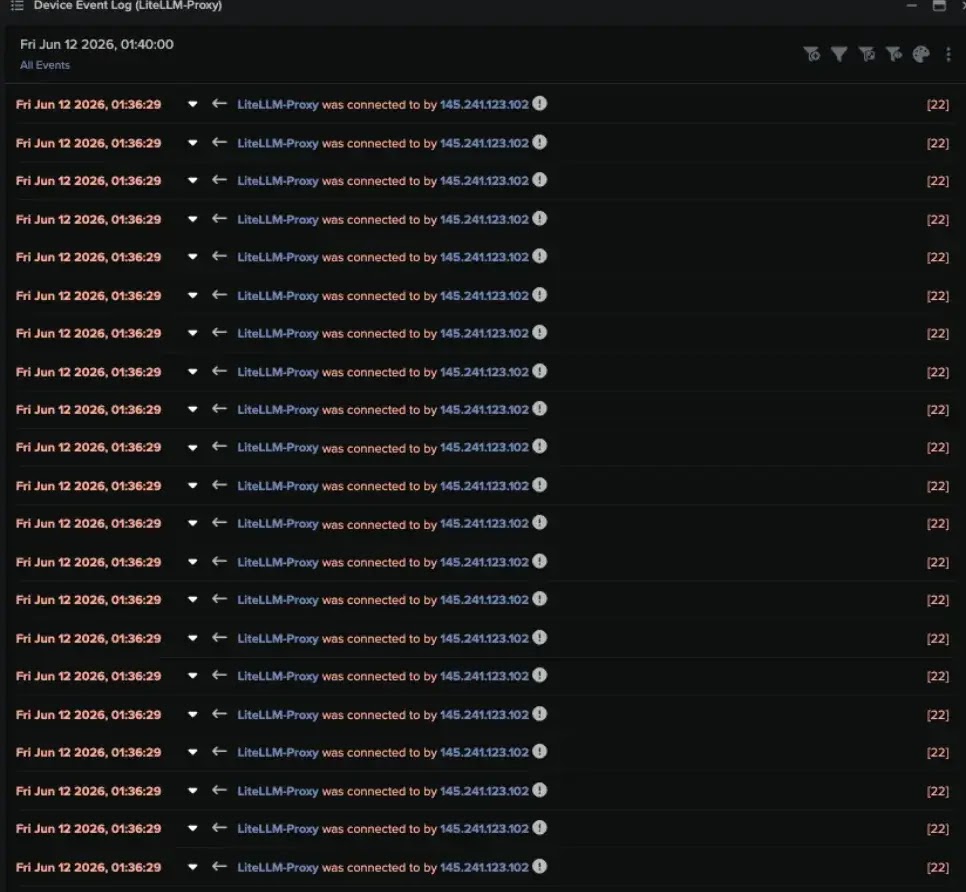
Darktrace began investigating the LiteLLM-Proxy instance after detecting active cryptomining behavior on June 12, 2026. The EC2 host had SSH on port 22 open to inbound connections from any IP address.
The server received many short-lived SSH connection attempts, including traffic from 145.241.123[.]102. This pattern resembled automated scanning or brute-force activity against an exposed cloud workload.
Investigators did not confirm that any SSH authentication attempt succeeded. The exposed service remained a possible initial access route, but the available evidence did not establish the exact method used to compromise the host.
- The EC2 instance exposed TCP port 22 to the internet.
- External systems repeatedly attempted short SSH connections.
- One observed source address was 145.241.123[.]102.
- Investigators found no conclusive evidence of a successful SSH login.
- The initial access method remained unconfirmed.
AWS describes an EC2 security group as a virtual firewall that controls incoming and outgoing traffic. Its EC2 security group documentation recommends defining rules that allow only the traffic required by each instance.
The compromised instance downloaded XMRig
Before the mining activity began, the LiteLLM-Proxy server downloaded data over HTTP from 185.62.1[.]8. The remote endpoint appeared to host a ZIP archive containing XMRig.
XMRig is a legitimate open-source cryptocurrency mining program, but attackers frequently deploy it on compromised servers. The miner uses the victim’s processor and electricity while directing the resulting cryptocurrency to an attacker-controlled account.
Shortly after the download, the instance began making repeated HTTPS connections to pool.hasvault[.]pro, a domain associated with cryptomining infrastructure.
- The attacker gained access to the EC2 instance through an unconfirmed route.
- The server downloaded a ZIP archive from 185.62.1[.]8.
- The archive delivered the XMRig cryptominer.
- The infected host connected to pool.hasvault[.]pro.
- The attacker used the EC2 instance’s computing resources for mining.
The activity maps to MITRE ATT&CK technique T1496, Resource Hijacking. The MITRE ATT&CK entry covers attacks in which adversaries abuse compromised systems to perform resource-intensive tasks such as cryptocurrency mining.
HTTPS helped the mining traffic blend with normal activity
The mining pool connections used HTTPS, which is common across legitimate cloud applications. An isolated connection over an encrypted web port may not immediately appear malicious.
Darktrace identified the activity by examining the destination, repeated connection pattern and wider behavior of the EC2 workload. The combination of a suspicious download, unusual outbound connections and resource consumption provided stronger evidence than any individual event.
This illustrates why cloud defenders need behavioral monitoring rather than simple port-based rules. Modern malware often communicates through protocols and services that enterprises already allow.
| Observed activity | Why it was suspicious |
|---|---|
| HTTP download from 185.62.1[.]8 | The endpoint appeared to deliver an XMRig archive |
| Repeated HTTPS connections | The destination was associated with cryptomining infrastructure |
| Unexpected computing activity | The AI gateway had no legitimate reason to mine cryptocurrency |
| Internet-wide SSH exposure | Any external address could attempt to reach the administrative service |
Suspicious IAM activity appeared the next day
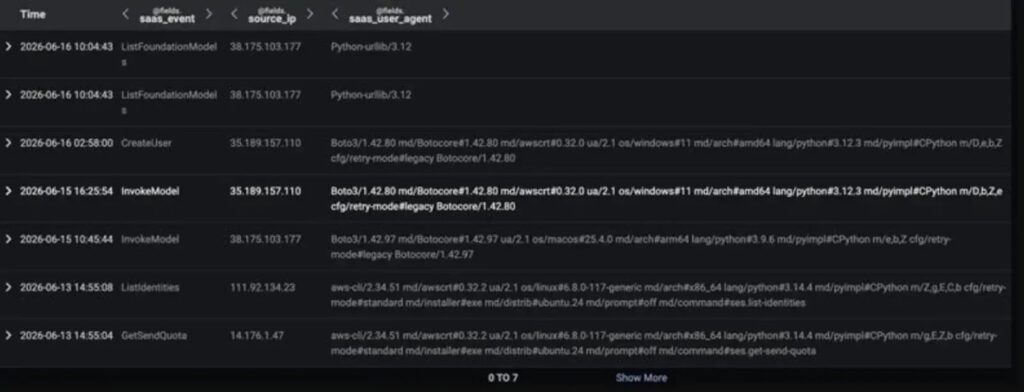
Darktrace also identified unusual AWS IAM activity one day after detecting the cryptomining infection. An IAM user accessed AWS services through the AWS Command Line Interface from 14.176.1[.]47, an IP address geolocated to Vietnam.
The location and command-line activity were unusual for the account. The user attempted actions involving service quotas, Amazon Bedrock models and IAM account creation.
The observed API actions included GetSendQuota, ListFoundationModels, InvokeModel and CreateUser. Some Amazon Bedrock requests failed, but the attempted calls may indicate cloud reconnaissance or efforts to access model services.
- GetSendQuota can reveal email sending limits associated with Amazon SES.
- ListFoundationModels returns information about models available through Amazon Bedrock.
- InvokeModel sends an inference request to a specified Bedrock model.
- CreateUser creates a new IAM user when the caller has sufficient permissions.
AWS states that ListFoundationModels returns a list of foundation models available through Amazon Bedrock. An attacker could use the action to understand which providers, modalities and inference options an account can access.
InvokeModel attempts may indicate unauthorized AI use
The InvokeModel API runs inference with a selected Amazon Bedrock model. A caller must have permission for the bedrock:InvokeModel action.
Unauthorized access could allow an attacker to consume paid model resources, test prompts, generate content or interact with models available to the compromised account.
AWS explains in its InvokeModel API documentation that the operation can generate text, images and embeddings, depending on the selected model.
| AWS action | Possible attacker objective |
|---|---|
| GetSendQuota | Check whether the account can support email abuse or spam operations |
| ListFoundationModels | Discover models and providers accessible through Amazon Bedrock |
| InvokeModel | Attempt unauthorized inference or test available permissions |
| CreateUser | Create a new identity for persistence |
The failed Bedrock commands do not prove that the attacker accessed model data successfully. They still provide a useful security signal because the IAM user did not normally make those requests from that location.
The CreateUser attempt raised persistence concerns
The attempt to call CreateUser was particularly important because attackers often create new cloud identities after obtaining administrative credentials.
A new IAM user can provide persistent access even after responders shut down an infected EC2 instance. The attacker may also create access keys, attach policies or add the user to privileged groups when existing permissions allow those actions.
Darktrace could not conclusively connect the suspicious IAM activity to the LiteLLM-Proxy compromise. The events occurred close together, but the evidence did not establish that credentials stolen from the AI gateway powered the later AWS CLI activity.
- Review every recently created IAM user and access key.
- Check CloudTrail for CreateUser, CreateAccessKey and AttachUserPolicy events.
- Investigate command-line access from unfamiliar countries or networks.
- Disable suspicious credentials before removing compromised resources.
- Confirm whether the affected EC2 role allowed credential or identity management.
AWS recommends regularly reviewing and removing unused identities, permissions and credentials. Its IAM best practices also call for temporary credentials, multi-factor authentication and least-privilege policies.
An EC2 role can increase the impact of a gateway compromise
Applications running on EC2 commonly receive temporary AWS credentials through an attached IAM role. This approach avoids placing permanent access keys on the server.
However, malware running on a compromised instance may use the same temporary credentials as the legitimate application. The attacker gains whatever AWS permissions the role grants until responders revoke access or isolate the workload.
An AI gateway role may need permission to list models, invoke selected models, read configuration data or write logs. Broad permissions can turn a host compromise into a wider cloud security incident.
| Role permission | Potential abuse |
|---|---|
| Bedrock model listing | Discover available foundation models |
| Bedrock model invocation | Generate unauthorized inference requests and increase costs |
| Secrets access | Retrieve application keys, database passwords or tokens |
| Storage access | Read or modify prompts, documents and model outputs |
| IAM administration | Create persistent users or attach additional permissions |
| Logging access | Read sensitive records or interfere with investigations |
Organizations should create a dedicated role for each gateway and grant only the actions required by its normal workload. A model-routing service rarely needs permission to create IAM users.
AI gateways can expose sensitive prompts and responses
Cryptomining was the visible objective in the investigated incident, but a capable attacker could pursue more damaging goals.
AI gateways may log prompts, model responses, user identifiers, access tokens and routing metadata. Business applications may send proprietary code, customer records or internal documents through the same gateway.
An attacker with access to those logs could steal sensitive information or monitor ongoing AI activity. The attacker might also modify routing or policy settings to redirect requests, weaken safeguards or capture future data.
- Prompt and response logs may contain confidential business information.
- API keys may provide access to additional model providers.
- Routing rules may reveal internal application architecture.
- Cloud credentials may grant access to storage and other AWS services.
- Gateway configuration may expose trusted downstream endpoints.
Organizations should avoid logging complete prompts by default when they may contain regulated or confidential data. Logs that remain necessary should receive encryption, access controls and retention limits.
Security groups should not expose SSH to every IP address
Administrative services such as SSH should not accept connections from the entire internet unless a documented requirement makes that exposure unavoidable.
Organizations can restrict SSH to approved corporate networks, VPN ranges or dedicated administrative hosts. They can also replace direct SSH with AWS Systems Manager Session Manager when the deployment supports it.
The AWS EC2 security group guide explains that inbound rules determine which traffic can reach an instance. Administrators can change those rules after launching the server.
- Remove inbound SSH rules that allow access from 0.0.0.0/0 or ::/0.
- Limit port 22 to approved administrative source ranges.
- Require key-based authentication and disable password login.
- Use a bastion host, VPN or Session Manager for administrative access.
- Monitor rejected and accepted SSH connections through network and host logs.
Restricting SSH would not address every possible gateway vulnerability, but it removes a common entry point and reduces automated attacks against the instance.
Teams should monitor Bedrock discovery and invocation activity
Amazon Bedrock activity deserves the same scrutiny as storage, identity and compute actions. Unexpected model discovery or invocation may reveal stolen credentials or misuse of a compromised application role.
The Amazon Bedrock ListFoundationModels reference shows that callers can filter available models by provider, output type, customization type and inference type.
Security teams should establish a baseline for the models each application uses. An AI gateway that normally invokes one text model should not suddenly enumerate image models or access unfamiliar providers without an approved change.
- Alert when a new identity lists Bedrock models for the first time.
- Detect model invocations from unusual regions, IP addresses or user agents.
- Track failed InvokeModel calls and repeated access-denied responses.
- Monitor sudden increases in token usage and model spending.
- Compare model activity with expected gateway applications and users.
AWS notes that the InvokeModel operation requires explicit bedrock:InvokeModel permission. IAM policies can limit which models a gateway can invoke instead of granting access to every available model.
Defenders must correlate workload and identity activity
The incident involved signals from several parts of the environment. Network monitoring detected mining connections, workload telemetry revealed the XMRig download, and cloud monitoring identified unusual IAM commands.
Reviewing these events separately could make each one appear less serious. Correlation provides the context needed to identify a broader compromise.
| Telemetry source | Useful detection |
|---|---|
| Network monitoring | Repeated mining pool connections and unusual downloads |
| EC2 host telemetry | XMRig processes, high CPU usage and unexpected archives |
| VPC Flow Logs | Inbound SSH scanning and suspicious outbound destinations |
| CloudTrail | Unusual IAM, Bedrock and account-management API calls |
| AI gateway logs | Unexpected model routes, users, prompts and configuration changes |
| Billing and usage data | Sudden increases in EC2 consumption or Bedrock inference costs |
Alerting should connect cloud identities to the workloads that use them. A suspicious API call becomes more meaningful when the related instance has already downloaded malware or contacted hostile infrastructure.
How organizations should respond to a compromised AI gateway
Teams should isolate the affected instance while preserving enough evidence to investigate the original entry point. Simply terminating the EC2 server may remove important logs and memory artifacts.
Responders should revoke active credentials, inspect the attached IAM role and search CloudTrail for actions performed by the instance. They should also identify every application and data source connected to the gateway.
- Remove the compromised instance from production traffic.
- Capture relevant logs, disk snapshots and volatile evidence.
- Block identified mining, payload and access infrastructure.
- Review the instance role and revoke compromised credentials.
- Search CloudTrail for unusual Bedrock, IAM, SES and storage activity.
- Rotate application secrets and third-party model API keys.
- Rebuild the gateway from a trusted image rather than cleaning it in place.
- Review prompts, responses and connected data for possible exposure.
Defenders should also check for new users, access keys, policies, roles and trust relationships. The absence of continued mining does not prove that the attacker lost cloud access.
Indicators linked to the investigated activity
The following indicators appeared in the reported investigation. Security teams should combine them with behavioral detection because attackers can change addresses, domains and filenames quickly.
| Category | Indicator | Description |
|---|---|---|
| Affected asset | LiteLLM-Proxy | EC2 instance operating as an AI gateway |
| Possible initial access IP | 145.241.123[.]102 | Address observed making SSH connection attempts |
| Exposed service | TCP port 22 | SSH accepted inbound traffic from any IP address |
| Payload hosting IP | 185.62.1[.]8 | Address that appeared to host an XMRig archive |
| Malware | XMRig | Cryptocurrency mining software deployed on the instance |
| Mining infrastructure | pool.hasvault[.]pro | Domain contacted repeatedly over HTTPS |
| Suspicious IAM source | 14.176.1[.]47 | Vietnam-based address associated with unusual AWS CLI activity |
| AWS actions | GetSendQuota, ListFoundationModels, InvokeModel, CreateUser | Commands associated with reconnaissance, model access and possible persistence |
The IP addresses and domain remain defanged to prevent accidental connections. Analysts should re-fang them only inside controlled security tools.
AI gateways need the same controls as critical cloud workloads
Organizations should not treat AI gateways as simple middleware. These services often handle sensitive data and carry permissions that connect several cloud resources.
Workload roles should use temporary credentials and narrowly scoped permissions. AWS recommends granting only the actions required for a task and regularly removing unused identities and credentials.
Cryptomining represents resource hijacking under MITRE ATT&CK T1496, but attackers who compromise an AI gateway may also pursue credential theft, persistence, data access and lateral movement.
- Restrict internet-facing administrative services.
- Apply least-privilege permissions to gateway IAM roles.
- Keep AI gateway software and dependencies updated.
- Separate production gateways from management services.
- Monitor outbound traffic and model usage continuously.
- Protect prompts, logs and configuration as sensitive data.
- Alert on unusual identity creation and policy changes.
As enterprises centralize AI access through gateway services, these systems will become more attractive to attackers. Defenders need visibility across network traffic, cloud workloads, identities and model activity to stop a server compromise from expanding into a wider enterprise incident.
FAQ
AI gateways often connect users and applications to cloud models while holding credentials, IAM permissions, prompts and logs. Compromising one gateway may therefore provide access to computing resources and other connected services.
The exact initial access method was not confirmed. The instance exposed SSH to the internet and received suspicious connection attempts, making SSH one possible route, but investigators did not find conclusive evidence of a successful login.
The compromised EC2 instance downloaded XMRig, an open-source cryptocurrency miner frequently abused by attackers. It then connected repeatedly to cryptomining infrastructure over HTTPS.
An IAM user attempted ListFoundationModels and InvokeModel actions through the AWS CLI from an unusual IP address. The commands may indicate model discovery or attempted unauthorized inference, although some requests failed.
Organizations should restrict SSH, use temporary credentials, apply least-privilege IAM policies, monitor model and cloud activity, review outbound traffic and protect gateway logs, prompts and configuration as sensitive data.


Read our disclosure page to find out how can you help VPNCentral sustain the editorial team Read more


Improve this guide


User forum
0 messages