
Internet Scanners Target MCP Servers, Claude Credentials, and Exposed AI Models


 9 min. read
  Published on
Internet scanners are actively searching for exposed Model Context Protocol servers, AI assistant credentials, and unauthenticated language model endpoints.
The activity suggests that attackers have already added AI development infrastructure to the list of services they routinely probe. Misconfigured systems could expose credentials, internal data sources, AI tools, or costly computing resources.

Access content across the globe at the highest speed rate.
70% of our readers choose Private Internet Access
70% of our readers choose ExpressVPN

Browse the web from multiple devices with industry-standard security protocols.

Faster dedicated servers for specific actions (currently at summer discounts)
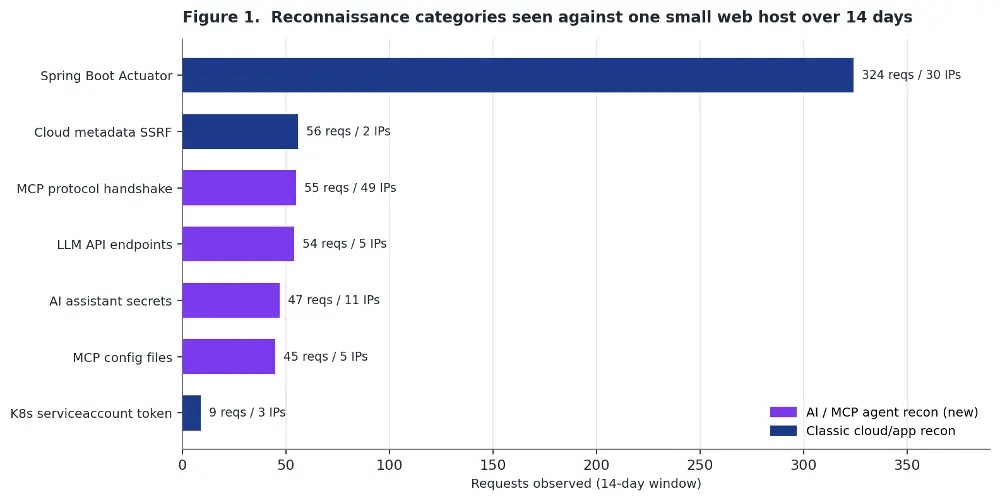
A SANS Internet Storm Center investigation found roughly 200 AI-related reconnaissance requests in 14 days of logs from a small web host. MCP handshake probes came from 49 different source IP addresses.
Distributed scans look for exposed AI infrastructure
The monitored server hosted a small collection of low-traffic websites and did not run any MCP services or local AI models. Despite that, scanners repeatedly tested it for AI-related endpoints and files.
This pattern points to broad, opportunistic reconnaissance rather than an attack aimed at one known AI deployment. The scanners appeared to test large numbers of internet hosts in search of accidental exposures.
The activity covered four main areas:
- Live MCP servers that accept protocol initialization requests.
- Configuration and credential files created by AI coding assistants.
- OpenAI-compatible and Ollama model-serving endpoints.
- Server-side request forgery paths targeting cloud metadata services.
| Scan category | What attackers may be seeking |
|---|---|
| MCP server probes | Tools, resources, prompts, and connected data sources available through an AI agent. |
| Assistant file probes | Claude, Cursor, Visual Studio Code, and project-level MCP settings or credentials. |
| Model endpoint probes | Unauthenticated language models, installed model lists, and free computing capacity. |
| Cloud metadata probes | Service account tokens, instance credentials, and Kubernetes secrets. |
Scanners send valid MCP initialization requests
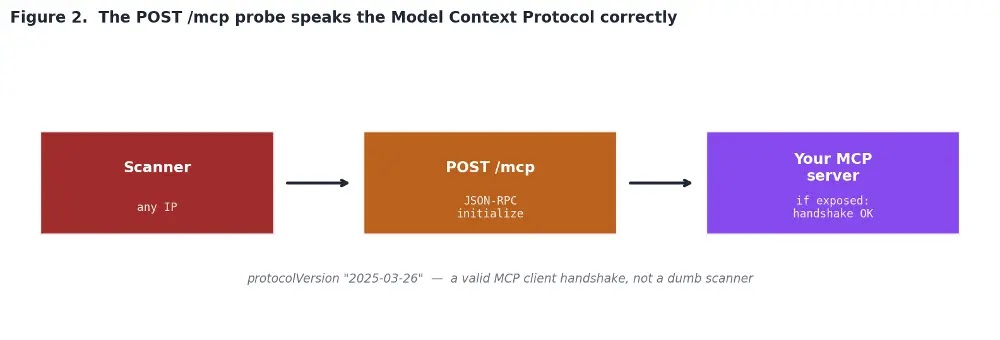
The most notable requests did more than check whether a common URL existed. Scanners sent correctly formatted JSON-RPC 2.0 messages to the /mcp path.
These messages used the MCP initialize method and supplied protocol version 2025-03-26. A valid response could confirm that the destination operates an MCP server and supports the requested protocol.
The observed request followed this general format:
POST /mcp HTTP/1.1
Content-Type: application/json

{
  "id": 1,
  "jsonrpc": "2.0",
  "method": "initialize",
  "params": {
    "capabilities": {},
    "clientInfo": {
      "name": "client",
      "version": "0"
    },
    "protocolVersion": "2025-03-26"
  }
}
After identifying a live service, an attacker could attempt to discover its exposed capabilities. Depending on the configuration, an MCP server may provide access to databases, files, internal APIs, ticketing systems, or administrative tools.
Why exposed MCP servers create serious risks
MCP provides a standard way for AI applications to connect with external tools and data. This access can make AI agents useful, but it also increases the effect of weak authentication and excessive permissions.
An exposed server could reveal the names and descriptions of available tools. Attackers might also attempt to call those tools, retrieve connected resources, or abuse actions that the agent can perform.
The official MCP authorization guidance recommends authorization for servers that access user data, administrative operations, enterprise resources, or other sensitive systems.
Organizations should not rely on obscure URLs or the assumption that attackers do not understand MCP. The observed scans already speak the protocol and search for known transports.
Claude and Cursor configuration files are also targeted
The scanners searched for configuration and credential files associated with Claude, Cursor, Visual Studio Code, and MCP projects. Developers can accidentally expose these files when copying entire project directories into a web root or deployment package.
Some probes used regular GET requests, while others used HEAD requests. A HEAD request checks whether a file exists without downloading its body, which reduces bandwidth during large-scale scanning.
Observed paths included:
| Requested path | Possible contents |
|---|---|
/.claude/mcp.json | Claude MCP server configuration and connection details. |
/.cursor/mcp.json | Cursor MCP server settings. |
/.cursor/mcp_config.json | Alternative Cursor MCP configuration. |
/.vscode/mcp.json | Visual Studio Code MCP configuration. |
/.mcp/config.json | Project-level MCP settings. |
/.claude/settings.local.json | Local Claude settings and permissions. |
/.claude/.credentials.json | Potential Claude authentication information. |
/.config/claude/.credentials.json | Claude credential data stored in a configuration directory. |
Configuration files may expose server addresses, command-line arguments, environment variables, API keys, or other information that helps attackers map an organization’s AI infrastructure.
Scanners hunt for unauthenticated AI models
The same activity repeatedly tested two endpoints commonly associated with self-hosted language models.
The /v1/models path can list models available through an OpenAI-compatible API. The /api/tags path can reveal models installed through Ollama.
If either endpoint responds without authentication, an attacker may gain free access to model inference, identify valuable models, consume system resources, or use the service as a possible entry point for further attacks.
GET /v1/modelschecks for OpenAI-compatible model servers.GET /api/tagschecks for Ollama installations and their available models.GET /ssechecks for the Server-Sent Events transport used by older MCP services.
The monitored web host did not operate any of these services. The requests still reached it because the scanners were searching broadly rather than using a confirmed list of AI deployments.
SSRF probes target cloud metadata credentials
Researchers also observed server-side request forgery probes aimed at cloud metadata services. The requests tested URL-fetching endpoints with parameter names such as url, uri, path, and dest.
These probes attempted to make a public server retrieve information from metadata.google.internal or the link-local address 169.254.169.254. Cloud platforms use metadata services to provide applications with instance details and temporary credentials.
AI agents and MCP tools often include functions that retrieve content from a user-supplied URL. Without strict filtering, such features can become SSRF paths that let attackers reach internal services unavailable from the public internet.
/fetch?url=http://metadata.google.internal/...token
/fetch?uri=http://metadata.google.internal/...token
/fetch?path=http://metadata.google.internal/...token
/fetch?dest=http://metadata.google.internal/...token
Amazon’s Instance Metadata Service documentation explains that IMDSv2 requires a session token for metadata requests. Organizations can require IMDSv2 to reject older tokenless requests.
Indicators defenders should search for
Administrators can review web application, reverse proxy, firewall, and ModSecurity logs for the paths and request patterns associated with the campaign.
| Indicator | Purpose of the probe |
|---|---|
POST /mcp | Tests for an MCP server using a JSON-RPC initialization request. |
GET /sse | Looks for the older MCP Server-Sent Events transport. |
/.claude/mcp.json | Searches for Claude MCP configuration. |
/.cursor/mcp.json | Searches for Cursor MCP configuration. |
/.vscode/mcp.json | Searches for Visual Studio Code MCP settings. |
/.claude/.credentials.json | Checks for exposed Claude credential data. |
GET /v1/models | Looks for an OpenAI-compatible model endpoint. |
GET /api/tags | Looks for an exposed Ollama service. |
metadata.google.internal | Targets the Google Cloud metadata service through SSRF. |
169.254.169.254 | Targets a link-local cloud metadata endpoint. |
/var/run/secrets/.../serviceaccount/token | Searches for a Kubernetes service account token. |
A request alone does not confirm that attackers compromised the server. It shows that an external system attempted to identify or reach a potentially sensitive resource.
How organizations can protect AI services
Organizations should inventory every MCP server, AI assistant integration, and model-serving endpoint they operate. Security teams should perform external testing because a service that appears private from inside the network may still be publicly reachable.
MCP servers should require authentication and grant only the permissions needed for their intended purpose. The official MCP security documentation describes OAuth-based authorization for protecting sensitive resources and operations.
Defenders should take the following steps:
- Block direct public access to MCP servers unless the deployment requires it.
- Require strong authentication and authorization for every remote MCP endpoint.
- Limit each AI tool to the minimum data and actions it needs.
- Remove Claude, Cursor, Visual Studio Code, and MCP configuration files from web roots.
- Store credentials in a dedicated secrets manager rather than project files.
- Require authentication for OpenAI-compatible and Ollama endpoints.
- Apply network-level restrictions to local model services.
- Block URL-fetching tools from reaching loopback, private, link-local, and metadata addresses.
- Rotate any keys or tokens found in publicly accessible files.
- Review logs for follow-up requests after a successful MCP initialization response.
Cloud metadata services need additional protection
Filtering malicious URLs at the application layer remains important, but cloud controls can reduce the damage if attackers bypass those checks.
AWS customers can require token-based metadata requests. Under IMDSv2 protections, requests need an instance-specific token, and tokenless requests receive an unauthorized response when administrators make IMDSv2 mandatory.
Teams should also restrict service account permissions and avoid assigning broad cloud privileges to AI agents. A stolen short-lived credential can still cause serious harm when the attached role grants access to sensitive data or infrastructure.
AI systems have joined the routine internet attack surface
The findings do not show that the scanners successfully breached an MCP server or stole Claude credentials. They demonstrate that attackers now search for these assets across ordinary internet hosts.
The Internet Storm Center findings show that AI infrastructure no longer remains hidden simply because it uses new technology. Automated scanners have already incorporated MCP paths, assistant files, model APIs, and cloud metadata attacks into their reconnaissance.
Organizations should treat AI agent infrastructure like any other internet-facing application. It needs asset tracking, authentication, least-privilege access, secure secrets storage, external exposure testing, and continuous log monitoring.
FAQ
Attackers are testing for live MCP endpoints that may expose tools, prompts, resources, databases, file systems, or internal APIs. A valid MCP response can help them identify what an AI agent can access or perform.
The observed scans targeted Claude MCP settings, local configuration files, and credential paths, including .claude/mcp.json, .claude/settings.local.json, and .claude/.credentials.json.
Scanners can request common endpoints such as /v1/models for OpenAI-compatible servers and /api/tags for Ollama. A response may reveal an unauthenticated model service and its installed models.
No. A probe only shows that an external system tested the server for an MCP endpoint or related file. Administrators should investigate further if the server returned a successful response or exposed sensitive content.
Organizations should restrict network access, require strong authorization, apply least-privilege permissions, protect credentials, monitor tool calls, and prevent URL-fetching features from reaching internal or cloud metadata services.


Read our disclosure page to find out how can you help VPNCentral sustain the editorial team Read more


Improve this guide

User forum
0 messages