
Hackers Compromise Jscrambler npm Package to Steal Developer and Cloud Credentials


 7 min. read
  Published on
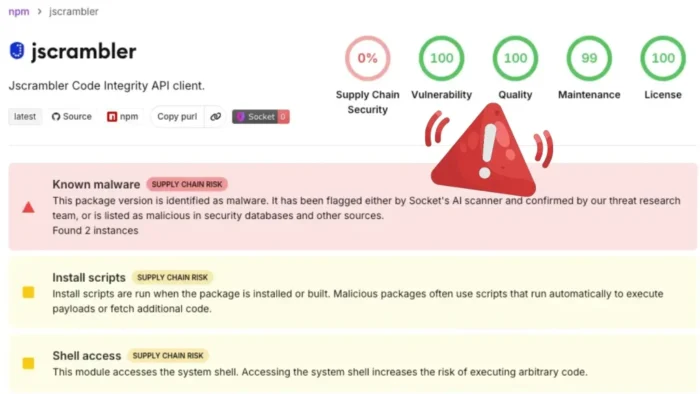
Hackers compromised the official jscrambler npm package and published malicious versions that deployed credential-stealing malware on Windows, Linux, and macOS systems.
The supply chain attack placed developer workstations, build servers, and continuous integration environments at risk. The package normally receives about 15,800 weekly downloads, although that figure does not show how many users installed the malicious releases.

Access content across the globe at the highest speed rate.
70% of our readers choose Private Internet Access
70% of our readers choose ExpressVPN

Browse the web from multiple devices with industry-standard security protocols.

Faster dedicated servers for specific actions (currently at summer discounts)
Jscrambler said npm recorded 1,479 downloads across the affected versions and related packages during the incident. The company has deprecated the compromised releases and recommends upgrading to version 8.22.0 or later.
Which Jscrambler versions were compromised?
The first known malicious release, jscrambler 8.14.0, appeared on npm on July 11, 2026. The Socket Research Team detected it six minutes after publication.
Attackers later published four more compromised releases over roughly three hours. They changed the malware’s execution method during the campaign, apparently to avoid security checks focused on npm installation scripts.
According to the official Jscrambler security advisory, the affected versions have been deprecated and are no longer available through normal npm dependency resolution.
| Package | Affected versions | Safe version |
|---|---|---|
| jscrambler | 8.14.0, 8.16.0, 8.17.0, 8.18.0, and 8.20.0 | 8.22.0 or later |
| jscrambler-webpack-plugin | 8.6.2 | 8.6.3 or later |
| gulp-jscrambler | 8.6.2 | 8.6.3 or later |
| grunt-jscrambler | 8.5.2 | 8.5.3 or later |
| jscrambler-metro-plugin | 9.0.2 | 9.0.3 or later |
Malware initially ran during npm installation
Versions 8.14.0, 8.16.0, and 8.17.0 added an undocumented preinstall command that launched a file named dist/setup.js. This command ran automatically when a developer installed the package.
Victims did not need to import jscrambler, execute its command-line tool, or add it to an application. Running npm install with one of the affected versions could start the malware immediately.
The loader read a second file called dist/intro.js. Despite its JavaScript extension, this file was a binary container holding three compressed native executables.
- The npm preinstall script launched dist/setup.js.
- The loader identified the victim’s operating system.
- It selected the matching native payload from dist/intro.js.
- The payload was written to a randomly named hidden temporary file.
- The loader marked the file as executable where required.
- It launched the malware silently as a detached background process.
Later versions removed the preinstall hook
The attackers changed tactics with versions 8.18.0 and 8.20.0. These releases removed the visible npm lifecycle hook and placed the loader directly inside the package’s main JavaScript files.
The malware then executed when an application imported jscrambler or when a user ran its command-line interface. This method could bypass tools that inspected only preinstall and postinstall scripts.
It also meant that using npm install with the –ignore-scripts option did not fully prevent infection from the later malicious releases.
Versions 8.18.0 and 8.20.0 also declared jscrambler 8.17.0 as a dependency. This behavior could pull a compromised release into an environment through a transitive dependency.
Cross-platform malware targeted developer secrets
The malicious package included Rust-based payloads for Linux x86-64, Windows x86-64, and Apple Silicon Macs. The loader did not include a native payload for Intel-based macOS systems.
Researchers described the malware as an extensive information stealer designed for developer and cloud-operator environments. Its targets included browser data, cryptocurrency wallets, messaging applications, cloud credentials, and operating system keyrings.
The malware encrypted about 2,400 sensitive configuration strings with ChaCha20-Poly1305. This technique made static inspection more difficult and concealed the services, file paths, and credentials it attempted to access.
- Browser passwords, cookies, and session information
- Cryptocurrency wallets and possible recovery phrases
- Discord, Slack, Telegram, and Steam session data
- Bitwarden and operating system keyring information
- Git and npm credentials
- Cloud access tokens and configuration files
- Kubernetes and deployment credentials
- Developer environment variables
AI coding tools and MCP configurations were targeted
The stealer searched for configuration files belonging to several AI-assisted development tools. These files may contain API keys, service credentials, local server details, and Model Context Protocol connections.
Targets identified in the Socket technical analysis included Claude Desktop, Cursor, Windsurf, Zed, VS Code, VS Code Insiders, Factory, and opencode.
The malware also searched for MCP server settings. Developers often use these configurations to connect AI tools with databases, cloud services, source repositories, internal applications, and other privileged systems.
| Target category | Examples found in the malware |
|---|---|
| AI development tools | Claude Desktop, Cursor, Windsurf, Factory, Zed, and opencode |
| Code editors | VS Code and VS Code Insiders |
| AI integrations | MCP server configuration files and credentials |
| Cloud platforms | Amazon Web Services, Google Cloud, and Microsoft Azure |
| Deployment systems | Kubernetes, CI environments, and local configuration files |
AWS, Azure, and Google Cloud credentials were at risk
The payload contained references to credential locations and metadata services for all three major cloud platforms. These included AWS container metadata endpoints, Google Cloud service-account data, and the Azure Instance Metadata Service.
It also searched for Google Cloud credential databases, application default credentials, AWS Secrets Manager data, AWS Systems Manager parameters, and Azure management access.
A successful infection on a build server could expose much more than one developer account. CI systems commonly hold source code, package-publishing tokens, signing keys, deployment credentials, and secrets used to access production services.
Attackers could use stolen tokens to access cloud infrastructure, modify software releases, compromise additional packages, or move into connected development environments.
Jscrambler says an npm publishing credential was abused
Jscrambler said its investigation found that the attacker published the malicious releases with an npm publishing credential. The company has not publicly explained how the credential was obtained.
The company revoked and rotated its publishing credentials, passwords, and related secrets. It also introduced additional controls around its package-publishing process and began a forensic investigation.
The incident affected the jscrambler package used with the company’s Code Integrity product. Jscrambler said its other products, including Webpage Integrity, were not affected.
The updated company advisory lists the malicious package versions, affected dependent packages, safe releases, and current remediation guidance.
What affected developers should do now
Organizations should check package lockfiles, npm installation records, build logs, and CI histories for the compromised versions. They should not assume that removing the dependency eliminates the risk.
Any system that installed or executed an affected release should be treated as potentially compromised. Security teams should isolate the device, investigate suspicious processes, and rotate every credential the malware could access.
Teams should also review repositories and build outputs created during the exposure period. A compromised build environment may allow attackers to steal secrets or alter software before release.
- Upgrade jscrambler to version 8.22.0 or later.
- Update the four affected Jscrambler plugins to their listed safe versions.
- Search lockfiles for all five malicious jscrambler releases.
- Review CI and npm logs for dist/setup.js execution.
- Investigate hidden executables launched from temporary directories.
- Rotate npm, GitHub, Git, cloud, and deployment credentials.
- Revoke browser, messaging, password manager, and developer-tool sessions.
- Replace AI service and MCP server API keys stored on affected systems.
- Move cryptocurrency assets away from wallets accessible to an infected device.
- Rebuild sensitive systems from a trusted image when investigators cannot confirm complete cleanup.
FAQ
The compromised versions were 8.14.0, 8.16.0, 8.17.0, 8.18.0, and 8.20.0. Jscrambler recommends upgrading to version 8.22.0 or later.
Early versions used an npm preinstall hook that ran during installation. Later versions placed the loader inside the package code, causing it to run when developers imported the package or used its command-line tool.
The malware targeted browser sessions, cryptocurrency wallets, messaging accounts, cloud credentials, operating system keyrings, developer secrets, AI coding tool settings, and MCP server configurations.
Jscrambler said npm recorded 1,479 downloads across the affected versions and dependent packages. The package’s normal weekly download figure of about 15,800 does not represent confirmed infections.
They should isolate and inspect the system, upgrade to a safe release, and rotate every accessible credential. This includes npm, GitHub, cloud, deployment, browser, messaging, cryptocurrency, AI tool, and MCP credentials.


Read our disclosure page to find out how can you help VPNCentral sustain the editorial team Read more


Improve this guide



User forum
0 messages