
Armored Likho Uses AI-Generated Loaders to Deploy BusySnake Stealer


 6 min. read
  Published on

A newly documented threat group called Armored Likho is using suspected AI-generated malware loaders to infect government agencies and electric power organizations with BusySnake Stealer.
The active phishing campaign has affected targets in Russia, Kazakhstan, and Brazil. Attackers use malicious archives, executable files, and Windows shortcuts to steal credentials, documents, browser data, and other sensitive information.

Access content across the globe at the highest speed rate.
🔥 Save 81% + 2 bonus months! 🔥
70% of our readers choose Private Internet Access
70% of our readers choose ExpressVPN
2
Browse the web from multiple devices with industry-standard security protocols.
🔥 Save 73%! 🔥

Faster dedicated servers for specific actions (currently at summer discounts)
🔥 Save 69%! 🔥
According to Kaspersky’s Armored Likho investigation, BusySnake is a previously undocumented Python-based information stealer for Windows. The malware also gives its operators remote access to compromised computers.
Who is Armored Likho?
Kaspersky named the newly identified threat cluster Armored Likho. Researchers found technical similarities with Eagle Werewolf, another group associated with targeted malware operations, but the connection remains circumstantial.
The security company attributed the latest campaign to Armored Likho with medium confidence. It based that assessment on shared malware structures, persistence methods, network activity, and reverse-tunneling techniques.
The group appears to conduct both financially motivated attacks against individuals and cyber-espionage operations against organizations. Its recent targets include public-sector bodies and companies connected to electrical power infrastructure.
| Campaign detail | Finding |
|---|---|
| Threat group | Armored Likho, with a possible link to Eagle Werewolf |
| Primary malware | BusySnake Stealer |
| Target platform | Microsoft Windows |
| Targeted sectors | Government and electrical power organizations |
| Confirmed locations | Russia, Kazakhstan, and Brazil |
| Initial access | Spear-phishing emails with archived EXE or LNK files |
Phishing emails deliver malicious EXE and LNK files
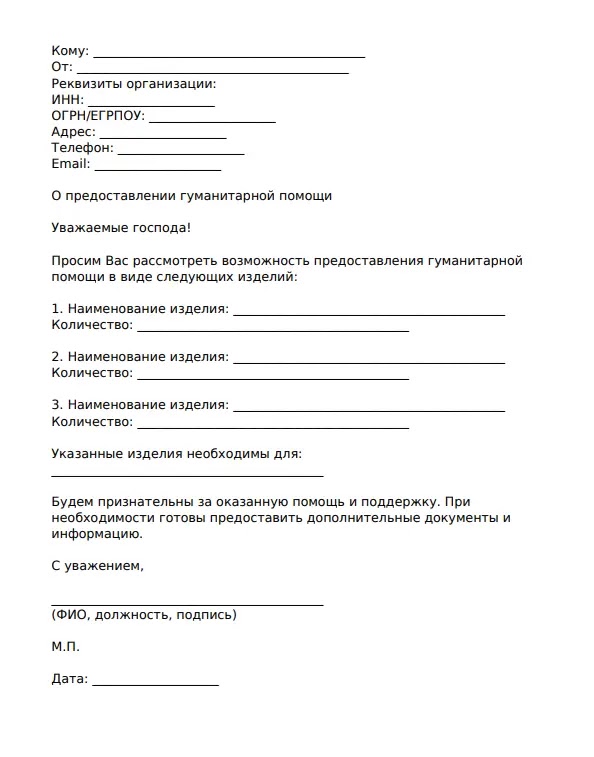
Armored Likho begins its attacks with spear-phishing emails tailored to appear relevant to the recipient. Observed themes have included government notices, psychological assessments, humanitarian aid applications, social programs, and debt-related documents.
The emails contain ZIP or RAR archives holding an executable or Windows LNK shortcut. Opening the attachment starts a multistage infection process while a decoy application or document appears on the screen.
This approach reflects a common phishing strategy in which attackers create urgency or imitate a trusted institution. The CISA phishing guidance recommends checking unexpected requests through a trusted communication channel before opening links or attachments.
How the BusySnake infection works
Kaspersky documented two main delivery paths. The first uses an executable dropper built as a self-extracting NSIS archive. In one case, the file launched a fake psychological survey while injecting a malicious loader into another process.
The loader then downloaded BusySnake, a Python 3.12 interpreter, the pip installer, and supporting components from attacker-controlled online repositories. It extracted the files into a WindowsHelper directory under the user’s AppData folder.
The second path uses a malicious LNK file. Attackers hide commands inside the shortcut by adding spaces or line breaks, making the full command difficult to see during a basic inspection.
- The victim opens an archive received through a phishing email.
- An EXE or LNK file launches a hidden command or loader.
- A decoy survey or document opens to reduce suspicion.
- The loader downloads Python and the encrypted BusySnake payload.
- BusySnake creates a scheduled task to maintain access.
- The malware begins collecting data and awaiting operator commands.
Why researchers suspect AI generated the loaders
Researchers found unusually detailed comments, repetitive explanations, structured code blocks, and bullet-point emojis inside some first-stage loaders. These characteristics are uncommon in malware that experienced operators write manually.
Kaspersky concluded that large language models likely generated the loaders and stagers. The evidence does not show that AI created the entire BusySnake platform or independently managed the campaign.
Using AI for disposable first-stage tools may help attackers produce more code variants quickly. Frequent variation can complicate signature-based detection and make it harder to connect separate attacks through consistent coding habits.
What BusySnake Stealer can collect
BusySnake inventories files across a compromised system and records their metadata in a local database. It searches Desktop, Documents, and Downloads folders while excluding selected system directories, file types, and oversized files.
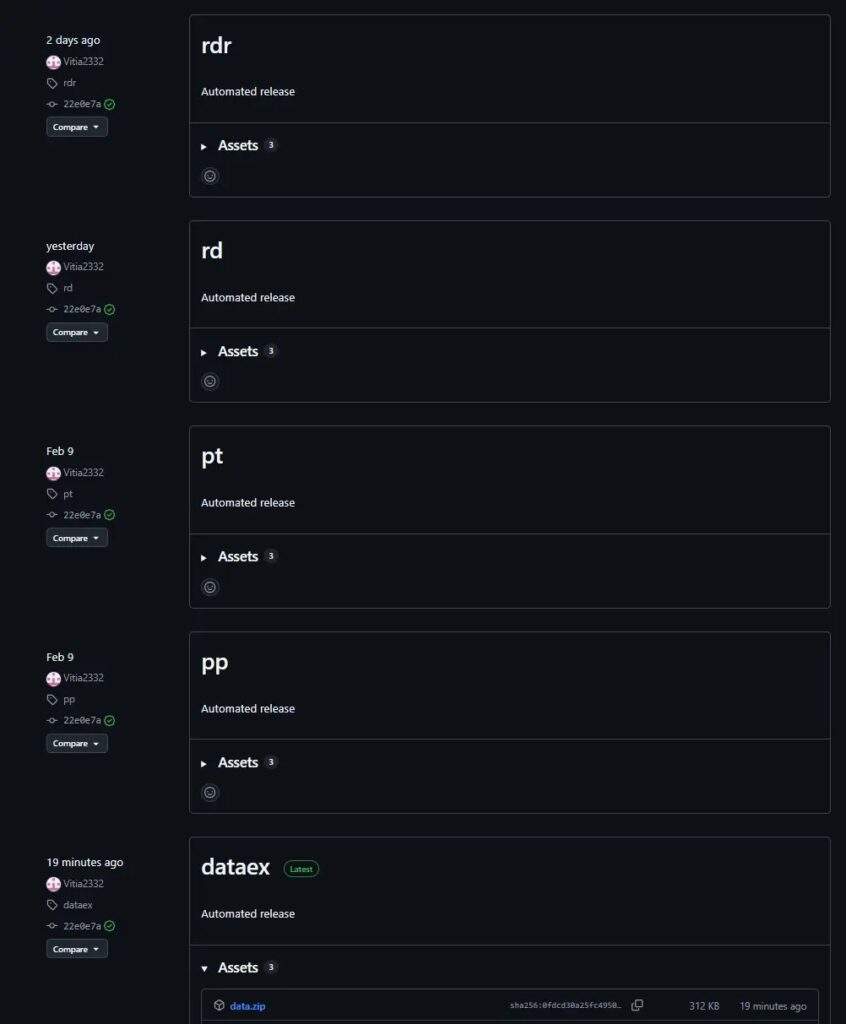
The malware can monitor clipboard activity, capture screenshots, and search files for 64-character hexadecimal strings. Such strings may include cryptographic keys, access tokens, wallet secrets, or other valuable credentials.
The BusySnake technical analysis also describes commands for extracting saved passwords from Chromium-based browsers and Firefox. The malware can collect browser cookies through database access or a malicious browser extension.
- Saved Chromium and Firefox passwords
- Browser cookies and active session data
- Clipboard contents
- Documents from common user folders
- Screenshots
- Potential cryptographic keys
- Telegram-related data
- System and file inventory information
Reverse SSH tunneling creates a wider security risk
BusySnake does more than steal information. It can receive instructions from a command-and-control server and establish a reverse SSH tunnel to infrastructure controlled by the attackers.
This tunnel can provide continuing access to the infected system or network. Attackers may use it to route traffic, explore additional resources, or maintain a path into the environment after the initial theft.
Newer BusySnake versions can also retrieve and execute arbitrary Python scripts. The malware installs required dependencies and runs the code in memory, reducing the number of malicious files written to disk.
BusySnake uses scheduled tasks for persistence
Earlier BusySnake samples used scripts and standard task commands to run the payload every five minutes. Newer versions create tasks through the Windows Schedule.Service COM interface instead.
This change may help the malware avoid detections that focus on direct use of the schtasks command. The task commonly uses the WindowsHelper name to resemble a legitimate system component.
BusySnake also uses PyArmor Pro to protect its Python code. Functions remain encrypted until the malware needs them, which complicates static analysis and slows investigation.
What security teams should monitor
Organizations in government and critical infrastructure should treat unsolicited archive files, executable attachments, and Windows shortcuts as high-risk. Humanitarian or administrative themes should not make an attachment appear trustworthy.
Security teams should also monitor unexpected PowerShell activity, Python installations in user directories, suspicious process injection, new scheduled tasks, and connections to newly registered or unusual domains.
Employees should report suspicious messages rather than responding to them. The CISA recommendations for recognizing phishing also advise users to resist pressure, inspect unexpected requests carefully, and report suspicious communications.
- Block executable and LNK attachments from untrusted external senders.
- Inspect archives in isolated analysis environments.
- Restrict unnecessary PowerShell and script execution.
- Monitor AppData for unexpected Python runtimes and payload folders.
- Audit scheduled tasks for unfamiliar entries such as WindowsHelper.
- Investigate reverse SSH activity from endpoints that do not require it.
- Reset exposed passwords and invalidate stolen browser sessions.
- Use the original vendor report when importing indicators of compromise.
FAQ
BusySnake is a Python-based Windows information stealer documented by Kaspersky. It can collect credentials, browser cookies, documents, screenshots, clipboard data, and other sensitive information.
Confirmed targets include government agencies and electrical power organizations in Russia, Kazakhstan, and Brazil.
Researchers found evidence suggesting that large language models generated some first-stage loaders and stagers. The research does not establish that AI created the entire BusySnake platform.
Attackers send spear-phishing emails containing archives with malicious EXE or LNK files. Opening the attachment launches a loader that downloads Python components and the BusySnake payload.
Security teams should investigate suspicious PowerShell commands, unexpected Python files in AppData, unfamiliar scheduled tasks, reverse SSH connections, and executable or LNK attachments received by email.


Read our disclosure page to find out how can you help VPNCentral sustain the editorial team Read more


Improve this guide




User forum
0 messages