
Microsoft Tests Copilot PC Insights to Diagnose Slow Windows 11 Computers


 10 min. read
  Published on
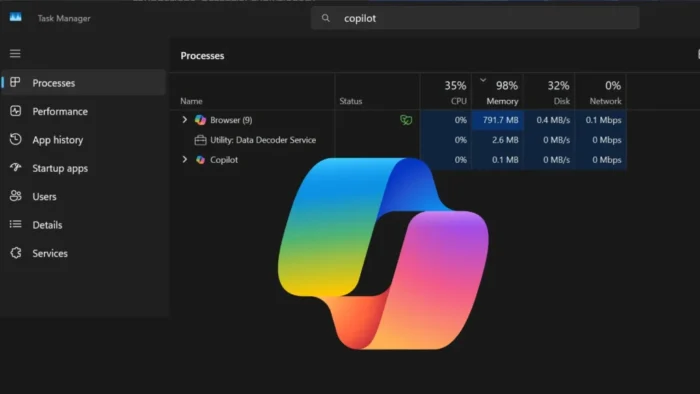
Microsoft is reportedly testing a Copilot feature called PC Insights that can examine a Windows 11 computer’s current hardware state and help explain why it feels slow.
The optional feature connects Copilot with Windows system information, allowing users to ask natural-language questions about processor activity, memory use, graphics hardware, storage, battery health, and connected devices.

Access content across the globe at the highest speed rate.
70% of our readers choose Private Internet Access
70% of our readers choose ExpressVPN

Browse the web from multiple devices with industry-standard security protocols.

Faster dedicated servers for specific actions (currently at summer discounts)
PC Insights is reportedly rolling out gradually to a limited number of Copilot users in the United States. Microsoft has not announced when, or whether, it will become widely available.
What is Copilot PC Insights?
PC Insights gives Copilot access to selected information about the computer on which it is running. This allows the assistant to provide answers based on the current device rather than generic Windows troubleshooting advice.
A user could ask why the computer feels slow, how much storage remains, which graphics card is installed, or whether antivirus protection is running.
According to PC Gamer’s report on Copilot PC Insights, the feature uses Windows APIs to retrieve system information and answer follow-up questions about the device.
| PC Insights detail | Current information |
|---|---|
| Feature name | PC Insights |
| Application | Microsoft Copilot for Windows |
| Operating system | Windows 11 |
| Availability | Limited rollout reported in the United States |
| Activation | Optional access requiring user permission |
| General release date | Not announced |
Copilot can check CPU, RAM, and GPU activity
The feature can reportedly retrieve current processor, memory, and graphics usage. This could help Copilot identify whether a demanding application or limited hardware resource is affecting performance.
For example, a user could ask why Windows 11 has become sluggish. Copilot may find that available memory is low or that processor activity is unusually high.
However, PC Insights does not appear to replace Task Manager or Resource Monitor. Those tools provide detailed process lists, performance graphs, startup information, and controls for ending applications.
- Current CPU usage
- Current RAM usage
- Current GPU usage
- Processor model
- Installed memory
- Graphics card information
- General system specifications
PC Insights can answer storage questions
Copilot can reportedly check the total and available space on internal and external drives. It can then use that information when answering questions about software installations or storage management.
A user might ask whether the computer has enough space for a 100GB game. Copilot could compare the required capacity with the drive’s available storage and explain whether additional space is needed.
The feature can also calculate the size of common folders, including Downloads and Documents. This may help users find broad areas that consume storage without opening several Settings pages.
- Ask Copilot how much storage remains on a drive.
- Provide the storage requirement for an application or game.
- Copilot compares the requirement with available space.
- The assistant can identify large folders that may need attention.
- The user decides which files to review or remove.
Copilot reportedly does not read file contents by default
PC Insights can inspect file and folder sizes without automatically opening or analyzing the contents of personal documents.
This distinction allows it to report that a Downloads folder uses a certain amount of storage without reading the files inside it.
Copilot may require separate permission before accessing the contents of a personal file. The exact consent experience and privacy controls could change before Microsoft releases the feature more broadly.
| Information | Reported access |
|---|---|
| Folder size | Available through PC Insights |
| Individual file size | Available through system metadata |
| Personal file contents | Requires separate user access or permission |
| Available drive space | Available through PC Insights |
| Storage capacity | Available through PC Insights |
Connected devices and network status are included
The assistant can reportedly identify connected USB devices, removable drives, printers, webcams, and other hardware. It may also show whether a device is currently available or experiencing a basic connection problem.
PC Insights can check Wi-Fi and Bluetooth states, which may help answer questions about devices that will not connect or wireless features that appear unavailable.
This information could make Copilot useful for simple troubleshooting. Users may no longer need to search several Windows menus before discovering that Bluetooth is disabled or an external drive is not detected.
- USB accessories
- External storage drives
- Printers
- Webcams
- Wi-Fi status
- Bluetooth status
- Other connected hardware
Battery, antivirus, and BIOS details are also available
PC Insights can reportedly answer questions about battery health and the computer’s security status. It may identify whether antivirus protection is active and provide basic information about the installed security software.
The feature can also retrieve BIOS details and hardware specifications. This could help users who need device information for troubleshooting, software compatibility, or technical support.
Copilot may present the information conversationally, but it cannot guarantee that every performance problem has one simple cause. Slow computers can result from software bugs, overheating, failing storage, driver issues, malware, or several problems occurring together.
How PC Insights may diagnose a slow computer
The feature’s main advantage comes from combining live system information with follow-up questions.
Instead of asking a general chatbot why a Windows PC runs slowly, users can ask Copilot to evaluate the current machine. The assistant can then use available hardware and resource data to produce a more relevant answer.
PC Insights may point to limited free memory, high CPU activity, low storage, or another visible resource constraint. It reportedly cannot directly repair every issue or replace a complete diagnostic assessment.
| User question | Possible PC Insights response |
|---|---|
| Why is my computer slow? | Reports current CPU, RAM, GPU, and storage conditions |
| Can I install a 100GB game? | Compares required capacity with available storage |
| What graphics card do I have? | Provides the detected GPU model |
| Is my antivirus running? | Reports the detected protection status |
| Why is my Bluetooth device unavailable? | Checks Bluetooth state and connected hardware |
| How healthy is my battery? | Provides available battery information |
The feature is optional and requires permission
Microsoft reportedly designed PC Insights as an optional capability. Copilot should request permission before it begins retrieving information about the device.
This approach gives users a choice between receiving device-specific answers and keeping Copilot limited to general information.
Microsoft will need to explain the permission clearly before a wide release. Users should know which information remains on the device, which data reaches Microsoft’s cloud services, and how long the company retains related prompts or responses.
Copilot’s own memory use raises questions
The feature arrives as Microsoft continues to face criticism about the resource use of web-based Windows applications.
Copilot for Windows uses an Edge-based application interface while its AI processing largely occurs through Microsoft’s online services. Even so, the local interface and supporting processes require system memory.
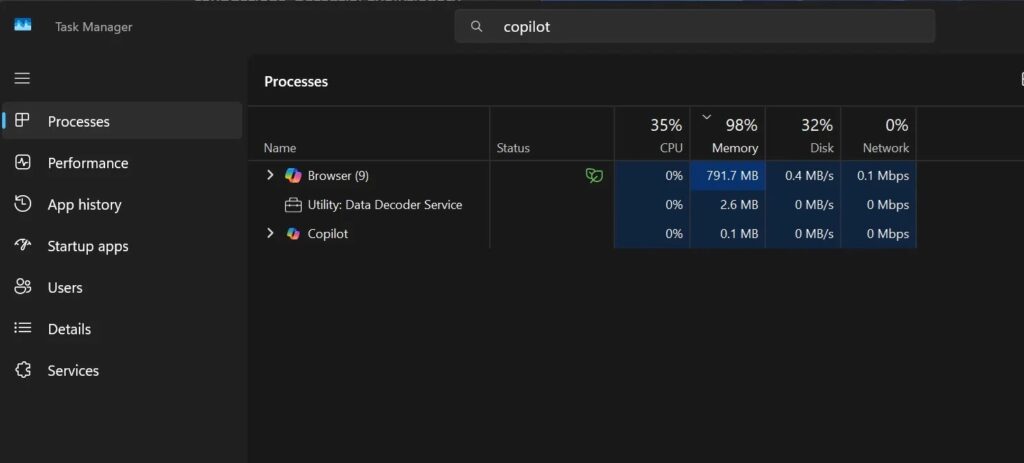
Independent Copilot memory testing observed roughly 560MB of usage on one PC and almost 792MB on another idle system. These examples do not mean Copilot always consumes the same amount of RAM.
The 1GB claim needs context
Reports have suggested that the Copilot application and its related processes can approach 1GB of memory use in some circumstances.
That figure represents observed usage, not an official Microsoft specification. Memory consumption can vary according to the Copilot version, active conversation, operating system state, supporting Edge processes, and other factors.
Using several hundred megabytes may have little effect on a computer with 32GB of RAM. The same usage could matter more on a low-cost device with 4GB or 8GB.
- Copilot memory use can vary between systems.
- One measurement cannot represent every Windows 11 PC.
- Edge-related processes may contribute to the total.
- Longer sessions may use more resources than an idle window.
- Low-memory computers may feel the effect more strongly.
PC Insights cannot replace Windows diagnostic tools
Task Manager still gives users a direct view of running processes, application resource use, startup programs, services, and performance history.
Resource Monitor provides more detailed information about processor, memory, disk, and network activity. Storage settings can show installed applications and broad storage categories.
PC Insights may make this information easier to understand, especially for users who do not know which Windows tool to open. Advanced users will likely continue using established diagnostic utilities for precise analysis.
| Tool | Main purpose |
|---|---|
| Copilot PC Insights | Conversational answers based on current system information |
| Task Manager | Process monitoring and basic performance management |
| Resource Monitor | Detailed CPU, memory, disk, and network activity |
| Windows Settings | Storage, battery, security, and device configuration |
| Event Viewer | System, application, and security event records |
Microsoft is testing more conversational Windows support
PC Insights fits Microsoft’s broader effort to let users manage and understand Windows through natural-language requests.
Windows 11 already includes AI-assisted features in Copilot, Settings, Paint, Photos, and other applications. Microsoft has also faced pressure to make these tools useful rather than adding AI entry points without a clear purpose.
A diagnostic assistant could provide practical value when it saves users from searching through complex menus. Its usefulness will depend on accuracy, privacy controls, resource consumption, and whether its recommendations lead to effective fixes.
Availability remains limited
PC Insights is reportedly reaching a small number of Copilot users in the United States. The feature may not appear even when a user has the latest public Windows 11 and Copilot updates.
Microsoft often tests features through gradual server-side rollouts. This allows the company to change or remove an experience without requiring a major Windows update.
The company has not provided a worldwide release date, a complete list of supported devices, or confirmation that PC Insights will reach every Windows 11 user.
What users should know before enabling PC Insights
Users should review the permission request and decide whether device-specific assistance provides enough value for their needs.
They should also verify important recommendations through Task Manager, Windows Security, Settings, or a trusted technician. AI-generated explanations can misinterpret system information or overlook less obvious causes.
PC Insights could make everyday troubleshooting more approachable, but users should treat it as an assistant rather than a final authority on computer health.
- Check which system information Copilot requests.
- Review privacy and data controls before enabling access.
- Confirm performance findings in Task Manager.
- Verify antivirus status through Windows Security.
- Do not delete personal files based only on an AI recommendation.
- Use hardware diagnostics when storage or memory failure is suspected.
- Contact technical support for repeated crashes or serious errors.
FAQ
PC Insights is a reported Copilot feature that uses selected Windows system information to answer questions about hardware, performance, storage, security, and connected devices.
PC Insights can reportedly examine current CPU, RAM, GPU, and storage conditions and suggest a likely cause. It may not identify every software, driver, hardware, or malware problem.
The feature can reportedly calculate file and folder sizes without reading their contents. Copilot would need separate permission before accessing the contents of personal files.
Memory usage varies by system and activity. Independent testing observed about 560MB on one computer and nearly 792MB on another, while total usage may approach 1GB in some situations.
Microsoft has not announced a general release date. Reports describe a limited rollout to some Copilot users in the United States.


Read our disclosure page to find out how can you help VPNCentral sustain the editorial team Read more


Improve this guide


User forum
0 messages