
Specter Turns Flipper Zero Into a Passive NFC Reader Detector


 8 min. read
  Published on
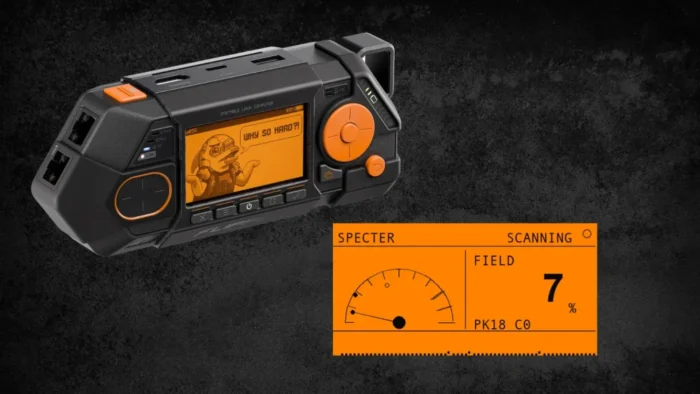
Specter is a new Flipper Zero application that detects active 13.56 MHz NFC reader fields without transmitting its own carrier. The tool can help users locate powered payment readers, access-control equipment, and potentially unauthorized NFC hardware during approved security inspections.
However, Specter cannot determine whether a detected reader is a skimmer. It identifies the presence of an NFC field, not the device producing it, its purpose, or the information it may process.

Access content across the globe at the highest speed rate.
70% of our readers choose Private Internet Access
70% of our readers choose ExpressVPN

Browse the web from multiple devices with industry-standard security protocols.

Faster dedicated servers for specific actions (currently at summer discounts)
Kailash Parshad, who publishes projects under the at0m-b0mb name, released version 1.0 through the Specter Flipper Zero project on July 15, 2026. The application runs on the standard Flipper Zero hardware and requires no external radio module.
What the Specter Flipper Zero App Detects
NFC readers generate a 13.56 MHz field when they poll for contactless cards, phones, payment devices, transit passes, or access badges. Specter monitors that field and alerts the user when the Flipper Zero detects it nearby.
The app does not read cards, emulate credentials, request information from a reader, or capture NFC transactions. Its source code starts the device’s field-detection function and repeatedly checks whether the NFC hardware reports an external carrier.
This approach makes Specter a passive field detector rather than a conventional NFC scanner. The Flipper Zero NFC hardware interface documents separate functions for external-field detection and carrier generation.
| Capability | What Specter Does |
|---|---|
| Detect an active NFC field | Yes, within the limits of the Flipper Zero antenna and detector |
| Transmit an NFC carrier | No, the application uses field-detection functions |
| Identify the reader | No |
| Confirm that a reader is malicious | No |
| Capture payment or card data | No |
| Detect 125 kHz readers | No |
How Specter Uses the Flipper Zero NFC Chip
Flipper Zero includes an ST25R3916 NFC transceiver and a high-frequency antenna. The official Flipper Zero NFC documentation confirms that this hardware operates at 13.56 MHz and normally supports reading, saving, and emulating compatible NFC cards.
The ST25R3916 also contains an external-field detector. According to the ST25R3916 datasheet, this low-power circuit can detect an RF field generated by another NFC device while the transmitter remains off.
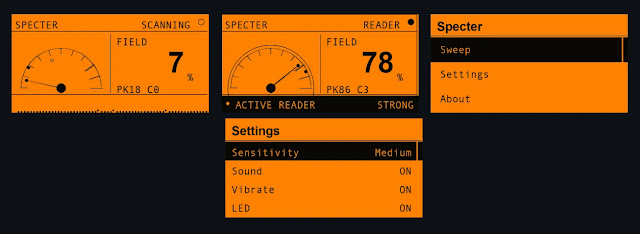
Specter acquires the NFC hardware, starts its field-detection mode, and checks the field-present result about once every two milliseconds. It groups 48 samples into a window, calculates the percentage of positive samples, and smooths the result before updating the display.
FIELD % Is Not a Calibrated Signal Measurement
The app labels its main measurement as FIELD %. This percentage does not represent signal strength in dBm, an exact voltage, or a calculated distance from the reader.
Instead, it represents a smoothed duty-cycle measurement. In simple terms, Specter calculates how often the hardware reported a field during a short sampling window. A stable carrier can produce a high reading, while intermittent polling or a marginal field may produce a lower one.
The result can still provide a warmer-or-colder guide during a sweep. Users should not treat it as proof that one reader has more transmission power than another because polling behavior, antenna placement, shielding, and device orientation can change the reading.
- FAINT appears for a reading below 20 percent.
- NEAR covers readings from 20 to 44 percent.
- CLOSE covers readings from 45 to 69 percent.
- STRONG appears at 70 percent or higher.
Visual, Sound, and Vibration Alerts
Specter’s Sweep screen presents an analog-style meter, a live waveform, a peak marker, and a field percentage. When the detector crosses the configured threshold, the interface displays an active-reader warning and changes its proximity label.
Users can enable sound, vibration, and LED feedback. The application increases the click frequency as the reported field percentage rises, which allows an inspector to concentrate on moving the device rather than continuously watching its screen.
The application also offers high, medium, and low sensitivity settings. These settings change the duty-cycle threshold that Specter uses to decide whether a detected pattern counts as an active field. They do not adjust or calibrate the chip’s physical RF detection range.
What Specter Can Miss
Specter only detects equipment that produces a field the Flipper Zero can sense during the inspection. A powered reader that polls regularly provides the clearest detection opportunity.
A dormant skimmer could remain silent until someone inserts or presents a payment card. Trigger-controlled hardware, heavy shielding, weak coupling, short polling bursts, or poor antenna alignment could also prevent an alert.
The chip’s external-field detector compares the incoming RF level against configured thresholds, as described in the ST25R3916 technical specifications. Specter samples the resulting field-present state instead of reading a calibrated RF power measurement.
| Reader Condition | Expected Result |
|---|---|
| Powered and continuously polling | Most likely to produce a stable detection |
| Polling intermittently | May produce a fluctuating or low FIELD % |
| Dormant until a card appears | May remain undetected during a normal sweep |
| Shielded or mounted behind metal | Detection range may fall sharply |
| Operating at 125 kHz | Outside Specter’s detection method |
Specter Does Not Detect 125 kHz RFID Readers
Specter’s monitoring mode only covers the 13.56 MHz high-frequency band. It cannot detect older 125 kHz low-frequency access systems such as many HID Prox and EM4100 installations.
Flipper Zero contains separate high-frequency and low-frequency antenna paths. The official NFC hardware overview distinguishes the ST25R3916-based 13.56 MHz system from the device’s nearby 125 kHz antenna.
This distinction matters during access-control inspections. A clean Specter sweep does not rule out an unauthorized low-frequency reader or another surveillance device operating outside the NFC band.
How Security Teams Can Use Specter
Specter may provide a quick screening tool for payment environments, office access panels, kiosks, parcels, desks, and other equipment where an unexpected NFC reader would justify closer examination.
Inspectors should first test the app against a known reader. Holding the Flipper Zero in the same orientation and moving it slowly can help establish how the meter behaves around legitimate equipment.
If Specter reports an unexpected field, the user should document the location and compare it with the site’s approved hardware inventory. A physical inspection, device identification, wiring review, and specialist analysis may then determine whether the source presents a security risk.
- Confirm that the inspection has proper authorization.
- Test Specter against a known 13.56 MHz reader.
- Move the Flipper Zero slowly across the target surface.
- Repeat the sweep using different orientations.
- Investigate unexpected readings instead of assuming malicious activity.
- Record the location, time, peak percentage, and surrounding equipment.
Installing Specter on Flipper Zero
Specter comes as a Flipper Application Package with the .fap extension. Users can download the compiled version from the project’s release page and copy it to the NFC applications directory through qFlipper.
Developers can also build the application from source with the official ufbt development tool. The application manifest places Specter in the NFC category and identifies the current release as version 1.0.
Specter relies on the same documented field-detection interface that allows Flipper Zero firmware to check for an external NFC carrier. The NFC interface reference lists field detection separately from the poller function that generates a carrier.
A Detection Should Trigger Investigation
Specter gives Flipper Zero owners a practical way to search for active 13.56 MHz fields with hardware they may already carry. Its listen-only design also limits interaction with the equipment under inspection.
The tool remains an indicator, not a skimmer verifier. Legitimate payment terminals, smartphones, badge readers, and other NFC equipment can all trigger it. Conversely, a dormant or shielded device may avoid detection.
Users should operate Specter only on their own equipment or during explicitly authorized assessments. Any unexpected result should lead to careful technical and physical examination before anyone concludes that tampering has occurred.
FAQ
Specter is a Flipper Zero application that passively detects active 13.56 MHz NFC fields. It presents detections through a meter, waveform, proximity labels, sound, vibration, and LED feedback.
No. Specter detects an active NFC field but cannot identify the reader, determine its purpose, or confirm malicious activity. A detection should lead to further inspection.
The version 1.0 source code uses Flipper Zero’s external-field detection functions and does not call the poller function that generates an NFC carrier.
FIELD % represents a smoothed percentage of samples in which the NFC hardware reported an external field. It is not a calibrated signal-strength reading or an exact distance measurement.
No. Specter uses Flipper Zero’s 13.56 MHz NFC hardware. It does not monitor the separate 125 kHz low-frequency RFID system.
Yes. A dormant, shielded, weak, intermittent, or trigger-controlled device may not produce a detectable field during a sweep. A clean result does not guarantee that equipment has not been tampered with.
Users can copy the prebuilt specter.fap file into the SD Card/apps/NFC directory with qFlipper. Developers can also compile and install the application with ufbt.


Read our disclosure page to find out how can you help VPNCentral sustain the editorial team Read more


Improve this guide


User forum
0 messages