
New Spirals Ransomware Encrypts IT Firm in Under 24 Hours


 9 min. read
  Published on
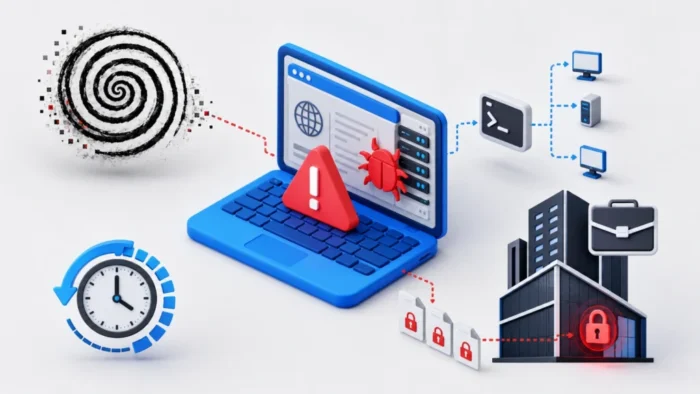
A previously unknown ransomware operation compromised a South Asian IT services company and began deploying its encryptor across the network less than 24 hours after the initial breach.
The attackers entered through an internet-facing Microsoft IIS server, installed an ASP.NET web shell, and created several remote-access channels. They later used WMI and PsExec to move through the network and distribute a Rust-based ransomware payload called Spirals.

Access content across the globe at the highest speed rate.
🔥 Save 81% + 2 bonus months! 🔥
70% of our readers choose Private Internet Access
70% of our readers choose ExpressVPN
2
Browse the web from multiple devices with industry-standard security protocols.
🔥 Save 73%! 🔥

Faster dedicated servers for specific actions (currently at summer discounts)
🔥 Save 69%! 🔥
Researchers have observed the ransomware on only one victim network so far. The identity of the attackers remains unknown, and investigators have not linked Spirals to an established ransomware group.
The attack began through an IIS web server
The first malicious activity appeared at 10:21 p.m. local time on June 16, 2026, according to the Symantec Threat Hunter Team’s Spirals report.
The attackers compromised a public-facing IIS server and uploaded an ASP.NET web shell. A web shell gives an attacker a remotely accessible interface for running commands through the affected web server.
Microsoft describes Internet Information Services as its Windows web-server platform for hosting websites and applications. Because IIS servers often face the public internet, unauthorized files and unusual child processes require immediate investigation.
Multiple tunnels provided persistent remote access
Within the first 10 minutes of observed activity, the attackers installed several tunneling and reverse-proxy tools. These components created overlapping communication channels that could continue working if defenders blocked one connection.
The tools appeared inside a public web production directory and the Windows Tasks folder. The attackers also renamed some of them to resemble legitimate software.
The observed tunneling and remote-access components included:
- tunn.exe, an unidentified tunneling utility
- Revsocks, a reverse SOCKS proxy
- Chisel renamed as chrome.exe
- A Cloudflare Tunnel client
Revsocks connected to an external IP address over port 443. The Cloudflare Tunnel client exposed local Remote Desktop Protocol access through another encrypted connection.
Attackers escalated privileges and created persistence
The web shell launched cmd.exe and PowerShell through the IIS worker process. This activity gave the attackers an interactive command session on the compromised server.
During roughly three hours of hands-on-keyboard activity, the operator performed a User Account Control bypass, enabled RDP, and created a local account for continued access.
A tool named tokens.exe also ran from a web project directory. Symantec assessed that the tool likely impersonated an access token to obtain higher privileges, although its exact role in the intrusion remains uncertain.
The attackers then examined users, network shares, and installed applications. They attempted to remove endpoint protection tools with WMI commands and Microsoft Defender utilities.
Credential theft supported lateral movement
The attackers exported the Security Account Manager hive and placed the credential material in a password-protected archive. The SAM hive stores local Windows account information that attackers can use during password extraction attempts.
Later in the attack, the operator dumped LSASS process memory on several systems with rundll32.exe and comsvcs.dll. LSASS memory can contain credentials, password hashes, or authentication tokens belonging to signed-in users.
At 11:33 p.m. on June 16, the attackers began using Windows Management Instrumentation for lateral movement. More than a dozen machines received commands within the first few minutes.
Symantec found evidence that the attackers abused multiple accounts, including accounts assessed as likely domain administrators or built-in domain administrator accounts. The repeated command structure and rapid pace suggested automated lateral movement rather than manual selection of each target.
PsExec distributed the attack across the network
On June 17, the operator shifted to PsExec as the main remote-deployment method. A compromised host began pushing the same Base64-encoded PowerShell command to remote systems every few seconds.
Microsoft PsExec is a legitimate Sysinternals administration tool that can execute processes on remote Windows computers. Attackers frequently abuse it after obtaining valid administrative credentials.
The commands used the -s option to run as the SYSTEM account and the -d option to launch the remote process without waiting for it to finish. This allowed the operator to move rapidly from one target to the next.
| Date and time | Observed activity |
|---|---|
| June 16, 10:21 p.m. | Tunneling and proxy tools appeared on the compromised IIS server |
| June 16, 11:07 p.m. | Attempts to disable security tools and download additional software appeared |
| June 16, 11:33 p.m. | WMI-based lateral movement began |
| June 17, around 2:12 p.m. | A compromised host began rapidly targeting remote systems with PsExec |
| June 17, 2:44 p.m. | PsExec remote sessions delivered the PowerShell payload |
| Within 24 hours | Spirals ransomware was deployed across affected systems |
The PowerShell payload disabled security and backup services
The PowerShell payload attempted to disable Microsoft Defender real-time monitoring, remove threat definitions, and turn off protection that inspects files downloaded from the internet.
It also searched for running services associated with 23 backup, database, virtualization, accounting, and business platforms. The script stopped matching services before encryption began.
Products and platforms targeted by the service-stopping commands included:
- Microsoft Exchange
- Hyper-V
- VMware
- Veeam
- Acronis
- Veritas
- Commvault
- Microsoft SQL Server
- Oracle Database
- MySQL
- PostgreSQL
- SAP
- Lotus Domino
Stopping these services releases open file handles that might otherwise prevent ransomware from accessing databases, virtual machines, mail stores, and backup data.
Spirals masqueraded as a Windows utility
The ransomware executable used the name bitsadmin.exe. Windows includes a legitimate utility with a similar name, so the attackers likely chose it to make the malicious file appear less suspicious.
The attackers placed copies of the encryptor in the Windows directory, on a desktop, in a temporary directory, and on network-accessible shares. One copy used the filename vbr2116.exe.
They also staged bitsadmin.exe in the SYSVOL domain scripts directory. SYSVOL content replicates between domain controllers and remains accessible to domain-connected systems, giving the attackers another way to distribute the payload.
In one case, a process presenting itself as svchost.exe dropped the ransomware into a user’s temporary directory. This added another layer of masquerading to the deployment process.
How Spirals encrypts files
Spirals is a file-encrypting ransomware payload written in Rust. Symantec identified capabilities for encryption, defense evasion, process termination, obfuscation, privilege escalation, and lateral movement.
The ransomware generates a separate AES-128 key for each file. It then protects those keys with an attacker-controlled ECDH P-256 public key.
For files larger than 5 MB, Spirals encrypts selected chunks instead of processing every byte. It varies the placement of those chunks, helping it damage large files more quickly while making recovery difficult.
| Component | Implementation | Purpose |
|---|---|---|
| File encryption | Per-file AES-128 key | Encrypts targeted file content |
| Key protection | ECDH P-256 public key | Prevents victims from recovering the AES keys |
| Large-file processing | Intermittent encryption of varied chunks | Accelerates encryption of files larger than 5 MB |
| Payload language | Rust | Produces a native Windows executable |
The ransom note threatens a data leak
Spirals writes its ransom note to C:\RECOVERY_SECTION.log. The note directs the victim to a Tor-based negotiation portal.
The attackers threaten to publish stolen corporate data within six days if the victim refuses to pay. This makes Spirals a double-extortion operation, combining file encryption with a claimed data-leak threat.
The onion negotiation site uses the Spirals name. However, researchers have not identified a broader public leak site, previous victims, or connections to an established ransomware brand.
Indicators linked to the Spirals attack
The Symantec Spirals investigation includes hashes for the ransomware and supporting tools, along with the external infrastructure used to deliver files.
| Indicator type | Value | Description |
|---|---|---|
| IP address | 185.141.216[.]194 | External payload-staging infrastructure |
| Domain | computer.kplus[.]com | Compromised domain used to host cd.zip |
| Domain | beta.padmin[.]com | Compromised domain used to host cd.zip |
| SHA-256 | 0f9574dc38e5c34a31153f0bcc603c6ec29cb3bf65c3d25380dbe86d42573141 | Spirals ransomware |
| SHA-256 | 84b9a9a1668145df04faa3d0e118e2f0acbebd3d9d260baf3a355b44c815c22d | Chisel renamed as chrome.exe |
| SHA-256 | 862a3ca7e944ccf0ff3a6d556b34faade4b68343015c35a014a43725ac14a2a1 | Token impersonation tool |
| Ransom note | C:\RECOVERY_SECTION.log | Spirals recovery and negotiation instructions |
How organizations can defend against Spirals
Organizations should begin by reviewing every internet-facing IIS deployment. Administrators should restrict write access to web directories and investigate newly created ASP.NET files that do not match an approved deployment.
- Monitor IIS worker processes that launch cmd.exe or PowerShell.
- Alert on new ASP.NET files in production web directories.
- Restrict RDP access to approved administrative networks.
- Block unnecessary outbound tunnels and reverse proxies.
- Protect LSASS and monitor suspicious comsvcs.dll use.
- Remove domain administrator accounts from routine workstation use.
- Restrict access to SYSVOL and domain script directories.
- Monitor Defender configuration and definition-removal commands.
- Keep offline or immutable backups outside the production domain.
- Test recovery procedures before an incident occurs.
Security teams should also establish a baseline for legitimate PsExec activity. Rapid SYSTEM-level commands sent from one host to many servers or workstations should trigger an immediate investigation.
Defenders should not block PsExec solely because attackers can misuse it. Instead, they should limit who can run it, restrict administrative shares, monitor service creation, and investigate remote execution from systems that do not normally perform management tasks.
Spirals may remain a targeted ransomware operation
Symantec has seen Spirals on only one victim network. That evidence does not yet show whether the attackers plan to reuse the ransomware or created it for a single targeted intrusion.
The operation nevertheless showed careful preparation. The attackers combined several remote-access channels, stolen administrative credentials, automated lateral movement, security-tool disruption, and multiple payload-staging locations.
The speed of the attack gives defenders a limited response window. Monitoring web servers, privileged credentials, WMI, PsExec, and SYSVOL can help security teams detect the intrusion before encryption reaches the wider network.
FAQ
Spirals is a Rust-based ransomware family first observed during a June 2026 attack against an IT services company in South Asia. It encrypts files and threatens to publish stolen data if the victim does not pay.
The attackers compromised an internet-facing Microsoft IIS server and uploaded an ASP.NET web shell. They then installed tunneling tools, collected credentials, and moved through the network.
The attackers used WMI for early lateral movement and later used PsExec to deliver a Base64-encoded PowerShell payload across the network. They also staged the ransomware in SYSVOL and other shared locations.
The ransomware used filenames including bitsadmin.exe and vbr2116.exe. It created the ransom note C:\RECOVERY_SECTION.log, while observed staging infrastructure included the IP address 185.141.216[.]194.


Read our disclosure page to find out how can you help VPNCentral sustain the editorial team Read more


Improve this guide




User forum
0 messages