
Ascend to ZERO Download: System Requirements, Gameplay and Latest Version


 9 min. read
  Published on
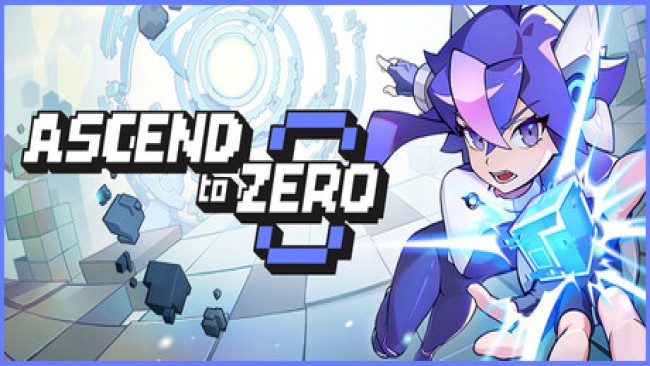
Ascend to ZERO is a time-bending action roguelike in which every second can determine whether a run succeeds or ends in defeat. Players fight through fast-paced stages, freeze time, build powerful combinations, and gradually unlock upgrades for future attempts.
The game launched on July 13, 2026, for PC and Xbox. PC players can purchase it or download the official demo through the Ascend to ZERO Steam page, while Xbox players can access it through Microsoft’s storefront and Xbox Game Pass.

Access content across the globe at the highest speed rate.
70% of our readers choose Private Internet Access
70% of our readers choose ExpressVPN

Browse the web from multiple devices with industry-standard security protocols.

Faster dedicated servers for specific actions (currently at summer discounts)
The latest publicly announced PC update is version 1.0.10.0, not version 1.0.4.0. Players should install the game through an authorized platform to receive security checks, cloud saves, achievements, and current patches automatically.
Ascend to ZERO at a glance
| Game detail | Information |
|---|---|
| Title | Ascend to ZERO |
| Developer | Flyway Games, Inc. |
| Publishers | Flyway Games and KRAFTON |
| Release date | July 13, 2026 |
| Platforms | PC and Xbox |
| Genre | Action roguelike |
| Game mode | Single player |
| Current announced PC version | 1.0.10.0 |
| Xbox Game Pass | Available |
What is Ascend to ZERO?
Ascend to ZERO combines action roguelike combat with a time-manipulation system. Players enter compact combat stages, defeat waves of mechanical enemies, collect upgrades, and attempt to climb farther during each run.
The central mechanic allows the protagonist to stop time. Players can pause incoming attacks, reposition between projectiles, prepare combinations, and decide which enemy to target before allowing the battle to continue.
The official Xbox listing for Ascend to ZERO describes the game as a time-bending roguelike built around unique avatars, weapons, items, and builds that evolve during each run.
The story behind Ascend to ZERO
Ascend to ZERO takes place in the year 22XX. Humanity has built an enormous underground Time Lab in an attempt to master time travel.
When researchers open a portal to the future, an army of mechanical creatures emerges and begins destroying civilization. Humanity responds by creating the Chrono Child, the only person capable of travelling into the past.
During an attack on the laboratory, its director sends the Chrono Child into a temporal rift. She must return through time, rebuild her strength, rescue allies, and prevent the future catastrophe.
How the time system changes combat
Time does more than support the story. It shapes almost every encounter and forces players to think quickly.
Each combat room gives players a limited window to defeat enemies and continue climbing. Freezing time temporarily stops opponents and projectiles, allowing the player to study the battlefield and prepare a response.
- Pause incoming enemy attacks.
- Move through dangerous projectile patterns.
- Position the character for a counterattack.
- Combine weapon effects before restarting time.
- Reach enemies before the stage timer expires.
- Recover control when the screen becomes crowded.
The mechanic creates a mixture of fast reactions and tactical planning. Players still need precise movement, but they can interrupt the action to avoid damage and set up more effective attacks.
Weapons, avatars and character builds
Ascend to ZERO lets players develop different builds through weapons, Tech Chips, equipment, statistics, and avatar abilities. A run can focus on close-range attacks, ranged damage, status effects, critical hits, or defensive bonuses.
Weapons behave differently and support distinct tactics. Fast melee weapons encourage aggressive movement, while ranged weapons let players attack from safer positions.
Tech Chips modify attacks and can create powerful combinations when matched with the right weapon or ability. Experimenting with different combinations forms an important part of the roguelike progression.
| Build element | Purpose |
|---|---|
| Avatar | Provides a distinct skill and combat identity |
| Weapon | Determines the main attack style |
| Tech Chips | Add effects and modify weapon behaviour |
| Equipment | Improves statistics and provides bonuses |
| Time Machine upgrades | Supports progression between runs |
| Temporary upgrades | Shape the current run |
Roguelike progression
Defeat does not erase every form of progress. Players can unlock new systems, improve permanent abilities, discover weapons, and gain access to more build options.
This structure encourages repeated runs. A difficult boss may feel overwhelming during an early attempt but become manageable after the player improves a build and learns its attack patterns.
Steam lists support for achievements, cloud saves, leaderboards, controller input, and Family Sharing. The game currently includes 58 Steam achievements.
Ascend to ZERO system requirements
The game requires a 64-bit version of Windows 10 and DirectX 12. Players with older graphics hardware should check DirectX 12 compatibility before purchasing it.
| Component | Minimum requirement |
|---|---|
| Operating system | Windows 10 64-bit |
| Processor | Intel Core i5-6600 or AMD Ryzen 5 1400 |
| Memory | 8 GB RAM |
| Graphics | Nvidia GeForce GTX 1060 6 GB or AMD Radeon RX 580 |
| DirectX | Version 12 |
| Storage | 3 GB available space |
| Architecture | 64-bit processor and operating system |
The small storage requirement makes Ascend to ZERO relatively easy to install, but the graphics requirement remains more demanding than its file size may suggest.
How to download Ascend to ZERO safely
Players should use an official store rather than an unauthorized torrent or repack. Official copies receive automatic patches and reduce the risk of modified installers, password-stealing malware, cryptocurrency miners, and corrupted game files.
- Open Steam, the Xbox app, or the Microsoft Store.
- Search for Ascend to ZERO.
- Purchase the game or access it through Xbox Game Pass.
- Select Install and choose a storage location.
- Allow the store client to download the current version.
- Launch the game from the official library.
Steam also provides an official demo for players who want to test the combat and performance before purchasing the complete game. The demo appears on the official Steam store listing.
Why you should not disable antivirus protection
A legitimate game purchased through Steam or Xbox should not require players to disable antivirus software. Security warnings that appear after downloading an unofficial installer should not be dismissed automatically.
Pirated installers may bundle malicious programs with real game files. Attackers commonly tell users to disable security software because antivirus tools would otherwise block the malware.
- Keep Microsoft Defender or another trusted antivirus enabled.
- Do not run unknown setup files as an administrator.
- Do not install unofficial DirectX or DLL packages.
- Download required components through Microsoft or the game platform.
- Scan unexpected files before opening them.
- Delete installers that request disabled security protection.
The claim that every antivirus warning represents a false positive cannot be trusted. A website distributing unauthorized copies cannot guarantee that every installer remains safe.
Latest Ascend to ZERO update
Flyway Games has released several updates since launch. Version 1.0.10.0 arrived after versions 1.0.6.0, 1.0.8.0, and 1.0.9.0, making the version 1.0.4.0 download described on some third-party sites outdated.
The official Ascend to ZERO patch notes show that version 1.0.10.0 addressed progression problems, crashes related to certain Tech Chip combinations, weapon issues, incorrect character positioning, and Supporter Pack effects.
Previous updates fixed crashes during boss fights, missing enemies, disappearing timers, unresponsive menus, language-change crashes, and problems that stopped players from progressing.
- Fixed progression after defeating the final boss while dying.
- Corrected several weapon and projectile problems.
- Resolved crashes involving specific Tech Chip combinations.
- Fixed incorrect positioning after using Recall Blade.
- Corrected selected Supporter Pack visual effects.
- Improved stability after earlier DirectX 12-related crashes.
Known issues
The developer continues to investigate several problems. Some players may encounter issues with dialogue, visual effects, controls, V-Sync, weapon reloading, enemy damage, and boss placement.
Flyway Games has asked players to report bugs through its support form, Discord community, or Steam discussions. Installing the latest update remains the most important troubleshooting step.
The developer’s Steam Community updates provide the most current list of resolved and known issues.
What to do when Ascend to ZERO crashes
Some launch and gameplay crashes have involved graphics cards or configurations with incomplete DirectX 12 support. The developer has already fixed several crash causes, but compatibility issues may remain on some systems.
- Update Ascend to ZERO through Steam or the Xbox app.
- Install the latest graphics driver from Nvidia, AMD, or Intel.
- Install pending Windows updates.
- Verify the game files through the store client.
- Disable unofficial mods and third-party overlays.
- Confirm that the graphics card supports DirectX 12.
- Restart the computer and test the game again.
Do not download random DLL files from third-party websites. Steam, Xbox, Windows Update, and official Microsoft redistributable packages provide safer ways to repair missing components.
How to verify Ascend to ZERO files on Steam
Steam can compare installed files with the official version and replace damaged or missing data.
- Open the Steam Library.
- Right-click Ascend to ZERO.
- Select Properties.
- Open Installed Files.
- Select Verify integrity of game files.
- Wait for Steam to complete the process.
This process can repair corrupted files without requiring a complete reinstallation. It will not repair hardware incompatibility or unsupported DirectX features.
Is Ascend to ZERO available on Xbox Game Pass?
Yes. Ascend to ZERO launched through Xbox Game Pass and supports Xbox Series X and Series S, Xbox on PC, and Xbox Cloud Gaming where available.
The official Microsoft store page provides the current purchase and Game Pass options for supported regions.
Cloud availability can help players whose local computers do not meet the PC requirements, although streaming performance depends on internet speed, latency, region, and Game Pass plan.
Is Ascend to ZERO worth playing?
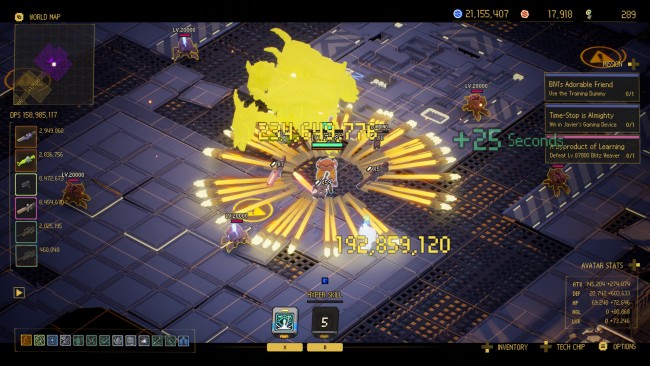
Ascend to ZERO should appeal to players who enjoy action roguelikes, bullet-hell combat, short stages, build experimentation, and repeated progression.
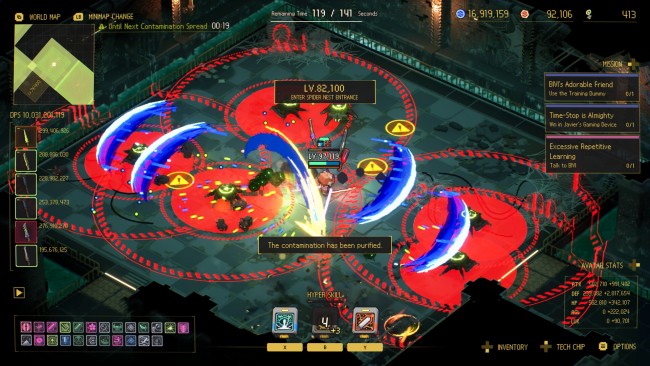
The time-stop system gives it a clear identity. It creates brief tactical pauses without removing the speed and pressure expected from the genre.
The game has also received a Very Positive Steam user rating shortly after release. Launch bugs affected some players, but Flyway Games has released frequent patches addressing crashes and progression blockers.
Final verdict
Ascend to ZERO offers a distinctive action roguelike experience built around freezing time, rapidly developing character builds, and climbing through increasingly difficult stages.
Players should avoid outdated torrent packages, particularly installers that demand disabled antivirus protection. The official Steam and Xbox versions provide current updates, platform support, and a safer installation process.
Version 1.0.10.0 has already replaced the older 1.0.4.0 build promoted by third-party download pages. Installing through an authorized platform ensures that players receive the latest fixes as Flyway Games continues improving the game.
FAQ
The latest publicly announced PC update is version 1.0.10.0. Version 1.0.4.0 is outdated and misses several crash, progression, weapon, and interface fixes.
Players can download Ascend to ZERO through Steam, the Xbox app, or the Microsoft Store. It is also available through Xbox Game Pass in supported regions.
Yes. Steam offers an official Ascend to ZERO demo that lets players test the combat and system performance before purchasing the complete game.
No. An official copy should not require disabled antivirus protection. Requests to turn off security software commonly appear with unofficial installers and can expose a computer to malware.
The game requires Windows 10 64-bit, an Intel Core i5-6600 or AMD Ryzen 5 1400, 8 GB RAM, a GTX 1060 6 GB or Radeon RX 580, DirectX 12, and 3 GB of storage.
Yes. Ascend to ZERO launched through Xbox Game Pass and is available on supported Xbox consoles, Xbox on PC, and Xbox Cloud Gaming services.


Read our disclosure page to find out how can you help VPNCentral sustain the editorial team Read more


Improve this guide




User forum
0 messages