
What Is a VPN Tunnel and How Does It Work?


 15 min. read
  Published on
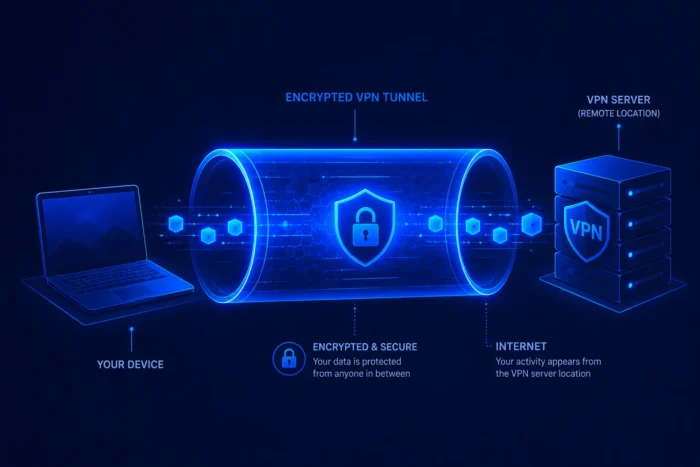
A VPN tunnel is an encrypted connection between a device and a VPN server. It protects selected internet traffic while it travels across a local network and through an internet service provider before the VPN server forwards it to its destination.
The tunnel prevents nearby network operators and internet providers from reading the protected traffic. Websites normally see the VPN server’s public IP address instead of the address assigned to the user’s home or mobile connection.

Access content across the globe at the highest speed rate.
🔥 Save 81% + 2 bonus months! 🔥
70% of our readers choose Private Internet Access
70% of our readers choose ExpressVPN
2
Browse the web from multiple devices with industry-standard security protocols.
🔥 Save 73%! 🔥

Faster dedicated servers for specific actions (currently at summer discounts)
🔥 Save 69%! 🔥
A VPN tunnel does not provide complete anonymity. Websites can still recognize accounts, cookies, browser fingerprints, device information, and details submitted by the user. The VPN provider also handles traffic at the tunnel endpoint, making its ownership, logging practices, software security, and audit history important.
How a VPN tunnel works
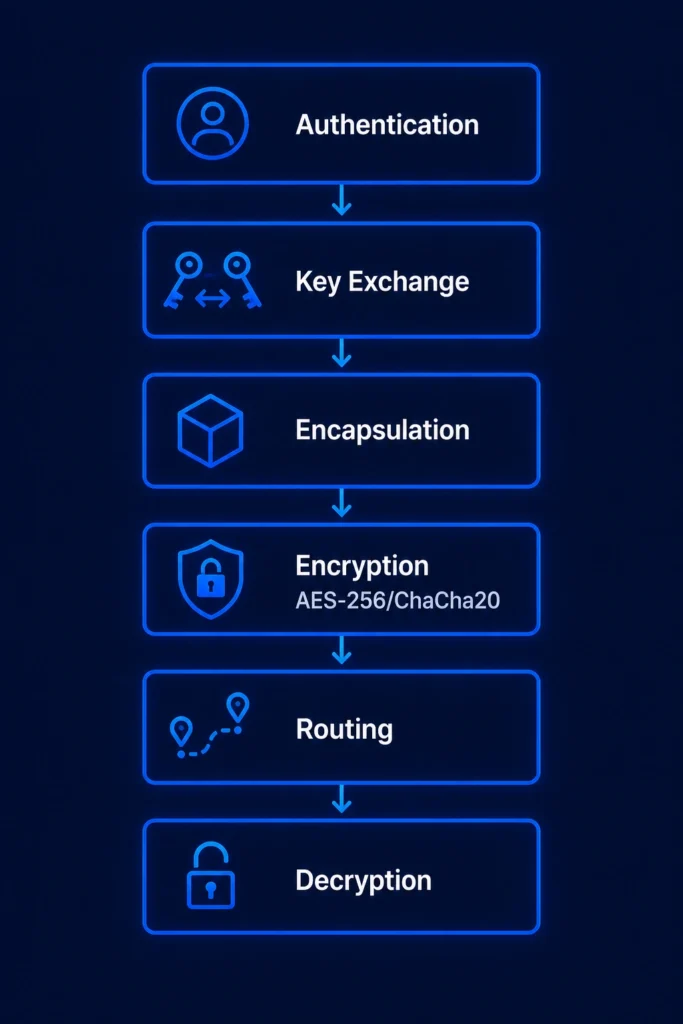
A VPN tunnel combines authentication, encryption, encapsulation, and routing. The exact process varies by protocol, but most consumer VPN connections follow the same general sequence.
First, the VPN application contacts a selected server and begins a handshake. The client and server authenticate the connection and establish temporary cryptographic keys that protect the session.
The VPN client then encrypts eligible network packets and places the protected information inside new packets addressed to the VPN server. This process is called encapsulation and explains why the protected connection is described as a tunnel.
- The VPN application contacts a server.
- The client and server authenticate the connection.
- They establish encryption keys for the session.
- The client encrypts and encapsulates eligible traffic.
- The VPN server verifies and decrypts the packets.
- The server forwards the original traffic to its destination.
- Replies return through the protected connection.
The server removes the VPN layer and routes the original traffic toward the requested website or service. Return traffic reaches the VPN server first, where it receives protection before traveling back to the device.
Modern protocols regularly refresh session keys. WireGuard, for example, uses periodic handshakes and rotating keys as part of the design described in its official protocol and cryptography documentation.
What information a VPN tunnel hides
A correctly configured VPN tunnel prevents the local Wi-Fi operator and internet provider from reading the protected packet contents. Those observers should not see the individual web requests, messages, files, or other data carried inside the tunnel.
They can still see that the device communicates with a VPN endpoint. They may also observe the VPN server’s address, the timing of the connection, its duration, and the amount of data transferred.
Websites normally receive the VPN server’s public IP address. This can hide the public IP address assigned by the user’s internet provider and change the approximate location associated with the connection.
| Observer | What the observer may see | What the tunnel normally hides |
|---|---|---|
| Local Wi-Fi operator | VPN endpoint, timing, and data volume | Protected traffic and destinations inside the tunnel |
| Internet provider | Connection to a VPN server | Traffic contents and final destinations carried inside it |
| VPN provider | Account and connection information available to the service | Properly encrypted HTTPS page contents |
| Website | VPN address, cookies, accounts, and browser details | The user’s normal public IP address |
The website can still identify a signed-in account and recognize previously stored cookies. It may also use browser fingerprinting, location permissions, advertising identifiers, payment information, and activity patterns.
A VPN therefore changes the network path and public IP address. It does not erase every identity signal or prevent a user from voluntarily revealing personal information.
VPN tunnels do not make users anonymous
A VPN provider occupies a privileged position because the tunnel ends on its server. Traffic that lacks separate application encryption may become readable after leaving the protected tunnel.
This transfers some trust away from the local network and internet provider and toward the VPN operator. Customers should examine what information the provider collects, how long it keeps that information, who owns the company, and whether independent experts have reviewed its claims.
A VPN also cannot remove malware, stop every phishing attack, repair an insecure device, or make an unsafe download trustworthy. It protects a network path rather than every part of the device or account.
- A VPN does not replace antivirus software.
- It does not stop users from entering passwords on phishing pages.
- It does not prevent tracking through signed-in accounts.
- It does not correct weak or reused passwords.
- It does not guarantee access to every streaming service.
- It does not make illegal activity safe or untraceable.
VPN tunnel vs HTTPS
HTTPS and VPN tunnels protect different sections of a connection. HTTPS encrypts communication between a browser or application and the website or service it contacts. A VPN encrypts selected traffic between the device and the VPN server.
Mozilla’s TLS security documentation explains that HTTPS protects HTTP headers and page content in transit after the browser and server complete a secure handshake.
When a user opens an HTTPS website through a VPN, both protections work together. The VPN tunnel carries an HTTPS connection inside it until the traffic reaches the VPN server.
The server removes the VPN layer, but the HTTPS encryption continues between the device and the website. The VPN provider can route the connection and identify the destination, but it should not be able to read properly encrypted HTTPS page contents.
| Protection | Protected section | Main purpose |
|---|---|---|
| VPN tunnel | Device to VPN server | Protect local traffic and change the visible public IP address |
| HTTPS | Application or browser to website | Protect web requests, responses, and page content |
| VPN and HTTPS together | Overlapping encrypted connections | Protect both the local network path and web session |
A VPN does not replace HTTPS. Without HTTPS or another end-to-end encryption system, information may become readable after it leaves the VPN server.
HTTPS also does not provide every VPN function. It does not normally replace the user’s public IP address or route all eligible device traffic through another server. The Mozilla TLS overview focuses on protecting communication between applications and services rather than creating a device-wide tunnel.
Full tunneling vs split tunneling
Routing rules decide which traffic enters the VPN connection. A full tunnel sends most eligible device traffic through the VPN server, while split tunneling excludes selected applications, websites, or network destinations.
Full tunneling provides broader network coverage and reduces the chance that an application will accidentally use the normal internet connection. It may also increase latency or cause compatibility problems with local devices, banks, workplace services, and streaming platforms.
Split tunneling lets users route sensitive applications through the VPN while allowing other traffic to use the normal connection. For example, someone might protect a browser while excluding a gaming application or local printer connection.
- App-based split tunneling includes or excludes selected applications.
- Website-based rules route selected domains differently.
- Destination-based routing covers specific IP ranges or networks.
- Inverse split tunneling sends only selected traffic through the VPN.
Excluded traffic does not receive the VPN tunnel’s protection or public IP address. Users should check which routing model their application uses and confirm how it handles IPv6, DNS requests, local networks, and newly installed programs.
VPN tunnel mode vs transport mode
Tunnel mode and transport mode are formal IPsec terms. They should not serve as general labels for every consumer VPN protocol.
In IPsec tunnel mode, the system protects an entire inner IP packet and adds a new outer IP header. The outer header identifies the tunnel endpoints, while the inner header contains the original source and destination information.
The Internet Engineering Task Force defines this architecture in RFC 4301. Security gateways commonly use tunnel mode to connect networks or route a remote device through a protected gateway.
IPsec transport mode primarily protects the payload carried by the original IP packet. The original IP header remains available for routing, making transport mode more closely associated with host-to-host protection.
| IPsec mode | What it protects | Typical use |
|---|---|---|
| Tunnel mode | The complete inner IP packet | Gateway-to-gateway and remote-access connections |
| Transport mode | Primarily the original packet payload | Host-to-host protection |
The distinction matters when discussing IPsec architecture, but WireGuard and OpenVPN use their own designs and terminology. Applying IPsec’s two formal modes to every VPN application can create confusion.
The complete IPsec security architecture also defines security policies, security associations, packet processing, and the roles of hosts and gateways.
Common VPN tunneling protocols
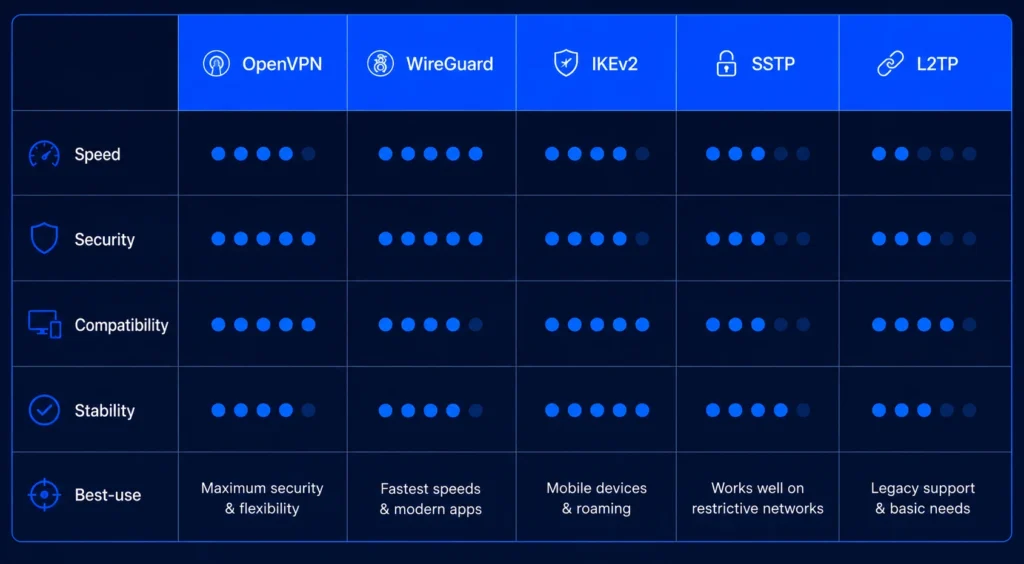
A VPN protocol defines how the client and server authenticate, exchange keys, protect packets, and maintain the connection. Protocol choice can affect speed, compatibility, mobility, reliability, and resistance to network blocking.
WireGuard
WireGuard is a compact Layer 3 tunnel that uses a fixed collection of modern cryptographic components. These include Curve25519, ChaCha20-Poly1305, BLAKE2s, SipHash24, and HKDF.
It sends packets over UDP and periodically rotates session keys. Its relatively small design can make it easier to inspect and implement, although VPN providers still need to build account, routing, privacy, and address-management systems around it.
The official WireGuard protocol description explains its handshake, key rotation, packet structure, replay protection, and cryptographic choices.
OpenVPN
OpenVPN is a mature and highly configurable protocol that supports many operating systems, routers, firewalls, and network environments. It can carry tunnel traffic over UDP or TCP.
UDP generally provides better performance because it avoids placing one reliable TCP connection inside another. TCP can still help on networks that block UDP or only allow traffic through common TCP ports.
The current OpenVPN 2.7 manual documents TCP and UDP transport, certificate settings, routing controls, encryption options, replay protection, and other configuration features.
IKEv2 with IPsec
IKEv2 negotiates and maintains IPsec security associations. It performs authentication, establishes keys, and manages the protected relationship between endpoints, while IPsec carries the secured user traffic.
It works particularly well on mobile devices because implementations can recover efficiently when a connection moves between Wi-Fi and mobile data. Operating-system support also allows many devices to use it without a separate protocol engine.
The IETF defines the protocol and its usage scenarios in RFC 7296, including gateway-to-gateway, endpoint-to-endpoint, and endpoint-to-gateway connections.
Provider-developed protocols
Some VPN companies create protocols or supporting systems for particular performance and censorship-resistance goals. These implementations should not be treated as identical simply because some build on familiar cryptographic components.
ExpressVPN developed Lightway as a protocol for quick connection establishment and reliable network switching. Its official Lightway documentation says the company reimplemented the protocol in Rust and supports it across its major applications and routers.
Proton VPN offers Stealth to make VPN traffic harder for restrictive networks to identify. Its protocol selection guide lists WireGuard, OpenVPN, Stealth, IKEv2, and an automatic Smart Protocol option, although availability varies by platform.
Which VPN protocol should you use?
Most users should leave the application on its automatic protocol setting. A well-designed app can select an appropriate option based on the operating system and current network conditions.
WireGuard often provides a strong balance of speed, modern cryptography, and efficient reconnection. OpenVPN remains useful for compatibility and networks that require detailed configuration.
IKEv2 with IPsec can work well on supported mobile devices and managed systems. Obfuscated protocols such as Stealth may help when a school, workplace, internet provider, or government network attempts to identify or block ordinary VPN traffic.
| Requirement | Protocol worth considering |
|---|---|
| General everyday use | WireGuard or the provider’s automatic option |
| Router and legacy compatibility | OpenVPN |
| Network changes on supported devices | IKEv2 with IPsec |
| Restrictive or filtered networks | An obfuscated provider protocol |
| Network blocks UDP | OpenVPN TCP or another supported TCP-based option |
No protocol will always provide the fastest result. Server distance, congestion, internet routing, Wi-Fi quality, device hardware, application implementation, and the original connection can matter more than the protocol name.
OpenVPN’s official configuration reference demonstrates how many settings can affect its behavior. Two providers can therefore deliver different results while using the same underlying protocol.
Provider protocols also require separate evaluation. The Lightway overview emphasizes mobility and quick connections, while Proton’s VPN protocol guidance positions Stealth as an option for difficult or censored networks.
How to test whether a VPN tunnel works
Begin by recording the device’s public IPv4 and IPv6 addresses before connecting. Turn on the VPN, repeat the test, and confirm that the visible addresses have changed to those associated with the VPN connection.
Next, run a DNS leak test. The displayed resolver should match the intended VPN or encrypted DNS configuration. An unfamiliar resolver does not automatically prove a leak, but the user’s normal internet provider should not unexpectedly handle requests that the VPN promises to protect.
A WebRTC test can display several address types. A private address such as 192.168.1.5 does not expose the user’s original public IP address. Users should investigate when the normal public address appears outside the intended route.
- Record the normal public IPv4 and IPv6 addresses.
- Connect to the VPN and repeat the address test.
- Check which DNS resolver handles requests.
- Test WebRTC in each browser you regularly use.
- Check both IPv4 and IPv6 behavior.
- Review which apps bypass the VPN through split tunneling.
- Interrupt the connection to test the kill switch.
A kill-switch test should take place in a controlled setting. Interrupt the VPN connection and confirm that protected applications cannot use the normal internet route before the tunnel reconnects.
Repeat the tests after changing protocols, enabling split tunneling, installing a browser, or moving to a different operating system. Each change can affect routing and leak protection.
Common VPN tunnel problems
The VPN connects but the internet stops working
DNS problems, stale routes, firewall rules, captive portals, or an unavailable VPN server can leave the tunnel connected without usable internet access. Complete any hotel or airport sign-in page before reconnecting to the VPN.
Try another server or protocol before changing system-wide network settings. Restarting the VPN app or device may also clear a stale route or virtual network interface.
The VPN connection is slow
A VPN adds another server and additional processing to the network path. Long distances, server congestion, weak Wi-Fi, protocol overhead, limited device performance, and poor internet routing can all reduce speed.
Compare results with and without the VPN, then test a nearby server. Changing protocols may help, but no single option wins on every device and network.
The tunnel disconnects frequently
Switching between Wi-Fi and mobile data can interrupt a connection. Aggressive battery-saving settings may also suspend the VPN application when it runs in the background.
Review the app’s automatic reconnection and kill-switch options. A TCP-based or obfuscated protocol may work better when the network blocks or disrupts UDP traffic.
A website still knows the user’s location
The tunnel may work correctly even when a website recognizes the user. The site may use account history, cookies, device location permissions, browser fingerprinting, language, time zone, or a known VPN server address.
Changing servers cannot remove every identification method. Users should review browser permissions and tracking controls rather than assuming that a familiar website proves the tunnel has failed.
Is a VPN tunnel enough for online security?
A VPN tunnel provides useful network privacy, particularly on networks controlled by an internet provider, workplace, hotel, airport, school, or other third party. It also supports secure remote access to private company resources.
It works most effectively as one part of a broader security setup. Users still need software updates, unique passwords, multifactor authentication, phishing awareness, encrypted websites, and protection against malicious files.
A secure tunnel also depends on correct routing and trustworthy software. A modern protocol cannot compensate for an unsafe application, poor server security, misleading logging claims, or a compromised device.
The practical goal is not to find a tunnel that solves every privacy problem. Users should choose a reputable provider, keep the application updated, use an appropriate protocol, verify routing and leak protection, and understand which traffic remains outside the connection.
FAQ
A VPN tunnel creates a protected network path between a device and a VPN server. People use it to protect traffic on local networks, change the public IP address visible to websites, connect remote workers to private resources, and reduce monitoring by internet providers.
An internet provider can normally see that a device communicates with a VPN server, along with timing and data volume. It should not be able to read the protected contents or see the final destinations carried inside a correctly configured tunnel.
The tunnel is the protected connection between endpoints. A complete VPN service also includes applications, servers, accounts, DNS systems, routing policies, customer support, privacy practices, and infrastructure management.
Only traffic selected by the application and routing configuration receives protection. Split tunneling, excluded applications, unsupported IPv6 traffic, DNS configuration errors, or connection failures can leave some traffic outside the intended tunnel.
No protocol is always fastest on every device and network. WireGuard often performs well, but server distance, congestion, routing, Wi-Fi quality, hardware, and the provider’s implementation can have a greater effect on speed.
A VPN tunnel encrypts selected traffic between a device and a VPN server. HTTPS encrypts communication between a browser or application and the website or service it contacts. When both are active, the HTTPS connection remains protected after it leaves the VPN server.


Read our disclosure page to find out how can you help VPNCentral sustain the editorial team Read more


Improve this guide




User forum
0 messages