
How to Change Your Google Play Store Country or Region


 13 min. read
  Published on
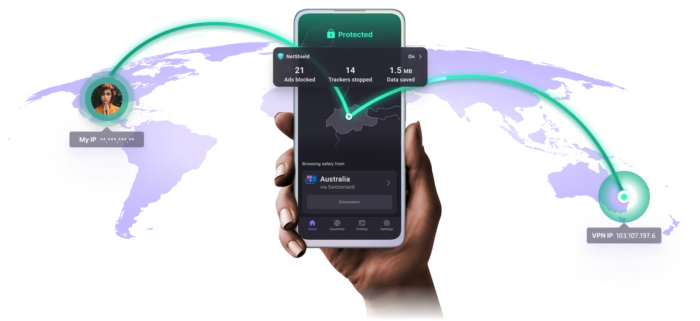
You can change your Google Play Store country through the Play Store settings, but Google applies several important restrictions. You must currently be in the new country, add a payment method issued there, and wait at least 90 days between country changes.
Changing your internet address with a VPN does not complete the process by itself. Google can evaluate your payments profile, account history, family membership, device location, and payment method in addition to your IP address.

Access content across the globe at the highest speed rate.
🔥 Save 81% + 2 bonus months! 🔥
70% of our readers choose Private Internet Access
70% of our readers choose ExpressVPN
2
Browse the web from multiple devices with industry-standard security protocols.
🔥 Save 73%! 🔥

Faster dedicated servers for specific actions (currently at summer discounts)
🔥 Save 69%! 🔥
A country change can also affect your apps, subscriptions, Google Play balance, Play Points, prices, and available content. Review these consequences before updating the account.
Google Play country change requirements
Your Google Play country determines which apps, games, books, films, subscriptions, payment options, and prices appear in the store. Developers and publishers can release content only in selected regions, which means the catalog can differ significantly between countries.
Google’s official Google Play country instructions list three main conditions for setting up a new region:
- You must currently be in the new country or region.
- You must have a payment method from that country or region.
- You must not have changed your Play country within the previous 90 days.
You also cannot change the region while you belong to a Google Family group. A family member must leave the group first, while a family manager may need to delete the family group before changing countries.
| Requirement | What Google expects |
|---|---|
| Physical location | You must be present in the new country or region |
| Payment method | You need a valid payment method from the new country |
| Waiting period | At least 90 days between country changes |
| Google Family | You cannot change countries while in a family group |
| Processing time | The change can take up to 48 hours |
Can a VPN change your Google Play country?
A VPN changes the public IP address visible to Google and can make an internet connection appear to originate in another country. However, Google does not rely on the IP address alone when deciding whether an account qualifies for a country change.
The company may compare the connection with the account’s payments profile, billing address, payment card, Google Family status, recent country changes, device information, and other location signals.
This means connecting to a foreign VPN server does not guarantee that the new country will appear under Country and profiles. Even when the option appears, Google can still require a valid payment method and address from the selected country.
A VPN may help travelers access an existing country profile or establish a consistent internet connection while physically present in that country. It should not serve as a substitute for Google’s location and payment requirements.
How to change your country in Google Play
Complete the change through the Google Play Store application on an Android phone or tablet. Make sure you have a supported payment method and that your device currently shows the correct physical country.
- Open the Google Play Store application.
- Tap your profile picture in the upper-right corner.
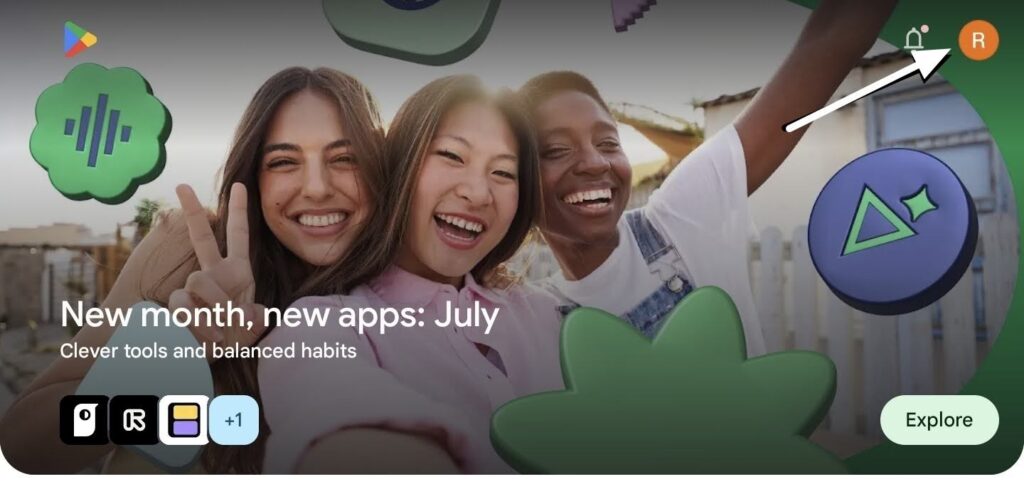
3.Tap Settings.
4.Open General.
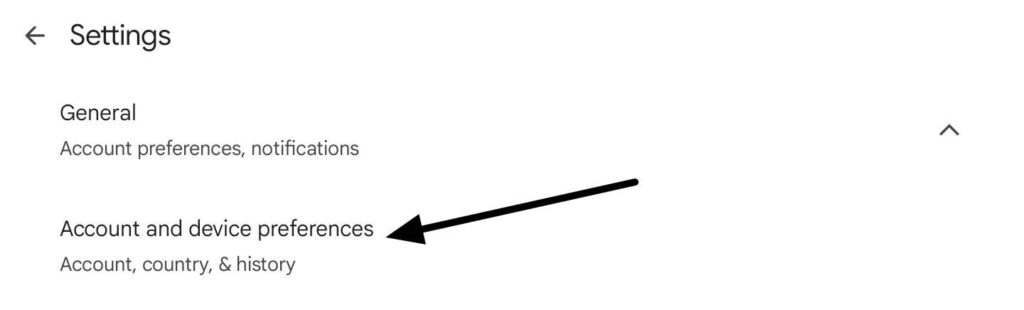
5Tap Account and device preferences.
6Open Country and profiles.
7Select the new country or region.
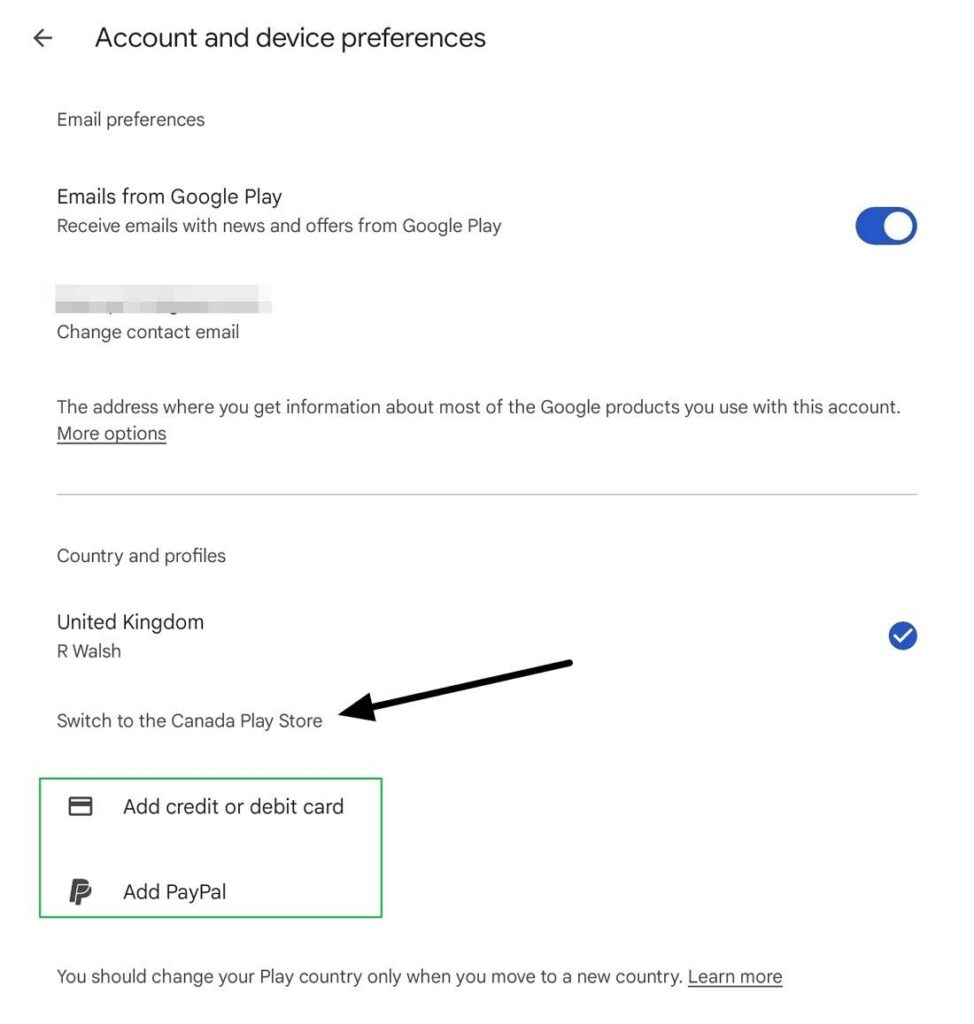
8Follow the instructions to add a payment method from that country.
9Review the warning and confirm the change.
10Allow up to 48 hours for the new profile to appear.
If the account already has more than one country profile, Google may let you switch between the available profiles from the same Country and profiles menu.
The exact names of menus can vary slightly between Android versions and device manufacturers. Updating the Play Store and Android system before starting can help ensure that the current options appear.
What happens after you change countries?
A Google Play country change affects more than the currency shown beside apps. It can alter the content available to the account and the payment profile used for future purchases.
Some apps, games, books, films, television programs, and subscriptions may not exist in the new region. Previously installed apps may remain on the device, but Google does not guarantee that users can download them again or continue receiving them through the new store.
Review these effects before changing:
- Your old Google Play balance will not work in the new country.
- Your Google Play balance remains attached to the old country.
- You will lose your Google Play Points and current level.
- Some apps and other content may disappear from the store.
- Some subscriptions may not operate in the new region.
- Prices and available payment methods may change.
- Google Play Pass availability may differ.
If you later return to the old country and switch the account back after the required waiting period, the balance linked to that old country may become available again.
What happens to Google Play subscriptions?
Existing subscriptions generally remain connected to the old payments profile unless you cancel them. This can create confusion because the account may show a new country while an older subscription continues billing through the previous profile.
To move a service to the new country, you may need to cancel the existing subscription and subscribe again using the new payments profile. Availability, price, billing currency, and included content can differ.
Some developers may cancel a subscription when they do not offer it in the new country. Check every important subscription before switching, particularly cloud storage, media services, games, and paid applications.
How to create a payments profile for another country
A Google payments profile can belong to only one country. You cannot edit the country attached to an existing profile, so you may need to create a separate profile for the new location.
Google explains this process in its payments profile country guide.
- Sign in to the Google Payments settings page.
- Locate Payments profile.
- Find Country or Region and select Edit.
- Choose Create new profile.
- Select the new country or region.
- Enter your name and local address.
- Save the new profile.
- Add a supported payment method for that country when requested.
Creating a second payments profile does not automatically move existing subscriptions. Services linked to the old profile may continue using it until you cancel or update them.
A local payment card can still fail when its billing address, issuing country, account name, or other details do not match the new profile. Enter the information exactly as it appears in the payment provider’s records.
Why the Country and profiles option may be missing
Google only displays the country-change option when the account appears eligible. The absence of the setting does not necessarily indicate a Play Store error.
The option may remain hidden when:
- You changed your Play country during the past 90 days.
- Google does not detect that you are in a new country.
- You belong to a Google Family group.
- Your payments profile still points to the old country.
- You do not have a supported payment method for the new region.
- The account faces an additional restriction.
Check the Country or Region section of Google Payments to confirm which country Google associates with the account. Create a new profile when the existing profile uses the wrong country.
Google may apply restrictions beyond the standard 90-day rule. Contact Google Play support when you meet the published requirements but the setting remains unavailable.
How long does a Google Play country change take?
Google says a Play country change can take up to 48 hours. The new catalog, currency, and profile may not appear immediately after confirmation.
Keep the account signed in, use a stable connection, and avoid repeatedly changing payment or account details during this period. Frequent changes can make troubleshooting more difficult.
After 48 hours, reopen the Play Store and check Country and profiles again. If the old region remains, confirm the payments profile before clearing application data.
How to clear the Google Play Store cache
Clearing the cache can force the Play Store to refresh temporary information after a valid country change. It does not override Google’s eligibility rules or replace the local payment requirement.
Google lists clearing the cache and storage among its official Play Store troubleshooting steps.
- Find the Google Play Store icon on the home screen or app list.
- Touch and hold the icon.
- Tap App info.
- Open Storage and cache.
- Tap Clear cache.
- Tap Clear storage.
- Confirm the deletion.
- Open the Play Store again.
Clearing Play Store data may reset local settings such as parental controls and purchase password protection. Review and restore those settings after reopening the store.
Should you clear Google Play services data?
Do not clear Google Play services storage as an early troubleshooting step. Google recommends trying other options first because deleting this data can affect information stored across the device.
Clearing Google Play services storage may remove saved passwords, transit cards, virtual payment cards, and other Google Pay information. It may also require you to sign in again and reauthenticate payment methods.
Try these safer steps first:
- Wait for the 48-hour processing period to end.
- Confirm the country in the Google Payments profile.
- Check the local payment method and billing address.
- Update the Google Play Store.
- Restart the Android device.
- Clear only the Play Store cache and storage.
- Contact Google support if the problem continues.
Does a dedicated VPN IP help?
A dedicated VPN address remains assigned to one customer rather than being shared among many users. It can reduce CAPTCHA requests and reputation problems caused by other people using the same server address.
However, a dedicated IP does not provide a local payment method, payments profile, address, or physical presence. It cannot bypass the 90-day limit or Google Family restrictions.
Users should not purchase a dedicated IP solely to change Google Play regions. It may improve connection consistency, but it does not alter the official account requirements.
Do you need a GPS spoofing app?
A GPS spoofing application should not form part of the normal Google Play country-change process. Google’s instructions require genuine presence in the new country rather than a simulated device location.
Location-spoofing applications can also request powerful permissions, collect sensitive information, interfere with maps and emergency features, or violate the rules of location-dependent services.
Do not install an unknown GPS spoofing app to force the country option to appear. Confirm the payments profile, country eligibility, family status, and payment method instead.
Can you change countries to download one app?
Changing the main Play country for a single application can create more problems than it solves. The account may lose access to its balance, Play Points, subscriptions, and region-specific content for at least 90 days.
Before changing, check whether the developer provides the app through its official website, another approved Android store, a web application, or a version designed for travelers.
Do not download APK files from unverified websites. Modified or repackaged applications can contain malware, steal account credentials, or avoid important update protections.
Using a second Google account
A separate Google account can help keep subscriptions, balances, and content associated with different countries apart. However, the second account still needs to meet Google’s location and payment requirements.
Creating another account does not guarantee access to a foreign Play catalog. Google may still require the user to be in that country and provide a valid local payment method.
Using separate accounts can also complicate app purchases, subscription management, cloud backups, parental controls, and device ownership. Record which account owns each paid app before adopting this approach.
Google Play country troubleshooting checklist
| Problem | What to check |
|---|---|
| New country does not appear | Physical location, 90-day limit, family group, and payments profile |
| Payment method rejected | Issuing country, billing address, supported card type, and profile country |
| Old store remains after changing | Wait 48 hours, restart, and clear Play Store cache |
| Old balance is missing | The balance remains attached to the previous country |
| Subscriptions do not appear | They may remain linked to the old payments profile |
| Some apps remain unavailable | Developer restrictions, device compatibility, age rules, or account eligibility |
The official Google Play country support page also recommends checking the family group, payments profile, Play Store version, and cache when a valid change does not appear.
For payments profile problems, use Google’s country-specific profile instructions to create the correct profile rather than trying to edit the country of an existing one.
If the application stops working during troubleshooting, follow Google’s Play Store repair guidance and avoid clearing Google Play services data until simpler options fail.
Should you change your Google Play Store country?
Change your Google Play country when you have genuinely moved to another country and expect to use its payment methods, applications, subscriptions, and digital catalog for at least the next 90 days.
A VPN alone cannot reliably or officially change the region. Google requires physical presence and a local payment method, while additional account and family restrictions may apply.
Before confirming, spend any balance you still need, review subscriptions, understand that Play Points will not transfer, and check whether essential apps remain available. Then allow up to 48 hours for Google to complete the update.
FAQ
Open the Play Store, tap your profile picture, and go to Settings, General, Account and device preferences, then Country and profiles. Select the new country and add a payment method issued there. Google says the change can take up to 48 hours.
A VPN can change the IP address and apparent internet location, but it does not meet all of Google’s requirements. Google also requires users to be in the new country and have a payment method from that country or region.
Google requires users to wait at least 90 days after initially setting a Play country and at least 90 days between subsequent country changes. Additional restrictions may apply to some accounts.
The option may be missing if you changed countries within the past 90 days, are not currently in a new country, belong to a Google Family group, lack a local payment method, or have an incorrect payments profile.
The balance remains linked to the old Google Play country and cannot be used in the new one. It may become available again if you later switch the account back to the previous country.
No. Google says members of a Google Family group cannot change their Play country. A member must leave the group first, while the family manager may need to delete the family group.
Clearing the cache can refresh the store after an eligible country change, but it cannot bypass Google’s location, payment, family, or 90-day requirements. Clearing storage may also reset parental controls and password protection settings.


Read our disclosure page to find out how can you help VPNCentral sustain the editorial team Read more


Improve this guide




User forum
1 messages