
How to Watch Edge of Tomorrow on Netflix in the US with a VPN (2026)


 12 min. read
  Published on

Edge of Tomorrow (2014) is currently available on Netflix in Singapore. The official Netflix Singapore page confirms that the science fiction action movie starring Tom Cruise, Emily Blunt, and Brendan Gleeson is part of the country’s streaming catalog, with original English audio and English subtitles.
However, Edge of Tomorrow is not currently available on Netflix US. If you’re in the United States, you can try connecting to a Singapore VPN server using Private Internet Access, ExpressVPN, or NordVPN. All three providers offer Singapore IP addresses.

Access content across the globe at the highest speed rate.
🔥 Save 81% + 2 bonus months! 🔥
70% of our readers choose Private Internet Access
70% of our readers choose ExpressVPN
2
Browse the web from multiple devices with industry-standard security protocols.
🔥 Save 73%! 🔥

Faster dedicated servers for specific actions (currently at summer discounts)
🔥 Save 69%! 🔥
Keep in mind that connecting to Singapore does not guarantee access to the movie. According to Netflix’s VPN guidelines, the service may recognize VPN connections and limit the available catalog to titles with worldwide licensing rights.
How to watch Edge of Tomorrow on Netflix with a VPN
Since Netflix Singapore currently carries Edge of Tomorrow, you can try connecting to a Singapore VPN server before opening Netflix. Follow these steps:
- Choose a VPN. Private Internet Access is our first recommendation, followed by ExpressVPN and NordVPN.
- Download and install the VPN app.
- Connect to a server in Singapore.
- Fully close Netflix if it is already open.
- Reopen Netflix after the VPN connects.
- Sign in with your existing Netflix account.
- Search for Edge of Tomorrow.
- Start playback if the title appears.
Singapore is a suitable location to try because the Netflix Singapore listing displays Edge of Tomorrow without an unavailability warning. The page also confirms English audio, English and Simplified Chinese subtitles, and offline downloads.
Make sure you select the 2014 movie directed by Doug Liman rather than another science fiction title. You may also encounter the name Live Die Repeat, which is associated with the same film. However, Netflix may still recognize your VPN connection and prevent playback.
Best VPNs for watching Edge of Tomorrow on Netflix
Private Internet Access, ExpressVPN, and NordVPN all provide Singapore VPN connections. PIA includes a dedicated streaming-optimized location, ExpressVPN offers several named Singapore locations, and NordVPN provides more than 70 servers in the country.
| VPN | Singapore locations | Option to try first |
|---|---|---|
| Private Internet Access (Editor’s Choice) | Singapore, SG Streaming Optimized | SG Streaming Optimized |
| ExpressVPN | Singapore, Singapore – CBD, Singapore – Jurong, Singapore – Marina Bay | Singapore – CBD |
| NordVPN | 70+ Singapore servers, automatic or individual server selection | Automatic Singapore server selection |
These locations come from the providers’ official server directories. Although all three services offer Singapore IP addresses, none guarantees access to Edge of Tomorrow through Netflix.
1. Private Internet Access
Private Internet Access is our Editor’s Choice for Edge of Tomorrow because it offers a dedicated SG Streaming Optimized location alongside its standard Singapore VPN connection.
According to the official PIA server directory, updated October 1, 2026, the available Singapore locations include Singapore and SG Streaming Optimized.
Start with SG Streaming Optimized. PIA provides this location specifically for streaming, making it a practical first connection to try when accessing Singapore streaming services.
Open the PIA application, navigate to the VPN server list, and search for Singapore. Select SG Streaming Optimized and connect before reopening Netflix.
If Edge of Tomorrow does not appear, disconnect and switch to the standard Singapore location. You can also reconnect to SG Streaming Optimized to try another available Singapore server.
Unlike providers that list several neighborhoods or cities within Singapore, PIA’s current application directory identifies two selectable Singapore options. It does not separately list locations such as Jurong or Marina Bay.
PIA distinguishes between physical and virtual VPN server locations. A virtual server gives users an IP address associated with one country while the physical hardware operates in another.
According to PIA’s virtual server documentation, Singapore does not appear among its published virtual IP locations. The provider also identifies Singapore as the physical hosting location for several virtual services serving other Asian countries.
These details confirm that PIA maintains physical infrastructure in Singapore. However, the documentation does not establish the exact hosting arrangement of every individual Singapore endpoint, including SG Streaming Optimized.
PIA supports WireGuard and OpenVPN protocols. WireGuard is a reasonable starting point because its lightweight design can provide efficient encrypted connections.
If Netflix does not display Edge of Tomorrow, try switching between SG Streaming Optimized and the standard Singapore location. Clearing cookies, changing protocols, or restarting the VPN application may also resolve connection problems.
PIA provides additional recommendations in its streaming support guide.
Even with a streaming-optimized connection, Netflix may recognize PIA’s IP addresses and restrict access to regional titles. PIA cannot guarantee that Edge of Tomorrow will appear or play.
2. ExpressVPN
ExpressVPN is another option for connecting to Singapore. The provider maintains several Singapore server locations, giving users alternatives if one connection experiences problems.
The official ExpressVPN server directory currently lists Singapore, Singapore – CBD, Singapore – Jurong, and Singapore – Marina Bay.
Start with Singapore – CBD. Open the ExpressVPN application, search for Singapore in the location list, and select CBD. Wait until the VPN confirms the connection before reopening Netflix.
If Edge of Tomorrow does not appear, disconnect and try Marina Bay. Jurong provides another Singapore location, while the standard Singapore option offers an additional connection choice.
These options allow you to try different Singapore IP addresses without switching countries. This may help when one server experiences connection problems or Netflix recognizes a particular IP address.
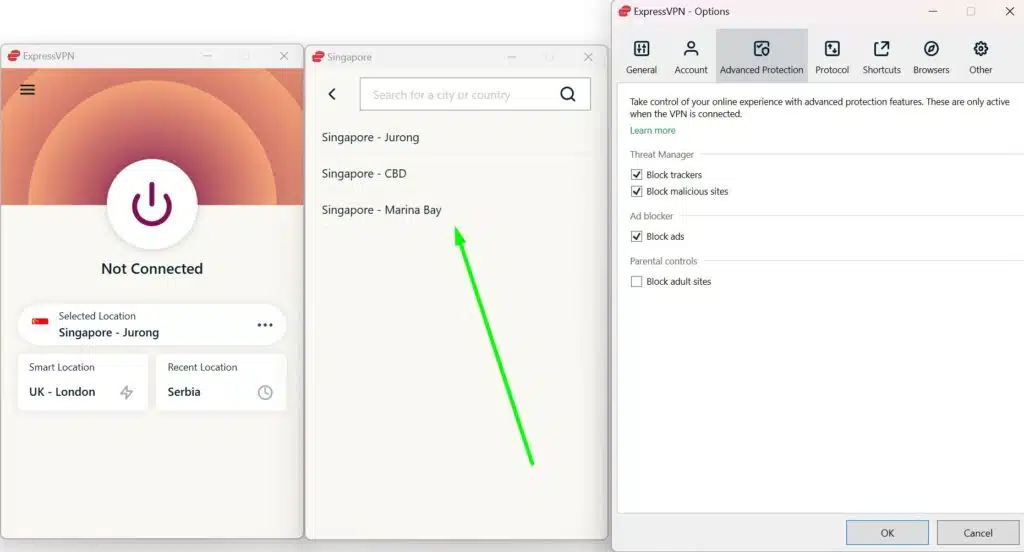
ExpressVPN supports Lightway, WireGuard, and OpenVPN at its listed Singapore locations. Protocol availability can vary depending on your device and application version.
Lightway is ExpressVPN’s own VPN protocol, designed to establish encrypted connections efficiently. You can also try WireGuard or OpenVPN if your device supports them and you experience connection issues.
According to ExpressVPN’s virtual server documentation, the company uses virtual locations when its server hardware operates outside the country associated with the IP address.
Singapore does not appear among ExpressVPN’s published virtual locations. Its server directory lists Singapore, CBD, Jurong, and Marina Bay as regular locations rather than virtual connections hosted abroad.
ExpressVPN also uses Singapore infrastructure to host virtual servers for certain other Asian countries. However, its published documentation does not establish the precise physical hardware arrangement of every individual Singapore endpoint.
The provider’s server directory confirms support for multiple VPN protocols across its Singapore locations. Choosing another server or protocol may help if your connection becomes unstable.
If Netflix does not display Edge of Tomorrow, switch between CBD, Marina Bay, Jurong, and the standard Singapore location before restarting Netflix.
However, ExpressVPN cannot guarantee access to Netflix Singapore. Netflix may recognize ExpressVPN’s IP addresses as VPN traffic and restrict titles licensed specifically for Singapore.
3. NordVPN
NordVPN offers another way to connect to Singapore, with more than 70 Singapore servers and automatic connection options.
According to NordVPN’s official Singapore server page, the provider currently advertises more than 70 servers in Singapore.
For the first connection, open NordVPN, select Singapore, and allow the application to choose an available server automatically. This is the simplest starting point if you do not have a preferred server.
You can also select an individual Singapore server through the available location controls. If Netflix does not display Edge of Tomorrow, disconnect and reconnect to another server in Singapore.
NordVPN’s Singapore page does not identify separately selectable neighborhoods such as CBD, Jurong, or Marina Bay. Instead, it documents country-level selection and individual server choices.
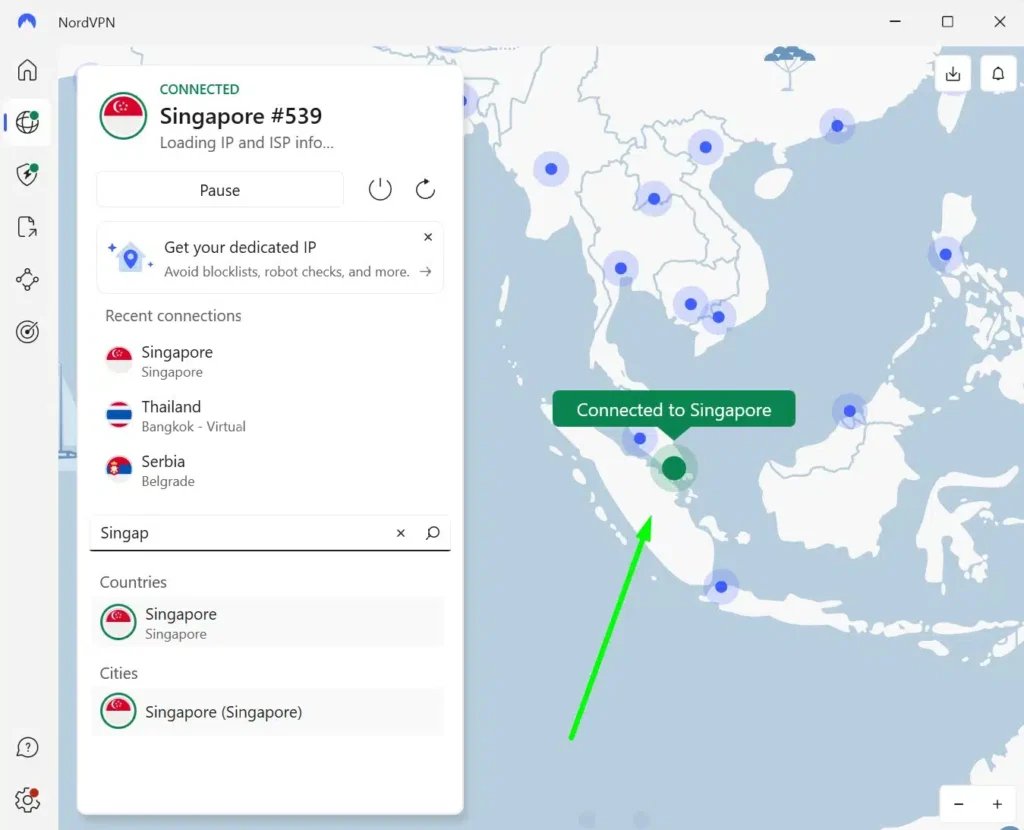
The provider’s advertised server count may change as NordVPN expands or adjusts its network. Its official directory confirms Singapore IP availability but does not publish the physical hosting arrangements of every individual endpoint.
NordVPN also includes SmartPlay, a feature that combines VPN encryption with DNS technology to improve streaming compatibility while maintaining a private connection.
According to NordVPN’s SmartPlay documentation, the feature activates automatically when you connect through the NordVPN application.
You do not need to enable SmartPlay separately, install an additional extension, or change your DNS settings. It works in the background as part of your regular VPN connection.
NordVPN also offers NordLynx, a protocol based on WireGuard technology that aims to provide efficient encrypted connections.
If you experience buffering or slow loading times, reconnecting to another Singapore server may help. Actual performance depends on your internet connection, network conditions, and distance from the server.
However, SmartPlay does not guarantee access to Edge of Tomorrow or any other regional Netflix movie. Netflix may still recognize NordVPN and limit the available catalog.
What to do if Edge of Tomorrow does not appear
If Netflix does not display Edge of Tomorrow after you connect to Singapore, your browser may retain previous location information, or Netflix may have recognized your VPN connection. Try these troubleshooting steps:
- Close Netflix completely.
- Disconnect from the VPN.
- Reconnect to Singapore.
- Try another server or location in the same country.
- Clear Netflix cookies and your browser cache.
- Open a private or incognito browser window.
- Reopen Netflix and sign in again.
- Search for Edge of Tomorrow.
Private Internet Access users should start with SG Streaming Optimized, followed by the standard Singapore location. ExpressVPN users can switch between CBD, Marina Bay, Jurong, and Singapore. NordVPN users can reconnect automatically or select another individual Singapore server.
Make sure you search for Edge of Tomorrow (2014), starring Tom Cruise, Emily Blunt, and Brendan Gleeson. You can also look for Live Die Repeat, a name associated with the same movie.
If the movie still does not appear, Netflix may be restricting its catalog because of VPN detection. The Netflix missing titles guide explains other possible causes, including regional licensing changes, maturity restrictions, and language preferences.
Netflix may detect the VPN
A VPN changes the public IP address Netflix sees when your device connects to the service. For example, connecting to a Singapore VPN server generally gives Netflix a Singapore IP address instead of your regular US address.
However, a Singapore IP address does not guarantee access to the country’s Netflix catalog. Netflix may recognize that the connection comes from a VPN provider and limit which movies and shows appear.
According to Netflix’s official VPN support page, users connecting through a VPN may only see titles for which Netflix has worldwide distribution rights.
That means Edge of Tomorrow may remain unavailable in your Netflix search results even when your VPN application shows Singapore as the connected country.
Trying another Singapore server may resolve some connection problems, but Netflix can still restrict regional playback. No VPN provider guarantees access to every Netflix catalog.
Can you use a Netflix ad-supported plan with a VPN?
No. Netflix currently states that its ad-supported experience does not support VPN connections.
If you subscribe to Netflix with ads, you may encounter playback errors or VPN-related restrictions when connecting through Private Internet Access, ExpressVPN, or NordVPN.
Netflix confirms this limitation in its VPN support documentation. To use an ad-supported subscription normally, disconnect your VPN.
An ad-free Netflix subscription avoids this particular restriction, but Netflix may still detect VPN connections and limit access to region-specific movies.
Does changing the VPN location change your Netflix account?
No. Connecting to a Singapore VPN server does not change your Netflix email address, password, profiles, or existing account credentials.
The VPN changes the public IP address Netflix sees. It does not automatically convert your US Netflix subscription into a Singapore account or modify your subscription information.
You can continue signing in with your existing Netflix credentials. However, the movies and shows Netflix displays may depend on regional licensing restrictions, account settings, and whether the service recognizes your VPN connection.
Current US streaming listings for Edge of Tomorrow identify services such as Paramount+ and fuboTV rather than Netflix. These services provide an alternative way to watch the movie without changing your VPN location.
When you disconnect from the VPN, Netflix generally recognizes your regular internet location again without changing your account settings.
Which VPN should you use?
Private Internet Access is our first recommendation because it offers a dedicated SG Streaming Optimized location alongside its standard Singapore VPN connection. These provide two documented options to try, although Netflix may still detect the VPN.
ExpressVPN is a useful alternative thanks to its Singapore locations in CBD, Jurong, and Marina Bay. NordVPN also offers more than 70 Singapore servers and includes SmartPlay, which activates automatically when you connect.
Netflix Singapore currently carries Edge of Tomorrow (2014), making Singapore the verified international region for this guide. However, licensing agreements, VPN detection, and server availability can change, so connecting to Singapore does not guarantee playback from the United States.
Which Netflix country currently has Edge of Tomorrow?
Edge of Tomorrow (2014) is currently available on Netflix Singapore. Netflix’s official Singapore title page confirms original English audio, subtitles, and downloads. Current US streaming listings do not include Netflix.
How can I watch Edge of Tomorrow on Netflix in the US?
You can try connecting to a Singapore VPN server using Private Internet Access, ExpressVPN, or NordVPN. Restart Netflix, sign in with your existing account, and search for Edge of Tomorrow (2014). Netflix may detect the VPN, so playback is not guaranteed.
What is the best VPN for Edge of Tomorrow on Netflix?
Private Internet Access is our Editor’s Choice because it offers an SG Streaming Optimized location alongside a standard Singapore VPN connection. ExpressVPN and NordVPN also provide Singapore IP addresses, but no VPN guarantees access to Netflix’s regional catalog.
What should I do if Edge of Tomorrow does not appear?
Close Netflix, disconnect and reconnect to a Singapore VPN server, and try another server in Singapore. Clear Netflix cookies, open a private browser window, and sign in again. Make sure you search for Edge of Tomorrow (2014). Netflix may still restrict playback when it detects a VPN.
Can I use a Netflix ad-supported plan with a VPN?
No. Netflix currently does not support VPN connections with its ad-supported experience. Disconnect the VPN to use that plan normally. An ad-free subscription avoids this particular restriction, but Netflix may still limit regional content when it detects a VPN.


Read our disclosure page to find out how can you help VPNCentral sustain the editorial team Read more


Improve this guide




User forum
0 messages