
How to Watch Tag on Netflix in the US with a VPN (2026)


 18 min. read
  Published on

Tag (2018) is available in the Netflix Brazil catalog, where the action comedy appears under the Portuguese title Te Peguei! Directed by Jeff Tomsic, the movie stars Ed Helms, Jeremy Renner, Jon Hamm, Jake Johnson, Hannibal Buress, and Isla Fisher. The story follows five childhood friends who continue their annual game of tag well into adulthood. The official Netflix Brazil movie page lists English original audio, Portuguese and Spanish dubbing, and English, Portuguese, and Spanish subtitles.
Unfortunately, Tag is not currently available on Netflix US. American viewers interested in the Brazilian catalog can find Brazilian VPN connections through Private Internet Access, ExpressVPN, and NordVPN. All three providers offer servers in Brazil, although their connection options, streaming features, and usage restrictions differ.

Access content across the globe at the highest speed rate.
🔥 Save 81% + 2 bonus months! 🔥
70% of our readers choose Private Internet Access
70% of our readers choose ExpressVPN
2
Browse the web from multiple devices with industry-standard security protocols.
🔥 Save 73%! 🔥

Faster dedicated servers for specific actions (currently at summer discounts)
🔥 Save 69%! 🔥
However, a Brazilian VPN connection does not guarantee access to Tag. While Netflix’s Portuguese-language Brazil page displays the film, its alternate English-language page has returned an unavailability warning. Netflix may also restrict VPN connections to titles with worldwide licensing rights. Its official VPN support documentation explains these limitations. Users must follow Netflix’s restrictions and their VPN provider’s applicable terms.
How to watch Tag on Netflix with a VPN
Netflix Brazil lists Tag under its localized title, Te Peguei! If Netflix and your VPN provider permit your intended use, you can check whether the film appears through a Brazilian connection using these steps.
- Choose a VPN provider. Private Internet Access is our first recommendation for its Brazilian server features, followed by ExpressVPN and NordVPN.
- Download and install the VPN application from your selected provider’s official website.
- Connect to Brazil. PIA offers Brazil and BR Streaming Optimized, while ExpressVPN and NordVPN provide Brazilian server connections.
- Fully close Netflix, including open browser tabs and applications running in the background.
- Reopen Netflix after establishing the VPN connection.
- Sign in using your existing Netflix account credentials.
- Search for Tag (2018), Te Peguei!, or Jogo da Apanhada.
- Start playback if Netflix displays the movie and your subscription, licensing rights, and applicable service terms permit access.
Make sure the VPN application displays Brazil as your selected location. Automatic connection features may choose a nearby server based on speed and latency, which could result in an American connection rather than a Brazilian one.
You can also visit the official Brazilian Netflix listing for Tag. Netflix identifies the film as a 2018 comedy and lists Ed Helms, Jeremy Renner, and Jon Hamm among its leading actors.
The film’s Brazilian Netflix title is Te Peguei!, while Brazilian streaming databases also use Jogo da Apanhada. Searching under these alternative names may help identify the correct movie when browsing localized listings.
English-speaking viewers should also check the available audio and subtitle options. Netflix Brazil currently lists English original audio and English subtitles alongside Portuguese and Latin American Spanish options. Actual language availability may vary by device, profile, or licensing arrangement.
Even after establishing a Brazilian connection, Netflix may recognize VPN traffic and restrict the available catalog. A Brazilian IP address alone does not guarantee that Tag will appear or play.
Best VPNs for watching Tag on Netflix
Private Internet Access, ExpressVPN, and NordVPN all offer officially documented Brazilian VPN locations. Their primary differences involve streaming optimization, server infrastructure, protocol support, and the flexibility of their connection options.
| VPN | Server locations in Brazil | Option to try first |
|---|---|---|
| Private Internet Access (Editor’s Choice) | Brazil, BR Streaming Optimized | BR Streaming Optimized for permitted local streaming |
| ExpressVPN | Two Brazilian server locations with São Paulo IP addresses | Brazil automatic selection or the first available Brazilian location |
| NordVPN | São Paulo, with 20+ Brazilian servers advertised | Brazil automatic connection |
These server choices come from the providers’ official documentation. They do not represent independently verified Netflix playback results.
All three providers can establish connections with Brazilian IP addresses. However, Netflix’s VPN detection and regional licensing rules can prevent access to Tag regardless of which server or protocol you select.
1. Private Internet Access
Private Internet Access is our Editor’s Choice because it offers a dedicated Brazilian streaming-optimized connection, straightforward server selection, and support for both WireGuard and OpenVPN.
According to PIA’s official server location directory, its Brazilian options are Brazil and BR Streaming Optimized.
Brazilian server locations and streaming features
PIA provides two documented Brazilian connection options.
The standard Brazil location supports general encrypted browsing, privacy protection, and everyday internet activities. BR Streaming Optimized uses infrastructure that PIA specifically configures for streaming performance.
For streaming activities that comply with applicable service terms, BR Streaming Optimized is the logical first choice. The provider designs its streaming-focused locations to help maintain stable connections during video playback.
However, streaming optimization concerns connection performance rather than content licensing. PIA does not guarantee that selecting BR Streaming Optimized will make Tag available on Netflix.
The company’s public location directory does not identify a specific Brazilian city for these two entries. Therefore, users should not assume that a particular endpoint operates from São Paulo or Rio de Janeiro without additional documentation.
Physical versus virtual server locations
Private Internet Access operates physical and virtual VPN locations worldwide.
A physical location generally uses server hardware in the country associated with its IP address. A virtual location provides an IP address from one country while physically hosting the underlying server in another.
Brazil does not appear in PIA’s current published virtual server location list.
This means the company does not currently identify its Brazilian endpoints as virtual locations in that documentation. However, the public listing does not provide the individual physical address of every Brazilian server.
Server placement can affect performance. Users connecting from the United States to Brazil may experience additional latency compared with nearby American servers.
How to select a Brazilian PIA connection
The PIA application includes a searchable list of available server locations.
To select a Brazilian connection, follow these steps:
- Open Private Internet Access and sign in.
- Select VPN SERVER to open the server directory.
- Search for Brazil or Streaming.
- Choose Brazil or BR Streaming Optimized.
- Connect and confirm that PIA displays an active connection.
For permitted local streaming in Brazil, BR Streaming Optimized is a reasonable starting point. If that endpoint experiences ordinary connectivity issues, the standard Brazil location provides an alternative.
PIA also allows users to save frequently selected locations for quicker access during future sessions.
WireGuard and OpenVPN performance
Private Internet Access supports WireGuard and OpenVPN, two established VPN protocols.
WireGuard uses a lightweight architecture that helps reduce processing overhead. This can improve connection efficiency when network conditions are favorable.

OpenVPN provides a mature alternative with additional configuration options and broad compatibility across devices and networks.
On supported desktop applications, users can find protocol options in the Settings menu. Changing protocols generally requires disconnecting and reconnecting the VPN.
For video streaming, a stable connection and sufficient sustained download speed matter more than the specific protocol name. WireGuard is a sensible first option, while OpenVPN can help when network conditions interfere with WireGuard traffic.
Neither protocol changes Netflix’s regional licensing rules or guarantees access to Tag.
PIA streaming troubleshooting
PIA’s official streaming support guide recommends several measures for ordinary streaming connection problems.
These include clearing browser cookies and cache, reconnecting the VPN, and installing the latest application updates.
Users can also compare the standard Brazil location with BR Streaming Optimized to determine whether connection instability affects one particular endpoint.
However, changing servers does not guarantee access to Netflix’s Brazilian catalog. If Netflix identifies a VPN connection, it may restrict the available content independently of the connection’s performance.
PIA’s geographic restriction policy
There is an important contractual limitation for American subscribers.
PIA explicitly prohibits using its service to circumvent geographic restrictions imposed by content providers. Its streaming support documentation also instructs users to connect to a server in the country where they are physically located.
Therefore, American viewers should not interpret PIA’s Brazilian server options as permission to bypass Netflix’s regional licensing restrictions.
Review the Private Internet Access Terms of Service before connecting.
For legitimate privacy protection and permitted streaming activity in Brazil, PIA offers flexible protocols, straightforward location selection, and dedicated streaming infrastructure.
2. ExpressVPN
ExpressVPN ranks second because it operates two documented Brazilian server locations with São Paulo IP addresses and supports multiple connection protocols.
The provider’s official São Paulo server page confirms that its Brazilian infrastructure uses physical servers located in São Paulo.
ExpressVPN server locations in Brazil
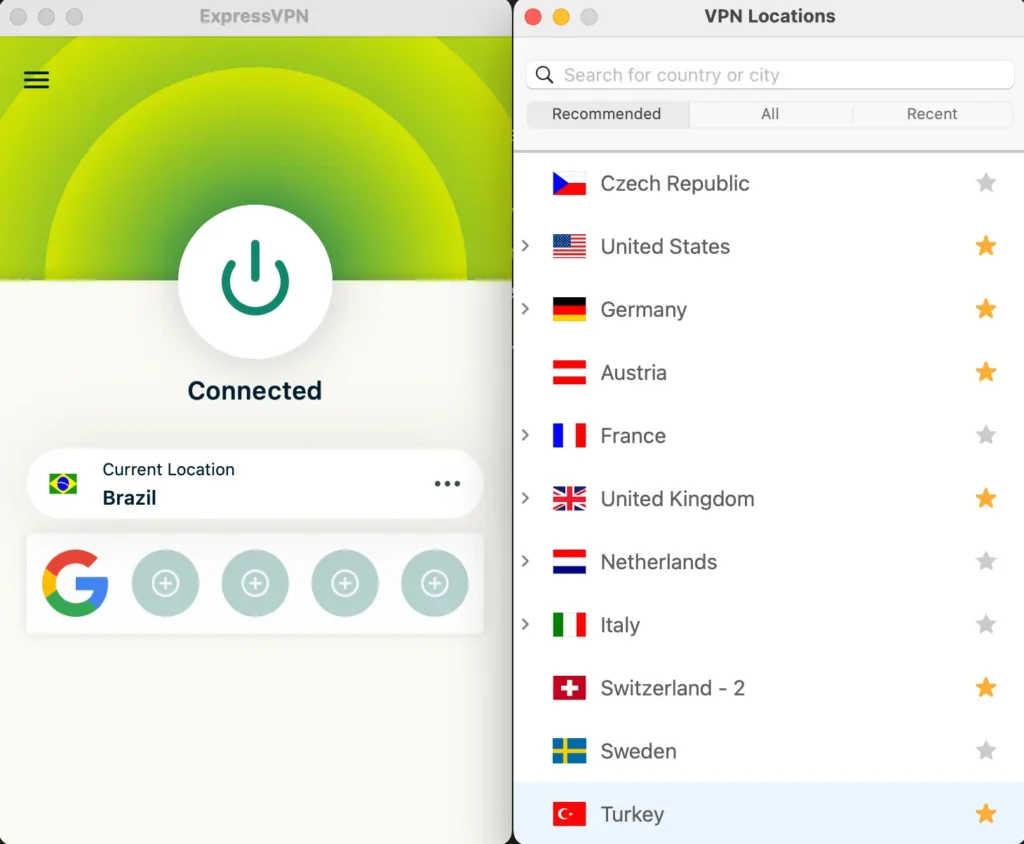
ExpressVPN documents two Brazilian server locations. Its official server directory identifies Brazilian connection entries, and its São Paulo page confirms that both provide São Paulo IP addresses.
These connections provide users with a Brazilian public IP address for encrypted browsing and legitimate online activities.
For general Brazilian VPN use, selecting Brazil manually is a reasonable starting point. The second Brazilian server entry provides an alternative when the first experiences network congestion or connectivity problems.
Unlike providers that advertise Brazilian IP addresses through infrastructure hosted elsewhere, ExpressVPN specifically documents physical server hardware in São Paulo.
Physical server infrastructure
ExpressVPN operates both physical and virtual server locations across its global network.
Virtual VPN locations provide an IP address associated with one country while hosting the underlying hardware in another.
However, ExpressVPN explicitly identifies its Brazilian infrastructure as physical servers located in São Paulo.
Its virtual server documentation explains how the provider distinguishes physical and virtual locations.
This infrastructure detail is useful when evaluating connection routing and geographical latency, although the physical location of a server does not determine Netflix compatibility.
How to connect through ExpressVPN
ExpressVPN allows users to select Brazilian locations manually through its application.
Follow these steps:
- Open the ExpressVPN application and sign in.
- Open the VPN location selector.
- Search for Brazil.
- Select one of the available Brazilian server entries.
- Connect and confirm that the VPN is active.
ExpressVPN also includes Smart Location, which recommends a server based on network conditions such as speed and latency.
However, Smart Location does not necessarily select Brazil. If you specifically need a Brazilian connection for an authorized purpose, choose the country manually.
Lightway, WireGuard, and OpenVPN
ExpressVPN supports Lightway, WireGuard, and OpenVPN on compatible platforms and applications.
Lightway is the company’s proprietary protocol, designed to establish reliable encrypted connections efficiently.
WireGuard offers a lightweight alternative, while OpenVPN provides a widely used protocol with UDP and TCP configurations.
ExpressVPN documents support for these protocols through its server directory and application guidance, although available choices may vary by device.
For most users, automatic protocol selection is a practical starting point. If network instability occurs, testing another supported protocol may improve connection reliability.
Protocol selection can affect speed and stability, but it does not determine whether Netflix allows a particular regional movie to play.
Streaming performance and troubleshooting
ExpressVPN advertises high-capacity Brazilian infrastructure intended to support demanding internet activities, including legitimate streaming.
However, users connecting from the United States to Brazil may experience increased latency because their traffic travels through an additional international network route.
Actual performance depends on internet speed, network congestion, device capabilities, and server load.
If a permitted streaming session experiences buffering, update the application, check your internet connection, and test another available Brazilian endpoint.
ExpressVPN also emphasizes that users must comply with content providers’ terms and applicable copyright rules. It does not encourage unauthorized access to protected content.
Most importantly, Netflix can recognize ExpressVPN traffic and restrict its available catalog. A fast Brazilian server does not guarantee access to Tag from the United States.
3. NordVPN
NordVPN ranks third in our comparison, although it offers an extensive Brazilian server network and several features intended to simplify encrypted streaming connections.
According to the official NordVPN Brazil server page, the provider advertises more than 20 Brazilian servers and identifies São Paulo as a supported location.
Brazilian server coverage
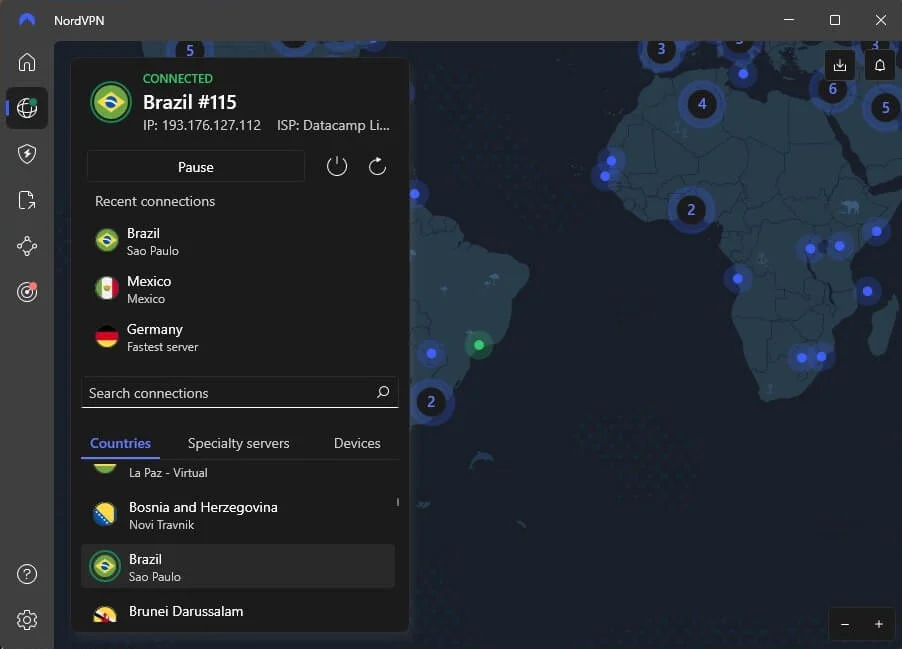
NordVPN allows users to choose Brazil directly through its interactive map or country list.
Selecting Brazil automatically connects to an available server based on the provider’s selection process.
Its documentation identifies São Paulo as a Brazilian IP location. However, the country page does not provide a complete physical-hosting breakdown for every individual endpoint.
NordVPN’s advertised server count indicates the scale of its Brazilian network, not the number of servers guaranteed to work with Netflix.
Users should rely on the current server selections displayed in their applications rather than assuming every advertised endpoint is individually selectable.
How to connect to Brazil with NordVPN
NordVPN supports automatic connections and manual server selection.
Follow these steps to choose Brazil:
- Open NordVPN and sign in.
- Find Brazil on the map or country list.
- Select Brazil to connect automatically.
- Use the available server selection controls if you prefer another Brazilian endpoint.
- Confirm that NordVPN displays an active connection.
Automatic selection is convenient because NordVPN chooses an available server without requiring users to evaluate individual endpoints.
For ordinary connectivity troubleshooting, choosing another available Brazilian server may help when a particular connection becomes unstable.
NordLynx and connection performance
NordVPN uses NordLynx, a VPN protocol based on WireGuard.
NordLynx uses a lightweight approach to encrypted networking to minimize unnecessary overhead while maintaining security.
This can benefit video streaming because playback depends on sustained download speeds and reliable network performance.
However, connecting between the United States and Brazil introduces additional network distance. Latency, routing, and congestion can influence streaming quality.
If a connection becomes unreliable, reconnecting or selecting another Brazilian server can help diagnose an ordinary network issue.
Neither NordLynx nor the size of NordVPN’s Brazilian network guarantees access to Netflix’s regional catalog.
How NordVPN SmartPlay works
NordVPN includes SmartPlay, a feature that combines VPN protection with DNS-related functionality for streaming.
According to NordVPN’s official SmartPlay documentation, SmartPlay activates automatically when users connect through the NordVPN application.
There is no separate installation or activation process.
SmartPlay operates alongside the encrypted VPN connection, helping users access permitted streaming content while maintaining privacy.
It differs from standalone SmartDNS because a complete NordVPN connection encrypts network traffic and hides the user’s ordinary public IP address.
However, SmartPlay does not override Netflix’s licensing restrictions and cannot guarantee that Tag will appear through a Brazilian connection.
NordVPN troubleshooting and limitations
If NordVPN cannot establish a stable Brazilian connection, disconnect and reconnect before making extensive configuration changes.
You can also update the application, check the selected protocol, and test another available Brazilian endpoint.
Make sure another VPN service is not running simultaneously, as competing VPN applications may create routing conflicts.
NordVPN also states that users must not employ SmartPlay or related services to violate copyright laws or applicable restrictions.
Even when NordVPN establishes a successful connection, Netflix may detect VPN traffic and limit the visible catalog to globally licensed titles.
What to do if Tag does not appear
Tag may not appear in Netflix search results even when its Brazilian listing exists. Possible explanations include Netflix’s VPN detection, regional licensing, profile preferences, or ordinary connection issues.
For permitted VPN connection troubleshooting, follow these eight steps:
- Close Netflix completely, including browser tabs and applications running in the background.
- Disconnect from your current VPN connection.
- Reconnect to Brazil if your intended VPN use complies with the applicable terms.
- Try another available Brazilian server or location if the connection itself is unstable.
- Clear Netflix cookies and your browser cache to remove outdated session information.
- Open an incognito or private browser window to test a fresh session.
- Reopen Netflix and sign in with your existing account credentials.
- Search for Tag (2018), Te Peguei!, or Jogo da Apanhada.
Private Internet Access users can compare Brazil with BR Streaming Optimized for permitted connection testing. ExpressVPN offers two Brazilian server entries with São Paulo IP addresses, while NordVPN advertises more than 20 Brazilian servers.
These alternatives may help resolve connectivity issues, but switching servers cannot guarantee access to a regionally licensed movie.
Check that you are searching for the correct film. Tag (2018) is the American comedy starring Ed Helms, Jeremy Renner, and Jon Hamm. The title also refers to other movies, including a Japanese horror film from 2015.
On Netflix Brazil, the localized title is Te Peguei!, while JustWatch Brazil identifies the film as Jogo da Apanhada.
If the movie remains unavailable, check your Netflix profile’s language preferences and maturity settings.
Netflix’s official missing-title troubleshooting guide explains that licensing restrictions, profile settings, and VPN detection can affect search results.
If Netflix recognizes your VPN and restricts regional content, disconnecting the VPN is the most reliable way to restore the catalog normally available in your location.
Netflix may detect the VPN
A VPN changes the public IP address websites and streaming platforms see when you connect to the internet.
For example, connecting through a Brazilian VPN server can make your public IP address appear to originate from Brazil instead of the United States.
However, changing your visible IP address does not automatically grant access to every movie available in Netflix Brazil.
Netflix negotiates streaming rights separately for different countries. Tag may appear in Brazil while remaining unavailable to Netflix subscribers in the United States.
When Netflix detects a VPN connection, it may restrict the visible catalog to movies and television shows with worldwide licensing.
As a result, users may encounter missing titles, unexpected search results, or playback errors despite having a working VPN connection.
Netflix explains this behavior in its official VPN guidance.
Neither a streaming-optimized server nor a specialized VPN protocol guarantees that Netflix will allow Tag to play through a Brazilian connection from the United States.
Can you use a Netflix ad-supported plan with a VPN?
No. Netflix explicitly states that its ad-supported experience does not support VPN connections.
If Netflix detects an active VPN while you use an ad-supported subscription, you may encounter playback errors.
Netflix recommends disconnecting the VPN to restore normal access to the service.
Ad-free subscriptions avoid this particular restriction, but they do not eliminate regional licensing requirements or VPN detection.
Even with an ad-free subscription, Netflix may restrict a VPN connection to globally licensed content rather than displaying the complete Brazilian catalog.
For details, consult Netflix’s official VPN troubleshooting instructions for ad-supported subscribers.
Does changing the VPN location change your Netflix account?
No. Connecting to a Brazilian VPN server does not automatically change your Netflix account country.
Your account credentials, password, profiles, subscription, and payment information remain associated with your existing account.
A VPN changes the public IP address visible to websites, but it does not directly modify your Netflix billing information or registered account details.
Netflix catalogs can differ by region because streaming platforms acquire distribution rights separately in different countries.
However, changing your apparent IP location does not guarantee access to the complete catalog associated with that country.
Netflix may also recognize the VPN connection and restrict regionally licensed movies.
American viewers who cannot find Tag on Netflix can check JustWatch’s current US streaming options for Tag.
At the time of research, JustWatch listed HBO Max and the HBO Max Amazon Channel as subscription options. Digital rental and purchase choices were also available through Amazon Video, Apple TV Store, and Fandango at Home.
These officially licensed alternatives provide a more straightforward way to watch Tag without relying on another country’s Netflix catalog.
Which VPN should you use?
Private Internet Access is our first recommendation for Brazilian VPN features because it offers Brazil and BR Streaming Optimized, alongside WireGuard and OpenVPN support. The provider makes Brazilian server selection convenient and offers infrastructure optimized for permitted streaming activities. However, PIA explicitly prohibits circumventing geographic restrictions, so American users should not interpret its Brazilian servers as permission to bypass Netflix’s licensing rules.
ExpressVPN ranks second with two documented Brazilian server locations using physical infrastructure in São Paulo, plus Lightway, WireGuard, and OpenVPN support where available. NordVPN follows with more than 20 advertised Brazilian servers, São Paulo connection options, NordLynx, and automatically activated SmartPlay. Both provide useful features for legitimate encrypted connections, but neither guarantees Netflix access to Tag.
As of October 13, 2026, Tag (2018) remains unavailable on Netflix US, while Netflix’s Portuguese-language Brazil page and JustWatch Brazil list the movie. Netflix’s alternate English-language Brazil page has returned an unavailability warning, so viewers should verify the title directly. Regional licensing, VPN detection, and provider terms may prevent playback. American subscribers can also watch through officially licensed US streaming alternatives.
Netflix Brazil lists Tag (2018) under the title Te Peguei!, and JustWatch Brazil confirms Netflix availability. However, an alternate English-language Netflix Brazil page has returned an unavailability warning.
Tag has a Netflix Brazil listing, but access through a Brazilian VPN connection from the US is not guaranteed. Netflix may restrict VPN connections to globally licensed titles. Check applicable terms or use a licensed US streaming provider.
Private Internet Access is our first choice for Brazilian VPN features, with Brazil and BR Streaming Optimized locations. ExpressVPN and NordVPN also offer Brazilian servers. PIA prohibits circumventing geographic restrictions, and no provider guarantees Netflix playback.
Restart Netflix, check your profile settings, and search for Tag (2018) or Te Peguei!. Netflix may hide regionally licensed movies when it detects a VPN, so disconnecting the VPN may be necessary.
No. Netflix does not support VPN connections on its ad-supported experience. Disconnecting the VPN is Netflix’s recommended solution. Ad-free plans can still encounter VPN detection and regional catalog restrictions.


Read our disclosure page to find out how can you help VPNCentral sustain the editorial team Read more


Improve this guide




User forum
0 messages