
How to Watch Get Hard on Netflix in the US with a VPN (2026)


 16 min. read
  Published on

Get Hard (2015) is available on Netflix UK, where viewers can find the comedy starring Will Ferrell and Kevin Hart. Directed by Etan Cohen, the movie follows James King, a wealthy hedge fund manager who hires a small-business owner to prepare him for prison after receiving a fraud conviction. The official Netflix UK movie page confirms the film’s listing, including English original audio, English audio description, and English subtitles.
Unfortunately, Get Hard is not currently available on Netflix US. American viewers interested in the British listing can find UK VPN connections through Private Internet Access, ExpressVPN, and NordVPN. Private Internet Access provides streaming-optimized infrastructure in Britain, ExpressVPN offers several British locations, and NordVPN advertises more than 440 UK servers.

Access content across the globe at the highest speed rate.
🔥 Save 81% + 2 bonus months! 🔥
70% of our readers choose Private Internet Access
70% of our readers choose ExpressVPN
2
Browse the web from multiple devices with industry-standard security protocols.
🔥 Save 73%! 🔥

Faster dedicated servers for specific actions (currently discounted)
🔥 Save 69%! 🔥
However, connecting to a British VPN server does not guarantee that Netflix will display or play Get Hard. Netflix may recognize VPN traffic and limit the visible catalog to movies with worldwide licensing rights. Its official VPN support documentation explains these restrictions. Subscribers must also comply with their VPN provider’s terms, including PIA’s prohibition on circumventing geographic content limitations.
How to watch Get Hard on Netflix with a VPN
Netflix UK currently lists Get Hard, but regional licensing and VPN detection may affect playback. If Netflix and your VPN provider permit your intended use, follow these steps to check the British listing.
- Choose a VPN provider. Private Internet Access ranks first, followed by ExpressVPN and NordVPN.
- Download and install the VPN application from your selected provider’s official website.
- Connect to the United Kingdom using an officially documented British server.
- Fully close Netflix, including open browser tabs and background application sessions.
- Reopen Netflix after establishing the VPN connection.
- Sign in using your existing Netflix account credentials.
- Search for Get Hard (2015), starring Will Ferrell and Kevin Hart.
- Start playback if the movie appears and your subscription and applicable terms permit access.
Select the United Kingdom manually in your VPN application. Many VPN services include automatic connection features that prioritize nearby or fast servers. If you live in the United States, automatic selection could connect you to an American server.
You can also visit the official British Netflix listing for Get Hard. The movie’s Netflix title ID is 80018689.
Get Hard stars Will Ferrell as James King and Kevin Hart as Darnell Lewis. James assumes that Darnell has experience with prison, even though Darnell has never served time. Their unusual arrangement drives much of the movie’s comedy.
The film also stars Alison Brie, Craig T. Nelson, and T.I. It runs approximately 100 minutes and carries a mature rating in several markets because of its language, sexual content, and adult humor.
Netflix UK currently lists English original audio and English subtitles. Viewers should check the available audio and subtitle settings on their individual devices, since Netflix can vary language choices across accounts and markets.
A successful British VPN connection does not guarantee that Get Hard will appear. Netflix may recognize VPN traffic and apply its regional licensing restrictions independently of your selected server.
Best VPNs for watching Get Hard on Netflix
Private Internet Access, ExpressVPN, and NordVPN all provide UK connections. Their primary differences involve individual server locations, streaming optimization, supported protocols, and application controls.
| VPN | Server locations in the United Kingdom | Option to try first |
|---|---|---|
| Private Internet Access (Editor’s Choice) | UK London, UK Manchester, UK Southampton, UK Tottenham, UK Streaming Optimized | UK Streaming Optimized for permitted local streaming |
| ExpressVPN | UK Docklands, East London, London, Manchester, Midlands, Tottenham, Wembley | UK London |
| NordVPN | Edinburgh, Glasgow, London, Manchester; more than 440 UK servers advertised | United Kingdom automatic connection |
These locations come from the providers’ official directories. They do not represent independently confirmed Netflix playback results. No VPN server guarantees access to Get Hard through another country’s catalog.
1. Private Internet Access
Private Internet Access is our Editor’s Choice because it provides multiple documented British server locations, a dedicated streaming-optimized connection, and support for WireGuard and OpenVPN.
According to the official PIA server directory, its UK options include London, Manchester, Southampton, Tottenham, and UK Streaming Optimized.
UK server locations and streaming features
Private Internet Access offers four city-specific British connections and one streaming-optimized location.
UK London, Manchester, Southampton, and Tottenham support encrypted browsing and everyday privacy protection. UK Streaming Optimized targets video streaming performance.
For legitimate local streaming activity in Britain, UK Streaming Optimized is the logical first choice. It may help users maintain a stable connection while streaming permitted content.
However, a streaming-optimized server does not guarantee access to Netflix UK’s complete catalog. The optimization concerns network performance rather than regional content licensing.
How to select a British PIA server
PIA provides a searchable server directory that allows users to select specific countries and locations.
Follow these steps to connect:
- Open Private Internet Access and sign in.
- Select VPN SERVER to display available locations.
- Search for UK, United Kingdom, or Streaming.
- Choose UK Streaming Optimized or another documented British location.
- Connect and confirm that the application displays an active VPN connection.
For permitted streaming in Britain, UK Streaming Optimized is a practical first choice. The standard London and Manchester locations provide alternatives if the connection itself becomes unstable.
PIA also lets users save frequently selected locations as favorites.
Physical and virtual server information
Private Internet Access distinguishes physical VPN locations from virtual ones.
A physical location generally uses infrastructure within the country associated with its public IP address. A virtual location can assign an IP address associated with one country while physically hosting the equipment elsewhere.
The United Kingdom does not appear in PIA’s published virtual server location directory.
Therefore, PIA does not currently classify its British servers as virtual locations in that documentation.
However, the public directory does not provide the precise hardware address of each individual server.
WireGuard and OpenVPN performance
Private Internet Access supports WireGuard and OpenVPN on compatible applications.
WireGuard uses a lightweight design intended to reduce connection overhead. OpenVPN provides an established alternative with broad compatibility across devices and networks.
Users can change protocols through the application’s Settings menu. Disconnect before changing protocols, then reconnect to the selected British location.
For video playback, sustained download speed and connection stability matter more than the selected protocol name alone.
International routing between the United States and the United Kingdom can introduce additional latency. Server congestion, internet speed, and Wi-Fi quality also affect streaming performance.
PIA streaming troubleshooting
PIA’s official streaming support guide recommends several measures for ordinary streaming connection problems.
These include clearing cookies and browser cache, reconnecting to the VPN, and updating the application.
Users can also compare documented UK locations when diagnosing server congestion or unstable network routing.
However, changing servers does not guarantee access to regionally licensed Netflix titles.
PIA’s geographic restrictions
PIA explicitly prohibits using its service to circumvent geographic restrictions imposed by content providers.
Its streaming guidance also instructs subscribers to connect to a streaming server in the country where they are physically located.
Consequently, American users should not interpret PIA’s British server availability as authorization to bypass Netflix’s regional restrictions.
Review the PIA Terms of Service before connecting.
2. ExpressVPN
ExpressVPN ranks second because it provides seven officially documented British server locations and several supported VPN protocols.
The official ExpressVPN server directory lists Docklands, East London, London, Manchester, Midlands, Tottenham, and Wembley.
ExpressVPN server locations in Britain
ExpressVPN provides multiple London-area connections alongside Manchester and the Midlands.
UK London is a practical manual starting point for general encrypted browsing. Docklands, East London, Tottenham, and Wembley offer additional London-area options.
Manchester and Midlands locations provide alternatives when users prefer another city or experience ordinary connection congestion.
These choices can affect network routing and performance, but selecting another city does not guarantee access to Netflix’s regional catalog.
How to connect through ExpressVPN
ExpressVPN provides a location picker that lets users choose a specific British connection.
Follow these steps:
- Open ExpressVPN and sign in.
- Open the VPN location selector.
- Search for United Kingdom or UK.
- Choose London or another documented British location.
- Connect and confirm that the application reports an active VPN session.
ExpressVPN also includes Smart Location, which recommends a server based on factors such as speed, distance, and latency.
However, Smart Location does not necessarily select Britain when users connect from the United States.
Lightway, WireGuard, and OpenVPN
ExpressVPN supports Lightway, WireGuard, and OpenVPN on compatible applications.
Lightway is the provider’s proprietary connection protocol, designed to establish efficient encrypted networking.
WireGuard offers a lightweight alternative, while OpenVPN provides established UDP and TCP connection options.
ExpressVPN’s published directory confirms protocol support for its British locations, although available choices can vary by operating system and application version.
For most users, automatic protocol selection is a sensible starting point. If a network interferes with one protocol, testing another supported option may improve connectivity.
Physical versus virtual servers
ExpressVPN operates both physical and virtual VPN locations worldwide.
A virtual location provides an IP address associated with one country while physically hosting the underlying server elsewhere.
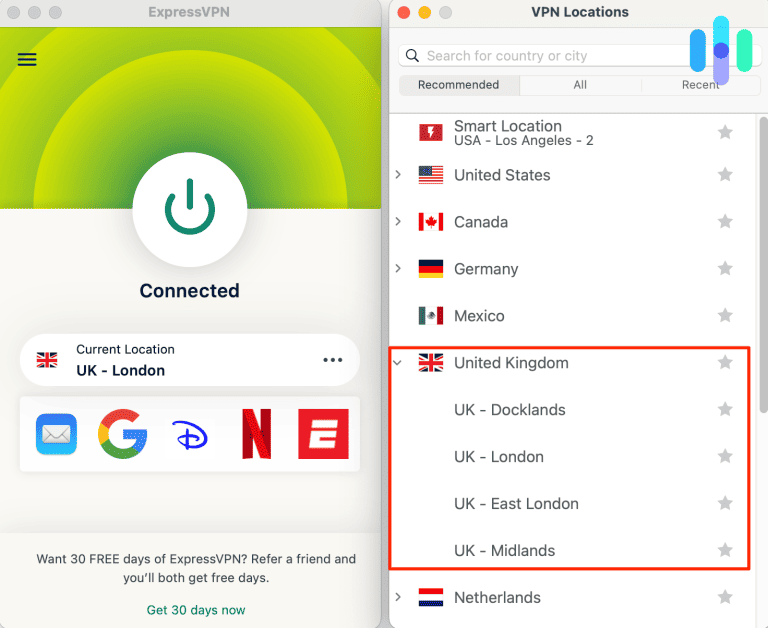
The United Kingdom does not appear in ExpressVPN’s published virtual server location list.
Its British server entries do not carry the provider’s virtual-location designation.
However, ExpressVPN does not publish the precise physical address of every individual British endpoint.
Streaming performance and limitations
ExpressVPN’s British network provides several endpoints for encrypted internet connections and permitted streaming activity.
Actual performance depends on internet speed, server congestion, international routing, and device capabilities.
A VPN connection between the United States and the United Kingdom may increase latency because traffic crosses the Atlantic.
If an authorized streaming session experiences buffering, update ExpressVPN, check your ordinary internet speed, or test another documented British server.
ExpressVPN expects users to comply with content provider terms and applicable copyright requirements.
Netflix may recognize the VPN regardless of connection speed, so ExpressVPN cannot guarantee access to Get Hard through Netflix UK.
3. NordVPN
NordVPN ranks third in our comparison, although it offers a large British server network and convenient automatic connection features.
According to the official NordVPN UK server page, the company advertises more than 440 British servers and documents Edinburgh, Glasgow, London, and Manchester.
British server selection
NordVPN allows users to select the United Kingdom directly from its application map or country list.
The application can automatically connect to an available server using its selection algorithm.
Users who prefer manual selection can choose Edinburgh, Glasgow, London, or Manchester through the city options.
The advertised server count describes NordVPN’s network scale. It does not prove that every individual endpoint will work with Netflix or provide access to every British movie.
NordVPN’s general country page does not disclose a complete hardware-hosting breakdown for each British server.
How to connect through NordVPN
Open NordVPN and sign in. Locate the United Kingdom on the interactive map or country list, then select it to connect automatically.
For manual selection, open the UK location controls and choose Edinburgh, Glasgow, London, or Manchester.
Confirm that the application displays an active VPN session.
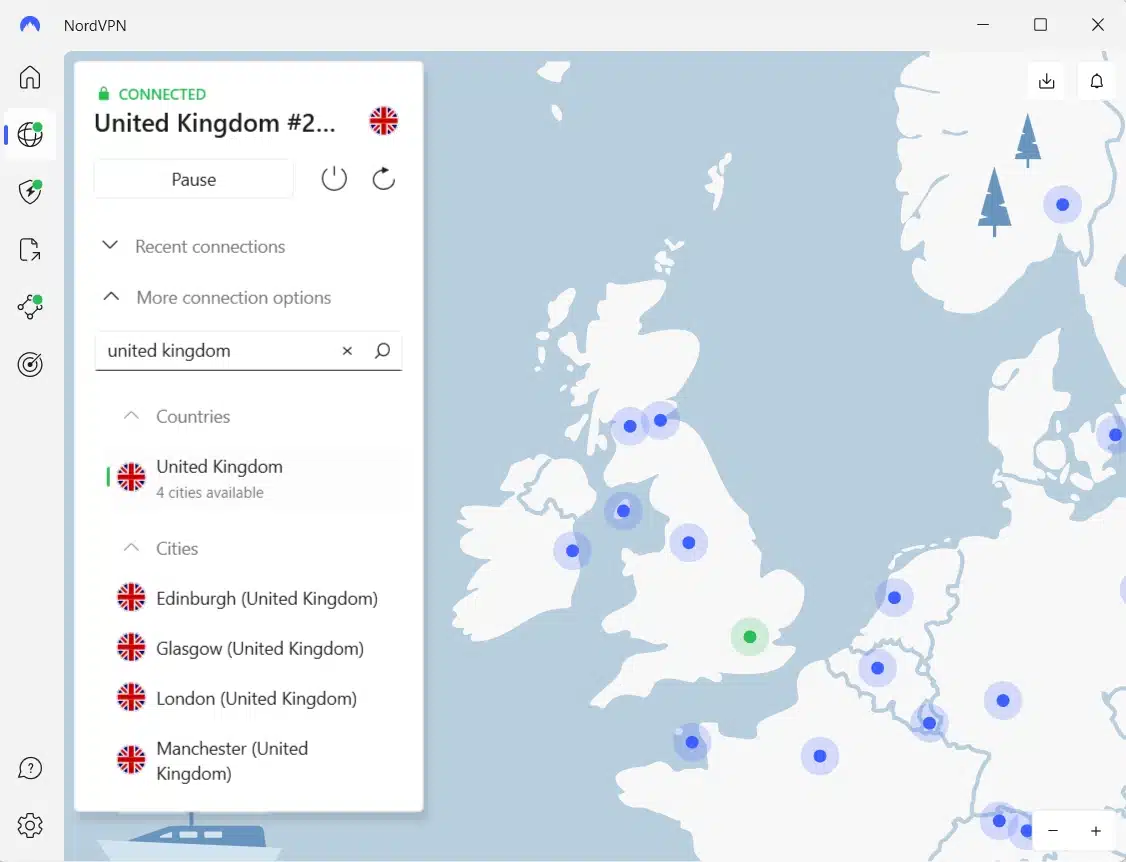
Automatic selection is convenient for general browsing. Manual city selection provides additional flexibility for ordinary connection troubleshooting.
NordLynx and connection performance
NordVPN uses NordLynx, a protocol based on WireGuard.
NordLynx aims to provide efficient encrypted networking with relatively low processing overhead.
For video streaming, sufficient download speed and stable connectivity matter more than server counts alone.
International routing, Wi-Fi quality, internet service provider performance, and server congestion all affect the viewing experience.
If the connection becomes unstable, reconnect automatically or choose another documented British city.
How SmartPlay works
NordVPN includes SmartPlay, a feature that combines VPN protection with DNS-related streaming functionality.
According to NordVPN’s official SmartPlay documentation, SmartPlay activates automatically whenever users connect through a NordVPN application.
No separate installation or manual configuration is necessary.
SmartPlay works alongside the encrypted VPN connection to support access to legitimate streaming content.
However, it cannot override Netflix’s regional licensing decisions and does not guarantee access to Get Hard.
NordVPN troubleshooting and restrictions
If NordVPN cannot establish a stable UK connection, disconnect and reconnect before changing other settings.
Users can also update the application, try another British city, or check the active connection protocol.
NordVPN requires subscribers to follow applicable copyright laws and service restrictions.
A working British VPN connection does not guarantee that Netflix will allow playback of a regionally licensed title from the United States.
What to do if Get Hard does not appear
Netflix may hide Get Hard because of geographic licensing, VPN detection, profile settings, or ordinary connection problems. For permitted VPN connection troubleshooting, follow these eight steps.
- Close Netflix completely, including browser tabs and background applications.
- Disconnect from your current VPN connection.
- Reconnect to the selected United Kingdom location if your intended use complies with applicable terms.
- Try another available British server if the connection itself is unstable.
- Clear Netflix cookies and your browser cache.
- Open an incognito or private browser window.
- Reopen Netflix and sign in using your existing account credentials.
- Search for Get Hard (2015), starring Will Ferrell and Kevin Hart.
Private Internet Access users can compare UK Streaming Optimized with London, Manchester, Southampton, and Tottenham. ExpressVPN provides seven documented British locations, while NordVPN offers Edinburgh, Glasgow, London, and Manchester.
These alternatives can help diagnose connectivity issues, but changing servers does not guarantee access to Netflix’s complete British catalog.
Because Get Hard has a relatively generic title, make sure you select the 2015 movie directed by Etan Cohen.
Netflix’s official missing-title troubleshooting guide explains that licensing rights, VPN recognition, profile maturity settings, and language preferences can affect search results.
If Netflix recognizes the VPN and restricts the catalog, disconnecting it may restore movies normally available in your physical location.
Netflix may detect the VPN
A VPN changes the public IP address that websites and streaming services see when users connect to the internet.
Connecting to a British VPN endpoint can make your public IP address appear associated with the United Kingdom.
However, Netflix does not automatically grant access to every film licensed in Britain simply because the connection uses a UK IP address.
Netflix negotiates streaming rights separately across countries. Get Hard can appear in the British catalog while remaining unavailable on Netflix US.
When Netflix detects VPN traffic, it may restrict the visible catalog to movies and television programs with worldwide licensing rights.
Subscribers may encounter missing titles, unexpected search results, or playback errors even when their VPN connection works correctly.
Netflix explains these restrictions in its official VPN support policy.
No VPN provider can guarantee that Get Hard will play through a British connection from the United States.
Can you use a Netflix ad-supported plan with a VPN?
No. Netflix states that its ad-supported experience does not support VPN connections.
Subscribers using an ad-supported plan may experience playback errors when Netflix recognizes an active VPN.
Netflix recommends disconnecting the VPN to restore ordinary access.
Ad-free Netflix subscriptions avoid this specific restriction, but regional licensing and VPN detection may still affect the available catalog.
Therefore, switching to an ad-free subscription does not guarantee access to Get Hard through Netflix UK.
Review Netflix’s current VPN policy for additional information.
Does changing the VPN location change your Netflix account?
No. Connecting to a British VPN server does not automatically change your Netflix account country, email address, password, profiles, subscription, or billing information.
A VPN changes your visible public IP address rather than directly modifying your registered account details.
Netflix catalogs differ between countries because distribution rights vary by geographical region.
However, changing your apparent IP location does not guarantee access to another country’s entire catalog.
Netflix may recognize VPN traffic and restrict regionally licensed titles.
For account-related information, consult Netflix’s account country guidance.
American viewers who cannot find Get Hard on Netflix can check JustWatch’s current US streaming alternatives.
At the time of research, JustWatch listed fuboTV, Paramount+ plans and channels, and YouTube TV. Digital rental and purchase choices were also available through Amazon Video, Apple TV Store, and Fandango at Home.
Which VPN should you use?
Private Internet Access is our first recommendation for British VPN features because it offers UK Streaming Optimized alongside London, Manchester, Southampton, and Tottenham, with WireGuard and OpenVPN support. However, PIA explicitly prohibits circumventing geographic restrictions imposed by content providers. American viewers should not treat its British server availability as permission to bypass Netflix’s regional content rules.
ExpressVPN ranks second with seven documented British server locations, including multiple London-area entries, Manchester, and the Midlands, alongside Lightway, WireGuard, and OpenVPN support where available. NordVPN follows with more than 440 advertised UK servers, documented city choices in Edinburgh, Glasgow, London, and Manchester, NordLynx, and automatically activated SmartPlay. Both support legitimate encrypted connections, but neither guarantees access to Get Hard on Netflix.
As of October 14, 2026, Get Hard (2015) is available on Netflix UK but not on Netflix US. Its official British Netflix page and JustWatch UK confirm the international listing. However, regional licensing, Netflix’s VPN detection, and individual provider restrictions may prevent playback from the United States. American viewers can also choose officially licensed domestic streaming alternatives.
Netflix UK currently carries Get Hard (2015), starring Will Ferrell and Kevin Hart. The official Netflix UK page and JustWatch UK confirm availability, while Netflix US does not currently offer the film.
Get Hard has a Netflix UK listing, but connecting through a British VPN from the US does not guarantee access. Netflix may restrict VPN connections to globally licensed movies. Check applicable terms or use licensed American streaming alternatives.
Private Internet Access ranks first for British VPN features, offering UK Streaming Optimized and four city connections. ExpressVPN and NordVPN also offer UK servers. PIA prohibits circumventing geographic restrictions, and no VPN guarantees Netflix playback.
Restart Netflix, check your profile settings, and search for Get Hard (2015) starring Will Ferrell and Kevin Hart. Netflix may hide regionally licensed movies when it detects a VPN. Disconnecting the VPN may restore your normal catalog.
No. Netflix does not support VPN connections on its ad-supported experience. Disconnecting the VPN is its recommended solution. Ad-free subscribers may still encounter VPN detection and regional licensing restrictions.


Read our disclosure page to find out how can you help VPNCentral sustain the editorial team Read more


Improve this guide




User forum
0 messages