
How to Watch Robin Hood on Netflix in the US with a VPN (2026)


 15 min. read
  Published on

Robin Hood (2010) is available on Netflix Spain. Directed by Ridley Scott, this historical action adventure stars Russell Crowe as Robin Longstride and Cate Blanchett as Lady Marion, alongside Mark Strong, Max von Sydow, William Hurt, and Oscar Isaac. The film explores Robin’s early adventures in medieval England, beginning with his return from the Crusades. The official Netflix Spain movie page confirms the film’s listing and identifies English original audio, Spanish dubbing, and English and Spanish subtitles.
Unfortunately, Robin Hood is not currently available on Netflix US. American subscribers who want to investigate its Spanish listing can find Spanish VPN connections through Private Internet Access, ExpressVPN, and NordVPN. Private Internet Access offers dedicated streaming-optimized infrastructure, ExpressVPN provides server locations in Barcelona, Madrid, and Valencia, and NordVPN maintains an extensive Spanish server network.

Access content across the globe at the highest speed rate.
🔥 Save 81% + 2 bonus months! 🔥
70% of our readers choose Private Internet Access
70% of our readers choose ExpressVPN
2
Browse the web from multiple devices with industry-standard security protocols.
🔥 Save 73%! 🔥

Faster dedicated servers for specific actions (currently discounted)
🔥 Save 69%! 🔥
However, connecting to Spain through a VPN does not guarantee access to Robin Hood. Netflix may recognize VPN traffic and restrict the available catalog to titles licensed worldwide. Its official VPN support documentation explains these limitations. Subscribers must also follow their VPN provider’s terms, particularly Private Internet Access’s restriction against circumventing geographic content limitations.
How to watch Robin Hood on Netflix with a VPN
Netflix Spain currently lists Robin Hood (2010), but actual playback depends on Netflix’s licensing requirements and your VPN provider’s terms. If your intended use complies with those requirements, follow these steps to check the film.
- Choose a VPN provider, starting with Private Internet Access, followed by ExpressVPN and NordVPN.
- Download and install the VPN application from the provider’s official website.
- Connect to Spain using an officially documented Spanish VPN location.
- Fully close Netflix, including any open browser tabs and background application sessions.
- Reopen Netflix after establishing the Spanish VPN connection.
- Sign in using your existing Netflix account credentials.
- Search for Robin Hood (2010), starring Russell Crowe and Cate Blanchett.
- Start playback if Netflix displays the film and your subscription and applicable service terms permit access.
Make sure you select Spain manually in the VPN application. Automatic connection features generally prioritize speed or geographical proximity, which may result in a nearby American server rather than a Spanish one.
You can also visit the official Netflix Spain listing for Robin Hood. The movie’s Netflix title ID is 70111323.
Be careful when searching because many films share the Robin Hood name. This article concerns Ridley Scott’s 2010 production, not the 1973 Disney animated film, the 1991 Kevin Costner movie Robin Hood: Prince of Thieves, or the 2018 adaptation starring Taron Egerton.
Netflix Spain lists English original audio, English audio description, Spanish dubbing, and other European languages. Its subtitle selection includes English and Spanish, alongside several alternatives.
The film is a lengthy historical adventure, running approximately 140 minutes in its theatrical version. Streaming performance depends on maintaining sufficient download speed throughout playback.
A successful Spanish VPN connection does not establish that Netflix will permit the movie to play from the United States. Netflix controls access according to licensing and VPN detection.
Best VPNs for watching Robin Hood on Netflix
Private Internet Access, ExpressVPN, and NordVPN all provide Spanish VPN connections. Their differences include specialized streaming locations, city-level server selection, supported connection protocols, and network capacity.
| VPN | Server locations in Spain | Option to try first |
|---|---|---|
| Private Internet Access (Editor’s Choice) | ES Madrid, ES Valencia, ES Streaming Optimized | ES Streaming Optimized for permitted local streaming |
| ExpressVPN | Spain – Barcelona, Barcelona – 2, Madrid, Valencia | Spain – Madrid |
| NordVPN | Madrid; 126 Spanish servers advertised | Spain automatic connection |
These locations come from the VPN providers’ official documentation. They do not represent independently tested Netflix playback results. Having a Spanish IP address does not guarantee access to movies licensed for Netflix Spain.
1. Private Internet Access
Private Internet Access is our Editor’s Choice because it offers two documented Spanish city locations, a dedicated streaming-optimized endpoint, and flexible connection protocols.
The official PIA server directory lists ES Madrid, ES Valencia, and ES Streaming Optimized.
Spanish locations and streaming optimization
PIA provides three Spanish connection options. ES Madrid is a standard VPN endpoint in Spain’s capital, while ES Valencia offers another geographical choice.
ES Streaming Optimized targets video streaming performance. For permitted streaming activities in Spain, it is a sensible starting point because PIA configures this location with streaming connections in mind.
However, a streaming-optimized server does not guarantee that Netflix will make Robin Hood available. Streaming optimization concerns network stability and performance, not content distribution rights.
Madrid and Valencia provide alternatives when a connection experiences ordinary congestion or routing problems.
How to select a Spanish PIA server
PIA includes a searchable location directory in its desktop and mobile applications.
Follow these steps to select a Spanish connection:
- Open Private Internet Access and sign in.
- Select VPN SERVER to display available locations.
- Search for Spain or Streaming.
- Choose ES Madrid, ES Valencia, or ES Streaming Optimized.
- Connect and confirm that the VPN status is active.
For authorized streaming in Spain, ES Streaming Optimized offers a relevant first choice. ES Madrid and ES Valencia provide standard alternatives for general encrypted browsing.
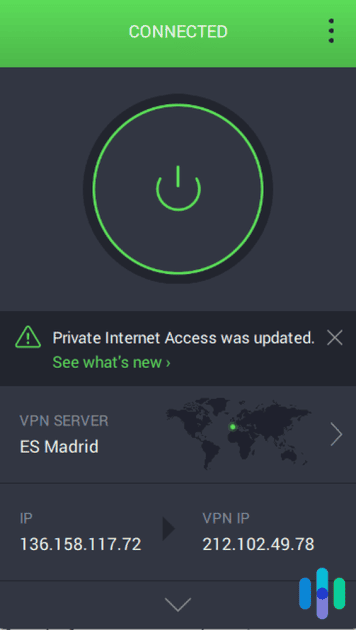
PIA also lets users save preferred servers as favorites, simplifying repeated connections.
Physical and virtual server information
Private Internet Access distinguishes between physical and virtual VPN server locations.
Physical servers generally operate in the country associated with their public IP address. Virtual connections provide an IP address associated with one country while routing through hardware hosted elsewhere.
Spain does not appear in PIA’s published virtual server destination list.
The company identifies Spain as the physical hosting location for some virtual endpoints assigned to other countries. That arrangement does not mean its own Spanish connections operate from outside Spain.
PIA does not disclose the precise hardware address of every individual endpoint in its general server directory.
WireGuard and OpenVPN performance
PIA supports WireGuard and OpenVPN on compatible applications.
WireGuard uses a lightweight architecture intended to minimize connection overhead while maintaining encryption. OpenVPN offers a mature alternative with established compatibility across many devices and networks.
Users can change protocols through the application’s Settings menu. Disconnecting before switching protocols helps establish a clean connection afterward.
For a long movie such as Robin Hood, connection stability and sustained download speed matter more than raw latency alone.
International routing between the United States and Spain can introduce additional network distance. Server congestion, local internet speed, Wi-Fi quality, and device performance also influence playback.
Neither WireGuard nor OpenVPN changes Netflix’s content licensing decisions.
PIA streaming troubleshooting
PIA’s official streaming support guide recommends updating the application, clearing browser data, and reconnecting when ordinary connection problems occur.
For permitted connection testing, users can compare ES Streaming Optimized with Madrid and Valencia.
These steps may improve ordinary connectivity, but they cannot guarantee access to regionally licensed Netflix movies.
PIA’s geographic restriction policy
There is an important contractual limitation for American subscribers.
PIA explicitly prohibits using its service to circumvent geographic restrictions imposed by content providers. Its streaming guidance also instructs users to choose streaming connections in the country where they are physically located.
American users should therefore not interpret the availability of Spanish servers as permission to bypass Netflix’s regional licensing rules.
Review the Private Internet Access Terms of Service before connecting.
2. ExpressVPN
ExpressVPN ranks second because it provides four documented Spanish server entries across Barcelona, Madrid, and Valencia. Its applications also support several connection protocols.
The official ExpressVPN server directory lists Spain – Barcelona, Spain – Barcelona – 2, Spain – Madrid, and Spain – Valencia.
Spanish ExpressVPN server locations
ExpressVPN provides four server entries across three cities.
Barcelona has two separately listed connections, giving users an alternative endpoint within the same city. Madrid and Valencia offer other geographical options.
Madrid is a reasonable first choice for general Spanish VPN use. Users experiencing ordinary connectivity problems can compare Barcelona, Barcelona – 2, and Valencia.
The provider’s official Spain VPN page confirms these city locations.
How to connect through ExpressVPN
ExpressVPN allows users to select a particular country or city from its location picker.
Follow these steps to establish a Spanish connection:
- Open ExpressVPN and sign in.
- Open the location selector.
- Search for Spain.
- Choose Madrid, Barcelona, Barcelona – 2, or Valencia.
- Connect and confirm that the application displays an active session.
ExpressVPN also offers Smart Location, which recommends servers according to distance, speed, and latency.
However, Smart Location does not necessarily select Spain when a user connects from the United States. Choose Spain manually when an authorized activity specifically requires that location.
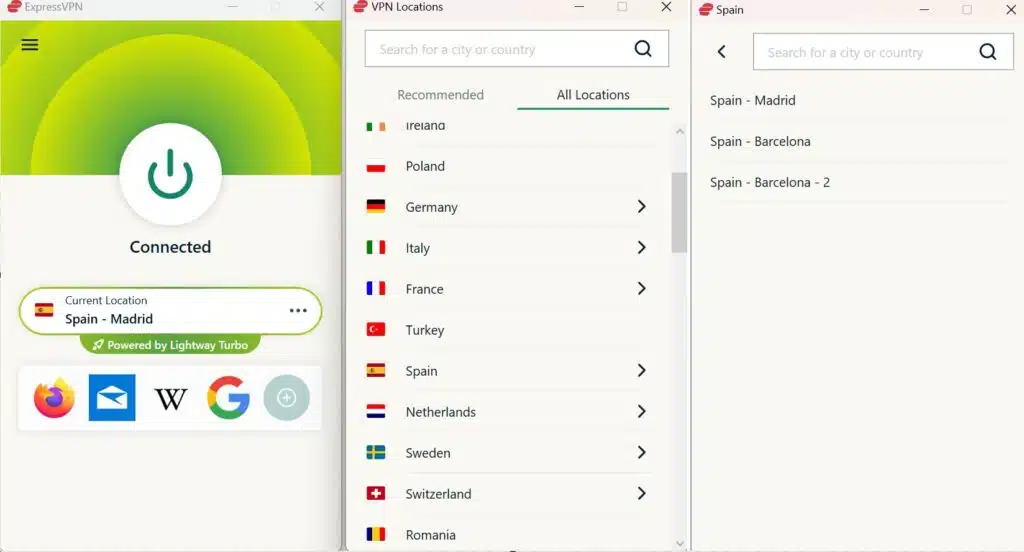
Lightway, WireGuard, and OpenVPN
ExpressVPN supports Lightway, WireGuard, and OpenVPN on compatible devices and applications.
Lightway is ExpressVPN’s proprietary VPN protocol, designed to establish efficient encrypted connections. WireGuard provides a lightweight alternative, while OpenVPN offers established UDP and TCP configurations.
ExpressVPN’s official server directory lists Lightway UDP, Lightway TCP, WireGuard, OpenVPN UDP, and OpenVPN TCP support for its Spanish locations.
However, available protocol choices may vary by operating system and application version.
Automatic protocol selection is a practical starting point. If a network disrupts one protocol, switching to another supported option may improve connection reliability.
Physical versus virtual infrastructure
ExpressVPN operates both physical and virtual VPN locations worldwide.
Its virtual server documentation identifies destinations whose IP location differs from the physical hosting country.
The Spanish entries do not carry virtual-location labels in the current server directory. ExpressVPN states that its nonvirtual locations generally use infrastructure in the specified country.
However, the provider does not publish the precise address of every Spanish server.
Streaming performance and limitations
ExpressVPN’s Spanish connections give users several endpoints for encrypted browsing and permitted streaming activities.
Actual performance depends on international routing, internet speed, server congestion, and device capabilities.
For American users, connecting to Spain may increase latency compared with using a nearby US server.
If a permitted streaming session experiences interruptions, check your internet speed, update ExpressVPN, or compare documented Spanish locations.
ExpressVPN also requires users to follow copyright laws and content provider terms. A stable connection cannot override Netflix’s geographic licensing rules.
3. NordVPN
NordVPN ranks third, although it maintains a substantial Spanish VPN network and convenient automatic connection tools.
The official NordVPN Spain server page advertises 126 Spanish servers and identifies Madrid as a supported location.
Spanish server coverage
NordVPN lets users connect to Spain directly through its interactive map or country list.
Its application can automatically select an available Spanish endpoint using its connection algorithm.
Madrid is the city explicitly documented in the company’s Spanish server guidance. NordVPN does not publish a complete physical-hosting breakdown for every individual server on its general country page.
The advertised number of servers reflects network scale, not the number guaranteed to access Netflix.
How to choose a NordVPN server
Open the NordVPN application and sign in. Find Spain on the map or country list, then select the country to connect automatically.
If the application offers manual city or server selection, choose a documented Spanish endpoint.
Confirm that NordVPN displays an active VPN connection.
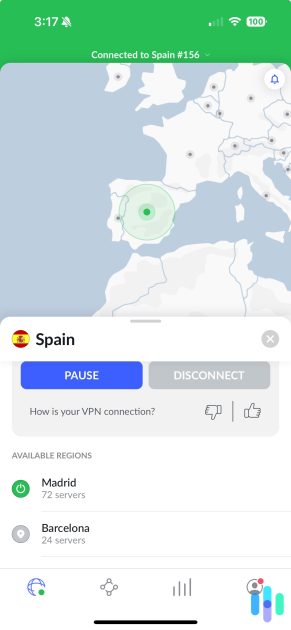
Automatic selection can simplify ordinary encrypted browsing. Manual selection provides additional control when troubleshooting connectivity.
NordLynx and streaming performance
NordVPN uses NordLynx, a protocol based on WireGuard.
NordLynx aims to provide efficient encrypted networking with relatively little processing overhead.
For streaming, sustained bandwidth, stable routing, and limited packet loss are important. The size of a VPN provider’s network alone does not determine video quality.
If a permitted Spanish connection becomes unstable, users can reconnect automatically or test another available endpoint.
How SmartPlay works
NordVPN includes SmartPlay, a feature that combines VPN encryption with DNS-related streaming functionality.
According to NordVPN’s official SmartPlay documentation, the feature activates automatically whenever users connect through a NordVPN application.
Subscribers do not need to install SmartPlay separately or change additional settings.
SmartPlay operates alongside the encrypted VPN connection to support legitimate streaming activity.
However, SmartPlay does not override Netflix’s licensing decisions or guarantee access to Robin Hood through Spain.
NordVPN troubleshooting and restrictions
If NordVPN cannot establish a stable Spanish connection, disconnect and reconnect before making extensive configuration changes.
Users can also update the application, inspect the protocol setting, and test another available Spanish server.
NordVPN requires subscribers to respect copyright laws and content provider restrictions.
A successful Spanish VPN connection does not guarantee that Netflix will provide access to regionally licensed movies from the United States.
What to do if Robin Hood does not appear
Netflix may hide Robin Hood because of geographic licensing, VPN detection, profile settings, or ordinary connectivity issues. For permitted connection troubleshooting, follow these eight steps.
- Close Netflix completely, including browser tabs and background application sessions.
- Disconnect from your current VPN connection.
- Reconnect to the selected Spanish location if your intended use complies with the applicable terms.
- Try another available Spanish server if the connection itself is unstable.
- Clear Netflix cookies and your browser cache.
- Open an incognito or private browsing window.
- Reopen Netflix and sign in using your regular credentials.
- Search for Robin Hood (2010), directed by Ridley Scott.
Private Internet Access users can compare ES Streaming Optimized with Madrid and Valencia. ExpressVPN offers Barcelona, Barcelona – 2, Madrid, and Valencia. NordVPN users can reconnect automatically or select another available Spanish endpoint.
These alternatives may help diagnose ordinary connection issues, but switching servers does not guarantee access to Netflix Spain.
Remember to choose the correct film. Several movies share the Robin Hood name, so check the release year, Russell Crowe’s name, and Ridley Scott’s directing credit.
Netflix’s official missing-title troubleshooting guide explains that regional licensing, VPN detection, language preferences, and profile restrictions can affect search results.
If Netflix recognizes a VPN and restricts the available catalog, disconnecting it may restore the titles normally licensed for your physical location.
Netflix may detect the VPN
A VPN changes the public IP address websites and streaming services see when users connect to the internet.
Connecting through a Spanish VPN endpoint can make a public IP address appear associated with Spain instead of the United States.
However, Netflix does not automatically grant access to every movie licensed in Spain based solely on that IP address.
Netflix negotiates movie rights separately across countries. Robin Hood can appear in the Spanish Netflix catalog while remaining unavailable through Netflix US.
When Netflix detects VPN traffic, it may limit the available catalog to movies and television shows with worldwide licensing rights.
Subscribers may encounter missing titles, unexpected search results, or playback errors even when the VPN connection itself works correctly.
Netflix explains these restrictions in its official VPN support policy.
No VPN provider can guarantee playback of Robin Hood through a Spanish connection from the United States.
Can you use a Netflix ad-supported plan with a VPN?
No. Netflix states that its ad-supported experience does not support VPN connections.
Subscribers using an ad-supported plan may encounter playback errors when Netflix recognizes an active VPN.
Netflix recommends disconnecting the VPN to restore ordinary access.
An ad-free Netflix subscription avoids this particular restriction, but regional licensing and VPN detection may still affect the available catalog.
Even with an ad-free subscription, Netflix may limit VPN users to globally licensed content rather than providing access to its complete Spanish catalog.
For more information, consult Netflix’s official VPN documentation.
Does changing the VPN location change your Netflix account?
No. Connecting to a Spanish VPN server does not automatically change your Netflix account country, email address, password, profiles, subscription, or billing information.
A VPN changes the visible public IP address, while Netflix maintains account information separately.
Netflix catalogs can vary substantially across countries because streaming rights differ by geographical market.
However, changing the apparent IP address does not guarantee access to another country’s complete catalog.
Netflix may recognize VPN traffic and restrict regionally licensed movies.
For account-related details, see Netflix’s account country documentation.
American viewers who cannot find Robin Hood through Netflix can check JustWatch’s current US streaming alternatives.
At the time of research, JustWatch listed HBO Max and Cinemax subscription options, including related channels, alongside digital rental and purchase services.
Which VPN should you use?
Private Internet Access is our first recommendation for Spanish VPN features because it offers ES Madrid, ES Valencia, and ES Streaming Optimized, alongside WireGuard and OpenVPN support. Its streaming-focused infrastructure makes it useful for permitted local streaming, but PIA explicitly prohibits circumventing geographic restrictions imposed by content providers. American viewers should not treat its Spanish servers as permission to bypass Netflix’s licensing requirements.
ExpressVPN ranks second with four documented Spanish server entries across Barcelona, Madrid, and Valencia, alongside Lightway, WireGuard, and OpenVPN support where available. NordVPN follows with 126 advertised Spanish servers, a documented Madrid location, NordLynx, and automatically activated SmartPlay. Both provide options for legitimate encrypted connections, but neither guarantees access to Robin Hood on Netflix.
As of October 14, 2026, Robin Hood (2010) is available on Netflix Spain but not on Netflix US. The official Netflix Spain page and JustWatch Spain confirm the international listing. However, Netflix’s regional licensing, VPN detection, and provider usage restrictions can prevent playback from the United States. American subscribers can also consider officially licensed domestic streaming services.
Netflix Spain currently lists Robin Hood (2010), starring Russell Crowe and Cate Blanchett. The official Spanish Netflix page and JustWatch Spain confirm availability, while Netflix US does not currently offer the movie.
Robin Hood has a Netflix Spain listing, but connecting through a Spanish VPN from the US does not guarantee access. Netflix may restrict VPN traffic to globally licensed movies. Check the applicable service terms or use licensed American streaming alternatives.
Private Internet Access ranks first for Spanish VPN features, offering Madrid, Valencia, and ES Streaming Optimized. ExpressVPN and NordVPN also provide Spanish connections. PIA prohibits circumventing geographic restrictions, and no VPN guarantees Netflix playback.
Restart Netflix, check your profile settings, and search for Robin Hood (2010), directed by Ridley Scott. Netflix may hide regionally licensed films when it detects a VPN. Disconnecting the VPN may restore your usual catalog.
No. Netflix does not support VPN connections on its ad-supported experience. Disconnecting the VPN is its recommended solution. Ad-free subscribers may still encounter VPN detection and regional licensing restrictions.


Read our disclosure page to find out how can you help VPNCentral sustain the editorial team Read more


Improve this guide




User forum
0 messages