
How to Watch Fast & Furious Presents: Hobbs & Shaw on Netflix in the US with a VPN (2026)


 17 min. read
  Published on

Fast & Furious Presents: Hobbs & Shaw (2019) is available on Netflix India. The action-packed spin-off stars Dwayne Johnson as Luke Hobbs, Jason Statham as Deckard Shaw, and Idris Elba as the cybernetically enhanced villain Brixton. Vanessa Kirby also stars as MI6 agent Hattie Shaw. You can find the movie on the official Netflix India page for Hobbs & Shaw, which confirms the title, cast, and available audio and subtitle options.
Unfortunately, Hobbs & Shaw is not currently available on Netflix US. Netflix offers different movies in different countries because of regional licensing agreements. India has the movie in its catalog, and three major VPN services, Private Internet Access (PIA), ExpressVPN, and NordVPN, offer Indian IP address locations. These services can change your visible IP address, although that does not necessarily give you access to India’s Netflix catalog.

Access content across the globe at the highest speed rate.
🔥 Save 81% + 2 bonus months! 🔥
70% of our readers choose Private Internet Access
70% of our readers choose Private Internet Access
2
Browse the web from multiple devices with industry-standard security protocols.
🔥 Save 73%! 🔥

Faster dedicated servers for specific actions (currently discounted)
🔥 Save 69%! 🔥
Before trying a VPN, understand that Netflix can detect VPN connections and restrict the titles you see. According to Netflix’s official VPN guidance, viewers using a VPN may only see movies and shows with worldwide licensing. Netflix also does not support VPN connections on ad-supported plans. Additionally, PIA prohibits using its service to circumvent geographic content restrictions. Always follow the streaming platform’s rules and your VPN provider’s terms.
How to watch Fast & Furious Presents: Hobbs & Shaw on Netflix with a VPN
Netflix India currently lists Hobbs & Shaw, and the following steps explain how to check the movie’s availability while using an Indian VPN location. However, Netflix may restrict regional content on VPN connections, so these steps do not guarantee playback. Only proceed where your streaming service and VPN provider permit the intended use.
- Choose a VPN. Private Internet Access is our first choice for general privacy and connection controls, followed by ExpressVPN and NordVPN. Remember that PIA explicitly prohibits circumventing streaming platforms’ geographic restrictions.
- Download and install the VPN application from the provider’s official website or your device’s app store. Sign in using your VPN subscription credentials.
- Connect to India if your intended use complies with the provider’s terms. PIA offers a virtual Indian location, ExpressVPN has India connections through Singapore and the UK, and NordVPN provides one virtual Indian location.
- Close Netflix completely, including any browser tabs or applications that remain open in the background.
- Reopen Netflix after establishing the VPN connection. Allow the application or website to load before searching.
- Sign in to your existing Netflix account. You do not need to create a new account simply because you connected through a VPN.
- Search for Fast & Furious Presents: Hobbs & Shaw. You can also search for Hobbs & Shaw if the complete title produces no results.
- Start playback if Netflix displays the movie and permits access through your connection. If it does not appear or Netflix displays a VPN error, follow Netflix’s guidance instead of assuming that the connection will work.
The easiest way to identify the correct movie is through its official Netflix title ID, 81073022. You can check the Netflix India listing for Fast & Furious Presents: Hobbs & Shaw to confirm the title, release year, and cast.
The movie follows two former enemies who must cooperate after a dangerous biological weapon threatens humanity. It belongs to the Fast & Furious franchise but works as a separate adventure focused on Hobbs and Shaw.
Netflix India currently lists English original audio, English audio description, Hindi, Tamil, and Telugu audio options, along with English and Hindi subtitles. The availability of individual languages can depend on your device and account settings.
If you cannot find the movie, avoid assuming that a VPN connection has failed. Netflix may identify the VPN, restrict the regional catalog, or remove a title because its licensing agreement has changed.
Best VPNs for watching Fast & Furious Presents: Hobbs & Shaw on Netflix
All three VPN providers offer virtual Indian locations. However, their server choices, physical hosting arrangements, and connection settings differ. The table below compares their officially documented options rather than claiming that any provider reliably unlocks Netflix India.
| VPN | Server locations in India | Option to try first |
|---|---|---|
| Private Internet Access (Editor’s Choice) | India, with a Mumbai virtual location physically hosted in Singapore | India virtual location, for uses permitted by PIA’s terms |
| ExpressVPN | India (via Singapore) and India (via UK), both virtual | India (via Singapore) |
| NordVPN | One virtual Indian location; no additional Indian city choices confirmed | India virtual location with automatic server selection |
These options provide Indian IP addresses, but Netflix may detect and restrict any of them. Server availability and streaming access are separate things. Check the provider’s terms before using a VPN with regional streaming services.
1. Private Internet Access
Private Internet Access is our Editor’s Choice for its privacy features, straightforward server selection, and support for both WireGuard and OpenVPN. It offers detailed connection settings and a large international network, making it useful for users who want more control over their internet connection.
According to the official PIA server directory, India is an available location. PIA’s virtual server documentation identifies India (Mumbai) as a virtual location physically hosted in Singapore.
This distinction matters. A virtual Indian server gives your connection an Indian IP address even though the actual hardware operates from another country. It does not mean PIA maintains physical servers in Mumbai.
To select the Indian location, open the PIA application and click the server selection area. Search for India and select the available Indian location. Depending on your device, you may need to enable the option that displays geo-located or virtual regions.
PIA’s server directory does not currently list a separate India Streaming Optimized location. It only lists India. Therefore, users should not expect to find an Indian streaming-specific server in the application.
PIA does provide streaming-optimized locations in other countries, but these are not interchangeable with an Indian IP address. Selecting a streaming server in Germany, the UK, or another country changes the apparent location and may produce an entirely different streaming catalog.
For connection performance, PIA supports WireGuard and OpenVPN. WireGuard generally offers lower overhead and can help maintain smoother speeds, particularly on devices with limited processing power.
You can change the protocol by opening Settings, selecting Protocols, and choosing WireGuard. If a network blocks or interrupts the connection, OpenVPN provides an alternative. PIA’s WireGuard setup guide explains the supported devices and connection settings.
Because the Indian virtual location uses infrastructure in Singapore, actual performance depends on your physical location, network routing, and connection quality. A virtual location does not automatically offer the same latency as a physical server in the selected country.
If a website behaves unexpectedly while PIA is connected, start by updating the application, reconnecting, and clearing browser cookies or cache. You can also test a different browser or switch between WireGuard and OpenVPN to diagnose ordinary connection problems.
However, a working VPN connection does not mean Netflix will show Indian titles. Netflix may recognize the VPN IP address and display only globally licensed movies.
There is also an important usage restriction. The official PIA streaming policy explicitly prohibits using its service to circumvent geographic restrictions imposed by content providers. PIA recommends selecting a streaming server that matches your physical country.
For that reason, PIA is our first recommendation for general VPN privacy and configurable connections, not a guarantee or endorsement of bypassing Netflix’s regional restrictions.
2. ExpressVPN
ExpressVPN offers two officially documented Indian virtual server locations, making it a flexible option for people who need an Indian IP address for legitimate uses.
The ExpressVPN server directory lists India (via Singapore) and India (via UK). Both locations provide Indian IP addresses, but the physical servers operate outside India.
India (via Singapore) is the more sensible starting point for most users because Singapore is geographically closer to India than the United Kingdom. However, performance depends on the user’s actual location and internet connection.
India (via UK) offers another routing option. It may help diagnose connection problems, although routing traffic through the UK could introduce additional latency for users in Asia.
To select either location, open ExpressVPN, go to the server location list, and search for India. Choose India (via Singapore) or India (via UK) rather than selecting Singapore or the United Kingdom directly. A regular Singapore or UK connection does not provide the same Indian IP location.
ExpressVPN’s virtual server documentation confirms the physical hosting arrangements for both locations. It also explains why ExpressVPN uses virtual infrastructure when local hosting cannot meet its security or operational requirements.
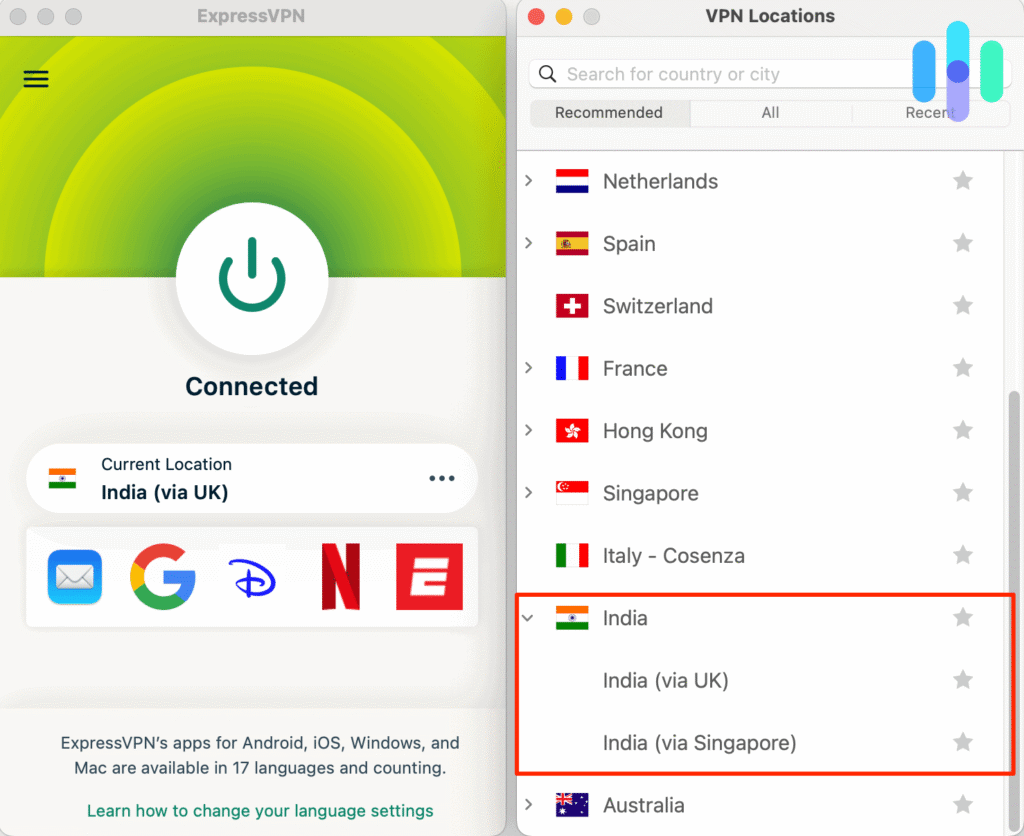
ExpressVPN supports Lightway, WireGuard, and OpenVPN on compatible devices and locations. Its application normally selects a connection protocol automatically, which is the best starting point for most users.
Lightway focuses on connection speed and reliability, while WireGuard provides another lightweight protocol option. OpenVPN remains useful when a network has compatibility problems. Not every protocol works on every device or server location.
If your internet connection feels slow, check your connection speed before changing settings. The official ExpressVPN speed troubleshooting guide recommends checking network conditions, selecting another location where appropriate, and changing protocols if the automatic option does not perform well.
Neither virtual Indian location guarantees Netflix India access. ExpressVPN can provide an Indian IP address, but Netflix independently decides which titles appear and whether to permit playback. Netflix may also identify the connection as a VPN.
ExpressVPN is worth considering when you want two documented Indian routing options, but you should review the service’s terms and Netflix’s restrictions before attempting regional streaming.
3. NordVPN
NordVPN is another established VPN provider with an officially documented Indian virtual location. It also offers NordLynx and SmartPlay, two features designed to support efficient and secure connections.
According to NordVPN’s India server documentation, the company removed its physical Indian servers following India’s data-retention regulations.
NordVPN subsequently introduced one virtual Indian location on January 2, 2024. This location provides an Indian IP address without requiring the company to operate physical server infrastructure in India.
NordVPN documents more than 7,000 servers across its worldwide network, but this figure does not represent the number of servers in India. The company confirms one Indian virtual location and does not provide a verified count of individual Indian servers in that support article.
To connect, open NordVPN, search for India in the country list, and select the available Indian location. NordVPN can automatically choose the server behind that location.
If the connection has problems, disconnect and reconnect to let NordVPN select a connection again. You can also review available servers through its application or official server directory. However, do not expect several separately documented Indian cities because NordVPN currently identifies only one virtual Indian location.
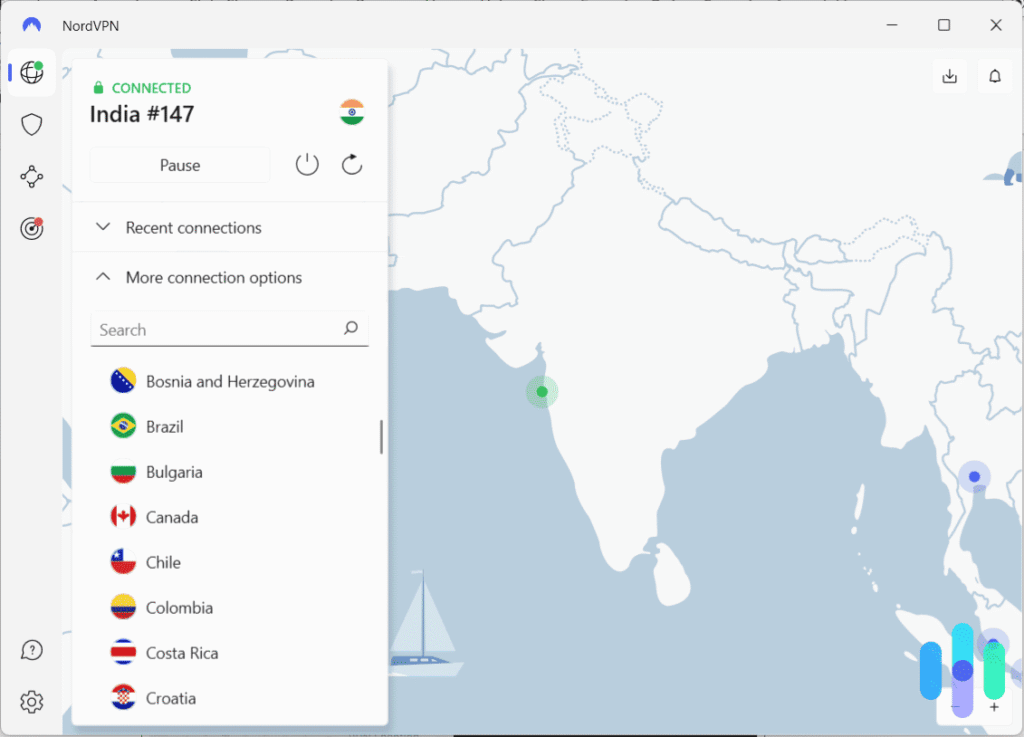
NordVPN supports NordLynx, its implementation based on the WireGuard protocol. NordLynx aims to improve connection speed and responsiveness while maintaining VPN encryption.
For Windows, you can select NordLynx under Settings, Connection and security, and VPN protocol. NordVPN also offers automatic protocol selection, which may be more convenient when you do not want to configure the connection manually.
Another useful feature is SmartPlay. According to NordVPN’s official SmartPlay explanation, SmartPlay activates automatically when you connect through the NordVPN application.
SmartPlay combines VPN protection with DNS-related technology intended to support private streaming. You do not need to install a separate application or enable an additional setting.
However, SmartPlay does not override Netflix licensing agreements. Netflix can still identify a VPN connection, hide regional movies, or block playback. It also does not guarantee access to Hobbs & Shaw from outside India.
For ordinary connection troubleshooting, try reconnecting, selecting NordLynx or another supported protocol, and checking whether your internet connection works normally without the VPN.
NordVPN makes sense for users who prefer automatic server selection and built-in streaming-related technology, provided their intended use complies with the relevant service terms.
What to do if Fast & Furious Presents: Hobbs & Shaw does not appear
Even if you connect to an Indian VPN location, Netflix may not display Hobbs & Shaw. This can happen because Netflix detects the VPN, the movie’s regional availability changes, or the application retains older browsing information.
If your VPN provider permits the intended use, the following steps can help identify ordinary connection or browser problems. They do not guarantee access to a regional catalog.
- Close Netflix completely, including browser tabs and any background application processes.
- Disconnect from the VPN using the provider’s application.
- Reconnect to the selected Indian location, provided the connection and intended use comply with the service terms.
- Try another documented server or virtual location within India if your provider offers one. ExpressVPN has two Indian virtual routing options, while PIA and NordVPN do not document comparable alternative Indian locations.
- Clear your browser’s Netflix cookies and cached website data to remove potentially outdated session information.
- Open Netflix in a private or incognito browser window to test whether ordinary browser data is contributing to the problem.
- Reopen Netflix and sign in to your existing account.
- Search for Fast & Furious Presents: Hobbs & Shaw again and check whether Netflix displays the movie.
For PIA users, the officially documented Indian choice is the Mumbai virtual location hosted in Singapore. If the VPN connection itself has problems, try reconnecting or changing between WireGuard and OpenVPN. PIA’s terms prohibit using the service to circumvent streaming geo-restrictions, so these connection checks should not serve that purpose.
ExpressVPN users can compare India (via Singapore) and India (via UK) for legitimate connectivity needs. The two virtual locations use different physical routing paths, which can affect performance. Neither one guarantees access to Netflix’s Indian catalog.
NordVPN users can reconnect to its Indian virtual location and check the selected protocol. NordVPN does not currently document multiple Indian city locations that users can independently select.
The movie’s official English title is Fast & Furious Presents: Hobbs & Shaw, but Netflix search may also recognize Hobbs & Shaw. Search results can vary by profile language and region.
Netflix also recommends checking your profile’s maturity settings because a restrictive profile can hide movies that would otherwise appear in your local catalog.
If the movie still does not appear, consult Netflix’s official missing-title troubleshooting guide. The company explains that licensing, profile settings, regional restrictions, and VPN detection can all affect title availability.
If Netflix identifies the VPN and limits playback, the appropriate solution may be to disconnect and use a legitimate streaming option available in your country.
Netflix may detect the VPN
A VPN changes the public IP address that websites and streaming services see. Instead of displaying your normal internet provider’s IP address, the connection may appear to originate from the VPN location you selected.
However, Netflix does not rely solely on a country label in your VPN application. It can recognize VPN-related IP addresses and apply additional restrictions to streaming sessions.
Netflix states that VPN users may only see movies and television shows that have worldwide licensing. That means an Indian IP address does not automatically give a US subscriber access to every title in the Netflix India catalog.
Hobbs & Shaw has regional streaming agreements, so its appearance in India does not establish that Netflix will let a VPN user outside India watch it.
You may encounter missing search results, a restricted catalog, or a playback error. These problems do not necessarily mean your VPN subscription or internet connection is defective.
Netflix’s official VPN policy explains these limitations and advises users to turn off their VPN when necessary. No VPN provider can guarantee continuous access to a particular Netflix movie.
Can you use a Netflix ad-supported plan with a VPN?
No. Netflix does not support VPN connections on its ad-supported experience.
If you subscribe to Netflix’s ad-supported plan and connect through a VPN, the service may interrupt playback and display an error stating that you appear to be using a VPN or proxy.
According to Netflix’s guidance for VPN-related playback errors, users on an ad-supported experience should disconnect their VPN to resolve this restriction.
An ad-free Netflix subscription avoids that specific plan restriction. However, it does not guarantee access to every international catalog when using a VPN.
Netflix may still detect a VPN on an ad-free subscription and limit the available titles to movies and shows with worldwide licensing.
Consequently, upgrading to an ad-free plan does not guarantee that Hobbs & Shaw will appear through an Indian VPN connection.
Does changing the VPN location change your Netflix account?
No. Connecting to an Indian VPN location does not automatically turn your US Netflix account into an Indian account.
Your login credentials, password, profiles, viewing history, and billing arrangements do not automatically change because you selected another VPN location.
A VPN primarily affects the public IP address that internet services see. Netflix maintains separate account information and applies its own policies when determining which movies to display.
Netflix catalogs differ by country because the company licenses films and shows for specific territories. It may also restrict viewing when it recognizes a VPN connection.
Netflix explains in its account country guidance that users cannot change their account country simply by choosing another connection location.
If you want to watch Hobbs & Shaw without relying on international Netflix availability, check current US streaming and rental options on JustWatch. The film may be available through another subscription service or a digital rental.
Which VPN should you use?
Private Internet Access is our Editor’s Choice for general VPN privacy because it offers flexible connection settings, WireGuard and OpenVPN support, and a documented virtual Indian location that uses physical infrastructure in Singapore. However, PIA expressly prohibits using its service to bypass geographic restrictions imposed by streaming providers. For users in the United States, it should not be treated as a permitted workaround for accessing Netflix India’s exclusive catalog.
ExpressVPN offers two Indian virtual connections, one through Singapore and another through the UK, providing different routing options for legitimate uses. NordVPN provides one virtual Indian location, supports the NordLynx protocol, and automatically activates SmartPlay when users connect. Both services offer useful privacy and connectivity features, but neither can guarantee Netflix playback or override the streaming platform’s access restrictions.
As of October 23, 2026, Fast & Furious Presents: Hobbs & Shaw is listed on Netflix India but not Netflix US. The Indian catalog listing is independently supported by JustWatch. However, licensing rules, Netflix’s VPN detection, subscription restrictions, and VPN provider terms mean that connecting to India does not guarantee the movie will appear or play. If Netflix blocks access, use a streaming or rental service that legitimately offers Hobbs & Shaw in your region.
Fast & Furious Presents: Hobbs & Shaw (2019) is currently available on Netflix India. It is not listed on Netflix US as of October 23, 2026.
Netflix India lists the movie, but connecting to an Indian VPN location does not guarantee access. Netflix may detect VPNs and restrict regional titles. Follow Netflix’s rules and your VPN provider’s terms.
Private Internet Access is our first choice for general VPN privacy, followed by ExpressVPN and NordVPN. All three offer Indian IP locations, but PIA prohibits circumventing streaming geo-restrictions, and none guarantees Netflix access.
Check the movie’s availability, restart Netflix, review your profile settings, and clear outdated browser data. If Netflix detects your VPN, disconnect it and use a streaming option available in your region.
No. Netflix does not support VPN connections on ad-supported plans. An ad-free subscription avoids that particular restriction, but Netflix may still detect VPN connections and limit regional titles.


Read our disclosure page to find out how can you help VPNCentral sustain the editorial team Read more


Improve this guide




User forum
0 messages