
How to Watch Ladies in Black on Netflix in the US with a VPN (2026)


 19 min. read
  Published on

Ladies in Black (2018) is currently available on Netflix in the United Kingdom. Directed by Bruce Beresford, this Australian comedy-drama stars Angourie Rice, Julia Ormond, and Rachael Taylor. Set in Sydney during the summer of 1959, the movie follows a teenage girl whose temporary job at a department store introduces her to new friendships, opportunities, and possibilities for her future. You can find the film on the official Netflix UK page for Ladies in Black, which confirms its description, cast, and available audio and subtitle languages.
Unfortunately, Ladies in Black is not currently available on Netflix US. Netflix offers different movie catalogs across countries because of regional licensing agreements. The United Kingdom has the film in its catalog, and Private Internet Access (PIA), ExpressVPN, and NordVPN all provide British VPN server locations. PIA offers five UK connections, ExpressVPN lists seven locations, and NordVPN operates more than 440 UK servers. These services can provide a British IP address, although that does not automatically give American subscribers access to Netflix UK’s regional movies.

Access content across the globe at the highest speed rate.
🔥 Save 81% + 2 bonus months! 🔥
70% of our readers choose Private Internet Access
70% of our readers choose Private Internet Access
2
Browse the web from multiple devices with industry-standard security protocols.
🔥 Save 73%! 🔥

Faster dedicated servers for specific actions (currently discounted)
🔥 Save 69%! 🔥
Before trying a VPN, understand that Netflix can detect VPN connections and restrict regional content. According to Netflix’s official VPN support policy, users connected through a VPN may only see movies with worldwide licensing. Netflix also does not support VPN connections on ad-supported plans. Private Internet Access additionally prohibits using its service to circumvent geographic restrictions imposed by streaming platforms. Consequently, no VPN can guarantee access to Ladies in Black from the United States.
How to watch Ladies in Black on Netflix with a VPN
Netflix UK currently lists Ladies in Black, and all three recommended VPN providers offer British connections. If your intended use complies with Netflix’s rules and your VPN provider’s terms, follow these steps to check the movie’s availability.
- Choose a VPN provider. Private Internet Access is our first recommendation for general privacy and connection flexibility, followed by ExpressVPN and NordVPN. Review each provider’s streaming restrictions before proceeding.
- Download and install the VPN application from its official website or your device’s app store. Open the application and sign in using your subscription credentials.
- Connect to the United Kingdom if your intended use complies with the applicable terms. PIA offers London, Manchester, Southampton, Tottenham, and UK Streaming Optimized. ExpressVPN and NordVPN also provide several British locations.
- Close Netflix completely. Exit the Netflix application or close all browser tabs containing an active Netflix session.
- Reopen Netflix after establishing the VPN connection. Allow the homepage to load before searching for the movie.
- Sign in to your existing Netflix account. Connecting through a VPN does not require you to create another account or change your billing details.
- Search for Ladies in Black. Select the 2018 Australian comedy-drama starring Angourie Rice and Julia Ormond.
- Start playback if Netflix displays the movie and permits access through your connection. If Netflix restricts the title or detects your VPN, follow its official troubleshooting guidance.
The movie’s official Netflix title ID is 81027243. You can check the Netflix UK listing for Ladies in Black to confirm the release year, cast, synopsis, and language options.
The film follows Lisa, a bookish teenager who takes a summer job at Goodes, a fashionable Sydney department store. She befriends several women in the clothing department, including the sophisticated Magda and fellow sales assistants Fay and Patty.
Through these relationships, Lisa begins to question the expectations surrounding education, work, marriage, and women’s independence in late-1950s Australia.
The movie adapts Madeleine St John’s novel The Women in Black and runs for approximately one hour and 49 minutes.
Netflix UK lists English original audio and English audio description. Additional audio choices include Spanish, French, Hindi, Polish, and Brazilian Portuguese. Subtitle options include English, Arabic, French, Hindi, Polish, and Ukrainian.
Available languages can vary depending on your device, account settings, and location. Remember that opening the public Netflix page does not guarantee playback through a VPN connection.
Best VPNs for watching Ladies in Black on Netflix
Private Internet Access, ExpressVPN, and NordVPN maintain UK server locations, but their networks differ in city selection, connection protocols, and streaming-related features.
| VPN | Server locations in the United Kingdom | Option to try first |
|---|---|---|
| Private Internet Access (Editor’s Choice) | London, Manchester, Southampton, Tottenham, UK Streaming Optimized | London for general connectivity; UK Streaming Optimized for permitted local streaming |
| ExpressVPN | London, East London, Docklands, Manchester, Midlands, Tottenham, Wembley | UK London or automatic UK server selection |
| NordVPN | London, Manchester, Edinburgh, Glasgow; more than 440 UK servers | London or automatic UK server selection |
These are officially documented server locations, not independently verified Netflix-unblocking connections. Netflix may recognize any of these VPNs and restrict Ladies in Black regardless of which server you select.
1. Private Internet Access
Private Internet Access is our Editor’s Choice because it offers multiple British server locations, customizable privacy settings, and support for WireGuard and OpenVPN.
According to the official PIA server directory, the company provides five UK connection options: UK London, UK Manchester, UK Southampton, UK Tottenham, and UK Streaming Optimized.
The regular locations provide British IP addresses for everyday browsing and other permitted internet activities. UK Streaming Optimized is a separate connection designed for subscribers who want improved streaming performance while accessing content in their own region.
This distinction matters because PIA does not authorize bypassing geographic restrictions simply because it offers a streaming-optimized server.
To find a British location, open the PIA application and select the VPN SERVER area. Search for United Kingdom or UK to display the available connections.
London is a reasonable starting point for general UK connectivity. Manchester, Southampton, and Tottenham provide alternatives if your network experiences latency or connection instability.
If you physically reside in the UK and want privacy protection while watching locally available streaming services, search for streaming and select UK Streaming Optimized.
PIA recommends choosing a streaming server that matches your physical location. Therefore, US subscribers should not interpret the UK Streaming Optimized option as permission to bypass Netflix’s geographic licensing restrictions.
PIA also distinguishes physical server locations from virtual locations.
With a virtual location, the VPN provides an IP address associated with one country while the physical server operates elsewhere.
According to PIA’s virtual server documentation, the United Kingdom does not appear among its foreign-hosted virtual locations.
PIA states that most of its locations use physical servers and registered IP addresses in the same country. However, its public directory does not identify the exact hosting facility for every British server.
Another important feature is WireGuard, a lightweight VPN protocol designed to provide efficient encrypted connections.
WireGuard can reduce processing overhead and improve connection responsiveness compared with some older VPN configurations.
To enable it, open PIA’s Settings menu, select Protocols, and choose WireGuard. Reconnect after applying the change.
PIA supports WireGuard on Windows, macOS, Linux, Android, iOS, Android TV, and Fire TV through compatible applications.
The official PIA WireGuard guide explains supported devices, connection timeouts, and additional configuration options.
OpenVPN provides an alternative when WireGuard encounters compatibility problems or when a network restricts certain types of connections.
Depending on your device, OpenVPN also supports different transport settings that can help diagnose unstable connections.
For most users, WireGuard is a sensible starting option because of its efficient design. However, neither protocol guarantees a particular download speed or streaming result.
If you connect from the United States to a British server, additional latency is unavoidable because your internet traffic must travel a considerable distance.
Users on the US East Coast may experience different routing conditions from those on the West Coast. Actual performance also depends on bandwidth, server congestion, and the internet provider.
If websites load slowly, first test your internet connection without the VPN. Then reconnect to PIA and compare performance.
You can also switch between WireGuard and OpenVPN, update the application, and clear outdated browser cookies or cached data.
PIA includes a kill switch and MACE, which can block certain advertising and tracking domains. When legitimate websites fail to load, reviewing optional content-blocking settings may help identify the problem.
However, these changes only address ordinary network or browser issues. They cannot override Netflix’s regional licensing restrictions.
There is also an important contractual limitation. According to PIA’s official streaming policy, subscribers must not use the VPN to circumvent geographic restrictions imposed by content providers.
PIA recommends connecting to a streaming location that matches the country where you physically reside.
Consequently, PIA is our first recommendation for general VPN privacy and configurable connections, not a guaranteed or authorized workaround for accessing Netflix UK from the United States.
2. ExpressVPN
ExpressVPN offers several British VPN locations, giving users more flexibility when choosing a city or connection route.
According to the official ExpressVPN server directory, the provider lists seven UK locations: Docklands, East London, London, Manchester, Midlands, Tottenham, and Wembley.
These options allow subscribers to choose between London-area locations and connections associated with other parts of the United Kingdom.
London is a reasonable starting option for general UK connectivity. Users who experience connection instability can compare other documented locations, such as Manchester or Midlands.
To connect, open ExpressVPN and select the location picker. Search for United Kingdom and expand the list of available destinations.
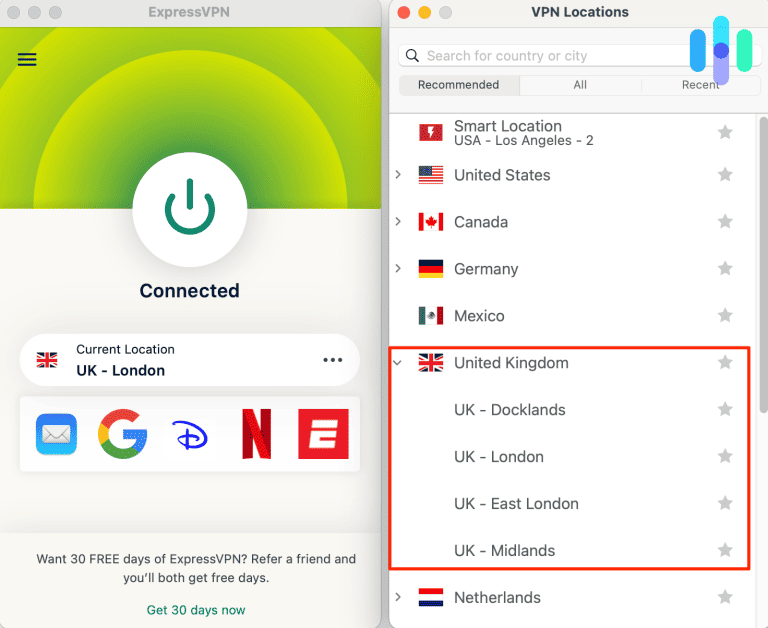
Choose UK London or another supported British location. The application displays the connection status after establishing the VPN tunnel.
ExpressVPN also offers Smart Location, which automatically recommends a server based on performance-related factors.
However, Smart Location does not necessarily select the United Kingdom. If an authorized activity specifically requires a British IP address, choose a UK destination manually.
ExpressVPN distinguishes between physical and virtual server locations.
A virtual location assigns an IP address from the selected country while the physical server operates in another country.
Its official virtual server documentation does not identify the United Kingdom among its foreign-hosted virtual locations.
ExpressVPN also does not mark the listed British connections as virtual in its main directory. However, the company does not disclose the precise physical hosting address of every server.
Another advantage is ExpressVPN’s selection of connection protocols, including Lightway, WireGuard, and OpenVPN on supported devices and locations.
Lightway is ExpressVPN’s proprietary VPN protocol, designed to establish secure connections efficiently and maintain stability when devices switch between networks.
WireGuard provides another lightweight encrypted connection option, while OpenVPN offers broad compatibility with different network environments.
ExpressVPN’s public UK server directory lists support for these protocols, although availability may differ depending on your operating system and application version.
The application normally selects a protocol automatically. For most subscribers, keeping this setting is the easiest approach.
If a network causes connection problems, you can manually test Lightway UDP, Lightway TCP, WireGuard, or OpenVPN where supported.
ExpressVPN’s official connection speed troubleshooting guide explains how to compare protocols and identify performance problems.
For example, a lightweight protocol may perform well on a stable broadband connection, while another configuration may work better when a network experiences packet loss.
Distance also matters. An American subscriber connecting to the UK should expect additional latency compared with using a nearby US server.
ExpressVPN’s server network aims to provide reliable encrypted connectivity, but actual performance depends on your internet connection, device, congestion, and routing conditions.
When Netflix does not display Ladies in Black, the problem may involve regional licensing or VPN detection rather than server performance.
Even a fast British VPN connection does not mean Netflix will provide access to the entire UK catalog.
ExpressVPN also instructs subscribers to respect applicable laws, copyright rules, and streaming service terms.
For general UK connectivity, ExpressVPN offers useful geographic choices and protocol flexibility. However, its British servers cannot guarantee access to Ladies in Black through Netflix from the United States.
3. NordVPN
NordVPN offers another established VPN service with a substantial British server network, automatic server selection, NordLynx, and SmartPlay technology.
According to the official NordVPN UK server page, the provider currently lists more than 440 servers in the United Kingdom.
NordVPN identifies four British cities where subscribers can select server locations: London, Manchester, Edinburgh, and Glasgow.
These locations provide geographic flexibility for users who need British IP addresses for legitimate internet activities.
To connect, open the NordVPN application and select the United Kingdom on the interactive map.
The application automatically chooses a suitable server using NordVPN’s connection selection system.
If you want to choose a specific city, open the country list and select London, Manchester, Edinburgh, or Glasgow from the available options.
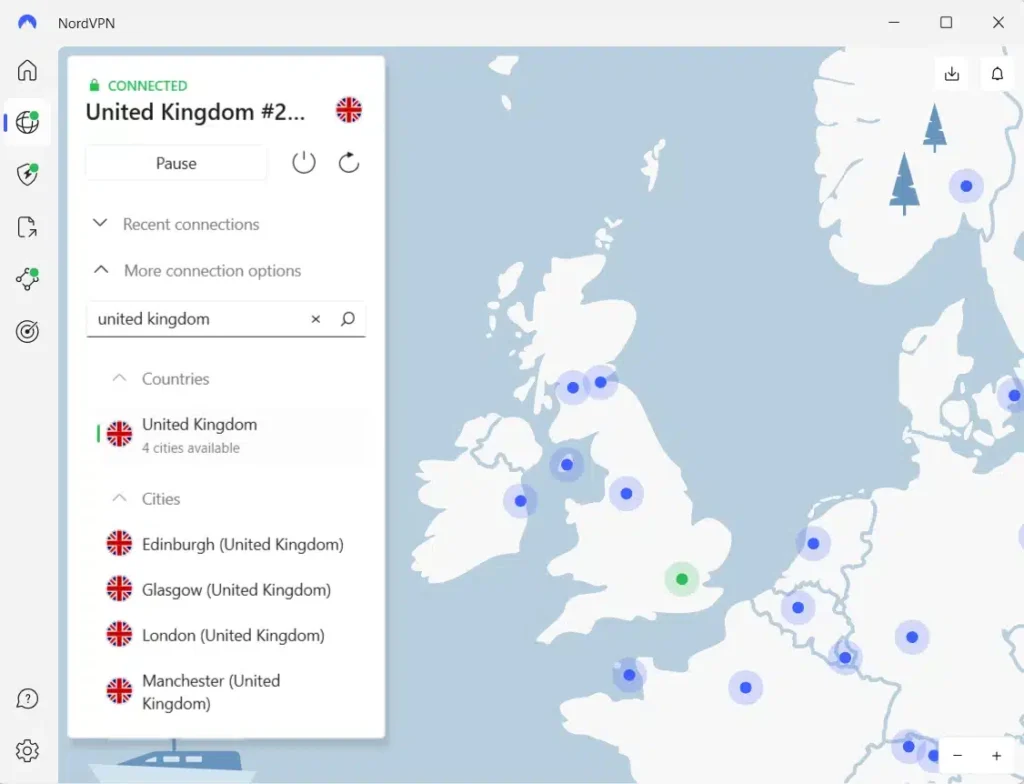
London is a reasonable starting point for general UK connectivity, while Manchester, Edinburgh, and Glasgow provide alternatives for troubleshooting connection performance.
NordVPN’s public UK server page does not provide a complete physical hosting address for every server or identify its listed cities as foreign-hosted virtual locations.
Therefore, users should not assume a specific data center or physical hosting arrangement without additional official documentation.
One of NordVPN’s main technical features is NordLynx, its VPN protocol based on WireGuard technology.
NordLynx combines efficient encrypted connections with NordVPN’s privacy-focused connection design.
It can help maintain responsive performance while protecting internet traffic, although speeds still depend on network conditions and server availability.
NordVPN also offers automatic protocol selection, which is convenient for subscribers who prefer not to configure technical settings manually.
Another important feature is SmartPlay, which combines VPN protection with DNS-related technology intended to support secure streaming.
According to NordVPN’s official SmartPlay documentation, the feature activates automatically whenever users connect through the NordVPN application.
You do not need to download SmartPlay separately or enable another setting.
SmartPlay works alongside VPN encryption, IP address protection, and DNS functionality to help users access their home streaming services privately.
It differs from SmartDNS, which changes DNS behavior without providing the same full VPN encryption and IP address protection.
However, SmartPlay cannot override Netflix’s regional licensing rules.
Netflix may still recognize a NordVPN connection and restrict country-specific titles, including Ladies in Black.
NordVPN also offers specialty servers such as Double VPN, Onion Over VPN, and obfuscated servers for specific privacy and connectivity needs.
These specialty connections should not be confused with guaranteed Netflix-compatible servers.
If NordVPN feels slow, disconnect and reconnect to let the application select another British server.
You can also compare one of the four documented British cities or review whether NordLynx works reliably on your network.
NordVPN’s more than 440 UK servers provide several options for general secure connectivity, but server count alone does not determine whether a particular Netflix title will play.
NordVPN makes sense for users who want automatic server selection and a large British network. Nevertheless, Netflix access remains subject to licensing restrictions and VPN detection.
What to do if Ladies in Black does not appear
Ladies in Black may not appear in Netflix search results even when your VPN application shows a British connection. Netflix can detect VPN traffic, while outdated browser data, profile restrictions, and catalog changes may also affect what you see.
If your intended connection complies with the applicable service terms, the following steps can help diagnose ordinary browser and connection problems.
- Close Netflix completely, including browser tabs and application sessions running in the background.
- Disconnect from the VPN using the provider’s application controls.
- Reconnect to the United Kingdom if your intended use complies with Netflix’s rules and your VPN provider’s terms.
- Try another documented British server or location if the VPN connection itself has problems.
- Clear Netflix cookies and your browser cache to remove outdated website information.
- Open an incognito or private browser window to check whether existing cookies or browser extensions contribute to the issue.
- Reopen Netflix and sign in using your existing account credentials.
- Search for Ladies in Black again and check whether Netflix displays the correct 2018 movie.
PIA users can compare London, Manchester, Southampton, and Tottenham for ordinary connection quality. The UK Streaming Optimized location is available for streaming activities permitted under PIA’s terms, which prohibit circumventing content providers’ geographic restrictions.
ExpressVPN users can reconnect through London, East London, Docklands, Manchester, Midlands, Tottenham, or Wembley. Different locations may provide different routing conditions, although none guarantees Netflix access.
NordVPN users can reconnect through London, Manchester, Edinburgh, or Glasgow. Its automatic server selection can also help diagnose ordinary connection problems.
Make sure you search for the correct movie. Ladies in Black (2018) stars Angourie Rice, Julia Ormond, and Rachael Taylor and was directed by Bruce Beresford.
The film also shares its name with Ladies in Black, a separate Australian television series released in 2024. The series continues the story of characters from the earlier film, but it is not the same production.
Use Netflix title ID 81027243 to identify the correct movie instead of relying only on search results.
If Ladies in Black remains missing, consult Netflix’s official missing-title troubleshooting guide.
Netflix explains that movies can disappear from search results because of regional licensing, profile maturity settings, language preferences, or VPN recognition.
Changing servers or connection protocols does not guarantee access to a restricted title. If Netflix detects your VPN and limits playback, disconnect and consider an authorized US streaming or rental service.
Netflix may detect the VPN
A VPN routes your internet traffic through another server and changes the public IP address visible to websites and streaming platforms.
When you connect to a British VPN location, Netflix may see an IP address associated with the United Kingdom instead of your normal US address.
However, changing your visible IP address does not automatically provide access to Netflix UK’s complete catalog.
Netflix licenses movies separately for different territories. A film available to British subscribers may have different streaming rights in the United States.
Netflix can also recognize IP addresses associated with VPN providers and restrict the available titles to movies and shows with worldwide licensing.
Consequently, you may successfully establish a British VPN connection and still find that Ladies in Black does not appear in Netflix search results.
Alternatively, Netflix may display a playback error asking you to disable your VPN or proxy service.
According to Netflix’s official VPN policy, users may need to turn off the VPN to view movies available in their physical region.
No VPN provider can guarantee continued access to country-specific Netflix content, regardless of its server count, connection protocols, or streaming-related features.
Can you use a Netflix ad-supported plan with a VPN?
No. Netflix does not support VPN connections on its ad-supported experience.
JustWatch UK lists Ladies in Black on both Netflix and Netflix Standard with Ads. However, this does not mean American subscribers can use a VPN with an ad-supported plan to access the British catalog.
If you connect through a VPN while using an ad-supported Netflix subscription, you may encounter error E121 or a message asking you to turn off your VPN or proxy.
According to Netflix’s official VPN playback error guidance, disconnecting the VPN is the recommended solution.
An ad-free Netflix subscription avoids that particular plan restriction, but Netflix can still identify VPN connections and limit regional movies.
Therefore, upgrading to an ad-free subscription does not guarantee access to Ladies in Black through a British VPN location.
Does changing the VPN location change your Netflix account?
No. Connecting to a UK VPN server does not automatically change your US Netflix account into a British account.
Your email address, password, profiles, viewing history, and subscription billing do not automatically change when you select another VPN location.
A VPN primarily changes the public IP address associated with your internet connection. Netflix separately manages account information and regional content access.
According to Netflix’s account country documentation, subscribers cannot change their account country simply by connecting through a VPN.
Netflix catalogs also change over time as the company adds or removes movies under different regional licensing agreements.
If you want to watch Ladies in Black without relying on international Netflix availability, check current US streaming options for Ladies in Black on JustWatch.
As of October 2026, JustWatch US lists Howdy Amazon Channel as a subscription option. It also identifies free or ad-supported viewing through services such as The Roku Channel, YouTube Free, and Tubi, along with eligible library access through Kanopy.
Digital rentals and purchases are also available through supported stores, including Amazon Video, Apple TV Store, and Fandango at Home.
These domestic services offer alternative ways to watch the film without relying on Netflix’s international catalog or uncertain VPN compatibility.
Which VPN should you use?
Private Internet Access is our first recommendation for general VPN privacy because it offers configurable connection settings, WireGuard and OpenVPN support, and five documented British locations: London, Manchester, Southampton, Tottenham, and UK Streaming Optimized. Its published virtual server directory does not identify the UK as foreign-hosted. However, PIA explicitly prohibits using its service to circumvent geographic restrictions imposed by streaming providers, so American subscribers should not treat its British servers as an authorized Netflix workaround.
ExpressVPN offers seven UK locations, including London, East London, Docklands, Manchester, Midlands, Tottenham, and Wembley. It supports Lightway, WireGuard, and OpenVPN on compatible devices. NordVPN provides more than 440 UK servers across London, Manchester, Edinburgh, and Glasgow, together with automatic server selection, NordLynx, and SmartPlay. Both services offer useful privacy and connection features, but neither guarantees regional Netflix playback.
As of October 24, 2026, Ladies in Black is not available on Netflix US but appears on Netflix UK. The official British Netflix page and JustWatch UK support its current availability. However, regional licensing, Netflix’s VPN detection, subscription restrictions, and VPN provider terms mean that playback from the United States is not guaranteed. If Netflix prevents access, Howdy Amazon Channel, free US streaming services, and authorized digital rental options provide alternative ways to watch the film.
Ladies in Black (2018) is currently available on Netflix UK. The official British Netflix page lists the movie, and JustWatch UK independently confirms its availability. It is not currently on Netflix US.
Netflix UK lists Ladies in Black, but connecting through a British VPN server does not guarantee playback. Netflix may detect VPN connections and restrict regional titles. US viewers can also check Howdy Amazon Channel and free streaming services.
Private Internet Access is our first recommendation for general VPN privacy, followed by ExpressVPN and NordVPN. All three offer UK connections, but PIA prohibits circumventing geographic streaming restrictions, and none guarantees Netflix access.
Check Netflix UK’s current listing, restart Netflix, review your profile settings, and clear outdated browser data. If Netflix detects a VPN, disconnect it and use an authorized US streaming or rental service.
No. Netflix does not support VPN connections on ad-supported plans. An ad-free subscription avoids that specific restriction, but Netflix may still detect VPN connections and limit regional titles.


Read our disclosure page to find out how can you help VPNCentral sustain the editorial team Read more


Improve this guide




User forum
0 messages