
How to Watch Shrek on Netflix in the US with a VPN (2026)


 14 min. read
  Published on

Shrek (2001) is listed on Netflix in India. The official Netflix India title page identifies the animated fantasy comedy directed by Andrew Adamson and Vicky Jenson. The story follows a solitary ogre and a fast-talking donkey as they embark on a rescue mission that overturns familiar fairy-tale conventions. The film features Mike Myers, Eddie Murphy, and Cameron Diaz.
As of October 29, 2026, the JustWatch US movie listing does not show Shrek in the Netflix US subscription catalog. The selected international catalog instead lists the movie through Netflix. Private Internet Access, ExpressVPN, and NordVPN all advertise a connection option for India, although a server location alone says nothing about Netflix access.

Access content across the globe at the highest speed rate.
🔥 Save 81% + 2 bonus months! 🔥
70% of our readers choose Private Internet Access
70% of our readers choose Private Internet Access
2
Browse the web from multiple devices with industry-standard security protocols.
🔥 Save 73%! 🔥

Faster dedicated servers for specific actions (currently discounted)
🔥 Save 69%! 🔥
A VPN connection cannot guarantee that Netflix will show or play this title. Netflix explains in its official VPN viewing guidance that VPN users may see only titles with worldwide rights. Its ad-supported experience does not support VPN use. Check the streaming platform’s terms and the VPN provider’s rules before making changes to your connection.
How to watch Shrek on Netflix with a VPN
If your streaming rights and provider terms permit the connection, the following sequence shows how to check the India catalog. It is a verification process, not a promise that an international title will unlock.
- Choose a VPN. Compare Private Internet Access first, ExpressVPN second, and NordVPN third, including their documented limitations.
- Download the official VPN app for your operating system and complete the installation.
- Connect to India using an officially listed country connection. For PIA, select the India virtual location; for ExpressVPN, India (via Singapore); or for NordVPN, the India virtual location.
- Fully close the Netflix app or close all browser tabs running Netflix.
- Reopen Netflix only after the VPN reports a completed connection.
- Sign in with your existing Netflix credentials; do not create another account merely for this test.
- Search for Shrek and check the release year 2001, cast, and film description.
- Start playback only if Netflix shows the title and your subscription, location, and service terms permit access.
The official India Netflix film page provides a useful reference for the correct title, cast, and synopsis. Search for the original 2001 animated film, not a sequel or a television special. Its primary characters are Shrek, Donkey, and Princess Fiona. A film page may remain visible even when playback fails, so treat the account-level catalog and the playback result as separate checks.
India also lists the original English audio and offers Hindi as an additional audio choice on the Netflix title page. Audio options can vary by device and profile. If you see a different show or a missing-title notice, compare the year rather than selecting the first search match. Netflix can change licensing without advance notice to US subscribers.
Best VPNs for watching Shrek on Netflix
All three services list an India exit location. The important differences are how many options they publish, whether they use virtual infrastructure, and how easily their apps let you switch endpoints. None guarantees that Netflix will stream this film through a VPN.
| VPN | Server locations in India | Option to try first |
|---|---|---|
| Private Internet Access (Editor’s Choice) | India (Mumbai), virtual; physical host Singapore | The India virtual location |
| ExpressVPN | India (via Singapore) and India (via UK) | India (via Singapore) |
| NordVPN | One virtual India location with an Indian IP address | The India virtual location |
A streaming-optimized label describes server tuning, not permission to view another catalog. Always check your agreement with the provider and Netflix before trying any destination different from your physical location.
1. Private Internet Access
Private Internet Access takes the Editor’s Choice position here because its officially published app server directory describes the available India location, and its support site explains both its app controls and streaming restrictions. This ranking reflects clarity of documentation and control over VPN settings, not proof that Netflix regional playback works.
PIA identifies its India (Mumbai) virtual location as physically hosted in Singapore. Its current app directory displays the selectable country label India, rather than several selectable Indian cities. The first country-specific option to examine is the India virtual location. There is no second India city or India streaming-optimized entry in the published PIA app list. Disconnecting and reconnecting to India is the documented country-level retry; changing to Singapore would no longer mean an India IP. These are precise options from the published directory, not inferred city names.
Open the PIA application, find the VPN Server selector, and search for the relevant location. The official Windows setup walkthrough illustrates the app’s controls. When PIA offers a streaming-optimized endpoint, its streaming help article explains how to search for the word streaming in the server list. An optimized option does not make a regionally restricted film available by default.
PIA supports WireGuard and OpenVPN connection choices in its apps. WireGuard often makes a reasonable starting point when balancing throughput and connection overhead. OpenVPN can serve as an alternative when a device, router, or network behaves differently. Neither protocol changes Netflix licensing decisions, so protocol changes should address connectivity rather than make claims about unlocking a catalog.
The PIA virtual location disclosure distinguishes the country of an advertised IP from the physical host country. For India, the document expressly identifies a Mumbai virtual IP with its hardware in Singapore. Check that distinction when comparing latency or interpreting speed tests. A shorter network route may reduce buffering, but congestion and your home network still influence playback.
The most important limitation is contractual. PIA explicitly says users should select a server matching the country where they currently are and prohibits using its service to circumvent streaming-platform geographic restrictions. That means a US viewer should not treat the India endpoint as permission to bypass Netflix regional rules. If ordinary streaming fails while you use PIA in a permitted way, disconnect and reconnect, update the app, clear cookies, and confirm Netflix functions without the VPN.
For Shrek, verify that search results match the 2001 movie even if the IP lookup shows India. Netflix may recognize VPN traffic and limit the library to globally licensed titles. No PIA connection or browser change eliminates that possibility.
2. ExpressVPN
ExpressVPN publishes a detailed server directory for India. Its named entries include India (via Singapore) and India (via UK). A sensible initial destination is India (via Singapore). If the connection experiences ordinary routing problems, an additional documented option is India (via UK). Stay within the same country when you are testing country-specific connectivity.
Open the ExpressVPN app, select the location picker, enter the desired country or city, and connect. Confirm the app reports an active connection before opening a browser. On mobile devices, let the VPN establish its system connection before returning to Netflix. The process protects and routes internet traffic; it does not change the region written into your Netflix billing details.
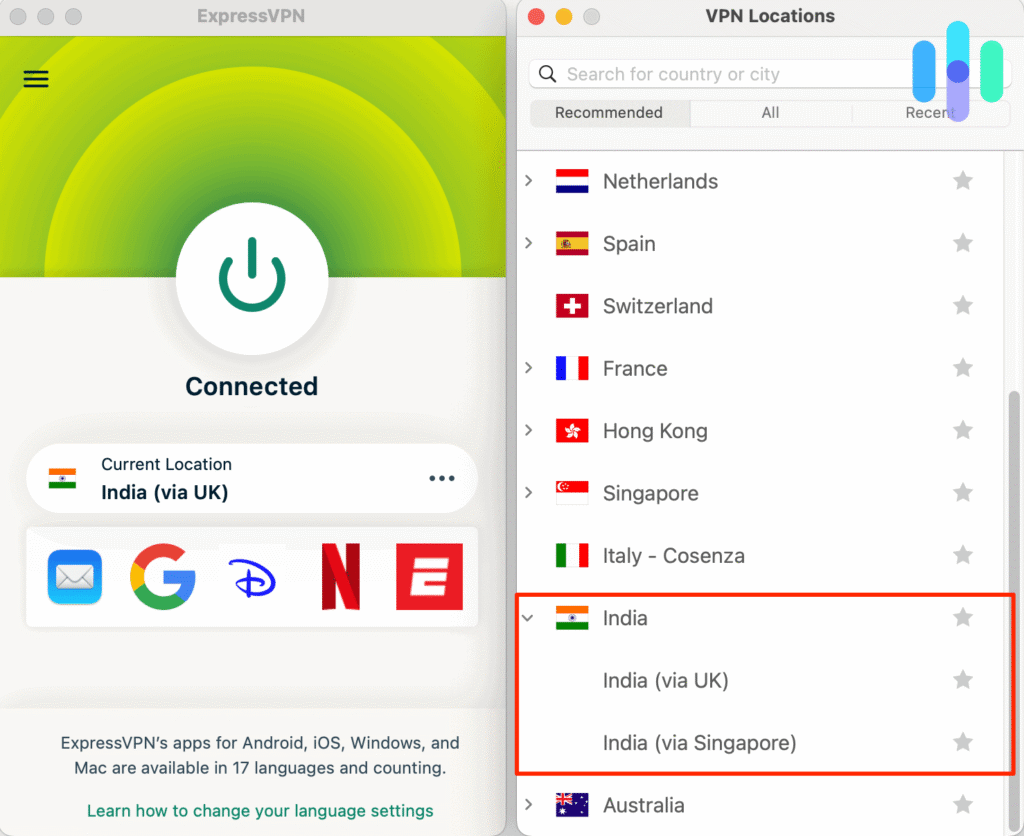
Both ExpressVPN India options use virtual server locations. The first hosts infrastructure in Singapore; the second hosts it in the United Kingdom while providing an Indian IP address. The ExpressVPN virtual server explanation distinguishes a country represented by an exit address from the location of the hardware. Virtual routing can affect latency and jurisdiction, so the distinction matters when interpreting an IP-location result. It does not grant additional rights to any movie.
ExpressVPN supports the Lightway protocol and documents WireGuard and OpenVPN options in its location table. Its directory specifies WireGuard availability on iOS, Android, and Windows. Use the protocol that your app and destination actually support, and remember that reconnecting or changing protocol may change connection reliability without changing streaming entitlements.
For a movie such as Shrek, prioritize a stable connection, consistent DNS resolution, and a device that can play Netflix without the VPN first. If playback produces a proxy or VPN error, read Netflix’s support message rather than assuming the movie has disappeared. ExpressVPN does not control the license Netflix has acquired in India, and different network endpoints can receive different treatment from Netflix’s VPN detection systems.
If a browser keeps old location information, close it, clear Netflix cookies where appropriate, and reopen it after the connection changes. Avoid confusing a hotel, workplace, or home network VPN with the provider app. Some networks route traffic through multiple gateways, and a second VPN can cause failures unrelated to the movie itself.
3. NordVPN
NordVPN’s official India server documentation establishes its coverage: NordVPN states that it offers one virtual India location, introduced in January 2024, after withdrawing its physical Indian servers in 2022. For a country-specific test, choose India virtual location. NordVPN documents one India virtual location and does not publish a second India city or a list of Indian alternatives. The company can add or remove endpoints, so use its current app list when making a connection.
The NordVPN application can automatically assign an available server when you choose a country. Where city selection appears, you can select an alternative location manually rather than using an unrelated country. NordLynx, NordVPN’s WireGuard-based protocol, offers an efficient starting option for compatible devices. Use a different protocol only to troubleshoot connection performance, not to imply that a regional streaming license has changed.
NordVPN explains in its SmartPlay support page that SmartPlay activates automatically inside every NordVPN app. It combines networking and DNS-related functionality with the VPN connection, and you do not need a separate SmartPlay toggle. Automatic activation should not be interpreted as proof that a particular Netflix movie will load from the United States.
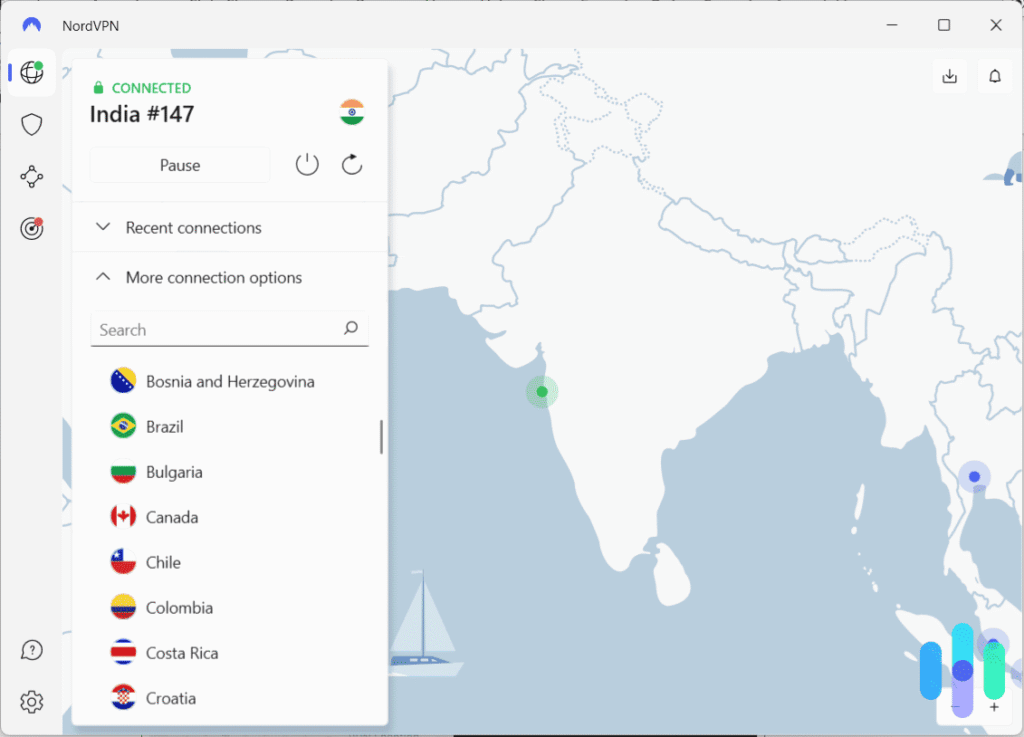
For Shrek, search within Netflix only after the country endpoint connects and compare the details with the official Netflix listing. If the title disappears, try refreshing the app session or testing normal Netflix playback without the VPN. A connection that opens a streaming website but fails to play a regionally licensed title does not necessarily indicate an internet or DNS outage.
NordVPN can publish large network-wide server figures, but those totals do not establish how many eligible connections currently exist in India. The country-specific locations above are the useful evidence. Streaming speed also depends on your own connection, distance, Wi-Fi quality, video resolution, and traffic conditions.
What to do if Shrek does not appear
If Netflix hides Shrek despite an international listing, start with simple session checks. A missing result may reflect licensing, a managed profile, or VPN recognition rather than a broken installation.
- Close Netflix completely, including any open browser tabs.
- Disconnect from the current VPN endpoint.
- Reconnect to the intended India country option only where your provider terms permit it.
- Try another officially documented server or location in the same country, if one exists.
- Clear Netflix cookies and your browser cache, then close the browser.
- Open a fresh incognito or private browsing window.
- Reopen Netflix and sign into your existing account.
- Search for Shrek again and confirm the 2001 film details.
PIA only lists one India country entry, so a disconnect and reconnect is the available India-specific retry, not a new Indian city. ExpressVPN offers India (via Singapore) and India (via UK). NordVPN documents one India virtual location and does not publish a second India city or a list of Indian alternatives. None of these changes guarantees that Netflix will show a geographically restricted title.
Use the exact title Shrek and confirm the 2001 release year. Netflix can show related Shrek movies in the same search results. Netflix’s missing movie guidance describes licensing and other reasons a title may be absent from an account. Pay attention to household maturity settings and the profile itself, particularly for films with a higher age rating.
If Netflix displays a VPN or proxy warning, follow the platform’s official recommendations, which may require disabling the VPN. PIA also prohibits using its service to circumvent geographic content restrictions. Rather than cycling indefinitely through servers, consider an authorized US streaming alternative or watch from the proper location.
Netflix may detect the VPN
A VPN replaces the public IP address that services see with an address associated with its exit server. That apparent location can differ from the country where you physically connect. However, Netflix also enforces content licenses and may recognize commercial VPN ranges, so appearing to connect from India is not the same as receiving the full Netflix India catalog.
Netflix says that when it detects a VPN, viewers may only see titles licensed worldwide. It can also show a proxy error or remove regional movies from search results. Its VPN and proxy error troubleshooting article explains the recommended response. VPN providers cannot override a studio’s license or guarantee that a particular film will play.
Licensing changes can remove a film overnight, even if a third-party tracking website still lists it. Check the film identity, use the official title page as a reference, and treat the result inside your signed-in Netflix account as the final playback test.
Can you use a Netflix ad-supported plan with a VPN?
No. Netflix states that its ad-supported experience does not support VPN connections. An account on that tier may show errors even when Shrek appears in a regional listing. Netflix advises turning off the VPN when that conflict occurs, rather than treating it as an issue with the movie itself.
An ad-free plan avoids this particular ad-tier restriction but does not bypass Netflix’s regional licensing checks or VPN detection. The official Netflix VPN rules make that distinction clear. Also note that Netflix may impose additional restrictions on live events; those policies are separate from movie availability.
Does changing the VPN location change your Netflix account?
Changing a VPN exit country changes the IP address a website observes. It does not automatically rewrite your Netflix email address, password, profiles, home address, billing currency, or subscription. Your account remains the same account, while the streaming catalog that Netflix shows can depend on your country, account configuration, and VPN recognition.
If you travel, follow Netflix’s account and country guidance and the terms that apply where you watch. You should not assume that using a VPN creates a new legitimate household location or billing country. When the India entry does not play, Peacock is listed among US streaming options for the original film; check its current subscription terms before paying.
Which VPN should you use?
Private Internet Access ranks first for documented choices and transparency around its India endpoints. PIA identifies its India (Mumbai) virtual location as physically hosted in Singapore. Its current app directory displays the selectable country label India, rather than several selectable Indian cities. Its critical restriction also matters: PIA prohibits circumventing geographic content restrictions and recommends using a server in your actual country. It is therefore not a guaranteed or unrestricted solution for a US-based attempt to reach another Netflix catalog.
ExpressVPN comes second with India (via Singapore) and India (via UK) and protocols such as Lightway. NordVPN takes third with one virtual India location with an Indian IP address and automatic SmartPlay. These are documented networking features, not Netflix eligibility promises. Netflix can limit catalog results on all three services.
Our verification found the 2001 film Shrek on Netflix in India, but not within Netflix’s US subscription catalog as of October 29, 2026. Rights, VPN detection, ad-supported plan restrictions, and provider terms can prevent playback. Treat the official Netflix page and current account-level results as the final references, and use an authorized US platform when available.
Shrek (2001) appears on the official Netflix India page, and JustWatch India lists it on Netflix. Availability can change.
Netflix US does not currently list Shrek for subscription viewing. You can check the Netflix India listing, but Netflix may restrict VPN connections and the provider terms still apply.
Private Internet Access ranks first for its documented India location, followed by ExpressVPN and NordVPN. PIA prohibits using its service to circumvent geographic restrictions, and none guarantees playback.
Restart Netflix, confirm you are searching for the 2001 film, check your profile restrictions, and read Netflix support guidance. Disconnect the VPN if Netflix flags it.
No. Netflix does not support VPN connections on its ad-supported experience. Disconnect the VPN to resolve that restriction.


Read our disclosure page to find out how can you help VPNCentral sustain the editorial team Read more


Improve this guide




User forum
0 messages