
How to Watch Scream on Netflix in the US with a VPN (2026)


 14 min. read
 Published on

Scream (1996), directed by Wes Craven and starring Neve Campbell, Courteney Cox, and David Arquette, is listed on Netflix India as of November 16, 2026. The original slasher film follows Sidney Prescott and her friends as a masked killer terrorizes the town of Woodsboro. You can find the movie on the official Netflix India page for Scream.
Scream is not currently available through a Netflix US subscription. However, Netflix India lists the film, and Private Internet Access, ExpressVPN, and NordVPN all provide Indian VPN locations. These services offer virtual Indian IP addresses, although their physical servers operate outside India.

Access content across the globe at the highest speed rate.
🔥 Save 81% + 2 bonus months! 🔥
70% of our readers choose Private Internet Access
70% of our readers choose Private Internet Access
2
Browse the web from multiple devices with industry-standard security protocols.
🔥 Save 73%! 🔥

Faster dedicated servers for specific actions (currently discounted)
🔥 Save 69%! 🔥

A VPN connection does not guarantee access to another country’s Netflix catalog. Netflix detects some VPN connections and may restrict users to titles with worldwide streaming rights. Its official VPN policy explains these limitations. You should also review your VPN provider’s terms before attempting to access region-specific content.
How to watch Scream on Netflix with a VPN
If you have a Netflix subscription and your VPN provider permits your intended use, you can check whether Scream appears while connected to an Indian VPN location. Follow these steps:
- Choose a VPN provider. Private Internet Access is our first choice for privacy features, followed by ExpressVPN and NordVPN.
- Download the VPN application from the provider’s official website and install it on your device.
- Open the VPN application and select an India location. All three providers offer Indian IP addresses through virtual locations.
- Fully close the Netflix application or browser tab before changing your connection.
- Connect to the selected VPN location, then reopen Netflix.
- Sign in using your existing Netflix account and profile.
- Search for Scream and confirm that you have found the original 1996 movie.
- If Netflix displays the movie and permits playback, select Play. If Netflix blocks the connection or removes the title from search results, follow its troubleshooting guidance.
You can use this process on a Windows PC, Mac, Android phone, or iPhone with a compatible VPN application. On a computer, you can open Netflix in a browser after establishing your connection. On mobile devices, close the Netflix app completely before reopening it.
Smart TVs require additional consideration. Some models support VPN applications directly, while others require a compatible router or another supported setup. Simply connecting your phone to a VPN does not necessarily change the connection used by your television.
Visit the Scream listing on Netflix India to confirm the film’s title, cast, and release year. The movie runs approximately 112 minutes and features English original audio. Its Indian listing also identifies English and Hindi subtitles.
Netflix may recognize your actual region or detect your VPN regardless of the country you select. A successful VPN connection only confirms that your device has established a connection through that provider. It does not confirm that Netflix will display or play Scream.
Best VPNs for watching Scream on Netflix
All three VPN providers offer Indian IP locations, but their infrastructure differs. None guarantees access to Netflix India’s catalog from the United States.
| VPN | Server locations in India | Option to try first |
|---|---|---|
| Private Internet Access (Editor’s Choice) | India (Mumbai), virtual location physically hosted in Singapore | India location, subject to PIA’s usage restrictions |
| ExpressVPN | India (via Singapore) and India (via UK), both virtual | India (via Singapore) |
| NordVPN | One virtual Indian location | Automatic selection of the India location |
These details come from the providers’ published server directories and support documentation. Virtual locations can provide an Indian IP address without placing a physical VPN server inside India.
1. Private Internet Access
Private Internet Access (PIA) is our Editor’s Choice for its configurable privacy settings, support for WireGuard and OpenVPN, and transparent documentation of its virtual server infrastructure. It offers an Indian connection, although users must understand an important restriction before selecting it for streaming.
According to the PIA virtual server directory, the provider’s India (Mumbai) location uses physical infrastructure in Singapore. Users receive an Indian IP address, but their traffic travels through a server outside India.
This distinction matters because physical distance can affect latency and connection speeds. A virtual Indian IP address does not necessarily provide the same network path as a server physically located in Mumbai.
The official PIA location list identifies India as an available region. However, it does not list a separate India streaming-optimized location. You should not confuse the standard India connection with PIA’s dedicated streaming locations in other countries.
To find the Indian location, open the PIA application, select the VPN server field, and search for India. Choose the available location and establish a connection. You can check the connection status in the app before opening your browser or streaming application.
For general connection stability, PIA supports WireGuard and OpenVPN. WireGuard can provide good performance with relatively low overhead, while OpenVPN offers another option when a network restricts certain connection types.
If websites fail to load or your VPN connection becomes unstable, check your protocol settings. You can disconnect, switch between WireGuard and OpenVPN, and reconnect. Updating the application and clearing stale browser cookies can also help with ordinary website access problems.
PIA publishes additional steps in its website access troubleshooting guide.
There is one significant limitation. PIA’s official streaming guidance explicitly prohibits using its service to circumvent geographic restrictions imposed by content providers. It recommends selecting a streaming location that matches the country where you currently reside.
Consequently, PIA’s India connection is not authorization for someone in the United States to bypass Netflix’s regional licensing restrictions. The service remains useful for privacy and connection security when users comply with applicable terms.
PIA also cannot guarantee that Netflix will recognize the Indian location as eligible for the regional catalog. Netflix may identify VPN traffic and display only globally licensed content.
2. ExpressVPN
ExpressVPN offers two officially documented Indian virtual server locations. Unlike providers that advertise an Indian IP address without explaining the infrastructure, ExpressVPN identifies the countries hosting these virtual connections.
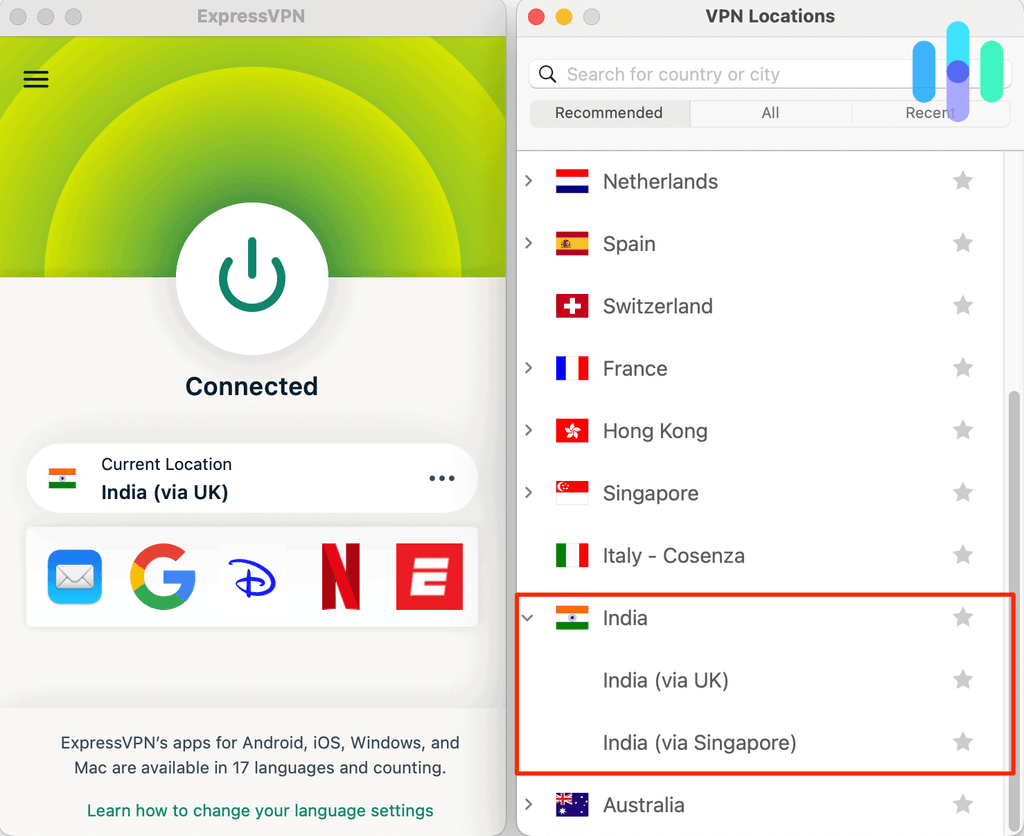
The ExpressVPN server directory lists India (via Singapore) and India (via UK). Both provide Indian virtual locations, but neither uses physical servers inside India.
India (via Singapore) is a sensible first choice for users testing general connection stability, particularly when they are geographically closer to Singapore. India (via UK) provides an alternative Indian virtual location with a different physical hosting country.
For users connecting from the United States, performance depends on their actual location, internet provider, network routing, server congestion, and connection protocol. The UK-hosted location might perform differently from the Singapore-hosted one, but neither automatically guarantees better streaming performance.
To connect, open ExpressVPN, locate the server selection menu, and search for India. Choose India (via Singapore) or India (via UK), then connect.
ExpressVPN officially lists Lightway UDP, Lightway TCP, WireGuard, OpenVPN UDP, and OpenVPN TCP among the supported options for its Indian virtual locations. Protocol availability can also depend on the application and operating system.
For general performance issues, start with the application’s automatic protocol setting. If the connection repeatedly disconnects, test another officially supported protocol and verify that the application is current.
Users who experience loading problems can close the streaming application, restart the VPN connection, and reopen Netflix. In a web browser, clearing cookies or trying a private browsing window may also eliminate stale session information.
Switching between India (via Singapore) and India (via UK) changes the physical hosting location while retaining an Indian virtual destination. This can help diagnose VPN connection problems, but it does not guarantee that Netflix will provide access to a region-specific movie.
Netflix can identify VPN or proxy traffic and restrict playback. ExpressVPN’s Indian locations therefore demonstrate country coverage, not guaranteed access to Scream on Netflix India.
3. NordVPN
NordVPN is the third option on our list. It provides an Indian virtual location and includes NordLynx, its WireGuard-based VPN protocol, along with automatic server selection and SmartPlay technology.
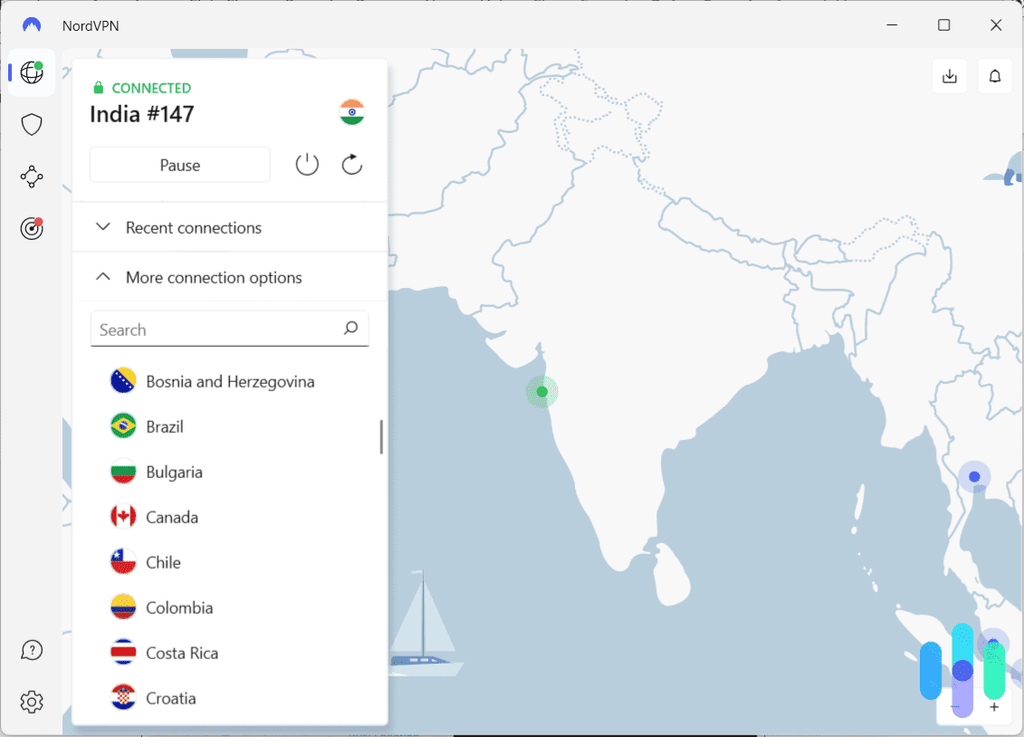
According to NordVPN’s official India server information, the company stopped operating physical servers in India following the country’s 2022 cybersecurity requirements. It subsequently introduced one virtual location with an Indian IP address in January 2024.
That means NordVPN supports an Indian IP location without physically hosting its VPN infrastructure there. Its support documentation does not identify multiple Indian cities or alternative Indian virtual locations.
To select India, open NordVPN, sign in, and search for the country in the location list. Choose India and allow the application to select an available connection.
If the connection performs poorly, you can disconnect and reconnect to request another connection through the available location. However, you should not expect a separate Mumbai, Delhi, or Bangalore option unless NordVPN officially adds one.
NordLynx is worth considering when you prioritize speed and low connection overhead. Actual performance still depends on your network, distance from the physical server, and overall congestion.
NordVPN also includes SmartPlay. The company’s SmartPlay documentation confirms that the feature activates automatically when you connect through the NordVPN application.
SmartPlay combines DNS-related functionality with the VPN’s encrypted connection. Users do not need to install or enable it separately. However, SmartPlay does not guarantee access to specific Netflix regional titles.
If Netflix does not load properly, first verify that the VPN connection works on other websites. You can then restart the application, reconnect to India, or test NordLynx against another protocol available in your NordVPN app.
A missing Scream listing may reflect Netflix’s VPN recognition rather than a problem with NordVPN’s Indian IP allocation. In that situation, changing the connection may not restore access.
What to do if Scream does not appear
Netflix may hide regional movies when it detects VPN traffic. Browser sessions, cached location information, account settings, and licensing restrictions can also affect search results.
Use these steps to rule out ordinary connection or session problems:
- Close Netflix completely, including any active application windows or browser tabs.
- Disconnect from your VPN.
- Reconnect to the selected Indian VPN location.
- If your provider offers another location within India, test that option. ExpressVPN documents two Indian virtual locations. The other two providers do not list multiple Indian locations.
- Clear Netflix cookies and relevant browser cache files.
- Open an incognito or private browser window.
- Reopen Netflix and sign in to your account.
- Search for Scream and verify that you are looking for the 1996 movie.
If you use Private Internet Access, check the connection status and available protocols. PIA documents India (Mumbai) as a virtual location but prohibits circumventing geographic restrictions, so follow its published streaming policy.
With ExpressVPN, you can test India (via Singapore) and India (via UK) for legitimate connection troubleshooting. Different physical hosting locations may affect speed and stability.
NordVPN users can reconnect to the provider’s single documented Indian virtual location or change protocols. NordVPN does not currently document a separate list of Indian cities to try.
Also make sure you search for the correct movie. The Scream franchise includes several sequels, and Netflix’s search results may show different installments depending on your catalog.
If the movie remains absent, read Netflix’s missing movie troubleshooting guide. Netflix explains that regional rights, profile maturity restrictions, language preferences, and VPN detection can all affect which titles appear.
Remember that these troubleshooting steps cannot override Netflix’s licensing decisions or your VPN provider’s usage restrictions. If Netflix rejects the VPN connection, its recommended solution is to disconnect the VPN.
Netflix may detect the VPN
A VPN replaces your visible public IP address with one associated with the selected VPN location. For example, a virtual Indian VPN location can assign an Indian IP address even when the physical server operates in Singapore or another country.
However, Netflix does not rely solely on the country name displayed inside a VPN application. It can detect certain VPN or proxy connections and restrict the content available through them.
Under Netflix’s published policy, users connecting through a VPN may see only titles that Netflix licenses worldwide. Therefore, Scream could disappear from Netflix search results even when Netflix India normally carries the movie.
Netflix may also display a playback error if its systems recognize the connection as a VPN or proxy. The Netflix VPN error guide advises users to turn off the VPN when these problems occur.
No VPN provider can promise continuous access to a particular Netflix country’s catalog. Netflix’s licensing agreements, detection methods, and regional catalogs can change independently of your VPN subscription.
Can you use a Netflix ad-supported plan with a VPN?
No. Netflix does not support VPN connections with its ad-supported experience. This restriction applies even when your VPN connects successfully and provides an IP address in a supported country.
Attempting playback may produce an error telling you that Netflix has detected a VPN or proxy. Netflix recommends disconnecting the VPN to resolve this problem.
The company’s ad-supported VPN error documentation explains the restriction and provides troubleshooting instructions.
An ad-free Netflix plan avoids this particular limitation, but it does not guarantee that regional content will appear while a VPN is active. Netflix may still identify the VPN connection and restrict the catalog to globally licensed movies and shows.
You should not upgrade your subscription solely on the assumption that an ad-free plan will provide access to Scream through an Indian VPN location.
Does changing the VPN location change your Netflix account?
No. Selecting an Indian VPN location changes the public IP address visible to websites and services, but it does not automatically change your Netflix account’s registered country, email address, password, profiles, or payment method.
Your existing Netflix account remains the same. However, Netflix may change the catalog it displays based on location, licensing rights, account circumstances, and whether it recognizes a VPN connection.
Netflix does not guarantee that a customer physically located in the United States can view every title offered in India. Users should also consider Netflix’s terms and any regional restrictions that apply to their accounts.
If you prefer to watch Scream without a VPN, the original 1996 film currently has several US streaming alternatives. These include Paramount+, HBO Max, and other services, depending on the subscription or channel package.
Check the current US streaming options for Scream before purchasing another subscription. Rental and purchase options may also provide a simpler way to watch the movie without regional VPN complications.
Which VPN should you use?
Private Internet Access is our first choice for configurable privacy and connection settings. Its India (Mumbai) virtual location uses physical infrastructure in Singapore, and its applications support WireGuard and OpenVPN. However, PIA explicitly prohibits using its service to circumvent content providers’ geographic restrictions. US viewers must respect that restriction rather than treating the Indian connection as guaranteed access to Netflix India’s library.
ExpressVPN offers more Indian virtual location choices, including India (via Singapore) and India (via UK). NordVPN provides one Indian virtual location, supports NordLynx, and automatically enables SmartPlay during VPN connections. Both services can provide Indian IP addresses, but neither can guarantee that Netflix will show or play Scream when it detects a VPN.
As of November 16, 2026, Netflix India lists Scream (1996), while Netflix US does not. Your ability to watch it through a VPN depends on Netflix’s licensing and VPN detection policies, your subscription, and the applicable VPN provider terms. If Netflix blocks the regional title, consider the streaming and rental options available directly in the United States.
Netflix India lists the original Scream (1996) as of November 16, 2026. Netflix US does not currently offer it through its subscription catalog.
Netflix India lists Scream (1996), but a VPN does not guarantee access from the United States. Netflix may detect VPN connections and restrict regional titles. You can also check US streaming and rental services.
Private Internet Access is our first choice for privacy features, followed by ExpressVPN and NordVPN. All three offer Indian virtual IP locations, but PIA prohibits circumventing geographic restrictions and none guarantees Netflix access.
Restart Netflix, review your connection, check your profile settings, and search for the original 1996 film. Netflix may hide regional titles when it detects a VPN. Follow Netflix’s guidance and disconnect the VPN if it causes errors.
No. Netflix does not support VPN connections with its ad-supported experience. An ad-free plan avoids that specific restriction but does not guarantee access to regional Netflix titles.


Read our disclosure page to find out how can you help VPNCentral sustain the editorial team Read more


Improve this guide




User forum
0 messages