
Adobe Acrobat Chrome Extension Flaw Exposed WhatsApp Web Chats


 9 min. read
  Published on
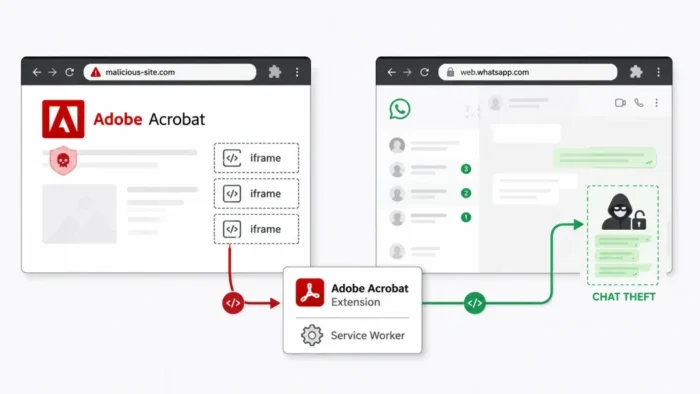
A vulnerability in Adobe’s Acrobat extension for Google Chrome could have allowed a malicious website to steal rendered content from an active WhatsApp Web session. The exposed information could include visible messages, contact names, chat previews, and profile details.
Guardio Labs discovered the vulnerability chain and named it HermeticReader. The researchers found that a webpage could abuse trusted components inside the Adobe Acrobat Chrome extension to interact with WhatsApp Web in another browser tab.

Access content across the globe at the highest speed rate.
🔥 Save 81% + 2 bonus months! 🔥
70% of our readers choose Private Internet Access
70% of our readers choose ExpressVPN
2
Browse the web from multiple devices with industry-standard security protocols.
🔥 Save 73%! 🔥

Faster dedicated servers for specific actions (currently at summer discounts)
🔥 Save 69%! 🔥
The flaw is tracked as CVE-2026-48294 and received a CVSS 3.1 score of 7.4, placing it in the high-severity category. Adobe fixed the issue, and current versions of the extension are no longer affected.
What is CVE-2026-48294?
| Category | Details |
|---|---|
| Vulnerability | UXSS-class cross-origin data disclosure |
| CVE | CVE-2026-48294 |
| CVSS score | 7.4, High |
| Affected product | Adobe Acrobat PDF Extension for Chrome |
| Affected versions | 26.5.2.2 and earlier |
| Required interaction | Victim visits a malicious URL or compromised webpage |
| Potentially exposed data | Rendered WhatsApp Web chats, contacts, previews, and profile information |
| Fixed version | 26.5.2.3 and later |
The National Vulnerability Database entry describes the issue as a UXSS-class cross-origin data disclosure vulnerability. UXSS refers to a browser or extension flaw that breaks the normal separation between websites.
Web browsers normally enforce the same-origin policy, which prevents one website from reading information belonging to another. HermeticReader bypassed that boundary by using privileged extension components already running inside the browser.
Who could have been affected?
A victim needed the vulnerable Adobe Acrobat extension installed in Chrome. The victim also needed an active WhatsApp Web session with content available in the browser.
The attack did not affect every person who installed the extension. Guardio reported that the extension had roughly 329 million installations during its research, but this figure described the extension’s reach rather than the number of confirmed victims.
The current Chrome Web Store listing shows approximately 312 million users. Installation figures can change over time and do not reveal how many people used WhatsApp Web or encountered an attack page.
- The vulnerable Adobe Acrobat extension had to be installed.
- The victim had to visit an attacker-controlled or compromised webpage.
- WhatsApp Web had to be accessible in the same Chrome browser.
- The browser needed to render the information targeted by the attacker.
- No Adobe account was required for the attack chain.
How the HermeticReader attack worked
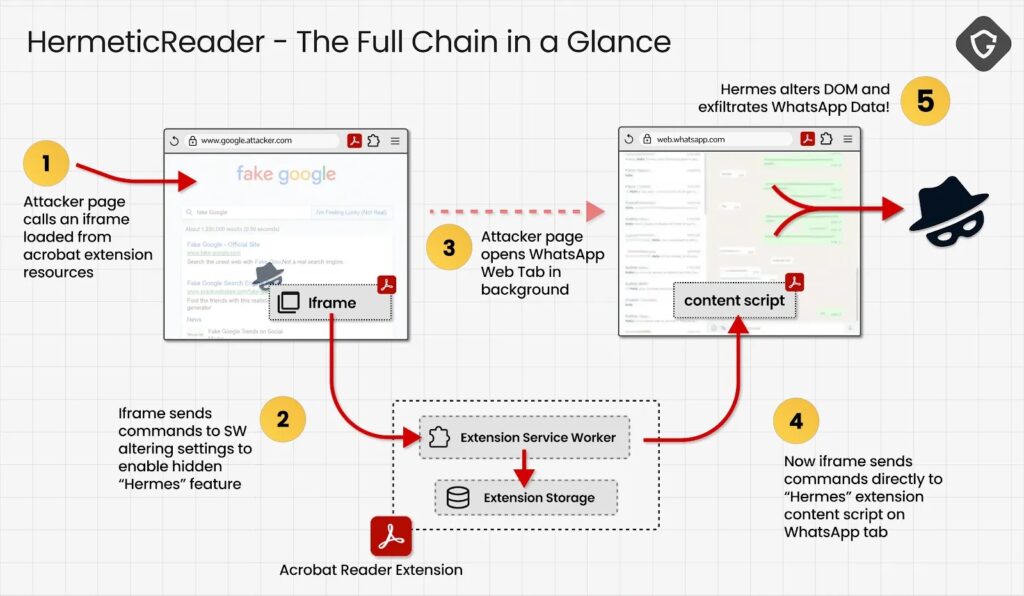
The attack began when a victim opened a malicious webpage. Adobe’s extension exposed several internal pages as web-accessible resources, allowing ordinary websites to load them inside hidden iframes.
One of these internal pages accepted attacker-controlled data from its URL and passed that data to the extension’s background service worker. Since the message came from an internal extension page, the service worker treated it as trusted.
The extension failed to verify the original website responsible for the message. This allowed the attacker to read and modify values in the extension’s local storage without requiring a separate click or permission request after the victim opened the page.
Attackers could activate Adobe’s Hermes engine
Adobe’s extension contained an integration engine called Hermes, which supported interactions with WhatsApp Web. A feature flag controlled whether this engine remained active.
The storage flaw allowed attackers to change a developer override called floodgate-add. By adding the Hermes feature identifier, the malicious page could activate the otherwise unavailable integration code.
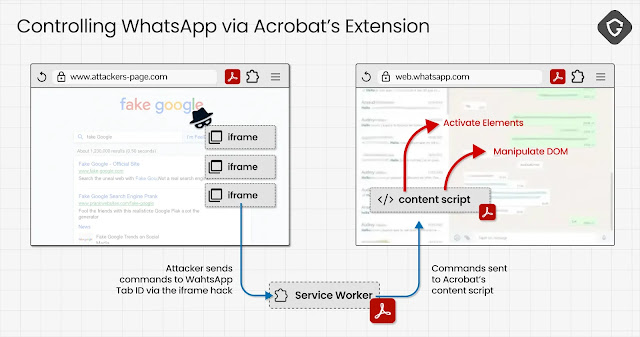
This stage did not immediately provide access to WhatsApp messages. The attacker still needed to identify the browser tab running WhatsApp Web and send commands to the correct content script.
- Load an Adobe extension resource inside an invisible iframe.
- Send a forged message to the extension’s service worker.
- Write a feature override into the extension’s local storage.
- Activate the Hermes WhatsApp integration engine.
- Identify the tab used for WhatsApp Web.
- Send DOM manipulation commands to that tab.
The attack predicted the WhatsApp Web tab ID
Chrome assigns numeric identifiers to browser tabs. Guardio found a separate weakness that disclosed the malicious page’s own tab ID through an Adobe search-overlay feature.
The attacker could then open WhatsApp Web in a new tab. Because Chrome assigned tab IDs sequentially in the researchers’ test environment, the attacker could predict the new tab’s identifier from the previous value.
With the identifier, the malicious page could direct Hermes commands to the content script running inside WhatsApp Web. The Guardio technical analysis documents how several individually limited weaknesses formed the complete cross-origin attack chain.
How WhatsApp chat text left the browser
WhatsApp Web’s content security policy blocked inline scripts and JavaScript event handlers. However, the Hermes engine still allowed structural changes to the page’s Document Object Model, commonly called the DOM.
The attacker could inject an HTML form into WhatsApp Web and move the page’s live body element into an option field. Since the option lacked an explicit value, the browser used its text content when submitting the form.
The researchers found that WhatsApp Web’s content security policy lacked a form-action restriction. The browser could therefore submit the generated form to an external server controlled by the attacker.
| Potentially exposed | Not directly exposed |
|---|---|
| Visible chat list | WhatsApp session cookies |
| Contact names | End-to-end encryption keys |
| Message previews | Unloaded message history |
| Text in the open conversation | Messages not present in the rendered DOM |
| Profile name | Raw encrypted message traffic |
The flaw exposed rendered content, not every message
HermeticReader did not break WhatsApp’s end-to-end encryption. It accessed text after WhatsApp Web had already decrypted and rendered that information for the signed-in user.
The attack could capture the visible conversation, chat list, contacts, message previews, and other text present in the page. It could not automatically retrieve messages that WhatsApp Web had not loaded or rendered.
An attacker could repeat the process as more content appeared, potentially collecting additional messages over time. However, describing the flaw as access to every message in an account would overstate the demonstrated capability.
Account takeover required another user action
Guardio also found that the extension’s DOM controls could replace the QR code shown during WhatsApp device linking. An attacker could display a QR code connected to a session under the attacker’s control.
This scenario still required the victim to scan the substituted code. Without that scan, the QR-code technique would not link the attacker’s device to the victim’s WhatsApp account.
The demonstrated chat-exfiltration chain did not require the victim to scan a QR code, enter credentials, install malware, or approve an extension permission. Visiting the malicious page counted as the user interaction recorded in the CVE assessment.
Adobe patched the vulnerable extension
Guardio reported the findings to Adobe’s Product Security Incident Response Team. Adobe acknowledged the report, investigated the vulnerability, and released extension version 26.5.2.3 during the same weekend, according to the researchers.
Adobe’s official security acknowledgements page credits Guardio researcher Shaked Biner for responsibly disclosing CVE-2026-48294. Adobe identifies versions through 26.5.2.2 as affected in its CVE submission.
The extension updates automatically through the Chrome Web Store in normal configurations. However, administrators should verify versions on managed endpoints, especially where organizational policies delay browser-extension updates.
How to check and update the Adobe Acrobat extension
Chrome users can open chrome://extensions, enable Developer mode, and check the version shown under Adobe Acrobat. Any version newer than 26.5.2.2 contains the original security correction.
The Adobe Acrobat Chrome Web Store page now offers a substantially newer release than the first patched version. Users who still run an older build should update Chrome and force an extension update.
Organizations should review whether users need extensions with broad permissions and integrations across sensitive web applications. Security teams should also maintain an inventory of installed browser extensions and monitor version compliance.
- Open
chrome://extensionsin Google Chrome. - Locate the Adobe Acrobat extension.
- Confirm that the version is newer than 26.5.2.2.
- Enable Developer mode and select Update if Chrome shows an older version.
- Restart Chrome after updating.
- Remove the extension if it is unnecessary or cannot receive updates.
Why CVE-2026-48294 received a 7.4 score
The CVSS vector records a network-based attack with low complexity, no required attacker privileges, and required user interaction. The assessment gives the flaw high confidentiality impact but no direct integrity or availability impact.
The CVE-2026-48294 assessment also marks the scope as changed because exploitation crossed the security boundary between an attacker-controlled site, the Adobe extension, and another web origin.
Adobe had already released a fix before Guardio published the full technical details. Neither the public CVE entry nor the research report presented evidence that attackers had exploited HermeticReader against users before the patch.
What the vulnerability shows about extension security
HermeticReader relied on several connected weaknesses rather than one conventional code-execution bug. These included exposed extension resources, insufficient sender validation, writable feature flags, weak hostname checks, predictable tab identification, and powerful DOM operations.
Each issue gave the attacker a limited capability. Together, they allowed an untrusted website to cross browser security boundaries and extract sensitive content from a separate service.
Adobe’s responsible disclosure record confirms the vulnerability report, while the rapid extension update reduced the period between discovery and remediation. Users and businesses should still verify that automatic updates reached every Chrome installation.
FAQ
HermeticReader is the name Guardio gave to a vulnerability chain in the Adobe Acrobat Chrome extension. It could allow a malicious webpage to extract rendered content from an active WhatsApp Web session.
Adobe Acrobat PDF Extension for Chrome versions 26.5.2.2 and earlier are affected by CVE-2026-48294. Adobe fixed the issue in version 26.5.2.3, and newer releases also contain the correction.
No. The attack accessed text after WhatsApp Web had decrypted and rendered it in the browser. It did not expose end-to-end encryption keys or break WhatsApp’s encryption protocol.
No evidence supports that claim. The figure referred to the approximate installation base of the Adobe extension during Guardio’s research, not the number of confirmed victims or exposed WhatsApp accounts.
Users should update the Adobe Acrobat Chrome extension to a version newer than 26.5.2.2. They can check the installed version through Chrome’s extensions page and remove the extension if they do not need it.


Read our disclosure page to find out how can you help VPNCentral sustain the editorial team Read more


Improve this guide




User forum
0 messages