
AI-assisted OpenClaw malware campaign hides in fake GitHub repos and targets developers, gamers, and crypto users


 5 min. read
  Published on

A large malware campaign has used fake GitHub repositories to spread trojanized tools under the OpenClaw name, according to Netskope Threat Labs. The operation did not just target developers. It also pushed lures aimed at gamers, Roblox users, crypto users, and people searching for cracked tools or trackers.
Researchers say the campaign relied on polished GitHub pages that looked believable enough to fool people into downloading malicious packages. One of the most visible examples impersonated an OpenClaw Docker deployment helper, even though OpenClaw already publishes official installation guidance through its own docs and GitHub repository.
The scale matters here. Netskope said it linked the same operation to more than 300 delivery packages spread across multiple GitHub repositories. The lures covered a wide range of themes, from AI tools and Docker helpers to gaming cheats, VPN crackers, Roblox scripts, and crypto-related software.
The technical design also made the malware harder to catch. Netskope said the payload arrived as a split package with a batch file, a renamed LuaJIT runtime, and an obfuscated script hidden as a text file. That setup helped the malware avoid simpler automated analysis because each file looked less suspicious on its own.
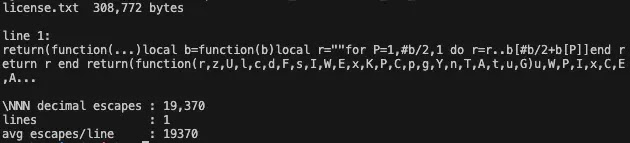
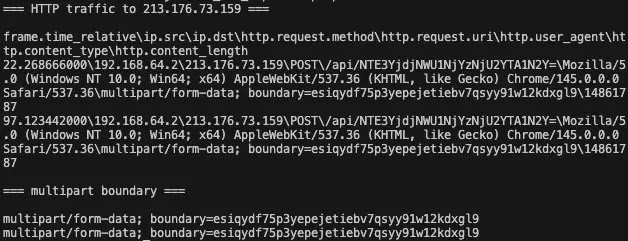
Once the victim ran the package, the malware checked whether it was running inside a sandbox or analysis environment. If the machine looked real, the payload could capture a screenshot, contact command-and-control infrastructure, and pull additional instructions. Netskope also said the campaign geolocated victims at the start of execution and used infrastructure tied to multiple backend IP addresses, which suggests an operation built to handle volume.
This case also lands at a bad time for OpenClaw users. The project has already drawn heavy attacker attention in recent weeks, including phishing attempts and copycat abuse that ride on its fast growth and developer visibility. That broader pattern makes fake repositories easier to sell because users already expect to find new installers, Docker helpers, plugins, and community tools around the project.
Why this campaign worked
Attackers did not rely on one crude trick. They stacked several trust signals at once.
| Tactic | How it helped the attackers | Why users fell for it |
|---|---|---|
| Fake project branding | Repo names and pages imitated OpenClaw-related tooling | Users thought they had found a community helper |
| Search-friendly topic tags | Repositories used AI, Docker, and LLM-related tags | The pages looked relevant in GitHub searches |
| Polished documentation | README files included setup steps for Windows and Linux | Detailed instructions made the repos look real |
| Multi-audience lures | Same infrastructure pushed dev tools, cheats, scripts, and crackers | Different user groups saw something tailored to them |
| Split payload design | Malware parts looked less dangerous when scanned separately | Basic automated checks missed the full chain |
The campaign also shows how repository abuse keeps evolving. GitHub has long prohibited content that directly supports active malware campaigns, and the company provides abuse reporting tools for repositories and organizations. But attackers still exploit the platform’s trust, search visibility, and familiar workflow to deliver malware before defenders catch up.
What users should do right now
If you downloaded a package from a suspicious OpenClaw-related GitHub repository, treat the machine as compromised until proven otherwise. Netskope’s advice points toward immediate containment, and GitHub’s own abuse workflow gives users a direct way to report malicious repositories.
Recommended actions:
- Disconnect the affected machine from sensitive accounts and internal networks.
- Change passwords that may have been exposed on that device.
- Rotate developer tokens, SSH keys, API keys, wallet secrets, and stored browser credentials.
- Review recent GitHub, cloud, and crypto account activity for suspicious logins.
- Scan for persistence and unknown files in user folders, especially recently dropped items.
- Block known command-and-control infrastructure from Netskope’s published indicators.
- Report the malicious repository through GitHub’s abuse reporting flow.
How to avoid fake OpenClaw downloads
OpenClaw has official documentation, an official site, an official GitHub repository, and a published security reporting channel. Users should start from those properties instead of GitHub search results, social posts, or third-party mirrors.
Safer habits:
- Start from the official OpenClaw docs or the official repository.
- Avoid random “helper” repos unless the main project links to them.
- Be cautious with ZIP files that bundle scripts, renamed runtimes, or oddly named text files.
- Verify install paths against official documentation before running anything.
- Treat cracked software, cheats, trackers, and unofficial automation tools as high risk.
- Report suspicious repos instead of testing them on your main machine.
FAQ
It is a malware operation identified by Netskope Threat Labs that used fake GitHub repositories and trojanized packages to target developers, gamers, crypto users, and other victims.
Researchers tied the campaign to fake repositories that impersonated OpenClaw-related tooling. OpenClaw itself publishes official install documentation and an official GitHub repository, which users should verify before downloading anything.
Netskope said the package split the payload into multiple parts and used anti-analysis checks before continuing execution. That design made simple automated scanning less reliable.
Developers searching for OpenClaw tooling faced direct risk, but the campaign also targeted gamers, Roblox users, crypto users, and people looking for trackers, cheats, or cracked tools.
Disconnect the system, rotate credentials, review account activity, scan for persistence, and report the malicious repository to GitHub. Organizations should also push the indicators into EDR and firewall tools.


Read our disclosure page to find out how can you help VPNCentral sustain the editorial team Read more


Improve this guide




User forum
0 messages