
Attackers use SEO poisoning and signed trojans to steal VPN credentials


 6 min. read
  Published on
Employees searching for VPN software are being lured to fake download pages that look real, install signed malware, and steal corporate login details. Microsoft says the campaign comes from Storm-2561, a financially motivated threat actor that has used SEO poisoning and software impersonation since at least May 2025.
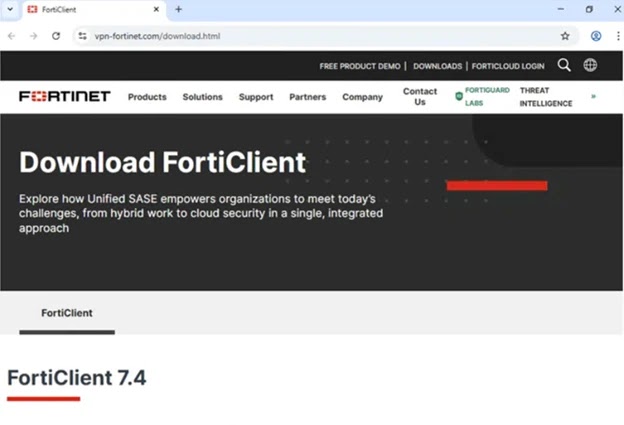
The latest campaign matters because it abuses two things many users trust by default: high-ranking search results and software that appears digitally signed. In this case, victims searching for tools tied to brands such as Pulse Secure, Ivanti, and Fortinet can end up on spoofed sites that deliver trojanized installers instead of legitimate VPN clients.
According to Microsoft, the fake software can harvest credentials and VPN data while appearing to work like a normal client. After the theft, the victim may even be redirected to the legitimate vendor download, which makes the compromise much harder to spot.
What happened
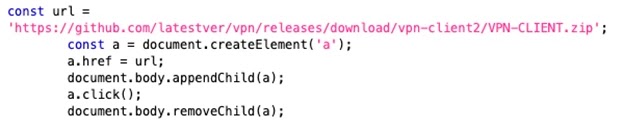
Microsoft says users were redirected from search results to fake VPN portals that closely copied trusted brands. Those pages then sent users to malicious GitHub-hosted ZIP files containing Windows Installer packages that sideloaded harmful DLLs during setup. Microsoft observed this activity in mid-January 2026 and linked it to Storm-2561.
The company also said the malicious components were digitally signed by a certificate issued to “Taiyuan Lihua Near Information Technology Co., Ltd.” That certificate has since been revoked, but the use of a valid-looking signature likely helped the malware avoid suspicion during installation.
This is not a broad consumer scam built around random fake apps. Microsoft’s write-up points to a more focused enterprise credential theft operation, with spoofed infrastructure tied to VPN brands that employees commonly search for when setting up remote access.
Why this attack is dangerous
The campaign does not rely on loud ransomware behavior or obvious system damage at first. It aims to quietly steal usernames, passwords, and connection information that can later open the door to internal systems.
That makes the impact far larger than a single infected PC. If attackers get working VPN credentials, they may try to move deeper into a company network, access internal services, or use the stolen accounts in follow-on attacks. Microsoft’s guidance stresses layered defenses because users may not realize anything went wrong after the fake client hands them off to a real vendor download page.
How the infection chain works
Microsoft says the fake installer arrives inside a ZIP archive and uses an MSI package to mimic legitimate VPN software. During installation, it drops files into a path designed to resemble a real Pulse Secure deployment, then sideloads malicious DLLs.
One DLL acts as an in-memory loader, while another is a Hyrax infostealer variant built to capture VPN credentials and related configuration data. Microsoft also said the malware used persistence via the Windows RunOnce registry key so it could launch again after restart.
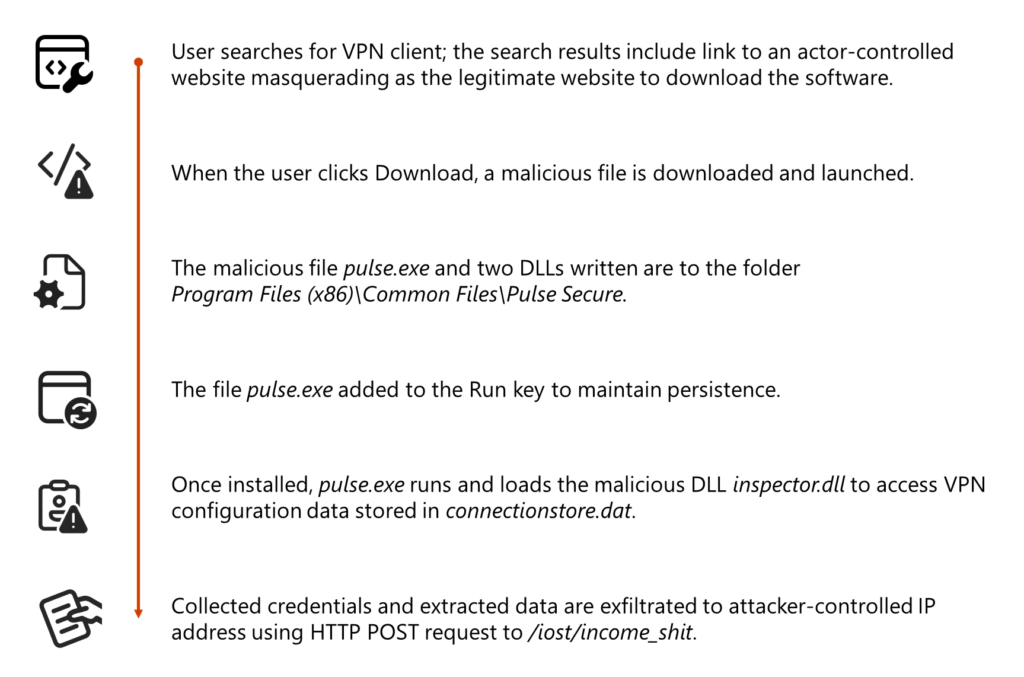
The table below breaks down the attack flow.
| Stage | What happens | Why it matters |
|---|---|---|
| Search | Victim searches for VPN software | Attack starts with ordinary user behavior |
| Redirect | Search result leads to spoofed VPN site | Fake site looks like a trusted vendor portal |
| Download | Site points to malicious ZIP on GitHub | User receives trojanized installer |
| Install | MSI drops signed malicious files | Signature lowers suspicion |
| Theft | Malware captures VPN credentials and data | Attackers gain access material |
| Cover | Victim may get redirected to real software | Compromise can stay unnoticed |
Key indicators from Microsoft’s findings
Microsoft’s report highlights several details that security teams should pay attention to:
- SEO-poisoned search results for VPN download terms
- Spoofed domains impersonating major VPN brands
- Malicious ZIP files hosted on GitHub repositories that were later removed
- Use of signed malware to reduce security warnings
- Theft of stored VPN configuration data in addition to typed credentials
- Use of RunOnce for persistence on Windows systems
What organizations should do now
The first step is simple: stop treating search results as trusted software sources. Employees should download VPN clients only from the organization’s approved portal or the vendor’s official site. That is especially important for remote staff who often search for setup tools on their own.
Microsoft also recommends stronger endpoint protections. For organizations using Microsoft Defender, attack surface reduction rules help block common malware and script-based abuse, while web and network protection help stop access to malicious or phishing infrastructure.
Identity protection matters just as much. MFA adds another barrier at sign-in, and Microsoft says phishing-resistant methods such as passkeys, FIDO2 security keys, and Windows Hello for Business offer the strongest protection. A stolen password alone becomes far less useful when a second factor or phishing-resistant method stands in the way.
For companies that run non-Microsoft antivirus on endpoints, Microsoft says EDR in block mode can still help remediate malicious artifacts detected after compromise, though some protections depend on Defender Antivirus running in active mode.
Practical defenses at a glance
| Defense | Why it helps | Official basis |
|---|---|---|
| Use official vendor download pages | Reduces risk from spoofed search results | Ivanti and Fortinet official download pages exist for legitimate client distribution |
| Enforce MFA | Limits value of stolen passwords | Microsoft Entra MFA guidance |
| Prefer phishing-resistant authentication | Harder to bypass than password-only sign-in | Microsoft authentication guidance |
| Turn on web and network protection | Helps block access to malicious sites and infrastructure | Microsoft Defender web and network protection docs |
| Deploy ASR rules | Helps stop common malware and exploit behaviors | Microsoft ASR documentation |
| Use EDR in block mode where appropriate | Can remediate post-breach artifacts | Microsoft Defender documentation |
Bottom line
Storm-2561’s campaign shows how effective a simple trap can be when it sits in front of users at the exact moment they search for business software. A polished fake download page, a signed trojan, and a normal-looking install flow can be enough to steal VPN credentials before anyone notices.
For enterprises, the lesson is clear. Control where software comes from, lock down endpoints, and treat remote access credentials as high-value targets that need stronger protection than a password alone.
FAQ
It is the practice of pushing malicious pages higher in search results so users searching for legitimate VPN clients click fake download sites instead. Microsoft says Storm-2561 used this tactic to distribute trojanized VPN software.
Microsoft attributes the activity to Storm-2561, a financially motivated threat actor linked to malware distribution through SEO abuse and software impersonation since at least May 2025.
Microsoft specifically mentioned spoofing tied to brands such as Pulse Secure, Ivanti, and Fortinet, and noted observed domains masquerading as Fortinet and Ivanti-related resources.
A digital signature can make malicious software look more trustworthy and reduce user suspicion during installation. Microsoft said the malware in this campaign was digitally signed with a certificate later revoked.
Use only approved download sources, enable MFA, prefer phishing-resistant sign-in methods, deploy web and network protection, and use attack surface reduction rules and endpoint detection capabilities where supported.


Read our disclosure page to find out how can you help VPNCentral sustain the editorial team Read more


Improve this guide



User forum
0 messages