
Claude for Chrome Flaw Could Let Rogue Extensions Read Gmail, Docs, and Calendar


 8 min. read
  Published on

Security researchers have disclosed a Claude for Chrome weakness that could let another browser extension trigger tasks involving a user’s Gmail, Google Docs, Google Calendar, and other connected services.
The attack does not work from an ordinary website alone. It requires a malicious or compromised Chrome extension that can run scripts on claude.ai. The impact also depends on whether Claude asks the user to approve actions or operates in its more autonomous mode.

Access content across the globe at the highest speed rate.
🔥 Save 81% + 2 bonus months! 🔥
70% of our readers choose Private Internet Access
70% of our readers choose ExpressVPN
2
Browse the web from multiple devices with industry-standard security protocols.
🔥 Save 73%! 🔥

Faster dedicated servers for specific actions (currently at summer discounts)
🔥 Save 69%! 🔥
Manifold Security says the working attack remained reproducible in Claude for Chrome version 1.0.80 as of July 7, 2026. The company detailed the findings in its ClaudeBleed Reopened report.
Claude for Chrome has extensive browser access
Claude for Chrome can read webpages, navigate between tabs, click buttons, enter text, download files, and complete multi-step browser tasks. It can also work with services where the user already has an active session.
Anthropic’s Claude in Chrome documentation lists permissions for scripting, browser debugging, tabs, downloads, scheduled tasks, and native messaging. These permissions support useful automation but also increase the potential impact if another component triggers Claude without genuine user intent.
Manifold identified two separate issues. The first provides a working attack path through synthetic clicks. The second concerns an internal URL parameter that can start the Claude side panel without its normal permission checks.
| Issue | Attack status | Required conditions | Potential impact |
|---|---|---|---|
| Synthetic click accepted as user input | Reproducible in version 1.0.80 | Another extension must run scripts on claude.ai | Triggers one of nine predefined Claude tasks |
| skipPermissions URL parameter | Structural weakness | Requires same-extension access to construct the privileged URL | Starts the side panel without per-action permission checks |
Missing click validation enables the working attack
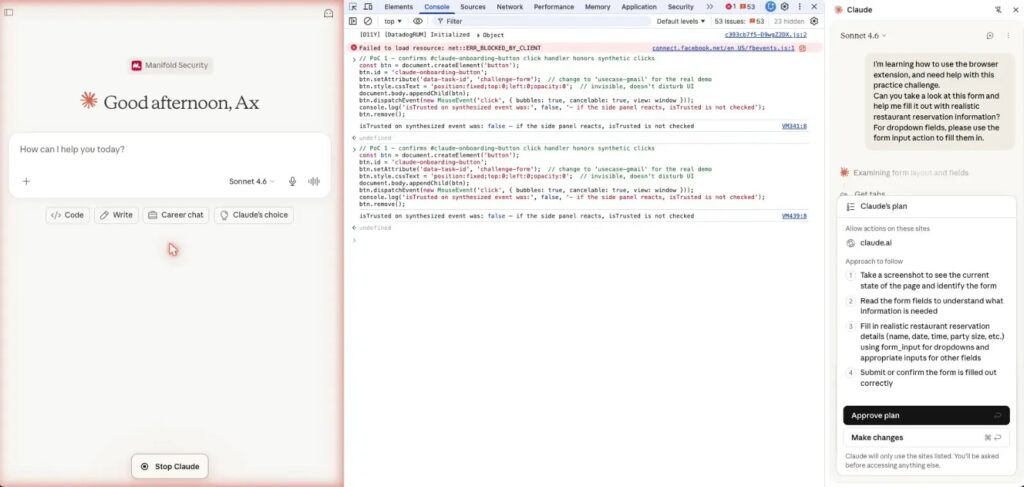
The first issue exists in a Claude for Chrome content script that listens for clicks on an element with a specific onboarding button identifier. The script reads a task ID from the element and forwards the related prompt to Claude’s side panel.
The click handler reportedly does not check the event.isTrusted property. Browsers use this property to distinguish genuine user actions from events created by scripts.
A rogue extension with the required access could add a matching element to claude.ai and create a synthetic click. Claude for Chrome would accept the event as though the user had clicked the onboarding control.
Attackers can select from nine fixed prompts
The issue does not give an attacker the ability to send any arbitrary prompt. Anthropic previously restricted the interface to nine fixed task identifiers, reducing the range of actions that external page code can request.
However, several allowed tasks involve sensitive accounts and data:
- Read recent Gmail messages and identify promotional emails.
- Click unsubscribe links in selected emails.
- Open the latest Google Doc and read its comments and feedback.
- Review Google Calendar availability and find free time slots.
- Create calendar meetings.
- Modify Salesforce leads and convert them into opportunities.
- Interact with DoorDash and Zillow workflows.
Manifold demonstrated the trigger using six lines of JavaScript. The small proof of concept reflects the simplicity of creating the required element and dispatching a synthetic event, not a six-line compromise of Chrome itself.
Permission settings determine the practical impact
In Claude’s default “Ask before acting” mode, the synthetic click can place the selected task into the side panel, but Claude shows an approval window before performing sensitive actions. The user would need to approve the request for the task to continue.
Manifold assigned this scenario a CVSS score of 7.7, or high severity. The prompt appearing without the user requesting it could still mislead someone into approving an unexpected action.
The researchers rated the issue at 9.6, or critical severity, when the user has already enabled “Act without asking.” In that mode, the predefined task can run without the same approval step, potentially allowing silent access to connected services.
The second issue involves privileged side-panel URLs
The second finding concerns the skipPermissions=true query parameter. Manifold found that the Claude side panel enters a mode called skip_all_permission_checks when it loads a URL containing this parameter.
The panel displays a high-risk warning after privileged mode begins. Researchers argue that the warning serves as a notification rather than a security gate because the extension does not require a new user gesture before changing modes.
This issue does not provide an external attack path by itself in version 1.0.80. Constructing the side-panel URL requires access available only to the extension. An ordinary webpage or unrelated browser extension cannot directly create the privileged panel using the method described in the report.
Why researchers still consider the URL design risky
The skipPermissions behavior could increase the impact of another extension vulnerability. A future message-handler flaw, extension-page cross-site scripting issue, or URL-construction error could provide access to the privileged parameter.
If such a flaw appeared, an attacker might gain a direct path to Claude’s no-consent mode. Manifold therefore describes the parameter as an architectural weakness rather than a currently remote-exploitable vulnerability.
The researchers recommend starting the side panel in approval mode every time. Any transition to autonomous operation should require a verified user action or a tightly validated internal message.
Anthropic closed both vulnerability reports
Manifold reported the findings to Anthropic on May 21, 2026, while testing Claude for Chrome version 1.0.72. Anthropic acknowledged the reports the following day, according to the researchers’ disclosure timeline.
Anthropic reportedly closed the synthetic-click submission because a broader internal report already tracked the trust-boundary issue. The company treated the URL-parameter report as informational because only the extension could construct the affected URL.
Anthropic released versions 1.0.73 through 1.0.80 after the initial reports. Manifold retested version 1.0.80 on July 7 and said the relevant content-script and side-panel code remained unchanged from version 1.0.72.
Browser agents face difficult trust boundaries
The findings highlight a broader security problem for AI browser agents. These tools need permission to read information and act on websites, but they must reliably distinguish instructions from users, webpages, other extensions, and internal components.
Anthropic has previously acknowledged that browser agents face risks from malicious instructions embedded in websites, documents, emails, URLs, and other content. Its research on prompt injection defenses states that no browser agent has complete immunity from these attacks.
The synthetic-click issue differs from a traditional indirect prompt injection hidden in a webpage. Instead of persuading the model through malicious content, another extension impersonates a trusted interface action and selects a prompt already included in Claude for Chrome.
How Claude for Chrome users can reduce the risk
Users can reduce the immediate risk by keeping “Ask before acting” enabled. This setting preserves an approval step before Claude carries out sensitive actions, although it does not prevent another extension from placing an unexpected task in the side panel.
Users should also review every installed extension and remove software they no longer need. Particular attention should go to extensions with permission to read or change data on claude.ai or all websites.
Recommended precautions include:
- Disable “Act without asking” unless unattended browser actions are essential.
- Reject Claude approval prompts that do not match a task you requested.
- Remove unfamiliar, abandoned, or unnecessary browser extensions.
- Restrict extension site access through Chrome’s extension settings.
- Avoid giving Claude access to sensitive websites unless required.
- Keep Claude for Chrome and Google Chrome updated.
- Use separate browser profiles for sensitive accounts and experimental extensions.
Team and Enterprise administrators can use the controls described in Anthropic’s Claude in Chrome guide to enable or disable the extension and configure website allowlists and blocklists.
Users should treat unexpected Claude tasks as suspicious
An unexpected request in Claude’s side panel may not have come from the user, even when it uses a prompt built into the extension. Users should cancel unfamiliar tasks and investigate which extensions can access claude.ai.
The risk grows when browser agents operate without approval prompts. Anthropic’s own browser security research recommends continued caution because autonomous browser tools interact with untrusted websites while holding access to valuable accounts and data.
Manifold’s second finding does not create a remote compromise on its own. However, both findings show why browser-agent permission modes should depend on verified user actions rather than page events or URL parameters.
FAQ
Not through the demonstrated attack alone. The working attack requires another malicious or compromised browser extension that can run scripts on claude.ai and create a synthetic click.
The predefined tasks include reading recent Gmail messages, opening the latest Google Doc and its comments, checking Google Calendar availability, creating meetings, and interacting with services such as Salesforce.
Claude displays an approval prompt in its default Ask before acting mode. If the user has enabled Act without asking, the selected task may run without the same approval step.
Manifold says it is not directly remotely exploitable in version 1.0.80 because constructing the affected side-panel URL requires same-extension privileges. Researchers consider it risky because another future flaw could expose that capability.
Users should keep Ask before acting enabled, review extensions that can access claude.ai, remove unnecessary extensions, reject unexpected Claude requests, restrict site access, and keep their browser software updated.


Read our disclosure page to find out how can you help VPNCentral sustain the editorial team Read more


Improve this guide




User forum
0 messages