
ClickFix Campaign Uses EtherHiding and GULoader to Target Windows Users With Fake CAPTCHA Pages


 10 min. read
  Published on

A new ClickFix campaign is targeting Windows users through compromised WordPress sites, fake CAPTCHA prompts, blockchain-hosted payload delivery, and a remote GULoader infection attempt. The attack does not begin with a phishing email. In the case analyzed by Sicuranext, the victim reached a legitimate European small-business website through Google Search.
The site looked normal. Product pages, maps, contact forms, and other public features still worked. Malicious JavaScript hidden in the WordPress backend only activated for desktop Windows visitors, which helped the campaign avoid mobile checks, search crawlers, and basic uptime monitoring.

Access content across the globe at the highest speed rate.
🔥 Save 81% + 2 bonus months! 🔥
70% of our readers choose Private Internet Access
70% of our readers choose ExpressVPN
2
Browse the web from multiple devices with industry-standard security protocols.
🔥 Save 73%! 🔥

Faster dedicated servers for specific actions (currently at summer discounts)
🔥 Save 69%! 🔥
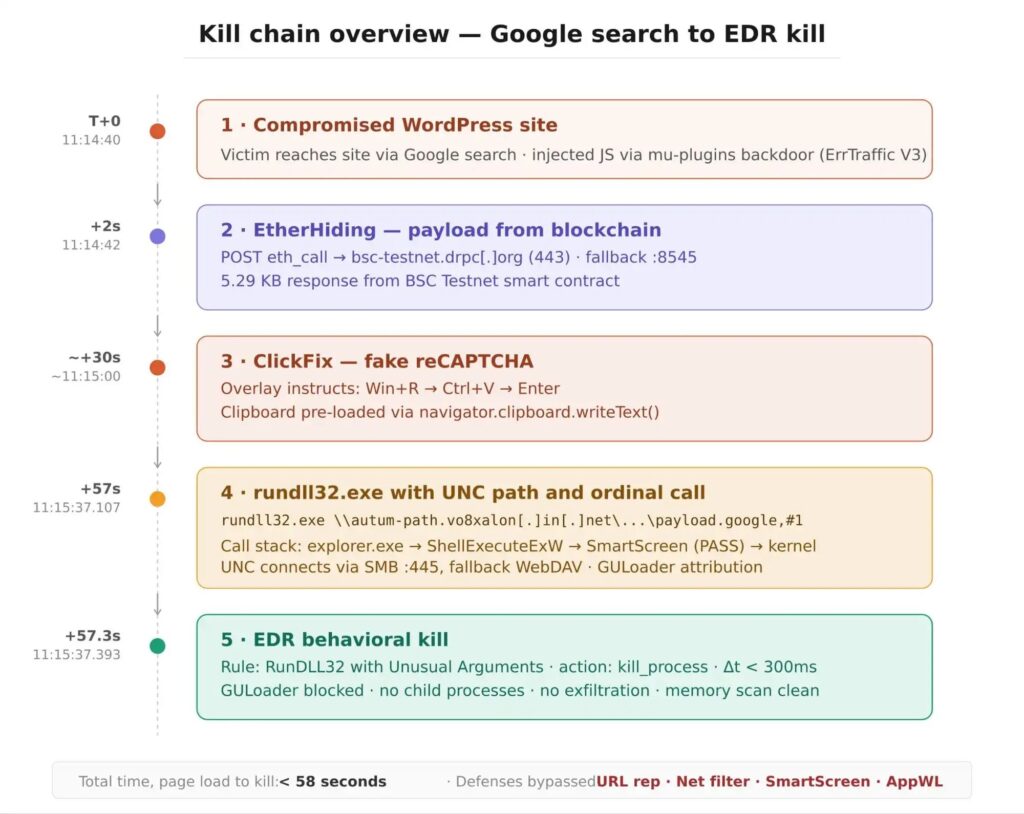
The attack chain combined four major pieces: a compromised WordPress site, EtherHiding through BNB Smart Chain Testnet, ClickFix social engineering, and a GULoader attempt through a remote UNC path. Elastic Defend stopped the execution in under 300 milliseconds before GULoader could initialize.
How the ClickFix attack worked
The victim landed on a compromised WordPress website that had been modified to inject malicious scripts into public pages. The injected code waited briefly, checked the visitor’s environment, and then contacted blockchain infrastructure to retrieve the next stage.
This blockchain-based method is known as EtherHiding. Instead of hosting the payload directly on the hacked website, the attacker stored delivery data in smart contracts and fetched it through public RPC endpoints. This makes takedown harder because the malicious content is not stored only on the compromised site.
The technique fits the broader ClickFix pattern documented by Sekoia, where attackers use compromised websites and fake verification pages to trick users into running commands on their own systems.
| Stage | What happened | Why it mattered |
|---|---|---|
| Compromised website | A legitimate WordPress site served hidden malicious JavaScript | The site had no obvious suspicious reputation for visitors |
| Traffic filtering | The payload targeted desktop Windows browsers | Mobile users and many automated scanners saw a clean page |
| EtherHiding | The script fetched payload data from BNB Smart Chain Testnet | Blocking or removing the payload becomes harder |
| Fake CAPTCHA | The page instructed the user to press Win+R, Ctrl+V, and Enter | The user unknowingly launched a malicious command |
| GULoader attempt | rundll32.exe tried to load a remote DLL from a UNC path | The malware attempted to run without writing a local file first |
EtherHiding made the payload harder to remove
EtherHiding lets attackers place malicious instructions or delivery data inside blockchain smart contracts. The compromised website can then query public blockchain RPC endpoints and pull down the next stage when a suitable visitor arrives.
In this incident, the injected JavaScript contacted bsc-testnet[.]drpc[.]org and a fallback BNB Smart Chain Testnet node. Sicuranext said the activity was visible in both sandbox data and endpoint telemetry.
LevelBlue SpiderLabs previously reported that ErrTraffic v3 uses compromised WordPress sites, traffic direction logic, and blockchain-based infrastructure to deliver ClickFix lures. Sicuranext said the compromised site behavior aligned with that framework.
The fake CAPTCHA turned the victim into the execution path
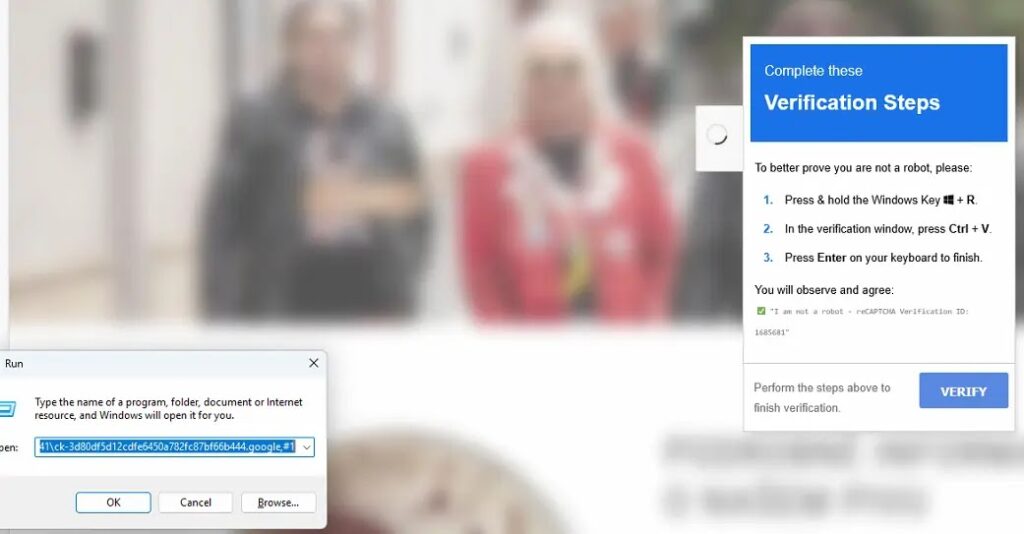
After fetching the payload, the site displayed a fake reCAPTCHA-style overlay. The message told the user to open the Windows Run dialog, paste a command, and press Enter to complete verification.
Behind the scenes, the browser had already placed the malicious command into the clipboard. The user believed they were completing a normal CAPTCHA check, but they were actually launching rundll32.exe with a remote network path.
This is why ClickFix attacks are so effective. They do not always need an exploit, macro, or attachment. The attack works because the user follows instructions that appear to be part of a routine verification flow.
- The prompt looked like a normal verification step.
- The compromised website still worked normally.
- The command used a trusted Windows binary.
- The payload came from a remote path, not a normal downloaded file.
- The attack avoided many reputation-based checks.
rundll32.exe and UNC paths helped the attack look legitimate
The pasted command used rundll32.exe, a legitimate Microsoft-signed Windows component often abused by attackers. In this campaign, rundll32.exe pointed to a remote UNC path on autum-path[.]vo8xalon[.]in[.]net and invoked an exported function by ordinal.
MITRE ATT&CK tracks this type of abuse under Rundll32, where attackers use a trusted Windows binary to proxy malicious execution. The technique can help bypass controls that trust signed operating system binaries by default.
Sicuranext’s call-stack analysis showed that Microsoft Defender SmartScreen evaluated the execution and allowed it to proceed. That outcome was expected because the visible program was a signed Windows binary and the UNC path did not carry the same Mark-of-the-Web metadata as a normal browser download.
| Command element | Purpose in the attack |
|---|---|
| rundll32.exe | Loads and runs DLL code through a trusted Windows binary |
| Remote UNC path | Loads the DLL from an attacker-controlled network location |
| .google extension | Makes the remote object look less suspicious in some logs |
| ,#1 ordinal call | Invokes an exported function by number instead of by name |
| Cloudflare-backed domain | Hides the origin server behind trusted infrastructure |
GULoader did not finish executing in the analyzed case
The remote domain in this campaign was attributed to GULoader based on threat intelligence reporting. GULoader is a shellcode-based downloader often linked to second-stage threats such as infostealers and remote access tools.
In this incident, behavioral detection stopped the rundll32.exe process before GULoader could initialize. Sicuranext reported no child processes, no network connections from rundll32.exe, no evidence of credential access, and no evidence of data exfiltration after the process was killed.
The detection matched behavior similar to the public Elastic rule for rundll32.exe with unusual arguments. The suspicious combination was a network path and ordinal-based function execution.
Why standard defenses can miss this chain
This attack did not rely on one obvious weak point. It used several legitimate-looking layers in sequence, which made each individual step harder to block in isolation.
The starting website was legitimate. The blockchain RPC endpoint looked like normal HTTPS traffic to trusted infrastructure. The Windows process was signed. The user started the execution manually. The DLL was loaded remotely instead of being saved through a normal browser download path.
That combination explains why behavior-based detection mattered. Reputation checks and identity-based trust can miss the context. A signed process can still behave suspiciously when it loads a remote payload through a UNC path.
| Defense layer | Why the attack could bypass it |
|---|---|
| Domain reputation | The user visited a legitimate compromised website |
| Search engine trust | The victim reached the site through a normal Google search |
| SmartScreen | The visible executable was a trusted Windows binary |
| File scanning | The DLL was attempted from a remote path without a standard local download |
| Basic web monitoring | The payload was served only to selected Windows desktop visitors |
WordPress compromise remains central to the campaign
The compromised site in the Sicuranext case was a real small-business website, not an attacker-owned landing page. The attacker kept the original website working while injecting hidden code into the page footer.
LevelBlue’s earlier ErrTraffic research described a WordPress backdoor that used mu-plugins for persistence and injected obfuscated inline scripts through WordPress hooks. That matters because must-use plugins can stay hidden from normal plugin views and run automatically.
Website owners should not assume a site is clean because the homepage looks normal. ClickFix infrastructure can preserve legitimate content while only showing malicious overlays to users who match the attacker’s filtering rules.
- Inspect WordPress mu-plugins directories for unknown PHP files.
- Monitor file integrity in wp-content and plugin folders.
- Review hidden admin accounts and recently changed plugin files.
- Check frontend HTML for unexpected encoded JavaScript blocks.
- Search server logs for beacon requests to suspicious low-cost domains.
Defenders should monitor browser-to-blockchain RPC activity
EtherHiding changes what defenders need to watch. Instead of looking only for downloads from suspicious domains, teams should also review browser processes that contact public blockchain RPC providers in environments that do not normally use Web3 applications.
Sicuranext recommended monitoring DNS queries to blockchain RPC domains from browser processes, including drpc[.]org and similar providers. Connections to public JSON-RPC ports from normal browsers should also stand out in most corporate environments.
The Sicuranext report also recommends checking the Windows Run dialog history for suspicious rundll32, PowerShell, cmd, mshta, or UNC path entries after a suspected ClickFix event.
Indicators of compromise
The following indicators were reported in the public analysis. Domains and paths are defanged for safer handling.
| Type | Indicator | Description |
|---|---|---|
| Domain | autum-path[.]vo8xalon[.]in[.]net | GULoader-attributed C2 domain used in the UNC path command |
| IPv4 address | 188[.]114[.]96[.]7 | Cloudflare reverse proxy resolving the C2 domain |
| IPv4 address | 188[.]114[.]97[.]7 | Cloudflare reverse proxy resolving the C2 domain |
| Domain | bsc-testnet[.]drpc[.]org | BNB Smart Chain Testnet RPC endpoint used for EtherHiding retrieval |
| Domain | data-seed-prebsc-1-s1[.]bnbchain[.]org | Fallback BSC Testnet node contacted on port 8545 |
| File path | \\autum-path[.]vo8xalon[.]in[.]net\05fe317c-0981-4de2-bc8a-930d369db441\ck-3d80df5d12cdfe6450a782fc87bf66b444.google | Remote UNC path pasted into the Windows Run dialog |
| SHA-256 | 172a25a9ed8b798d8baeec29424b46627b5b39723b37c787f928d3700509001e | Web content hash associated with the campaign |
| MD5 | 236e1bef618edfe7f7c29ee2b4cba620 | Web content hash associated with the campaign |
How organizations can reduce the risk
Organizations should block outbound SMB traffic on port 445 where it is not required. They should also review whether workstations need the WebClient service, since WebDAV fallback can help UNC-based attacks load remote content.
Endpoint teams should monitor rundll32.exe executions that include UNC paths, ordinal calls, or unusual arguments. The public Elastic detection rule provides a useful reference for this type of behavior-based detection.
The same activity also maps to MITRE ATT&CK’s Rundll32 technique, so defenders can align this campaign with existing detection engineering, threat hunting, and security awareness programs.
- Block outbound SMB to the internet wherever possible.
- Disable WebClient on workstations that do not need WebDAV.
- Alert on rundll32.exe with UNC paths and ordinal-based calls.
- Hunt RunMRU entries that contain suspicious commands or remote paths.
- Monitor browser connections to public blockchain RPC providers.
- Train users that real CAPTCHA checks do not require Win+R or pasted commands.
ClickFix attacks rely on trust, not technical exploits
ClickFix campaigns succeed because they turn a familiar browsing moment into an execution path. Users expect CAPTCHA checks. Attackers exploit that expectation by making the user run the malware command themselves.
Sekoia’s IClickFix research shows that this tactic has become part of a wider WordPress-targeting ecosystem. The technique can deliver different payloads depending on the campaign, the victim’s operating system, and the attacker’s infrastructure.
The practical lesson is clear: users should never paste unknown commands into the Windows Run dialog because a website tells them to do so. Security teams should treat fake CAPTCHA instructions as a high-risk social engineering signal and investigate immediately when a user reports them.
For defenders, the best coverage comes from combining user education, WordPress integrity monitoring, browser-to-RPC visibility, outbound SMB controls, and behavioral endpoint detection. This campaign shows that no single layer catches every step, but a well-correlated defense can stop the infection before the loader runs.
FAQ
It is a malware campaign that uses compromised WordPress sites, fake CAPTCHA prompts, blockchain-hosted payload delivery, and rundll32.exe to attempt GULoader infection on Windows systems.
EtherHiding is a technique where attackers store malicious payload data or delivery instructions in blockchain smart contracts. A compromised website can query public blockchain RPC endpoints to retrieve the next stage of an attack.
The fake CAPTCHA tells users to press Win+R, Ctrl+V, and Enter. The page has already placed a malicious command in the clipboard, so the user unknowingly launches the attack through the Windows Run dialog.
No. Sicuranext reported that Elastic Defend stopped the rundll32.exe process in under 300 milliseconds. The investigation found no child processes, no rundll32 network connections, and no evidence of data exfiltration.
Organizations should block outbound SMB where possible, monitor rundll32.exe executions with UNC paths or ordinal calls, review RunMRU history after incidents, monitor browser connections to blockchain RPC providers, and train users never to paste commands from websites into Windows Run.


Read our disclosure page to find out how can you help VPNCentral sustain the editorial team Read more


Improve this guide




User forum
0 messages