
Cursor Declines to Patch Windows Flaw That Auto-Runs Code From Malicious Git Repositories


 8 min. read
  Published on
Cursor has acknowledged a Windows behavior that can automatically execute a malicious file named git.exe when a developer opens a poisoned repository. However, the company says the issue falls outside its bug bounty scope and recommends Workspace Trust as the primary protection.
Security company Mindgard disclosed the flaw on July 14, 2026, after reporting it privately in December 2025. Its researchers found that Cursor searches the active workspace while trying to locate Git, allowing a repository to supply the executable that the editor launches.

Access content across the globe at the highest speed rate.
🔥 Save 81% + 2 bonus months! 🔥
70% of our readers choose Private Internet Access
70% of our readers choose ExpressVPN
2
Browse the web from multiple devices with industry-standard security protocols.
🔥 Save 73%! 🔥

Faster dedicated servers for specific actions (currently at summer discounts)
🔥 Save 69%! 🔥
The attack requires a user to obtain and open a malicious repository or directory containing git.exe in its root. After that action, Cursor can run the file without an additional click, approval dialog, command prompt, or warning. The code runs with the privileges of the current Windows user.
How the Cursor git.exe flaw works
Cursor relies on Git for repository features such as identifying the project root and monitoring source-control changes. When a workspace opens, the editor searches several locations for a suitable Git executable.
According to the Mindgard vulnerability report, that search includes the workspace itself. An attacker can therefore place a malicious Windows executable named git.exe in the repository root and wait for Cursor to select it.
Process Monitor logs published by Mindgard show Cursor.exe creating the planted executable with a Git command intended to identify the repository’s top-level directory. Because Cursor repeats Git-related checks in the background, it may launch the malicious file more than once.
| Requirement | Details |
|---|---|
| Affected platform | Windows |
| Attacker-controlled file | An executable named git.exe |
| File location | The root of the repository or opened directory |
| User action | Opening the repository or directory in Cursor |
| Additional approval | No further prompt or confirmation in the reported test |
| Execution privileges | The privileges of the current user |
Calculator test demonstrated automatic execution
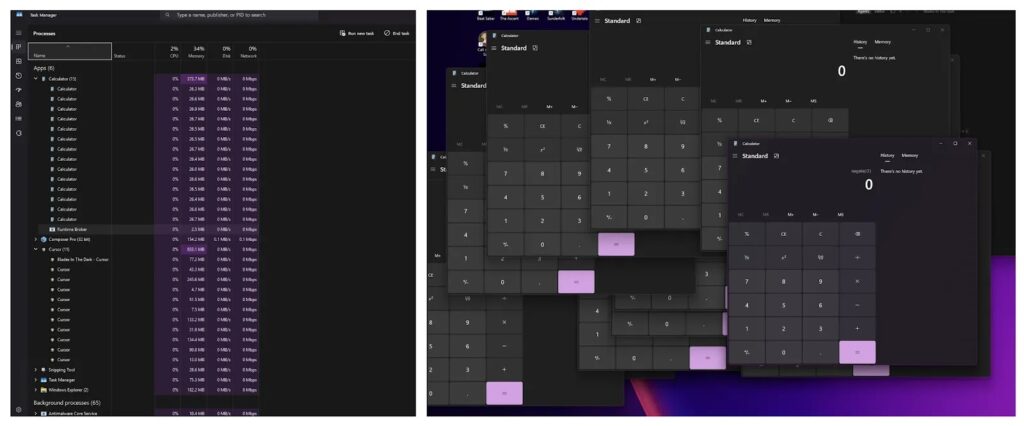
Mindgard demonstrated the behavior by copying Windows Calculator, renaming it git.exe, and placing it in the root of a test repository. Opening the directory in Cursor caused Calculator to launch automatically.
The editor continued invoking the renamed file during routine background activity, producing several Calculator windows. This showed that the execution was not limited to one manually initiated Git operation.
In a real attack, a threat actor could replace Calculator with malware. Potential payloads could steal source code and credentials, install remote-access tools, encrypt files, or alter projects accessible to the victim’s account.
- An attacker creates or compromises a source-code repository.
- The attacker places a malicious executable named git.exe in its root.
- A developer downloads or clones the repository on a Windows system.
- The developer opens the directory in Cursor.
- Cursor searches for Git and finds the repository’s executable.
- Cursor runs the file without displaying an additional approval request.
The flaw does not provide SYSTEM privileges automatically
The issue can enable arbitrary code execution, but it does not automatically grant administrator or SYSTEM privileges. The planted program runs within the security context of the person using Cursor.
That limitation still leaves substantial risk. Developers often have access to private repositories, source-code signing systems, SSH keys, cloud credentials, API tokens, package registries, and production deployment tools.
The behavior also does not constitute remote execution without user involvement. An attacker must first convince the victim to download and open the poisoned repository, or find another way to place the malicious directory on the system.
| Claim | Assessment |
|---|---|
| Opening a poisoned repository can trigger code | Demonstrated by Mindgard and acknowledged by Cursor |
| No further click is required after opening it | Confirmed in the reported proof of concept |
| The attack works remotely with no user action | No, the user must obtain and open the repository |
| The malware gains administrator privileges | Not automatically |
| macOS and Linux are affected | Cursor says the issue affects Windows only |
| The flaw has a CVE and official critical rating | No CVE or independent severity score has been published |
Cursor classifies the report as out of scope
In an official response published July 15, Cursor said it operates under a shared-responsibility model for repositories, prompts, external content, MCP servers, rules, and tools that customers bring into the development environment.
The company said issues requiring malicious inputs to exist inside that context generally fall outside its bug bounty scope. Cursor also described the preconditions as narrow because the behavior affects Windows and requires an executable named exactly git.exe in the project root.
Cursor did not announce a code change or patch. It instead directed customers working with potentially malicious repositories to Workspace Trust, which can open untrusted folders in a restricted mode.
Mindgard disputes Cursor’s assessment
Mindgard argues that opening repositories represents a routine part of software development and should not authorize the editor to execute a binary supplied by that repository. The company characterizes the problem as an untrusted search-path vulnerability.
The researcher also questioned whether Workspace Trust blocks every path reliably and noted that users may not have it enabled. Cursor states that its Workspace Trust security control prevents code from malicious repositories from running automatically when the folder remains untrusted.
No public evidence reviewed for this article shows exploitation in attacks. The proof of concept used Calculator and did not include a destructive payload.
Disclosure began in December 2025
Mindgard says it discovered and reported the behavior to Cursor on December 15, 2025. After receiving no confirmation, it followed up by email and contacted the company publicly through LinkedIn in January.
Cursor’s chief information security officer later said an automation problem had prevented the expected HackerOne invitation. Mindgard entered the private program, where the report was initially marked informative and out of scope before HackerOne reproduced it and reopened the submission.
Mindgard says it requested updates several times between February and June without receiving a resolution. Cursor later accepted responsibility for failing to communicate its final assessment promptly, while maintaining that the report did not qualify for its bounty program.
| Date | Event |
|---|---|
| December 15, 2025 | Mindgard discovers and reports the issue |
| January 15, 2026 | Cursor manually invites Mindgard to its private HackerOne program |
| January 16, 2026 | The submission is closed, challenged, reproduced, and reopened |
| April 30, 2026 | Mindgard last verifies its technical evidence on Cursor 3.2.16 |
| July 14, 2026 | Mindgard publishes the vulnerability details |
| July 15, 2026 | Cursor publishes its response and recommends Workspace Trust |
How Windows developers can reduce the risk
Cursor users should enable Workspace Trust before opening unfamiliar code. Organizations can enforce the setting across managed systems, according to Cursor.
Developers should inspect an unfamiliar repository through a browser or another non-executing review process before opening it locally. Any executable in a repository root deserves scrutiny, especially a file named git.exe.
- Enable Workspace Trust and leave unfamiliar folders in restricted mode.
- Review repository contents before opening them in Cursor.
- Do not open unknown projects directly on a sensitive development workstation.
- Use Windows Sandbox, a disposable virtual machine, or another isolated environment for untrusted repositories.
- Keep genuine Git installations in controlled system locations.
- Monitor unexpected child processes launched by Cursor.exe.
- Protect SSH keys, cloud credentials, package tokens, and signing keys with separate access controls.
- Limit developer accounts to the permissions required for their work.
Enterprise administrators can also consider AppLocker or Windows App Control rules that prevent executables from running inside development workspace directories. Path-based controls may work better than hash blocklists because an attacker can change the binary and its hash.
Cursor’s published position on the Mindgard report means users should not assume that a future update will remove the behavior. Until Cursor changes its approach, Windows developers who handle untrusted repositories should treat Workspace Trust, isolation, and endpoint monitoring as essential safeguards.
The original Mindgard disclosure includes its proof-of-concept evidence, Process Monitor output, mitigation guidance, and full communication timeline.
FAQ
Cursor may execute a file named git.exe from the root of an opened Windows repository while searching for Git. A malicious repository can use this behavior to run attacker-controlled code.
Yes, if the repository contains a malicious Windows executable named git.exe in its root. After the user opens that repository, the reported execution path does not require another click or approval prompt.
Cursor says the reported behavior affects Windows only. The published proof of concept and Process Monitor evidence also cover the Windows version of Cursor.
Cursor has not announced a patch. The company classified the report as outside its bug bounty scope and recommends enabling Workspace Trust for users who open potentially malicious repositories.
Not automatically. The malicious executable runs with the privileges of the current Cursor user, although those privileges may still provide access to valuable source code, credentials, and development systems.
Enable Workspace Trust, inspect repositories before opening them, use an isolated virtual machine or Windows Sandbox for unfamiliar code, and monitor unexpected processes launched by Cursor.exe.


Read our disclosure page to find out how can you help VPNCentral sustain the editorial team Read more


Improve this guide




User forum
0 messages