
Fake event invitations target US organizations with credential theft and remote access tools


 6 min. read
  Published on
A large phishing campaign is targeting US organizations with fake event invitations that lead to credential theft, one-time passcode interception, or remote management tool downloads. ANY.RUN researchers said the campaign uses polished invitation pages to make the first step look harmless.
The attack starts with a link to what appears to be a party, meeting, or event invitation. After a CAPTCHA check, victims land on a convincing event page that can push them toward a fake email login form or a download for remote access software.

Access content across the globe at the highest speed rate.
70% of our readers choose Private Internet Access
70% of our readers choose ExpressVPN

Browse the web from multiple devices with industry-standard security protocols.

Faster dedicated servers for specific actions (currently at summer discounts)
The campaign affects sectors that depend heavily on email access and remote administration, including education, banking, government, technology, and healthcare. A single stolen mailbox or remote access session can give attackers a wider path into an organization.
How the fake invitation attack works
The first stage looks routine. A victim clicks an invitation link, passes a CAPTCHA page, and sees an event-themed landing page. This flow helps the attack appear more legitimate than a basic phishing form.
From there, the campaign splits into two main paths. Some pages push users to enter email credentials and one-time passcodes. Others deliver legitimate remote monitoring and management tools that can give attackers remote access to the device.
ANY.RUN said nearly 160 suspicious links had been submitted to its sandbox by April 27, 2026. Researchers also identified around 80 phishing domains linked to the activity, with many using the .de top-level domain.
At a glance
| Detail | What researchers found |
|---|---|
| Campaign theme | Fake event invitations |
| Main target region | United States |
| Observed activity | Credential theft, OTP interception, and remote management tool delivery |
| Suspicious links | Nearly 160 submitted to ANY.RUN by April 27, 2026 |
| Phishing domains | Around 80 identified by researchers |
| Common TLD | .de domains appeared frequently |
| Affected sectors | Education, banking, government, technology, and healthcare |
The credential theft path
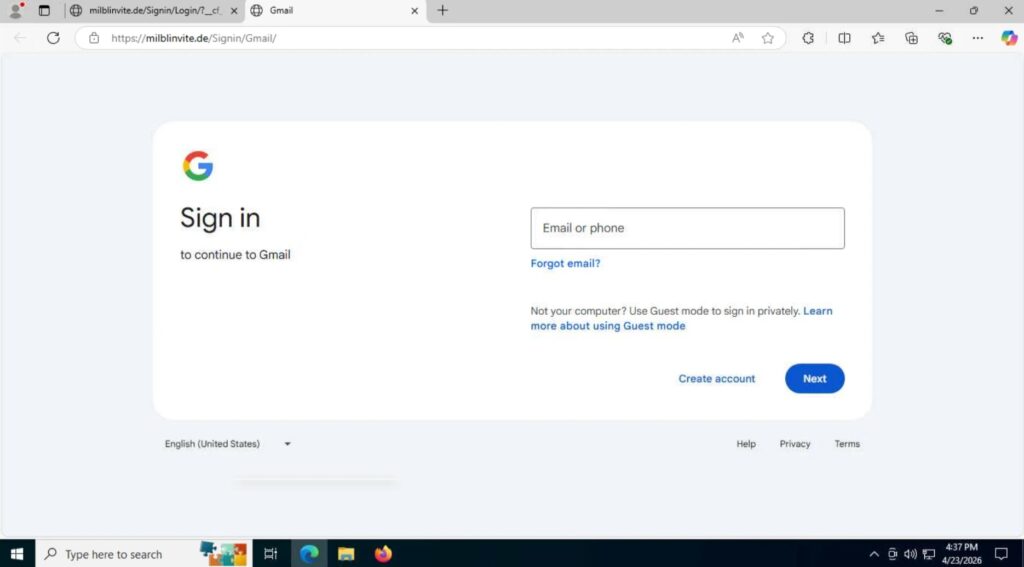
In the credential theft version, the fake event page asks the victim to sign in with an email service. When a victim chooses Google, the campaign can redirect to a fake Google authorization form.
For other email services, the page collects the email address and password, then displays an incorrect password message. This pushes the user to type the password again, giving attackers two captured attempts.
The campaign also asks for one-time passcodes. If the victim enters an OTP, the code is sent to the attacker, which can support account takeover while the code is still valid.
The remote access tool path
Some versions of the lure do not stop at stealing credentials. They instead trigger downloads for legitimate remote monitoring and management tools.
ANY.RUN listed tools such as ScreenConnect, ITarian, Datto RMM, ConnectWise, and LogMeIn Rescue in connection with the campaign. These tools have real business uses, which can make detection harder when attackers abuse them.
Some pages show a download button, while others start the download automatically. If a user installs the tool and grants access, attackers may gain direct control of the machine.
Why the attack is convincing
The campaign avoids many obvious warning signs. It does not always begin with a file attachment, and it does not immediately show a crude login form.
The CAPTCHA step adds a layer of trust for many users. It also helps attackers filter traffic and make automated analysis harder.
The event theme also feels normal in a workplace setting. Invitations, RSVPs, internal gatherings, vendor events, and client meetings all give attackers a believable reason to ask users to click.
Shared infrastructure gives defenders a hunting path
ANY.RUN found repeatable patterns across the phishing pages. The pages often request a root page, then load /favicon.ico, /blocked.html, and image files from paths such as /Image/*.png.
The credential submission endpoints also repeat across the campaign. Examples include processmail.php, process.php, pass.php, and mlog.php, depending on the login flow.
This reuse gives security teams a way to hunt for related domains even when attackers register new sites. The lure changes, but parts of the framework stay recognizable.
What security teams should do now
- Block known phishing domains and watch for newly registered event-themed domains.
- Search proxy, DNS, and browser logs for /blocked.html, /favicon.ico, and /Image/*.png request patterns.
- Monitor for credential POST requests to endpoints such as processmail.php, process.php, pass.php, and mlog.php.
- Review unexpected installations of ScreenConnect, ITarian, Datto RMM, ConnectWise, LogMeIn Rescue, and similar tools.
- Require phishing-resistant MFA for high-risk users and administrator accounts.
- Train employees to report unexpected event invitations, especially those asking for email login details.
- Analyze suspicious links in a sandbox before opening them on a real device.
- Limit who can install remote management tools without administrator approval.
What users should watch for
Users should treat unexpected event invitations with caution, especially when the page asks them to log in again. A real invitation should not need an email password or OTP just to view basic event details.
Users should also avoid installing remote support tools from an invitation page. IT teams usually provide remote support tools through known internal portals or managed software systems.
If a user entered credentials on a suspicious invitation page, the organization should reset the password, revoke active sessions, review mailbox rules, check sign-in logs, and confirm whether any remote access tool was installed.
Why this campaign matters
This campaign shows how phishing is moving beyond simple fake login pages. Attackers now combine social engineering, CAPTCHA pages, reusable phishing kits, OTP collection, and legitimate remote access tools.
That mix creates several possible outcomes. One victim may lose email credentials. Another may install a remote tool that gives attackers control of the device. A third may hand over an OTP that helps attackers complete account takeover.
Defenders need to inspect the full link behavior, not only the first page. A landing page that looks like an invitation can still lead to credential theft, remote access, or both.
FAQ
It is a phishing campaign that uses event-themed invitation pages to steal email credentials, intercept OTP codes, or deliver remote management tools.
ANY.RUN observed delivery paths involving legitimate tools such as ScreenConnect, ITarian, Datto RMM, ConnectWise, and LogMeIn Rescue.
CAPTCHA pages make the flow look more legitimate to users and can also make automated security analysis harder.
ANY.RUN said the campaign targets US organizations, with education, banking, government, technology, and healthcare among the affected sectors.


Read our disclosure page to find out how can you help VPNCentral sustain the editorial team Read more


Improve this guide


User forum
0 messages