
Fake Recruiter Emails Use Career Pages to Steal Gmail Logins


 7 min. read
  Published on
A phishing campaign is impersonating recruiters from major global brands to steal Google account credentials from professionals looking at job opportunities.
The campaign uses personalized recruitment emails, fake career pages, and a browser-in-the-browser trick that makes a fake Google sign-in window look like a real login prompt. Researchers say the lure has targeted marketing professionals and used brand names including Adobe, Netflix, Coca-Cola, OpenAI, McKinsey, Marriott, Adidas, and several airlines.

Access content across the globe at the highest speed rate.
🔥 Save 81% + 2 bonus months! 🔥
70% of our readers choose Private Internet Access
70% of our readers choose ExpressVPN
2
Browse the web from multiple devices with industry-standard security protocols.
🔥 Save 73%! 🔥

Faster dedicated servers for specific actions (currently at summer discounts)
🔥 Save 69%! 🔥
The activity was documented in Will Thomas’ GitHub analysis and later detailed by BleepingComputer. The attack works because it mixes real business platforms with fake hiring pages, making the path to the final phishing site look more trustworthy than a typical suspicious link.
How the recruiter phishing campaign works
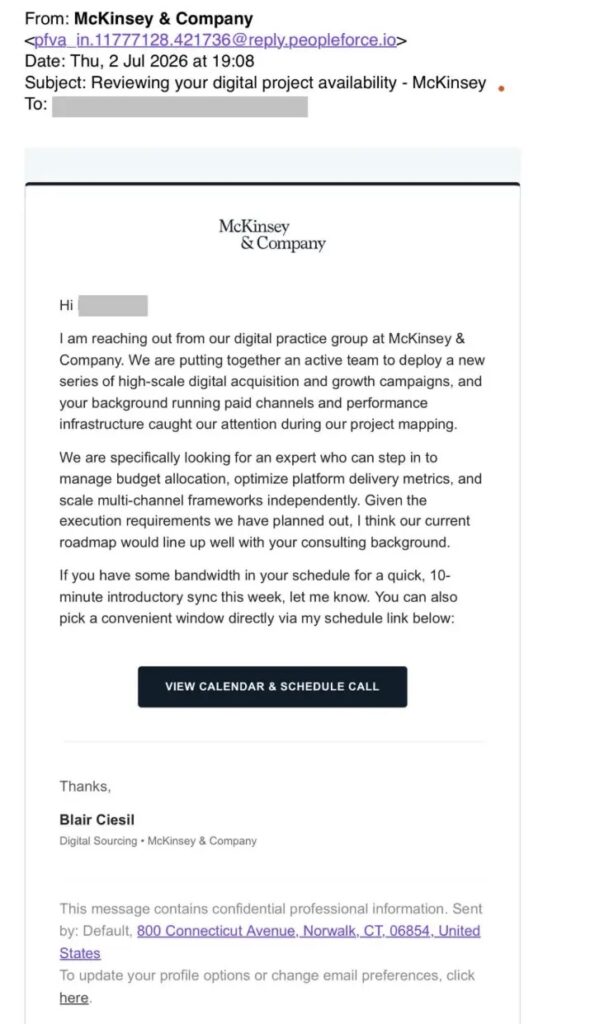
The attack starts with an email that appears to come from a recruiter. The message usually offers a marketing-related role and may address the recipient by name or refer to their field of work.
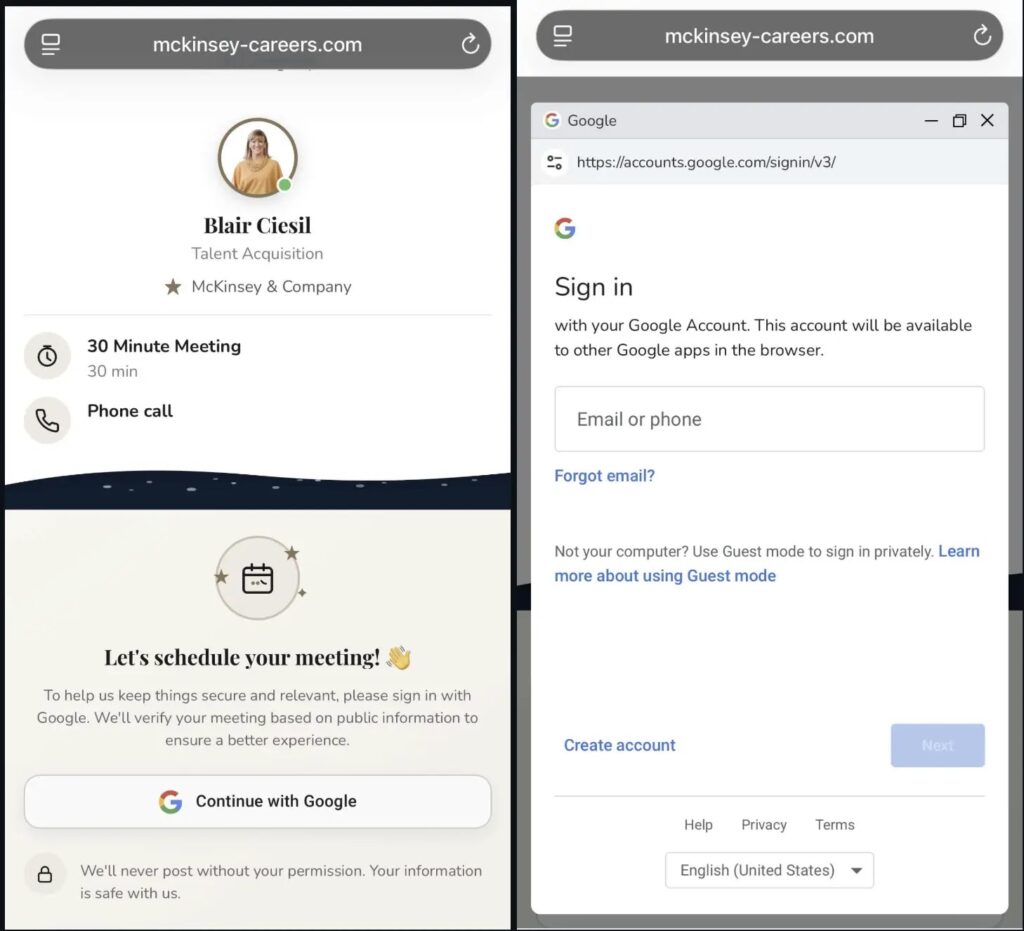
After the victim clicks the scheduling link, the campaign sends the browser through multiple redirects. According to the phishing workflow summary, the chain observed by the researcher involved PeopleForce, Salesforce Marketing Cloud or ExactTarget, Wise Agent, and then a final fake career page.
That layered path matters. A victim sees familiar-looking services before reaching the actual phishing page, while some email security tools may treat the early links as less suspicious because they point to legitimate platforms.
| Stage | What the victim sees | Purpose of the step |
|---|---|---|
| Recruiter email | A message about a job or interview | Build trust and create urgency |
| Scheduling link | A link that appears tied to a hiring process | Move the victim away from email controls |
| Redirect chain | Legitimate cloud and business services | Hide the final phishing page |
| Fake career page | A page using a known company’s branding | Make the job offer look real |
| Fake Google login | A pop-up that imitates Google sign-in | Capture Gmail credentials |
Fake Google pop-ups make the attack harder to spot
The phishing page does not simply send the victim to a normal-looking login form. Instead, it uses a browser-in-the-browser technique, often shortened to BitB, to display a fake pop-up inside the page.
That pop-up can imitate browser elements such as a title bar, window border, and address area. To a user focused on booking an interview, it may look like a standard “Continue with Google” prompt.
BleepingComputer’s report says clicking “Continue with Google” triggers a fake authentication window rendered with HTML and CSS inside the phishing page. Any email address or password typed there goes to the attacker, not to Google.
More than 30 brands are being impersonated
The campaign uses a wide range of fake career domains, which helps it reach people across different industries. The impersonated names include airlines, travel companies, food and beverage brands, apparel companies, staffing firms, consulting companies, hospitality brands, and entertainment groups.
The brands cited in the research include American Airlines, Booking.com, Delta Air Lines, United Airlines, Coca-Cola, PepsiCo, Red Bull, Adidas, Louis Vuitton, Sephora, Levi’s, Adobe, Aquent, ManpowerGroup, McKinsey & Company, OpenAI, Marriott, Omnicom Group, FIFA, and Netflix.
Recruitment scams have also appeared in other forms this year. In March, Unit 42 reported a separate scheme in which attackers impersonated Palo Alto Networks talent acquisition staff and used details from LinkedIn profiles to make the outreach feel credible.
- Airlines and travel brands help attackers target frequent travelers and business professionals.
- Tech and consulting brands make the lure more believable for marketing and corporate candidates.
- Hospitality and entertainment brands widen the pool of potential victims.
- Luxury and retail brands make fake marketing roles look plausible.
Why Gmail credentials are valuable to attackers
A stolen Gmail login can expose far more than email. Many people use a Google account to access cloud files, calendars, password resets, business tools, advertising accounts, and personal services.
Once attackers control the inbox, they can search for financial records, reset passwords on other sites, monitor conversations, or launch new phishing attacks from a trusted address.
Google recommends stronger account protection steps, including two-step verification, passkeys, Google prompts, and security keys. The company’s account security guidance says passkeys are more secure against phishing because they cannot be copied, shared, written down, or accidentally handed to an attacker.
Warning signs in fake recruiter emails
The campaign succeeds because the email does not always look careless. The message can feel targeted, and the job role can match the victim’s background.
Still, there are warning signs. A legitimate recruiter should not ask a candidate to enter a Gmail password just to book an interview. A real hiring flow should also lead to a company’s official careers website or a known applicant tracking platform tied clearly to that employer.
Security teams should also treat recruiter-themed phishing as a broader social engineering risk. Unit 42’s threat brief noted that attackers can use flattering language, profile details, and company branding to make fake employment outreach look more convincing.
| Red flag | Why it matters |
|---|---|
| The recruiter pushes a fast login step | Urgency reduces careful checking |
| The job link uses an unfamiliar domain | Fake hiring pages often use lookalike domains |
| The page asks for a Gmail password | Recruiters do not need account passwords to schedule interviews |
| The login window appears inside the page | BitB attacks can fake pop-up windows |
| The sender identity does not match the company domain | Attackers often mix real names with unrelated infrastructure |
How users can protect their Google accounts
Anyone who receives an unexpected recruiter email should verify the role through the company’s official careers page before clicking the link. Searching for the job directly on the employer’s website is safer than trusting an email button.
Users should also avoid typing a Google password into any sign-in prompt that appears after a suspicious job link. A safer option is to close the page, open Google directly in a new browser tab, and check account activity from the official Google Account security page.
Google’s account security guidance also recommends stronger second steps such as security keys and Google prompts, while passkeys can reduce the risk of credential phishing.
- Do not sign in through a link sent in an unsolicited recruiter email.
- Check the job opening on the company’s official careers website.
- Look closely at the domain before entering any login details.
- Use passkeys or two-step verification on your Google account.
- Change your password immediately if you entered it on a suspicious page.
- Review recent account activity and revoke access for unknown apps.
What security teams should monitor
Organizations should not treat this as a consumer-only scam. Marketing staff, recruiters, contractors, and employees with public profiles can all receive believable job-themed lures.
Defenders can look for unusual redirect chains, employee reports involving recruiter emails, and visits to newly registered lookalike career domains. Security teams may also want to block or monitor known indicators listed in the researcher’s report.
The campaign shows how attackers can combine targeted wording, real business tools, and polished fake pages to steal credentials without deploying malware. That makes user verification, strong authentication, and fast reporting essential parts of the defense.
FAQ
It is a phishing campaign that impersonates recruiters and fake career pages from major brands. Victims are asked to schedule an interview and then enter Google account credentials into a fake sign-in window.
A browser-in-the-browser attack uses HTML and CSS to create a fake pop-up window inside a webpage. It can look like a real login window, but any credentials entered into it go to the attacker.
Check whether the job appears on the company’s official careers website, inspect the domain carefully, and avoid any recruiter link that asks for your Gmail password. Legitimate recruiters do not need your email password to schedule an interview.
Change your Google account password immediately, review recent account activity, remove unknown app access, enable two-step verification or passkeys, and report the phishing page to your security team or email provider.


Read our disclosure page to find out how can you help VPNCentral sustain the editorial team Read more


Improve this guide




User forum
0 messages