
Fake Telegram installer site pushes malware with in-memory execution and Defender bypass


 5 min. read
  Published on

A fake Telegram download site is distributing a Windows installer that looks legitimate but launches a multi-stage malware chain designed to weaken defenses and run its final payload directly in memory. Researchers at K7 Labs say the campaign uses the typosquatted domain telegrgam[.]com, along with other lookalike domains, to trick users into downloading a trojanized file named tsetup-x64.6.exe.
The attack matters because it does not stop at a fake installer. K7 says the malware checks whether the machine was infected before, adds Windows Defender exclusions through obfuscated PowerShell, drops staged files into a user profile path, and uses rundll32.exe to launch a DLL that rebuilds a payload from encoded data stored in GPUCache.xml. That payload then runs in memory instead of being written to disk, which can make detection harder for traditional file-based scanning tools.
The campaign also hides behind a real Telegram installation flow. K7 says the malicious package silently deploys a legitimate Telegram executable so the user still sees what looks like a normal install, while the malware continues in the background.
Why this Telegram-themed campaign is dangerous
Typosquatting campaigns are effective because they rely on visual mistakes, not software bugs. In this case, the fake site sits just one character away from Telegram’s real domain and offers what appears to be a normal desktop installer. Telegram’s official site uses the legitimate telegram.org domain for downloads, which makes the fake version easy to miss if users do not check the address bar carefully.
K7 identified more than one fake domain in this activity. Alongside telegrgam[.]com, the researchers also listed telefgram[.]com and tejlegram[.]com, which suggests the operators built several typo-based entry points to catch different user mistakes.
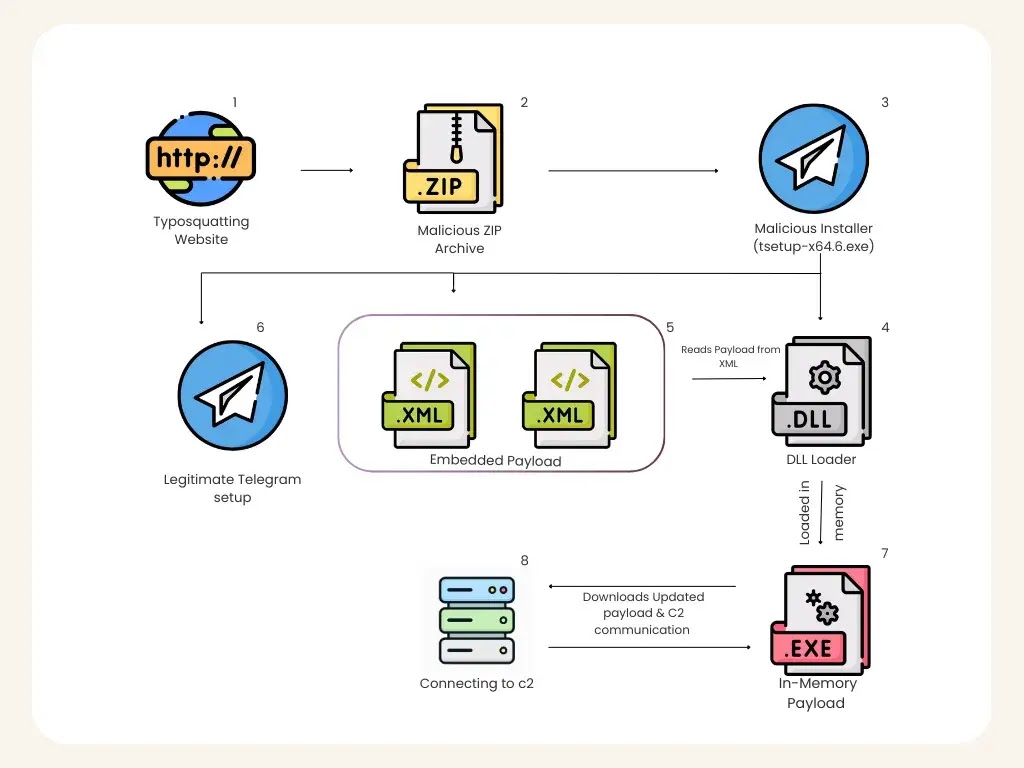
How the infection chain works
The installer uses a staged process instead of dropping one obvious malicious file.
| Stage | What K7 observed |
|---|---|
| Fake website | User lands on a Telegram lookalike download page |
| Malicious file | Site offers tsetup-x64.6.exe |
| Initial check | Installer runs cmd.exe and looks for 0tray.exe to check prior infection |
| Defense weakening | Obfuscated PowerShell adds Defender exclusions across drive partitions |
| File drop | Components are written to C:\Users\<User>\AppData\Roaming\Embarcadero\ |
| Marker | Registry value under HKCU\Microsoft User\Source is used as an infection flag |
| DLL launch | AutoRecoverDat.dll runs through rundll32.exe using DllRegisterServer |
| In-memory load | DLL reads encoded data from GPUCache.xml, reconstructs a PE, and executes it in memory |
| C2 contact | Payload reaches out to 27[.]50[.]59[.]77:18852, linked to jiijua[.]com |
Source: K7 Labs analysis mirrored by malware.news and cited in other reporting.
What stands out in the loader chain
K7 says the malware first uses cmd.exe to look for a process named 0tray.exe, which appears to function as an infection check. It then decodes and runs a PowerShell command that tells Microsoft Defender to exclude drive partitions from scanning. That gives later stages more room to operate without being flagged.
The dropped files live under an Embarcadero directory inside the roaming profile. That name can look ordinary enough during a quick manual check, which helps the malware avoid suspicion. K7 also says the installer writes a registry marker so it knows whether a machine was already compromised.

The most important step comes next. According to K7, AutoRecoverDat.dll is launched with rundll32.exe, and the DLL uses GPUCache.xml as a container for encoded binary data. It reconstructs a portable executable in memory and runs it there, rather than dropping the finished payload to disk.

Command and control details
K7 says the in-memory payload connects to 27[.]50[.]59[.]77:18852, associated with jiijua[.]com, and can receive new commands or updated payloads from that infrastructure. That means the malware is not limited to the first-stage behavior seen during installation. Once the connection is established, the operators can continue to interact with the infected machine.
Indicators of compromise
| Type | Value |
|---|---|
| MD5 | A9A5CC6B6766FEC51B281B94F5F17CCD for tsetup-x64.6.exe |
| MD5 | 62F8EFFC7690455ABCB300E3574F0A93 for the loaded payload |
| C2 IP | 27[.]50[.]59[.]77:18852 |
| Domain | jiijua[.]com |
| Fake domain | telegrgam[.]com |
| Fake domain | telefgram[.]com |
| Fake domain | tejlegram[.]com |
These values come from the K7 analysis cited above.
What users and defenders should do
- Download Telegram only from the official website and verify the domain before running any installer. Telegram’s official download page is hosted on
telegram.org. - Treat lookalike domains, ZIP files, and unexpected EXE downloads as suspicious, even when the branding looks familiar. This recommendation follows directly from the observed typosquatting method.
- Watch for hidden PowerShell,
rundll32.exelaunching unusual DLLs, and outbound connections to unfamiliar IPs after software installation. Those behaviors match the loader chain K7 documented. - Review Defender exclusions for unexpected broad path or drive-level entries, since the malware tries to weaken scanning early in the infection process.
FAQ
This is a fake site problem. The campaign abuses typosquatted domains that imitate Telegram’s official download page. The reporting does not say Telegram’s real site was compromised.
It means the final payload runs from memory after reconstruction, rather than being saved to disk in a normal way. That can make the malware harder to detect with tools that focus on scanning stored files.
K7 highlighted tsetup-x64.6.exe, AutoRecoverDat.dll, GPUCache.xml, and a process check for 0tray.exe as notable parts of the infection chain.
Yes. K7 says the package silently deploys a legitimate Telegram executable to keep the fake installation looking normal to the user.


Read our disclosure page to find out how can you help VPNCentral sustain the editorial team Read more


Improve this guide



User forum
0 messages