
Ghostwriter Hackers Target Gmail Users With Fake Admin Alerts to Steal Passwords and 2FA Codes


 10 min. read
  Published on
The UNC1151/Ghostwriter threat group is targeting Gmail users with fake Google administrator emails designed to steal passwords and two-factor authentication codes. According to CERT Polska, the campaign has been running with high intensity since March 2026 and mainly targets Polish users.
The phishing emails imitate Gmail security notices and warn about suspicious activity, unauthorized logins, account blocking, or service violations. The goal is to push victims into clicking a link and entering their Google account credentials on a fake login page.

Access content across the globe at the highest speed rate.
🔥 Save 81% + 2 bonus months! 🔥
70% of our readers choose Private Internet Access
70% of our readers choose ExpressVPN
2
Browse the web from multiple devices with industry-standard security protocols.
🔥 Save 73%! 🔥

Faster dedicated servers for specific actions (currently at summer discounts)
🔥 Save 69%! 🔥
The campaign is dangerous because the phishing kit can also request 2FA codes in real time. That means SMS codes and authenticator-app codes can be stolen if a victim enters them into the fake page.
UNC1151 has shifted heavily toward Gmail accounts
UNC1151, also known as Ghostwriter, has spent years targeting Polish citizens through email phishing. In earlier campaigns, the group focused heavily on Polish email services such as Onet, Wirtualna Polska, and Interia.
Since March 2026, the group has focused much more heavily on Gmail accounts. CERT Polska says new phishing domains have appeared almost daily in recent weeks, and most activity takes place on weekdays.
Mandiant previously assessed with high confidence that UNC1151 is linked to Belarus. The group’s targeting has historically included Poland, Lithuania, Latvia, Ukraine, Germany, Belarusian opposition figures, journalists, media entities, and government-related targets.
| Campaign detail | What CERT Polska observed |
|---|---|
| Threat actor | UNC1151, also known as Ghostwriter |
| Main target since March 2026 | Gmail accounts used by Polish targets |
| Earlier focus | Polish providers such as Onet, Wirtualna Polska, and Interia |
| Primary goal | Email account takeover and intelligence gathering |
| Key risk | The phishing flow can steal passwords and 2FA codes |
The emails look like Gmail security warnings
The attackers send messages that look like official Gmail administrator notices. CERT Polska says they are usually sent from Gmail accounts created for the campaign, although compromised accounts with modified display names also appear in some attacks.
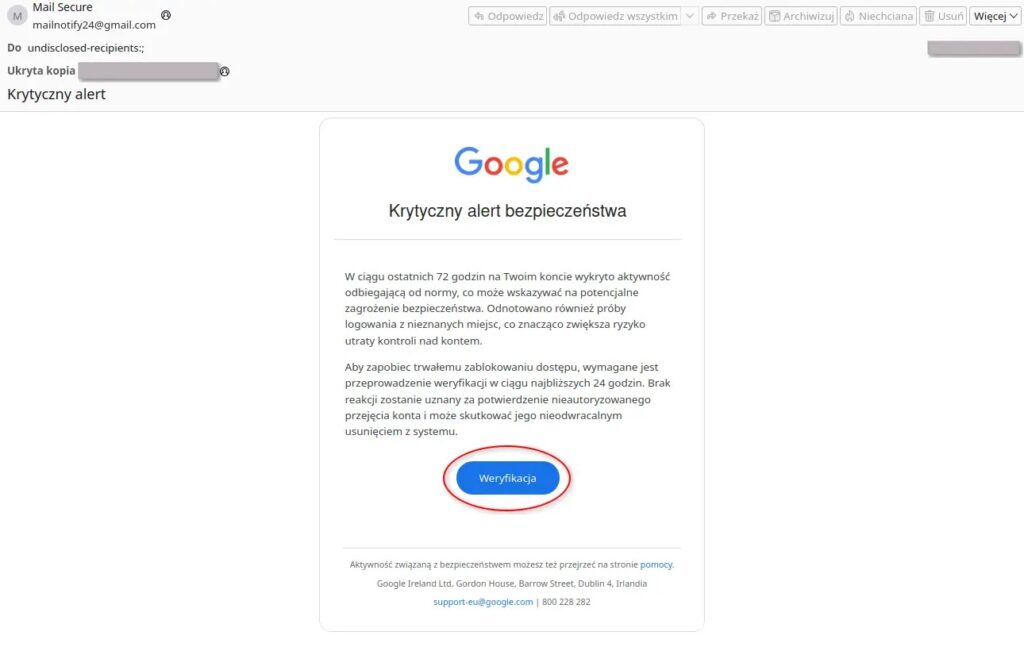
The messages are written in Polish and generally do not contain obvious language mistakes. They use urgent subjects such as critical alert, new device login detected, suspicious activity, important access verification, or account may be blocked.
The sender display name is part of the deception. A message may appear to come from “Mail Secure,” “Support Security,” or “Zespół Poczty,” but the actual sender address may be a throwaway Gmail account rather than a real Google security address.
- The email claims the account has suspicious activity or policy violations.
- The message threatens account suspension or permanent deletion.
- The link leads to a fake Gmail login panel.
- The phishing page captures the email address and password.
- If Google asks for 2FA, the fake page asks for the code too.
The phishing page can steal 2FA codes in real time
After the victim clicks the link, the phishing page imitates the Gmail login process. It first collects the email address and password, then displays another form asking for the second factor if the real account requires it.
A separate RESIDENT.NGO ThreatLab case study described a related UNC1151 Gmail phishing attempt against a Belarusian pro-democracy figure. The case found real-time adversary-in-the-middle phishing that could relay one-time 2FA codes to attackers.
This matters because not all two-factor methods provide the same protection. SMS codes and authenticator-app codes can still be phished if the attacker relays them quickly. Passkeys and FIDO2 security keys provide stronger protection because they are designed to resist fake login sites.
| Protection method | Phishing resistance | Why it matters |
|---|---|---|
| Password only | Low | A fake login page can capture it directly |
| SMS code | Medium | A real-time phishing page can ask for and relay the code |
| Authenticator app code | Medium | It can still be typed into a fake page if the victim is tricked |
| Google prompt | Better | It reduces some risks but users still need to check the sign-in context |
| Passkey or hardware security key | High | It is built to block credential relay to fake login pages |
Ghostwriter targets public figures and their networks
The campaign focuses on people involved in political and public life, researchers, journalists, public administration employees, law enforcement workers, and people connected to these groups through family or social relationships.
CERT Polska also observed campaigns aimed at specific regions and professional groups, including translators and court experts. In some cases, attackers appear to guess email addresses, which can cause phishing emails to reach unrelated people with similar names.
The same pattern fits older Mandiant reporting that described UNC1151 as a group focused on credential theft and information access, with targeting that closely aligns with Belarusian government interests.
Compromised Gmail accounts can lead to wider damage
Once attackers access a Gmail inbox, the damage can spread beyond email. They may search for contacts, sensitive documents, password resets, cloud files, private conversations, and linked social media accounts.
Contacts can become future targets. Documents can support intelligence gathering. Linked social media accounts can be hijacked and used for impersonation, propaganda, or further phishing.
This follow-on activity is why targeted phishing against Gmail accounts is more serious than a simple spam campaign. For journalists, public officials, researchers, and activists, one compromised personal inbox can expose entire networks of people.
| After account takeover | Potential attacker action |
|---|---|
| Contact harvesting | Build new target lists from emails and address books |
| Document search | Look for sensitive files, attachments, and shared links |
| Social media takeover | Use linked accounts for impersonation or influence operations |
| Password resets | Attempt access to services tied to the Gmail account |
| Conversation monitoring | Track private communications and relationships |
Phishing infrastructure changes quickly
The campaign uses dedicated phishing domains and hosted pages that rotate regularly. CERT Polska reported domains using TLDs such as .digital, .biz, and other short-lived infrastructure, as well as phishing pages hosted on Netlify subdomains.
Attackers also place fake login panels on compromised websites belonging to Polish organizations. They can do this without changing the visible homepage, which helps the intrusion stay hidden from site owners and normal visitors.
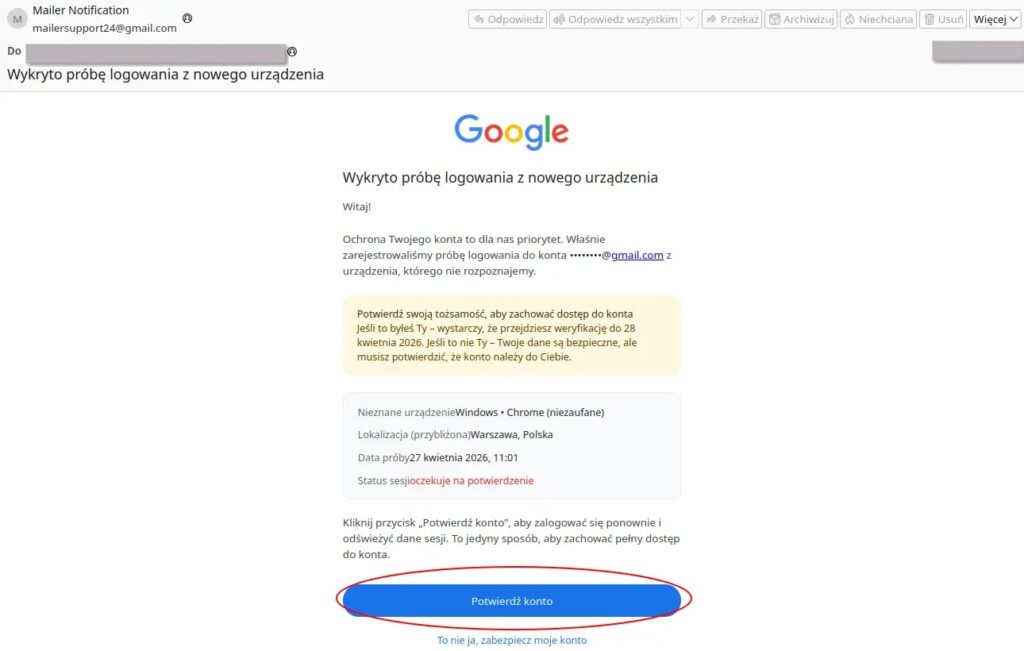
Because domains change so often, users should not rely only on domain blocklists. The stronger habit is to avoid login links in urgent security emails and visit Google Account settings directly through a typed or bookmarked address.
Users should verify alerts inside their Google Account
Google recommends using Security Checkup to review account protections, recovery information, connected apps, recent security events, and 2-Step Verification settings.
That advice is especially important for this campaign. If an email says a Gmail account will be suspended, deleted, or blocked, users should not click the message link. They should open their Google Account directly and check whether the alert appears there.
Google also says users should choose stronger second verification steps where possible. Security keys and Google prompts are safer than text message codes, and high-risk users should consider stronger phishing-resistant options.
- Do not click links in urgent Gmail security emails.
- Check the real sender address, not just the display name.
- Look at the browser address bar before entering any password.
- Use passkeys or hardware security keys for high-risk accounts.
- Review recent devices, forwarding rules, filters, and app access after any suspected compromise.
Advanced Protection is the better choice for high-risk users
Google’s Advanced Protection Program is designed for users who face targeted online attacks, including journalists, activists, political staff, campaign workers, and people with sensitive information.
The program requires a passkey or security key to verify sign-ins. That makes account takeover much harder even if attackers know the username and password, because the fake phishing site cannot complete the same hardware-backed or passkey-based verification.
For people in Ghostwriter’s target pool, this is one of the most practical defensive steps. It directly addresses the campaign’s main weakness: the attacker needs the victim to type reusable credentials and 2FA codes into a fake page.
Indicators of compromise
The following indicators were listed in the CERT Polska reporting on the Gmail phishing campaign. They can help defenders hunt for related activity, but they should not replace user training and account-hardening steps.
| Type | Indicator | Description |
|---|---|---|
| Domain | mailverify.digital | Dedicated phishing domain |
| Domain | check-mail-verify.biz | Dedicated phishing domain |
| Domain | verify-check.digital | Dedicated phishing domain |
| Netlify subdomain | monitoring-google-konta.netlify.app | Netlify-hosted phishing page |
| Netlify subdomain | konta-weryfikacja.netlify.app | Netlify-hosted phishing page |
| Netlify subdomain | service-auth.netlify.app | Netlify-hosted phishing page |
| Sender address | [email protected] | Example admin-themed sender address |
| Sender address | [email protected] | Example campaign sender address |
| Sender address | [email protected] | Example monitoring-themed sender address |
What to do if credentials were entered
Anyone who entered a Gmail password or 2FA code into a suspicious page should act from a different trusted device. The first step is to change the password, sign out of other sessions, and check recent security activity.
Users should also review Gmail forwarding settings, filters, recovery email addresses, recovery phone numbers, connected apps, app passwords, and linked social media accounts. Attackers often try to keep access or expand the compromise after the first successful login.
The Google Account security guide also recommends reviewing linked apps with access to account data and removing any apps that are no longer needed or look unfamiliar.
The campaign shows why phishing-resistant login matters
Ghostwriter’s Gmail phishing campaign shows that attackers do not need malware to compromise high-value accounts. A convincing email, a realistic fake login page, and a real-time 2FA prompt can be enough.
The RESIDENT.NGO case study makes the same point: the attack was the link itself, and the strongest defense was refusing to follow it while using phishing-resistant sign-in methods.
For high-risk users, the Advanced Protection Program gives a stronger baseline by requiring passkeys or security keys and adding extra protections against harmful access and downloads.
The Mandiant assessment also explains why this campaign should be treated as intelligence-driven activity, not ordinary credential theft. UNC1151’s long-running focus on politicians, journalists, officials, civil society figures, and regional targets makes Gmail account protection a security priority for anyone in those networks.
The safest response is simple: do not trust urgent account-deletion emails, go directly to Google Account settings, and move sensitive accounts to passkeys or hardware security keys wherever possible.
FAQ
It is a UNC1151/Ghostwriter phishing campaign that targets Gmail users with fake Google administrator or security emails. The messages lead victims to fake login pages that steal passwords and, in some cases, two-factor authentication codes.
CERT Polska says the campaign targets people involved in political and public life, researchers, journalists, public administration and law enforcement employees, and people connected to those groups through family or social ties.
Yes. This campaign can display a fake 2FA prompt after stealing the password. If the victim enters an SMS code or authenticator-app code, the attacker can relay it in real time to take over the account.
Users should avoid links in urgent security emails, visit Google Account settings directly, review recent security activity, use strong and unique passwords, and switch to phishing-resistant sign-in methods such as passkeys or hardware security keys.
Use a different trusted device to change your password, sign out of all other sessions, review recent security activity, check forwarding rules and filters, remove unknown connected apps, and warn contacts if your account may have been used for further phishing.


Read our disclosure page to find out how can you help VPNCentral sustain the editorial team Read more


Improve this guide




User forum
0 messages