
GoodPersonRAT Malware Spreads Through Fake LetsVPN Installer


 8 min. read
  Published on
A fake Windows installer for LetsVPN is being used to deliver GoodPersonRAT, a remote access trojan that gives attackers broad control over infected computers. The malicious package installs a real, signed copy of LetsVPN to reduce suspicion, while a hidden malware chain runs in the background.
The campaign targets people looking for Kuailian VPN, also known as LetsVPN, a service commonly associated with bypassing internet restrictions in China. According to the ThreatLocker report, the malicious MSI file was found in the wild and masquerades as a LetsVPN installer.

Access content across the globe at the highest speed rate.
🔥 Save 81% + 2 bonus months! 🔥
70% of our readers choose Private Internet Access
70% of our readers choose ExpressVPN
2
Browse the web from multiple devices with industry-standard security protocols.
🔥 Save 73%! 🔥

Faster dedicated servers for specific actions (currently at summer discounts)
🔥 Save 69%! 🔥
Once active, GoodPersonRAT can log keystrokes, monitor the clipboard, transfer files, run commands, control the screen, move the mouse, route traffic through a proxy, and maintain persistence after reboot. That makes it a serious threat for both individual users and organizations.
How the Fake LetsVPN Installer Works
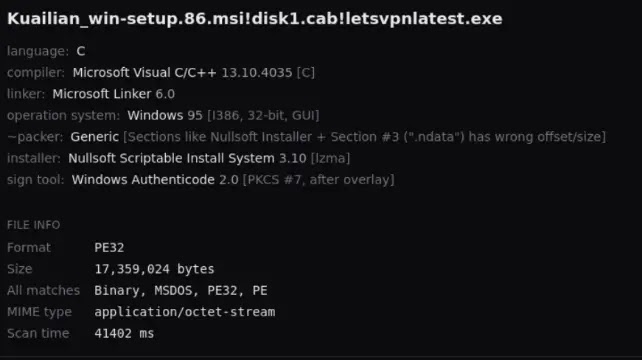
The malicious installer is named Kuailian_win-setup.86.msi. It contains three embedded components that work together to make the infection look legitimate while hiding the final payload from standard file-based scanning.
The first component is a real LetsVPN installer named LetsVPNLatest.exe. It is signed and installs after the malicious steps finish, which helps convince the victim that the setup process worked normally.
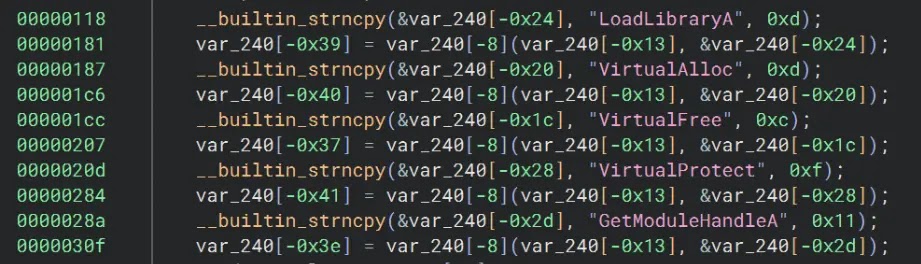
The second component is a loader called promecefplugilte8.exe. It reads an encrypted file named 20260609.dat, allocates executable memory, and launches shellcode that decrypts the final GoodPersonRAT payload.
| Component | Role in the attack |
|---|---|
| Kuailian_win-setup.86.msi | Malicious MSI package that starts the infection chain |
| LetsVPNLatest.exe | Legitimate signed LetsVPN installer used as a decoy |
| promecefplugilte8.exe | Shellcode loader that runs the encrypted payload |
| 20260609.dat | Encrypted shellcode payload used to load GoodPersonRAT |
Why the Attack Is Harder to Notice
The attack succeeds because the victim still receives the VPN software they expected. The visible installation reduces suspicion, while the remote access trojan loads from memory instead of writing the final payload directly to disk.
ThreatLocker says the final stage is reflectively loaded in memory and is not written to disk. In the GoodPersonRAT analysis, researchers also noted that the outer MSI is not signed, even though the bundled LetsVPN installer is legitimate and signed.
This detail matters because a valid signature on one bundled file does not make the full installer safe. Users still need to check the installer they actually downloaded and ran, not only the app that appears after installation.
- The VPN installs normally after the malicious activity begins.
- The final payload runs from memory to reduce file artifacts.
- The RAT uses multiple command-and-control options.
- The malware creates persistence through a service and scheduled task.
- The outer MSI file is the suspicious object users need to verify.
What GoodPersonRAT Can Do
GoodPersonRAT gives attackers a wide set of remote-control features. It can open a command prompt, move files in and out of the system, capture keystrokes, read clipboard data, and interact with the desktop in real time.
The malware also includes proxy features, which means an attacker can route traffic through the infected machine. That can turn the victim’s computer into part of a hidden infrastructure chain and may make malicious activity appear to come from the victim’s network.
ThreatLocker’s findings also show that the malware targets Telegram Desktop. It can copy Telegram session data, patch the Telegram executable, and reroute app traffic through attacker-controlled infrastructure.
| Capability | Risk to the victim |
|---|---|
| Keylogging | Passwords, messages, and other typed data may be captured |
| Clipboard monitoring | Copied passwords, crypto addresses, or sensitive text may be stolen |
| Remote desktop control | Attackers can watch and control the infected machine |
| File transfer | Files can be uploaded or stolen |
| Proxying | The victim’s connection can be used to hide attacker traffic |
LetsVPN Users Were Already Being Targeted by Scams
The GoodPersonRAT campaign fits a broader pattern of attackers abusing demand for VPN tools in Chinese-speaking communities. Scammers often use familiar VPN branding, fake discount channels, copied logos, and unofficial download offers to make malicious or fraudulent pages look trustworthy.
LetsVPN has previously warned users about targeted scams on social platforms, including fake low-price offers and fake download claims. In its scam warning for Chinese VPN users, LetsVPN advises users to download software only from its official website or from official app stores.
That guidance is especially relevant here because the GoodPersonRAT campaign relies on a fake installer rather than a weakness in the legitimate VPN application itself.
- Use only the official LetsVPN website or trusted app stores.
- Avoid installers shared through Telegram groups, forums, ads, or unknown mirrors.
- Check whether the exact installer file is signed before running it.
- Be cautious of unusually cheap or “special channel” VPN offers.
- Report suspicious installers to security teams before opening them on work devices.
Connection to Earlier Fake VPN Malware Campaigns
This is not the first time fake LetsVPN-themed installers have appeared in malware operations. In 2025, Rapid7 documented a separate campaign that used trojanized installers for VPN and browser software to deploy Winos v4.0.
The Rapid7 analysis described fake installers bundled with signed decoy apps, memory-resident payloads, reflective loading, persistence mechanisms, and infrastructure that appeared focused on Chinese-speaking environments.
GoodPersonRAT is a separate malware family in the new ThreatLocker report, but the use of fake VPN installers shows the same social engineering theme. Attackers know that users trying to access blocked services may urgently seek working VPN installers and may accept files from unofficial channels.
| Campaign | Fake software lure | Observed payload |
|---|---|---|
| ThreatLocker report | LetsVPN or Kuailian VPN installer | GoodPersonRAT |
| Rapid7 report | LetsVPN, QQBrowser, Telegram, and Chrome installers | Winos v4.0 campaign components |
How to Reduce the Risk
The safest response is to avoid unofficial installers entirely. A fake VPN setup file can look convincing, especially when it installs a legitimate app afterward, so users should treat the download source as the first security check.
CISA explains that digital signatures help verify the origin and integrity of software. Its digital signatures guidance notes that signatures can help confirm that content came from an expected sender and was not changed after signing.
However, this campaign also shows the limits of casual signature checks. A legitimate signed app can be packaged inside an unsigned malicious installer, so users and admins need to inspect the full installer package, not only the visible app installed at the end.
- Download VPN software only from official vendor pages or official app stores.
- Reject unsigned installers when the software vendor normally signs Windows packages.
- Scan suspicious files with endpoint protection before execution.
- Watch for new scheduled tasks, unknown services, and unexpected proxy settings.
- Reset passwords if a machine may have run the fake installer.
- Reinstall Telegram Desktop and revoke active sessions if Telegram data may have been exposed.
Key Indicators of Compromise
Administrators can use the following indicators to support threat hunting and incident response. These indicators should be handled carefully because malware infrastructure can change quickly.
The corrected hash values below follow the ThreatLocker report. The Rapid7 report on trojanized installers also reinforces why teams should monitor for fake VPN setup files, memory-resident loaders, and persistence through scheduled tasks.
| Type | Indicator | Description |
|---|---|---|
| File name | Kuailian_win-setup.86.msi | Malicious installer |
| File name | promecefplugilte8.exe | Shellcode loader |
| File name | 20260609.dat | Encrypted shellcode payload |
| File name | telegram.exe | Patched Telegram Desktop executable |
| SHA-256 | 3AD0B2AA1AFE79E95D20AECD1599B524D4D1D5D0972A23D54F778E145EA350C8 | Kuailian_win-setup.86.msi |
| SHA-256 | 46E2AF62358205AC114C047D878A22258AE448B7BD140FCC5B5F9444D008364F | promecefplugilte8.exe |
| SHA-256 | EC3D4D6B0B35E1013C12E0044A8B202D0114809587AA97D83CBAFF68C0E96B81 | 20260609.dat |
| SHA-256 | 4F34E002C9C5916D35C3E32435960E6EF1F8ADFBFE324983F2AAEB09CB8F2D73 | Patched telegram.exe |
What Users Should Do Now
Anyone who recently downloaded a LetsVPN or Kuailian VPN installer from an unofficial source should stop using that machine for sensitive activity until it has been checked. That includes banking, work logins, messaging apps, and crypto accounts.
Security teams should review endpoint logs for the installer name, loader name, suspicious scheduled tasks, unknown services, and connections to the listed command-and-control domains or IP addresses. If GoodPersonRAT is suspected, teams should isolate the device and preserve evidence before cleanup.
The practical lesson is simple: VPN tools are attractive targets for impersonation because users often install them quickly and from whatever source appears to work. The safer approach is to trust the official download path, verify the installer, and treat unsigned setup files as a serious warning sign. Users can also follow LetsVPN’s official scam guidance and CISA’s signature verification guidance before running software from outside managed app stores.
FAQ
GoodPersonRAT is a remote access trojan that gives attackers control over an infected Windows computer. It can capture keystrokes, monitor the clipboard, transfer files, control the screen, run commands, and route traffic through a proxy.
The fake installer contains a real signed LetsVPN installer plus hidden malware components. The legitimate VPN installs after the malicious actions start, making the setup appear normal while GoodPersonRAT loads in memory.
The report describes a fake installer that bundles a legitimate signed LetsVPN installer with malware. The risk comes from the trojanized installer package, not from downloading the app through official channels.
Disconnect the device from the network, avoid entering passwords, run an endpoint security scan, check for suspicious services and scheduled tasks, reset passwords from a clean device, and review Telegram sessions if Telegram Desktop was installed.
Users should download VPN software only from the official vendor website or trusted app stores, avoid files shared through unofficial groups or ads, and verify that the exact installer they run has a valid digital signature.


Read our disclosure page to find out how can you help VPNCentral sustain the editorial team Read more


Improve this guide




User forum
0 messages