
Google brings Gmail end-to-end encryption to Android and iPhone for eligible Workspace users


 5 min. read
  Published on
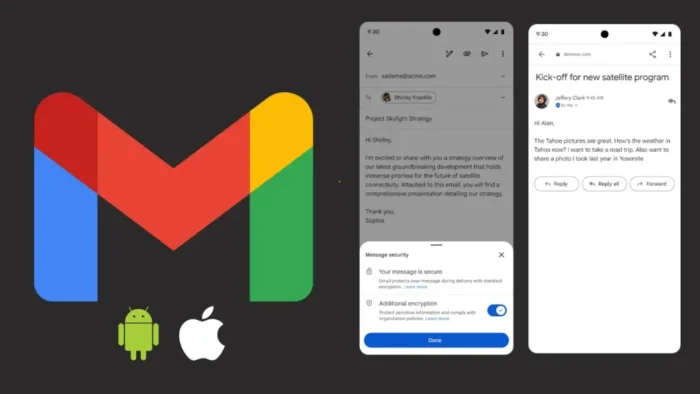
Google has started rolling out Gmail end-to-end encryption support on Android and iOS for organizations that use Gmail client-side encryption. The update lets eligible employees compose, send, read, and reply to encrypted email directly inside the Gmail mobile app, without switching to a separate secure mail portal or extra app.
This is not a new encryption system for personal Gmail. It is an expansion of Google Workspace client-side encryption, which gives organizations control over encryption keys and keeps Google from accessing private keys or decrypted message content. Google says the feature is available now on both Rapid Release and Scheduled Release domains.

Access content across the globe at the highest speed rate.
70% of our readers choose Private Internet Access
70% of our readers choose ExpressVPN

Browse the web from multiple devices with industry-standard security protocols.

Faster dedicated servers for specific actions (currently at summer discounts)
The launch matters because it closes a major gap for mobile workers in regulated industries. Teams that handle legal, financial, government, healthcare, or export-controlled data can now use protected Gmail conversations from phones and tablets instead of waiting to get back to a desktop browser. Google also positions the feature as a way to support data sovereignty and compliance requirements.
What changes for users
Inside the Gmail app, users with access can add encryption while drafting a message by tapping the lock icon and choosing additional encryption. After that, they can write the message and attach files as they normally would. Google says the experience stays native on Android and iOS, which should reduce the friction that usually comes with secure email tools.
Google also says encrypted messages can go to any recipient, not just people inside the same company or even people who use Gmail. If the recipient uses the Gmail app, the message arrives like a normal thread in the inbox. If the recipient does not use the Gmail app, Google says they can securely open and reply in a browser.
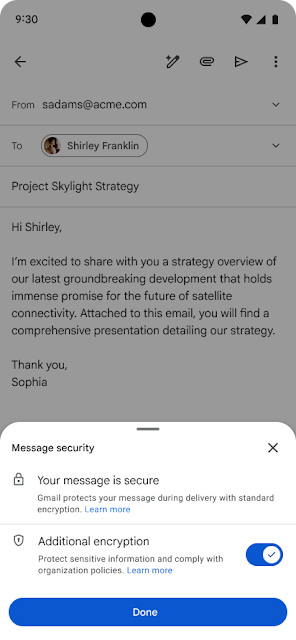
That cross-platform handling may be the most important part of this rollout. Traditional secure email often slows communication because both sides need certificates, separate accounts, or custom software. Google’s recent Gmail encryption push tries to avoid that by letting the sender stay in Gmail and giving outside recipients a browser-based path instead of forcing a dedicated client.
What admins need to do
The feature does not light up automatically for every Workspace customer. Google says admins must enable Android and iOS clients in the client-side encryption admin interface before users can access mobile support. That means the launch is live, but actual employee access still depends on admin-side setup.
Google’s documentation also makes clear that the organization, not Google, controls the encryption keys and the identity provider used to access those keys. That structure forms the core of client-side encryption and explains why Google markets it to customers with strict compliance and sovereignty demands.
For licensing, Google lists this mobile Gmail encryption rollout as available to Google Workspace Enterprise Plus customers with the Assured Controls or Assured Controls Plus add-on. That is a narrower target than consumer Gmail, and it shows Google still sees this as a high-security enterprise feature rather than a mainstream inbox setting.
Key rollout details
| Item | Details |
|---|---|
| Feature | Gmail end-to-end encryption on mobile |
| Platforms | Android and iOS Gmail apps |
| Rollout status | Available now |
| Release tracks | Rapid Release and Scheduled Release |
| Eligible tier | Google Workspace Enterprise Plus |
| Required add-on | Assured Controls or Assured Controls Plus |
| Admin action | Enable Android and iOS clients in CSE admin interface |
| Recipient experience | Gmail app thread for Gmail users, browser access for others |
Source-backed rollout details come from Google’s April 9 Workspace Updates announcement and related admin documentation.
Why this launch matters
- It brings encrypted Gmail workflows to phones and tablets without a separate secure mail tool.
- It lets organizations keep control of encryption keys instead of handing that access to Google.
- It reduces friction for external recipients by supporting browser-based access when the Gmail app is not available.
- It strengthens Gmail’s pitch in regulated sectors where mobile access and compliance often clash.
Google has offered client-side encryption in Gmail for some time, but this mobile step matters because email does not stay on desktops anymore. Secure communication tools only help when staff can actually use them in day-to-day work, especially when travel, field work, and hybrid schedules push sensitive conversations onto mobile devices.
The bigger question now is whether Google will widen access beyond its current high-end enterprise packaging. For now, the company has improved the mobile experience, but the feature remains tied to a premium Workspace setup and admin-managed controls.
FAQ
No. Google’s client-side encryption documentation says the feature is not available to personal Google Accounts. The current mobile rollout targets eligible Google Workspace customers.
No. Google says Gmail app users receive it like a normal thread, while recipients without the Gmail app can read and reply securely in a browser.
Google says organizations manage the keys in client-side encryption, and Google does not access private keys or decrypted content.
Google says admins must enable Android and iOS clients in the client-side encryption admin interface before users can use the mobile feature.


Read our disclosure page to find out how can you help VPNCentral sustain the editorial team Read more


Improve this guide

User forum
0 messages