
Hackers abuse Cloudflare anti-bot checks to hide Microsoft 365 credential phishing pages


 5 min. read
  Published on
Cybercriminals are increasingly using trusted web security tools to make phishing pages harder to detect, and one reported Microsoft 365 credential theft campaign shows how that works in practice. According to reporting based on DomainTools research, the attackers used Cloudflare Turnstile checks, IP filtering, and user-agent screening to keep security scanners and automated crawlers away from the real phishing page long enough to steal credentials from real users.
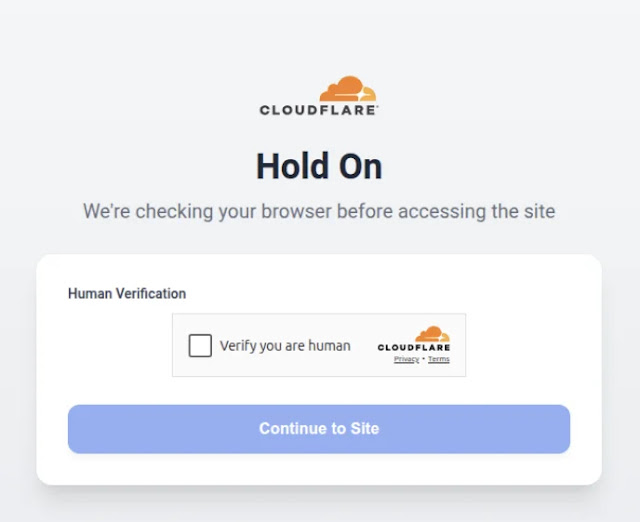
The tactic matters because it flips a defensive tool into an evasion layer. Cloudflare Turnstile is designed to separate real visitors from bots, but in the hands of a phishing operator it can also block security analysis systems, URL scanners, and search crawlers. Cloudflare itself describes Turnstile as a verification tool that confirms visitors are real and blocks unwanted bots. That legitimate function is what makes the abuse effective.
This is not an isolated idea. Security researchers have documented similar campaigns before. Netskope reported that attackers used Cloudflare Turnstile to protect phishing pages from scanners, while Microsoft has separately warned that phishing kits targeting Microsoft 365 continue to evolve and operate at very large scale. Earlier this month, Microsoft detailed how Tycoon2FA became one of the most widespread phishing-as-a-service platforms, reaching more than 500,000 organizations each month worldwide.
How the campaign reportedly worked
The reported campaign used a staged filtering process before showing the fake Microsoft 365 login page. Based on the sample details you shared, the operators first placed a Cloudflare human-verification step in front of the phishing flow. They then checked the visitor’s IP address and browser user-agent, and served fake error pages or harmless redirects to visitors that looked like researchers, crawlers, or cloud-hosted scanners.
That approach fits a broader pattern seen in modern phishing. Attackers increasingly rely on anti-analysis gates, trusted cloud services, and multistage redirection to make phishing sites look more legitimate while shrinking the window in which defenders can inspect them. Microsoft has warned that phishing actors are exploiting complex infrastructure and misconfigurations to improve delivery and evade detection, while Cloudflare’s own 2026 threat report says phishing and credential abuse remain a major issue in modern identity attacks.
Why Microsoft 365 users should care
Microsoft 365 accounts remain high-value targets because they often unlock email, files, Teams chats, calendars, cloud storage, and internal business workflows. Once an attacker steals a password, the next step can be account takeover, business email compromise, data theft, or follow-on phishing from a trusted mailbox.
Microsoft says Defender for Office 365 includes anti-phishing protections such as impersonation protection, mailbox intelligence, and adjustable phishing thresholds. The company also says phishing kits and adversary-in-the-middle services continue to target Microsoft 365 at scale, especially when organizations rely on weaker authentication or do not use phishing-resistant controls.
What made this phishing campaign hard to spot
| Evasion method | What it does | Why it helps attackers |
|---|---|---|
| Cloudflare Turnstile check | Filters visitors before the phishing page loads | Blocks many automated scanners and crawlers |
| IP filtering | Screens incoming IP addresses | Hides the real page from researchers and security vendors |
| User-agent checks | Detects bots or analysis tools | Serves fake 404 pages instead of the phishing content |
| Redirect logic | Sends suspicious visitors elsewhere | Reduces forensic evidence and live captures |
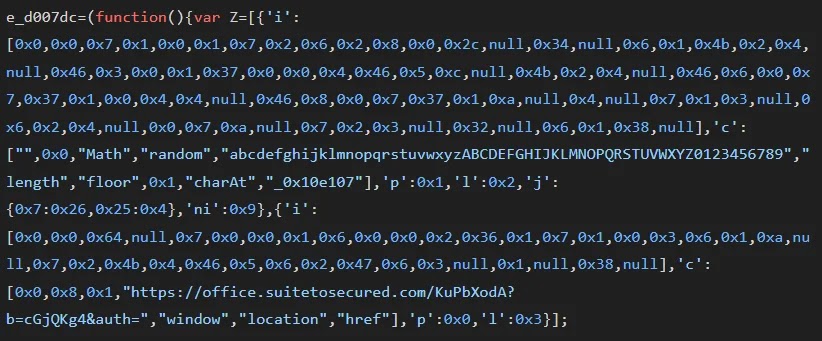
| Obfuscated scripts | Hides credential theft logic | Makes static analysis slower and less reliable |
The most important point is not that Cloudflare built these tools for attackers. It did not. The problem is that legitimate security and traffic management services can be repurposed by criminals to protect phishing infrastructure from scrutiny. Similar abuse of trusted platforms has also shown up in campaigns involving cloud hosting, URL wrapping, and reverse-proxy phishing kits.
What defenders should do
- Treat CAPTCHA or human-verification gates on unexpected login pages as a warning sign, not reassurance.
- Enforce phishing-resistant MFA where possible.
- Use Microsoft Defender for Office 365 anti-phishing policies and impersonation protection.
- Inspect domains, redirects, and page behavior, not just page branding.
- Look for multistage phishing flows that hide behind trusted infrastructure.
- Train users to reach Microsoft 365 through known bookmarks or direct navigation instead of email links.
Signs a page may be a fake Microsoft 365 login
- The login link arrives through an unexpected email or shared document lure.
- A CAPTCHA or verification screen appears before a routine sign-in page.
- The domain does not belong to Microsoft, even if the page looks familiar.
- The page redirects several times before the sign-in form appears.
- The site shows a fake error page when revisited from a different browser or network.
FAQ
Cloudflare says Turnstile is a CAPTCHA replacement that confirms a visitor is real and blocks unwanted bots.
No. The issue is that attackers can abuse legitimate anti-bot and traffic-filtering tools to shield phishing pages from automated analysis. Similar abuse has been documented in other phishing campaigns.
Microsoft 365 accounts can provide access to email, files, identity systems, and internal communication tools, making them valuable for account takeover and business email compromise. Microsoft has repeatedly warned that phishing operators actively target these accounts.
MFA helps a lot, but not every form of MFA stops advanced phishing. Microsoft’s recent Tycoon2FA analysis showed that adversary-in-the-middle phishing services can bypass weaker MFA approaches by stealing session data in real time.


Read our disclosure page to find out how can you help VPNCentral sustain the editorial team Read more


Improve this guide




User forum
0 messages