
Hackers abuse MSBuild to slip past defenses and launch stealthy Windows attacks


 5 min. read
  Published on
Threat actors are increasingly abusing MSBuild.exe, a legitimate Microsoft build tool, to execute malicious code while blending in with normal Windows activity. AhnLab Security Intelligence Center, or ASEC, says recent cases show attackers using MSBuild as a Living off the Land Binary, or LOLBin, to run code, download payloads, and support DLL sideloading.
The attraction is easy to understand. MSBuild is a trusted, Microsoft-signed utility that can build and execute code from project files, which makes it useful to developers and attractive to attackers. Microsoft’s own documentation also confirms that MSBuild supports inline tasks through project files, including C# code compiled and executed during the build process.

Access content across the globe at the highest speed rate.
70% of our readers choose Private Internet Access
70% of our readers choose ExpressVPN

Browse the web from multiple devices with industry-standard security protocols.

Faster dedicated servers for specific actions (currently at summer discounts)
That combination creates a real defensive problem. Security tools that rely heavily on signatures or trust decisions around signed binaries can miss abuse when the malicious logic sits inside a project file instead of a dropped EXE. ASEC says that is exactly why threat actors keep turning to MSBuild in active campaigns.
Why MSBuild works so well as an attack tool
ASEC says attackers favor MSBuild for three main reasons. It can execute inline C# inside project files, it supports core functions such as file handling and network communication, and it runs as a legitimate binary that many environments already trust.
LOLBAS, a widely used project that tracks abuse of legitimate binaries, also lists MSBuild as a known execution and application control bypass tool. Its MSBuild entry notes that attackers can execute C# code from XML or .csproj files using msbuild.exe directly.
Microsoft documentation helps explain the mechanism behind that abuse. The company says the RoslynCodeTaskFactory lets users write C# or Visual Basic code directly in a project file for immediate use, with the code compiled during the build process and executed in that same build. In the wrong hands, that flexibility becomes a covert execution path.
The attack chain seen in the latest campaign
ASEC’s April 10 report points to a February 2026 campaign in which attackers used phishing emails carrying compressed attachments disguised as work documents or meeting invitations. Inside the archive, victims received a renamed copy of MSBuild.exe plus a malicious project file.

According to ASEC, when the victim launched the disguised executable, MSBuild automatically found and loaded the .csproj file in the same directory even without command-line arguments. The project file then ran an inline C# script that decoded Base64 URLs and downloaded three files from an external server into the Windows temp folder.
ASEC says those downloaded files included a randomly named executable, Avk.dll, and AVKTray.dat. After the download, MSBuild launched the executable, which then loaded the malicious DLL from the same directory through DLL sideloading. That final step let the attackers execute malware while keeping the earlier stages hidden behind trusted components.
This was not just a theory test
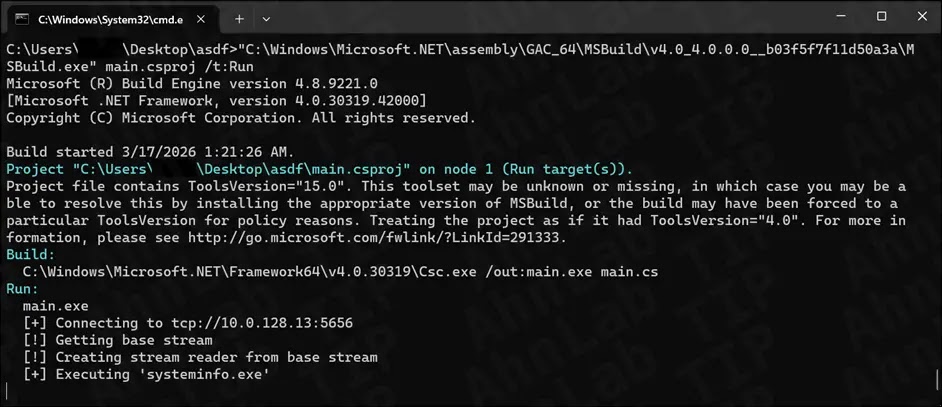
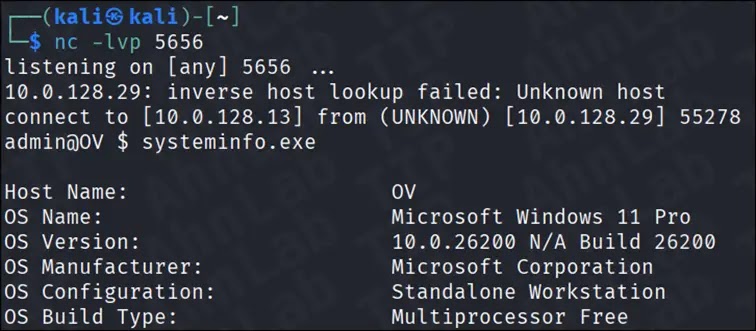
The same ASEC report also revisits an earlier January 2025 scenario based on research by Michał Walkowski. In that test case, attackers used a project file and C# source file to build and run a reverse shell through MSBuild, and ASEC says Windows 11 Defender did not block or alert on the activity even with real-time protection enabled.
That does not mean every security product will miss every MSBuild-based attack. It does mean defenders should not assume that a Microsoft signature or a familiar Windows process equals safe behavior. ASEC’s conclusion is that defenders need context-based monitoring, not simple trust rules.
The broader lesson is that MSBuild abuse fits a larger trend. Attackers keep leaning on trusted tools already present in Windows because they reduce friction, lower suspicion, and shrink the forensic trail. In the MSBuild cases ASEC analyzed, the most dangerous part was not one single payload but the way each stage looked ordinary on its own.
Attack chain at a glance
| Stage | What happens | Why it is hard to spot |
|---|---|---|
| Initial access | Victim opens a phishing attachment disguised as a document | The file is a renamed copy of a legitimate signed binary |
| Execution | MSBuild loads a nearby .csproj file | Project file execution can look like normal developer activity |
| Payload delivery | Inline C# downloads files from a remote server | The downloader logic lives inside the project file |
| Final compromise | Signed executable loads malicious Avk.dll | DLL sideloading hides behind a legitimate process |
ASEC report published April 10, 2026.
What defenders should watch for
- MSBuild.exe running on systems that are not developer workstations.
.csprojor.xmlfiles executing from Downloads, temp folders, or extracted archives.- MSBuild making outbound network connections or downloading multiple files in a short period.
- Randomly named executables appearing in
%TEMP%after MSBuild activity. - Signed applications loading suspicious DLLs from the same directory.
FAQ
MSBuild is Microsoft’s build engine for compiling and processing project files. It supports tasks and inline code execution inside project files, which makes it powerful for developers and useful to attackers.
Because MSBuild is already trusted and signed. Attackers can hide malicious logic inside project files and avoid dropping a standard standalone payload at the first stage.
ASEC says one January 2025 reverse shell test did not trigger Windows 11 Defender alerts with real-time monitoring enabled. That finding shows detection gaps, though results can vary by product and configuration.
Behavior-based monitoring works better than simple trust checks. Security teams should watch execution context, network behavior, project file activity, and DLL sideloading patterns rather than assuming a signed Microsoft binary is safe.


Read our disclosure page to find out how can you help VPNCentral sustain the editorial team Read more


Improve this guide

User forum
0 messages