
Hackers Use Compromised Outlook Accounts to Steal Microsoft 365 Sessions


 10 min. read
  Published on
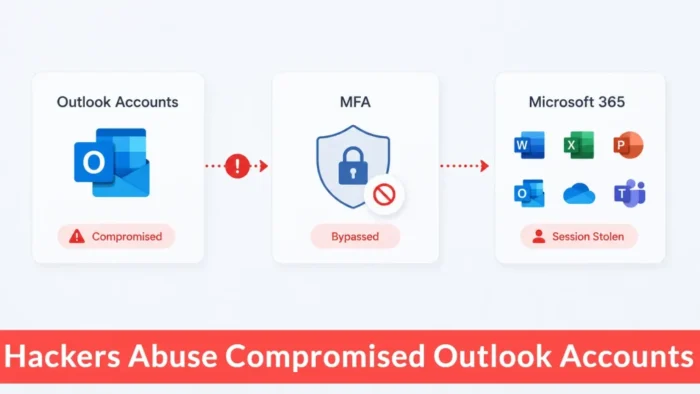
Hackers are using compromised organizational Outlook accounts to distribute phishing emails that can steal MFA-protected Microsoft 365 sessions. The campaign targets universities, businesses and multinational institutions with convincing procurement and project-related messages.
Infoblox Threat Intel uncovered the campaign after investigating a phishing email reported in May 2026. Researchers traced the message to a wider adversary-in-the-middle, or AiTM, operation affecting dozens of organizations.

Access content across the globe at the highest speed rate.
🔥 Save 81% + 2 bonus months! 🔥
70% of our readers choose Private Internet Access
70% of our readers choose ExpressVPN
2
Browse the web from multiple devices with industry-standard security protocols.
🔥 Save 73%! 🔥

Faster dedicated servers for specific actions (currently at summer discounts)
🔥 Save 69%! 🔥
The campaign does not exploit a vulnerability in Outlook or Microsoft 365. Attackers manipulate users into completing a legitimate Microsoft authentication process through an attacker-controlled proxy, which captures credentials and authenticated session cookies.
How the Microsoft 365 phishing campaign works
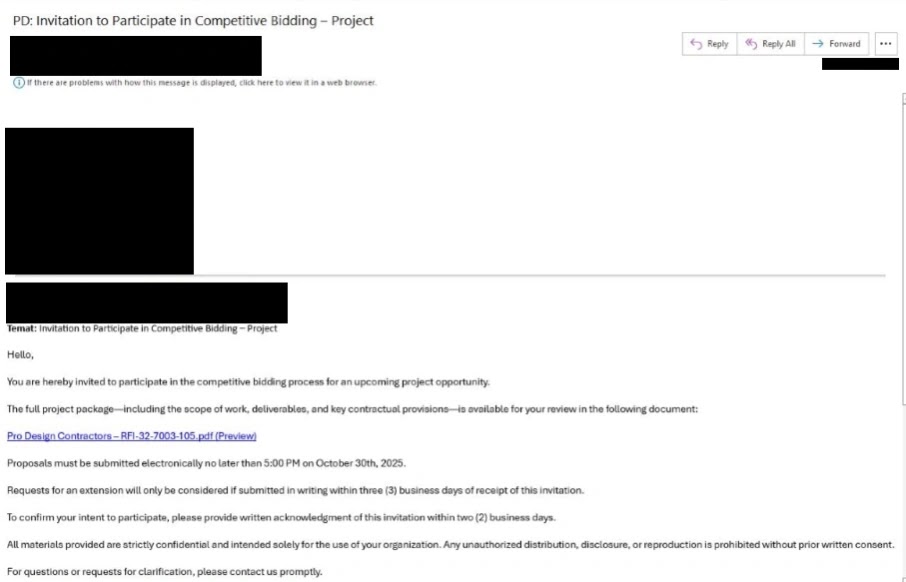
The attack starts with an email sent from an organizational account that attackers previously compromised. Because the message comes from a legitimate mailbox, recipients may recognize the sender or trust the organization’s domain.
The emails imitate common business workflows, including requests for information, bid invitations, procurement notices and shared project documents. Many include short deadlines or confidentiality language intended to discourage recipients from checking the request with colleagues.
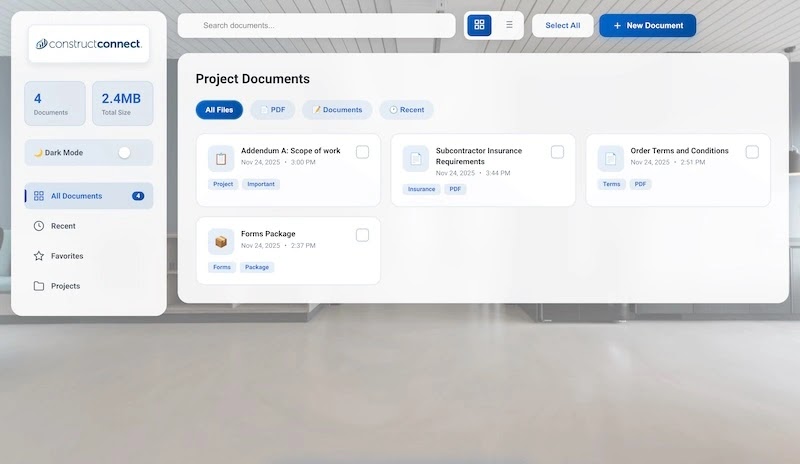
Once a recipient clicks the link, the campaign uses several staged pages to make the process appear legitimate. Fake document portals, email prompts and CAPTCHA checks eventually direct the victim to a cloned Microsoft sign-in page.
| Attack stage | What the victim sees | What the attacker gains |
|---|---|---|
| Trusted email | A procurement or project message from a legitimate mailbox | Credibility and access to internal or external contacts |
| Document portal | Files presented through a familiar sharing or procurement interface | Confirmation that the recipient followed the link |
| Email prompt | A request to enter an email address before downloading files | Target validation and personalization data |
| CAPTCHA | A Cloudflare Turnstile or generic verification page | Protection from automated scanners and security analysis |
| Microsoft login | A closely copied Microsoft authentication page | Credentials and an MFA-authenticated session token |
Compromised mailboxes extend the phishing chain
Infoblox said the original incident began with a phishing email sent to a small group of employees. After compromising accounts, the attackers used those mailboxes to distribute similar lures more widely across the organization.
The attackers also sent messages to external contacts, allowing one compromised mailbox to expose suppliers, contractors and partner organizations. This technique turns an established business relationship into a route for further phishing.
Microsoft has previously documented a similar pattern in which AiTM phishing led to business email compromise. After taking over an account, attackers can search conversations, study payment processes and insert themselves into active business discussions.
- Messages originate from real organizational email accounts.
- Recipients may recognize the sender or company domain.
- Procurement themes fit normal communication between different organizations.
- Urgent deadlines encourage users to act before verifying the request.
- Compromised accounts provide access to internal and external contact lists.
Fake download pages imitate trusted business services
The phishing links often open pages that resemble document-sharing or procurement services. Infoblox observed branding connected to services such as ConstructConnect and OpenGov, as well as pages designed for specific targeted institutions.
Some URLs contain the recipient’s email address in the path. This small detail makes the page appear personalized and can convince a victim that the files were specifically shared with them.
The Infoblox investigation also found conditional cloaking. When researchers submitted an email address that did not match the intended target, at least one phishing page redirected them to a legitimate website instead of displaying the malicious login flow.
How attackers steal sessions protected by MFA
Traditional phishing pages collect a username and password directly. AiTM frameworks add a reverse proxy between the victim and Microsoft’s real authentication service.
When a victim enters credentials, the proxy sends them to Microsoft in real time. Microsoft then requests the configured second factor, and the victim completes that challenge through the same proxied session.
After Microsoft approves the authentication, the service issues a session cookie or token. The proxy captures that token, allowing the attacker to recreate the authenticated session without completing another MFA challenge.
| Security control | Why the attack can still succeed |
|---|---|
| Password | The victim enters it into the attacker-controlled proxy. |
| Authenticator approval | The victim approves the legitimate Microsoft authentication request. |
| One-time code | The proxy relays the code immediately before it expires. |
| Session cookie | The attacker captures and replays the authenticated session. |
| Domain reputation | The campaign uses aged or likely compromised domains with legitimate histories. |
MFA is not broken, but some methods remain phishable
The attackers are not calculating or technically defeating the second authentication factor. They convince the legitimate user to complete it and then take the resulting authenticated session.
This distinction matters because standard push notifications and one-time codes can remain vulnerable to real-time phishing. They provide valuable protection against password theft but do not bind authentication to the legitimate website in the same way as phishing-resistant credentials.
Microsoft explains that Token Protection in Conditional Access can reduce replay attacks by requiring supported sign-in session tokens to remain bound to the device that received them.
Multiple phishing kits supported the campaign
Infoblox observed infrastructure associated with several AiTM phishing platforms. These included EvilProxy, FlowerStorm, also tracked as Storm-1167, and Kali365. The broader report also references Evilginx.
Using several phishing kits gives an attacker alternative infrastructure when a provider or security company disrupts one part of the operation. It also makes the campaign harder to classify using a single technical signature.
The kits support different combinations of reverse-proxy phishing, credential collection, session interception and device-code abuse. Infoblox assessed that the observed campaigns appeared to come from one actor rotating among different services.
Aged domains make the phishing pages harder to detect
Instead of relying only on newly registered domains, the attacker used older websites that appeared dormant or compromised. Aged domains may already have an established reputation and therefore attract less attention from basic URL filters.
For example, testserveren[.]com appeared dormant for nearly a decade before hosting phishing content in May 2026. Another domain, barifurniture[.]net, had previously displayed furniture-related material before serving a fake document download page.
Infoblox identified dozens of similar domains. Their varied registration dates, hosting details and previous content suggested that the attacker had compromised unrelated websites and injected malicious PHP files.
| Indicator | Observed use |
|---|---|
| barifurniture[.]net | Likely compromised domain hosting a fake download page |
| satoriestate[.]com | Likely compromised domain hosting document-themed phishing |
| sohantraders[.]com | Likely compromised domain hosting fake document content |
| testserveren[.]com | Hosted United Nations and OpenGov-themed download pages |
| vresortsliving[.]com | Likely compromised domain hosting fake downloads |
| usersatisfactionlab[.]de | FlowerStorm or Storm-1167 infrastructure |
| q1evaluationperformance[.]net | EvilProxy phishing infrastructure |
| duemineral[.]uk | Kali365 phishing infrastructure |
DNS patterns can reveal the phishing infrastructure
Some of the phishing domains followed registered domain generation algorithm patterns. FlowerStorm infrastructure frequently combined corporate-sounding words under the .de top-level domain, while EvilProxy used similar phrases under .com or .net.
Individual phishing pages can disappear quickly, but DNS records may preserve connections between domains, subdomains and hosting infrastructure. Security teams can use passive DNS history to identify related assets after one malicious page becomes known.
Infoblox recommends combining DNS threat intelligence with identity and email monitoring. Domain reputation alone may miss an older compromised website that recently started serving malicious content.
How organizations can reduce AiTM phishing risk
Organizations should treat MFA as one layer of identity security rather than a complete defense. Conditional Access, device compliance, token protection and phishing-resistant authentication can limit an attacker’s ability to reuse a stolen session.
Microsoft recommends enforcing phishing-resistant authentication through Conditional Access. Supported approaches include FIDO2 passkeys, security keys, Windows Hello for Business and certificate-based authentication.
Administrators should also evaluate device-bound Token Protection for supported users, devices and applications. A stolen token becomes less useful when Microsoft Entra accepts it only from the device to which it was issued.
- Require phishing-resistant authentication for administrators and high-risk users.
- Enable Conditional Access policies based on user, device, location and risk.
- Deploy Token Protection where Microsoft supports the required applications and devices.
- Block or investigate sign-ins from unmanaged and unexpected devices.
- Monitor unusual mailbox access, forwarding rules and external email activity.
- Alert on impossible travel, unfamiliar IP addresses and new browser sessions.
- Inspect procurement emails requesting sign-in through an external link.
- Use DNS intelligence to detect related phishing infrastructure.
- Train employees to open shared documents through known service portals.
What administrators should do after suspected session theft
Changing the user’s password alone may not remove an attacker who already holds a valid session. Administrators must also invalidate existing sessions and investigate any changes made after the account takeover.
Microsoft’s compromised email account response guidance recommends revoking active sessions, resetting the password, reviewing MFA devices and checking the account for malicious forwarding rules.
Security teams should examine Microsoft Entra sign-in logs, mailbox audit records, sent messages, inbox rules, OAuth application consent and SharePoint or OneDrive activity. They should also identify every recipient who received phishing from the compromised mailbox.
- Temporarily block the affected account from signing in.
- Revoke active sessions and refresh tokens.
- Reset the password and review registered authentication methods.
- Remove unknown MFA devices, passkeys or telephone numbers.
- Delete malicious inbox and forwarding rules.
- Review OAuth applications and revoke suspicious consent grants.
- Search sent mail for internal and external phishing messages.
- Notify recipients who may have followed the malicious links.
- Investigate access to SharePoint, OneDrive and other connected services.
Why trusted email requires additional scrutiny
The campaign shows why a familiar sender address cannot prove that a message is safe. Attackers deliberately use compromised accounts because recipients trust existing conversations and organizational domains.
Phishing-resistant MFA can stop many real-time proxy attacks because the credential validates the legitimate website’s origin. Microsoft’s deployment guidance recommends prioritizing high-impact identities and expanding enforcement through tested Conditional Access policies.
If an attacker successfully takes over a mailbox, administrators should follow Microsoft’s account recovery process promptly. The longer a trusted account remains under attacker control, the more opportunities it provides for internal phishing, partner compromise and data theft.
FAQ
Hackers use an adversary-in-the-middle proxy to relay a victim’s credentials and MFA challenge to Microsoft. After authentication succeeds, the proxy captures the resulting session token or cookie.
No known Outlook vulnerability drives this campaign. Attackers use compromised organizational mailboxes, deceptive emails and cloned login pages to manipulate users and steal authenticated sessions.
The victim completes a legitimate MFA challenge through the attacker’s proxy. The attacker then steals the authenticated session rather than attempting to calculate or defeat the second factor.
Infoblox identified universities, enterprises and multinational institutions among the targets, including organizations connected to the European Union and United Nations.
Infoblox observed infrastructure associated with EvilProxy, FlowerStorm or Storm-1167 and Kali365. Its report also referenced Evilginx among the frameworks used by the actor.
Administrators should block the account, revoke active sessions and refresh tokens, reset credentials, review MFA methods, remove malicious mailbox rules and investigate email, OAuth and cloud-storage activity.


Read our disclosure page to find out how can you help VPNCentral sustain the editorial team Read more


Improve this guide




User forum
0 messages