
Hackers use Telegram-based ResokerRAT to spy on Windows PCs and keep access after reboot


 5 min. read
  Published on

A newly analyzed Windows remote access trojan called ResokerRAT uses Telegram’s Bot API as its control channel instead of a traditional command-and-control server. That gives attackers a familiar cloud service to hide behind while they send commands and receive stolen data from infected systems.
The malware runs as Resoker.exe and focuses on Windows systems. Researchers say it can capture screenshots, download additional files, request elevated privileges, and interfere with system tools that defenders often use during incident response.
ResokerRAT also tries to make analysis harder from the start. The malware creates a mutex named Global\ResokerSystemMutex so only one copy runs at a time, checks whether a debugger is attached, and can interrupt analysis if it detects one.
How the malware gains control
After launch, the malware attempts to relaunch itself with administrator privileges by using the Windows runas option through ShellExecuteExA. If elevation succeeds, the original process exits and the elevated instance continues running. If it fails, the malware can report that back through the Telegram channel.
Researchers say the malware also scans running processes and tries to kill analysis or monitoring tools such as Task Manager, Process Explorer, and Process Hacker. That behavior can make it harder for victims or analysts to inspect what is happening in real time.
The bigger idea here is not just remote control. It is stealthy remote control built on a legitimate platform that many environments already trust. Traffic to Telegram can look less suspicious than traffic to a dedicated attacker-owned server, especially if security teams are not inspecting process-level network behavior closely.
Persistence and Telegram control
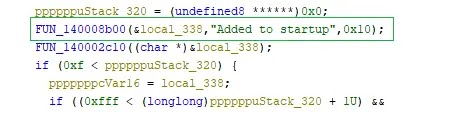
ResokerRAT can make itself persistent through the Windows Run registry key. When operators issue the /startup command, the malware writes its path under HKCU\Software\Microsoft\Windows\CurrentVersion\Run using the name Resoker, which causes it to launch automatically when the user signs in.
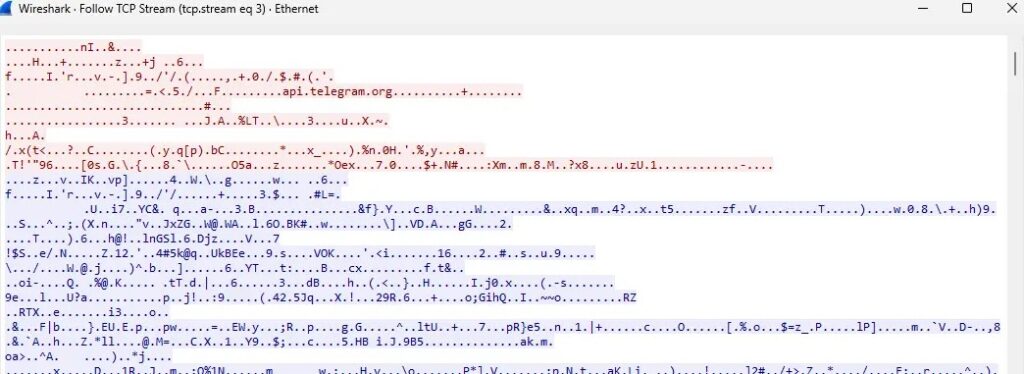
The malware’s command flow goes through the Telegram Bot API using hardcoded bot details. It repeatedly polls Telegram for new instructions and sends back results over the same channel, which removes the need for a separate conventional C2 server.
Before transmitting information, the malware URL-encodes the data. Researchers also observed this Telegram-based traffic during packet capture analysis, which helped confirm that the bot channel was actively being used for command retrieval and data return.
Screenshot capture and defense weakening
One of the more invasive commands is /screenshot. Researchers say the malware creates a Screenshots folder in its working directory and launches a hidden PowerShell script to capture the full screen and save the image as a PNG file without any visible warning to the user.

Another command, /uac-min, weakens Windows protections by changing User Account Control behavior. The malware reportedly sets ConsentPromptBehaviorAdmin to 0 and disables the secure desktop prompt while keeping UAC looking enabled on the surface, which can reduce friction for later attacker actions.
Taken together, these features make ResokerRAT more than a simple bot-controlled nuisance. It is a Windows surveillance and access tool that combines persistence, privilege escalation, screenshot capture, and anti-analysis behavior with a control channel hosted on a mainstream messaging platform.
What defenders should watch for
Security teams should monitor the Windows Run key for unexpected entries named Resoker or other unfamiliar startup references. They should also look for suspicious outbound traffic to api.telegram.org coming from unknown or newly dropped processes rather than from an approved Telegram client.
Other warning signs include unexpected UAC behavior changes, hidden PowerShell activity tied to screenshot capture, and sudden failures when opening tools such as Task Manager or Process Explorer. Those symptoms can point to malware that is actively trying to impair local investigation.
Because ResokerRAT arrives as a Windows executable, the simplest preventive step still matters. Users should avoid running executables from untrusted sources, and organizations should keep application control policies tight enough to block unsigned or unexpected binaries from launching in the first place.
| Capability | Reported behavior |
|---|---|
| Control channel | Telegram Bot API |
| Platform | Windows |
| Persistence | Run registry key entry named Resoker |
| Privilege escalation | Relaunch with runas |
| Surveillance | Full-screen screenshot capture |
| Defense evasion | Kills analysis tools, anti-debug check |
| Data handling | URL-encoded exfiltration |
- Monitor
HKCU\Software\Microsoft\Windows\CurrentVersion\Runfor suspicious startup entries - Inspect outbound connections to
api.telegram.orgfrom non-Telegram processes - Review hidden PowerShell activity and screenshot-related file creation
- Investigate abrupt failures in Task Manager, Process Explorer, or Process Hacker
- Block or restrict untrusted executables and unusual startup persistence changes
FAQ
ResokerRAT is a Windows remote access trojan that uses Telegram’s Bot API to receive commands and send data back to attackers.
Telegram gives attackers a legitimate cloud platform to hide their control traffic behind, which can make detection harder than a normal attacker-owned command server.
Researchers say it can capture screenshots, request admin rights, persist through the Run key, download files, and interfere with diagnostic tools such as Task Manager and Process Explorer.
It can add itself to HKCU\Software\Microsoft\Windows\CurrentVersion\Run under the name Resoker, which allows it to launch automatically at sign-in.
Unusual startup entries, non-standard traffic to api.telegram.org, hidden PowerShell activity, and unexpected attempts to kill local analysis tools are strong early indicators.


Read our disclosure page to find out how can you help VPNCentral sustain the editorial team Read more


Improve this guide




User forum
0 messages