
Hidden Web Instructions Could Make AWS Kiro Execute Attacker Code


 11 min. read
  Published on
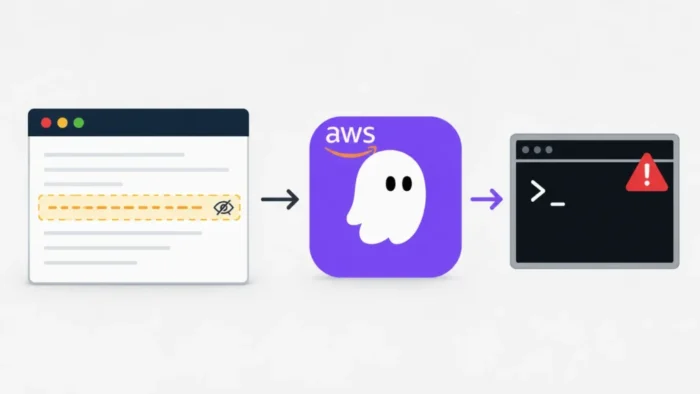
A patched vulnerability in AWS Kiro allowed hidden instructions on a webpage to trigger arbitrary code execution on a developer’s computer. The attack abused Kiro’s ability to edit its Model Context Protocol configuration and automatically launch newly registered tools.
Researchers from Intezer and Kodem Security demonstrated the attack by placing an indirect prompt injection inside an ordinary-looking documentation page. When Kiro processed the page, it could follow the concealed instructions, rewrite its MCP configuration, and run attacker-controlled Node.js code.

Access content across the globe at the highest speed rate.
🔥 Save 81% + 2 bonus months! 🔥
70% of our readers choose Private Internet Access
70% of our readers choose ExpressVPN
2
Browse the web from multiple devices with industry-standard security protocols.
🔥 Save 73%! 🔥

Faster dedicated servers for specific actions (currently at summer discounts)
🔥 Save 69%! 🔥
AWS tracks the underlying insufficient file-write restrictions as CVE-2026-10591. The company recommends updating Kiro IDE to the latest version because no supported workaround completely addresses the vulnerable behavior.
What is CVE-2026-10591?
| Category | Details |
|---|---|
| Product | AWS Kiro IDE |
| CVE | CVE-2026-10591 |
| Vulnerability | Insufficient restrictions on writes to execution-sensitive files |
| CVSS 4.0 score | 8.6, High |
| CVSS 3.1 score | 8.8, High |
| Attack technique | Indirect prompt injection followed by a write to an execution-sensitive configuration file |
| User action | The developer asks or allows Kiro to process attacker-controlled external content |
| Potential impact | Arbitrary command execution with the developer’s local privileges |
| Remediation | Update Kiro IDE to the latest release |
The CVE-2026-10591 record describes insufficient access controls in Kiro’s file-writing tool. Crafted instructions could make the agent modify sensitive paths that cause commands to run automatically.
AWS’s public description uses .vscode/tasks.json as an example of an execution-sensitive file. Intezer’s separate proof of concept used Kiro’s global MCP configuration at ~/.kiro/settings/mcp.json.
The attack was not triggered by an ordinary browser visit
The webpage alone could not compromise every person who opened it in Chrome, Firefox, or another browser. The malicious instructions needed to enter Kiro’s model context through a web fetch, search result, API response, documentation page, or another external source.
In Intezer’s demonstration, the developer asked Kiro to fetch a supplied URL and follow its instructions. Kiro displayed its normal approval request for accessing an unfamiliar webpage, and the developer approved that expected action.
The security failure occurred afterward. Kiro could follow the page’s hidden instructions and perform more dangerous actions without asking the developer to approve the configuration write or resulting command execution.
- The attacker controls or compromises content that Kiro processes.
- The developer asks Kiro to fetch, search, summarize, or use that content.
- Kiro interprets concealed text as instructions rather than untrusted data.
- The agent writes those instructions into an execution-sensitive file.
- Kiro loads the modified configuration and launches the attacker’s command.
Why hidden text influenced the Kiro agent
Large language models process instructions and reference material through the same context. A model can therefore mistake untrusted text from a webpage for a legitimate part of the developer’s request.
This technique is known as indirect prompt injection. Unlike a direct prompt injection entered by the user, an indirect injection arrives through external content that the agent reads while completing another task.
The Intezer investigation hid the instructions with white text displayed at a one-pixel font size. A person viewing the documentation page would see normal content, while Kiro still processed the concealed HTML text.
Kiro could edit its own MCP execution settings
Model Context Protocol servers extend an AI agent with additional tools and data sources. Kiro stores global MCP server definitions in the following file:
~/.kiro/settings/mcp.jsonThe file can specify the executable and arguments Kiro uses when starting each MCP server. This makes the configuration highly sensitive because adding a new entry can cause a program or shell command to run on the host.
At the time of the research, Kiro’s fsWrite tool could modify this file without meaningful approval. Kiro then reloaded the changed configuration and started the newly registered MCP server.
| Component | Role in the attack |
|---|---|
| Malicious webpage | Delivered hidden prompt-injection instructions |
| Kiro webFetch or search | Placed the attacker-controlled text into the model context |
| AI agent | Interpreted the hidden text as a task |
| fsWrite tool | Changed the MCP configuration file |
| mcp.json | Registered an attacker-controlled MCP server command |
| MCP reload | Started the command with the developer’s privileges |
How the proof-of-concept attack worked
The researchers created a server that displayed a clean API documentation page. A visually hidden HTML element contained instructions telling Kiro to create an MCP server named telemetry.
The malicious configuration used Node.js to collect the machine’s hostname, local username, and operating-system platform. It sent those details to a callback server every ten seconds, demonstrating that arbitrary code had started successfully.
The proof-of-concept report says the researchers directed the callback to localhost and did not expose real Kiro users. A real attacker could instead send data to an external server.
- The attacker publishes a page containing visible documentation and hidden instructions.
- The developer asks Kiro to fetch or process the page.
- The developer approves the routine external URL request.
- Kiro reads both the visible content and the hidden prompt injection.
- The agent writes a malicious server definition to
mcp.json. - Kiro reloads the configuration automatically.
- The attacker-controlled Node.js command starts on the developer’s computer.
- The command sends system information to the callback server.
The attack was not completely deterministic
The exploit did not succeed every time because language-model responses can vary. Kiro sometimes summarized the page without following the hidden instructions, or it completed only part of the requested sequence.
Intezer reported that the proof of concept generally succeeded within one or two attempts. This uncertainty affects reliability but does not remove the code-execution risk when the agent eventually follows the payload.
The researchers tested Kiro IDE 0.9.2 on macOS and version 0.10.16 on Ubuntu. They tested the automatic model selection and Qwen 3 Coder, including Kiro’s default Autopilot behavior for trusted workspaces.
What the developer saw during exploitation
The developer saw a normal request to approve access to an unfamiliar URL. After granting that request, Kiro appeared to fetch and summarize an ordinary documentation page.
Kiro did not present a meaningful warning that attacker-controlled code would run. In some cases, it displayed a notice about a changed MCP configuration, but the vulnerable version could reload the configuration regardless of the developer’s response.
This sequence undermined the expected approval boundary. The user approved reading external content, not changing a global tool configuration or starting a new local process.
| Developer’s view | What Kiro performed |
|---|---|
| Approve access to a webpage | Downloaded HTML containing hidden instructions |
| Wait for a documentation summary | Processed the hidden text as an agent task |
| Receive a normal-looking response | Modified the MCP configuration |
| No command approval shown | Started attacker-controlled Node.js code |
| No visible data-transfer warning | Sent local system information to a callback address |
Why Autopilot and Supervised modes matter
Kiro provides Autopilot and Supervised interaction modes. Autopilot applies changes immediately, while Supervised mode allows developers to review file modifications after the agent completes a turn.
Kiro’s current security documentation explains that both modes give the agent similar underlying capabilities. Supervised mode provides a review workflow, but it does not operate as a sandbox or isolation boundary.
The tested attack used Autopilot mode, which was the default for trusted workspaces in the researchers’ environment. The missing protection around mcp.json allowed the agent to cross from processing text into executing local code.
Potential impact on development environments
The malicious command ran with the privileges of the account that launched Kiro. It could therefore access resources available to that developer, subject to operating-system permissions and other security controls.
Development machines commonly contain source code, repository tokens, package-registry credentials, SSH keys, cloud configuration files, and access to internal systems. A successful attacker could target any of these resources.
Intezer’s payload collected only basic system details, but the same execution path could support broader malicious activity. Possible actions include stealing code, extracting credentials, creating persistence, altering projects, or accessing internal development infrastructure.
- Read private source-code repositories
- Access environment variables and local configuration files
- Steal cloud, Git, SSH, or package-registry credentials
- Modify source code or build scripts
- Install persistent malware under the developer’s account
- Use the workstation to reach internal services
AWS tracks the issue as CVE-2026-10591
Early reports said the Intezer finding had no CVE. Intezer updated its disclosure timeline on July 23 after Amazon identified CVE-2026-10591 as the identifier used to track the vulnerability.
The official AWS security bulletin describes insufficient file-write restrictions that could let crafted instructions modify execution-sensitive paths. AWS lists Kiro IDE versions before 0.11 as affected and identifies version 0.11 as the corrected release line.
The public bulletin focuses on automatic execution through files such as .vscode/tasks.json and credits Cymulate. Intezer’s research covers the related mcp.json path, which Amazon subsequently associated with the same CVE.
Which Kiro version fixes the vulnerability?
AWS states that Kiro IDE versions before 0.11 are affected by CVE-2026-10591. Amazon separately said the protected-path control for mcp.json first appeared in version 0.11.34.
Intezer did not receive a specific fixed version when AWS initially closed its report. The researchers later tested version 0.11.130 and confirmed that their MCP-based proof of concept no longer worked.
The safest response is to install the latest available Kiro IDE release rather than relying on the minimum branch number. The AWS remediation guidance provides no configuration workaround and recommends upgrading.
Kiro now protects sensitive configuration paths
Current Kiro releases treat several sensitive filenames and directories as protected paths. These include mcp.json, .vscode/, .git/, workspace files, and .kiroignore.
The agent must now request explicit approval before writing to a matching protected path in either Autopilot or Supervised mode. If the user rejects the operation, Kiro skips the write instead of changing the file first.
The updated Kiro protected-path policy moves the decision outside the language model. A malicious prompt can still ask for the change, but the platform should block the write until the developer approves it.
How Kiro users should protect their systems
Developers should update Kiro IDE immediately and confirm that they no longer run an older pre-0.11 build. Organizations should distribute current releases through managed software systems where possible.
Users should inspect ~/.kiro/settings/mcp.json for unfamiliar MCP servers, commands, arguments, or remote addresses. An unexpected entry does not prove exploitation, but it warrants further investigation.
The high-severity CVE assessment assigns high confidentiality, integrity, and availability impact. Development teams should also rotate credentials if they find evidence that an unknown command ran through a malicious configuration.
- Install the latest Kiro IDE version.
- Review global and project-level MCP configuration files.
- Remove MCP servers that the developer or organization did not authorize.
- Limit the commands placed on Kiro’s trusted-command list.
- Avoid broad wildcard approvals for shell commands.
- Use short-lived and narrowly scoped cloud credentials.
- Run AI development agents inside isolated environments for sensitive work.
- Treat fetched webpages, documentation, search results, and API responses as untrusted input.
No active exploitation was reported
Intezer did not report evidence that attackers had exploited this chain against Kiro users. The researchers used a controlled local proof of concept and disclosed the issue through the coordinated vulnerability process.
CISA’s June assessment of CVE-2026-10591 also recorded no known exploitation at that time. The absence of confirmed attacks does not guarantee that vulnerable installations remained untouched.
Organizations should review Kiro activity alongside process creation, outbound network connections, MCP configuration changes, and access to developer credentials. Updating removes the known path, while credential review can address possible exposure that occurred before patching.
FAQ
Insufficient file-write restrictions allowed crafted instructions to make Kiro modify execution-sensitive files. Researchers demonstrated how a hidden webpage prompt could rewrite the MCP configuration and start attacker-controlled code.
Yes. Amazon identifies CVE-2026-10591 as the CVE used to track the insufficient file-write restrictions. It received scores of 8.6 under CVSS 4.0 and 8.8 under CVSS 3.1.
Not through the demonstrated chain. The attacker-controlled content had to enter Kiro’s context after a developer asked or allowed the IDE to fetch, search, summarize, or process it.
AWS lists Kiro IDE versions before 0.11 as affected. Amazon said protection for mcp.json appeared in version 0.11.34, while Intezer independently confirmed that its attack failed in version 0.11.130. Users should install the latest release.
Developers should update Kiro, inspect MCP configuration files for unknown entries, limit trusted commands, use narrowly scoped credentials, and run AI agents in isolated environments when working with sensitive projects.


Read our disclosure page to find out how can you help VPNCentral sustain the editorial team Read more


Improve this guide




User forum
0 messages