
Hotspot Shield VPN Review: Fast Speeds but Privacy Trade-Offs


 15 min. read
  Published on
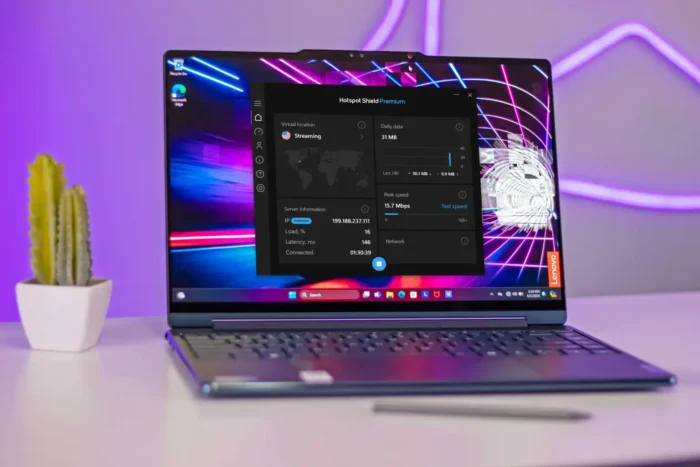
Hotspot Shield is a fast and easy-to-use VPN with a free plan, streaming-optimised locations, support for up to 10 devices, and a choice of Hydra, WireGuard, and IKEv2 protocols.
Its speed remains the main attraction. In PCWorld’s testing, both Hydra and WireGuard retained about two-thirds of the original download speed, placing Hotspot Shield among the faster consumer VPNs.

Access content across the globe at the highest speed rate.
🔥 Save 81% + 2 bonus months! 🔥
70% of our readers choose Private Internet Access
70% of our readers choose ExpressVPN
2
Browse the web from multiple devices with industry-standard security protocols.
🔥 Save 73%! 🔥

Faster dedicated servers for specific actions (currently at summer discounts)
🔥 Save 69%! 🔥
The service has more complicated privacy practices than some rivals. It says it does not connect browsing activity to individual users, but it collects device, session, bandwidth, and diagnostic information. It also lacks the regular public no-logs audits offered by several privacy-focused competitors.
Hotspot Shield review summary
Hotspot Shield launched in 2008 and now belongs to Pango Group, a digital security company created after Aura separated its VPN and security brands into a standalone business.
The VPN offers applications for Windows, macOS, Android, iPhone, iPad, Linux, smart televisions, browsers, and selected routers. Premium subscribers can connect up to 10 devices simultaneously.
The current Hotspot Shield plans advertise more than 125 virtual locations, at least 800 servers, unlimited Premium data, streaming support, and a 45-day money-back guarantee.
| Category | Hotspot Shield details |
|---|---|
| Best for | Fast browsing, streaming, simple apps, and occasional free use |
| Paid device limit | Up to 10 simultaneous connections |
| Free device limit | One device |
| Virtual locations | More than 125 on current Premium plans |
| Published server count | At least 800 on the current plans page |
| Protocols | Hydra, WireGuard, and IKEv2/IPSec, depending on platform |
| Jurisdiction | United States |
| Owner | Pango Group |
| Refund period | 45 days on eligible Premium purchases |
What we like about Hotspot Shield
Hotspot Shield delivers fast connections without requiring users to configure complicated settings. The main application presents a large connection button, a location selector, and useful connection statistics.
Its Hydra protocol performed well in the supplied testing, while WireGuard produced almost identical results. The service also includes dedicated streaming and gaming locations.
The free plan gives users a way to test the application without entering payment information. This remains a useful option for short browsing sessions and occasional protection on public Wi-Fi.
- Fast Hydra and WireGuard performance
- Simple desktop and mobile applications
- Free plan with no initial payment
- Dedicated streaming locations
- Locations for gaming on supported apps
- Kill switch and split tunnelling
- Automatic public Wi-Fi protection
- Up to 10 Premium device connections
- 45-day money-back guarantee
What we do not like
Hotspot Shield collects more operational information than privacy-focused services such as Mullvad, Proton VPN, or Private Internet Access claim to retain.
The company’s policy discusses device hashes, approximate location, session duration, bandwidth consumption, diagnostic information, and encrypted IP processing during a VPN session.
Hotspot Shield also offers fewer advanced privacy tools than several competitors. It does not provide a traditional double-VPN feature, Tor-over-VPN servers, or extensive identity-protection tools with its standard VPN subscription.
- US jurisdiction
- No recurring public no-logs audit programme
- Collection of device and session information
- Proprietary Hydra protocol
- No traditional multi-hop connections
- Limited advanced privacy controls
- Free-plan details differ between platforms and official pages
- Some Premium offers renew at substantially higher prices
Who owns Hotspot Shield?
AnchorFree originally developed Hotspot Shield. The business later became part of Pango, which Aura acquired in 2020.
In 2024, Aura separated into two companies. Aura continued focusing on identity and family online safety, while Pango Group took control of Hotspot Shield and several related VPN and privacy brands.
Aura’s corporate separation announcement lists Hotspot Shield, Betternet, UltraVPN, VPN 360, Touch VPN, and several other products in the Pango Group portfolio.
Hotspot Shield pricing
Hotspot Shield’s prices vary between its website, promotional landing pages, mobile app stores, and renewal offers.
The main plans page currently advertises a discounted annual subscription for £29 during the first year, followed by renewal at £95.99 per year. Other official offers show monthly and multi-year options at different prices.
Customers should therefore rely on the final checkout page rather than a price quoted in an older review. They should check both the introductory payment and automatic renewal amount.
| Plan element | Current official information |
|---|---|
| Premium introductory annual offer | £29 for the first year on the main plans page |
| Annual renewal | £95.99 per year on that offer |
| Monthly offers | Can reach £12.99 per month on promotional pages |
| Multi-year offers | Prices vary by promotion and region |
| Money-back guarantee | 45 days for eligible purchases |
App-store subscriptions may use different prices and refund procedures. Apple or Google normally handles cancellations for purchases made inside their stores.
Hotspot Shield free plan
Hotspot Shield provides a free Basic plan that supports one device and a limited selection of locations.
Official Hotspot Shield pages currently provide conflicting descriptions of its free data limits. Some pages describe unlimited bandwidth, while support documentation and older plan pages mention daily limits, speed restrictions, or advertising-based extensions.
Users should check the terms displayed in the application installed on their device. Limits can vary between Windows, macOS, Android, and iOS.
| Free-plan feature | What to expect |
|---|---|
| Price | Free |
| Devices | One |
| Locations | Limited compared with Premium |
| Advertising | May appear on supported mobile versions |
| Streaming optimisation | Reserved primarily for Premium |
| Speed and data limits | May vary by device, application version, and region |
Is the free version worth using?
The free plan works best for occasional browsing, checking email, or protecting a short session on public Wi-Fi.
It does not provide the same location choice, streaming performance, support, or device coverage as Premium.
People who need a free VPN for regular use should compare Hotspot Shield with providers that publish clearer data limits and independent security audits.
Server network and locations
Hotspot Shield’s website currently lists more than 125 virtual locations for Premium subscribers. A separate server page continues to advertise more than 1,800 servers in over 80 countries.
The difference likely reflects inconsistent updates across the provider’s website. The current plans page lists at least 800 servers, while other official marketing pages still use the older 1,800 figure.
Because the provider does not explain this discrepancy clearly, users should focus on whether it offers the countries and cities they need rather than relying on one total server number.
Virtual locations explained
A virtual location gives users an IP address associated with a selected country even when the physical server may operate elsewhere.
Virtual servers can extend coverage to countries where operating hardware creates legal, security, or technical problems.
They can also produce unexpected latency when the physical server sits farther away than the location displayed in the app. Hotspot Shield does not always make the physical placement obvious inside every application.
Dedicated streaming and gaming locations
Hotspot Shield provides servers or virtual locations labelled for streaming in the United States and United Kingdom. Some applications also display gaming-optimised options.
These locations aim to provide suitable IP addresses and routing for streaming platforms or game servers.
They do not guarantee access. Netflix, Prime Video, Disney+, Hulu, and other services regularly identify and block VPN addresses.
Hotspot Shield speed test results
Hotspot Shield remained fast in PCWorld’s testing. The reviewer tested servers in six countries over several days using Hydra and WireGuard.
Hydra retained an average of 66 percent of the original download speed and 71 percent of the upload speed.
WireGuard produced an average of 64 percent of the original download speed and 71 percent of the upload speed.
| Protocol | Average download retention | Average upload retention |
|---|---|---|
| Hydra | 66 percent | 71 percent |
| WireGuard | 64 percent | 71 percent |
What the performance results mean
Retaining about two-thirds of the original download speed gives Hotspot Shield enough performance for 4K video, large downloads, video calls, and ordinary gaming on most connections.
Results will vary according to server distance, local network quality, congestion, protocol choice, device performance, and internet provider routing.
Hotspot Shield no longer dominates every VPN speed comparison because leading WireGuard-based competitors have improved considerably. It still ranks among the faster mainstream services.
Hydra protocol
Hydra is Hotspot Shield’s proprietary VPN protocol. The company designed it to deliver fast and stable connections over long distances and unreliable networks.
Unlike WireGuard and OpenVPN, Hydra’s complete source code does not receive the same level of public inspection. Hotspot Shield says other security companies have licensed or used the technology.
The provider’s protocol guidance recommends Hydra for speed, gaming, streaming, and secure everyday connections.
WireGuard and IKEv2 support
Hotspot Shield also supports WireGuard and IKEv2/IPSec on selected platforms.
WireGuard uses a small, open-source codebase and modern cryptography. It offers a strong alternative for users who do not want to rely on the proprietary Hydra protocol.
Protocol availability varies by operating system. Hotspot Shield’s support documentation currently says WireGuard availability includes Android and macOS, while Windows settings also reference WireGuard.
| Protocol | Main advantage | Recommended use |
|---|---|---|
| Hydra | Fast long-distance performance | Streaming, browsing, and gaming |
| WireGuard | Modern open-source design | Everyday privacy and fast connections |
| IKEv2/IPSec | Rapid reconnection | Phones and changing mobile networks |
Encryption and leak protection
Hotspot Shield uses AES encryption to protect traffic between the user’s device and its VPN servers.
The company’s support pages mention both AES-128 and AES-256. The exact encryption configuration can depend on the platform and selected protocol.
PCWorld found no DNS or IP leaks during its tests. The reviewer’s real IP address remained hidden after connecting to the tested servers.
Kill switch
The kill switch blocks internet traffic when the VPN connection drops unexpectedly.
This prevents applications from quietly returning to the normal internet connection and exposing the user’s regular IP address.
Hotspot Shield may disable the kill switch by default. Users should open the settings and activate it before handling sensitive traffic.
Split tunnelling and Smart VPN
Hotspot Shield calls its split-tunnelling feature Smart VPN on some platforms.
It lets users decide which applications or websites bypass the VPN. Excluded traffic uses the normal internet connection.
The provider’s Windows settings guide also documents Auto-protect, kill-switch controls, IP-leak protection, and public-network connection rules.
- Route browsers through the VPN.
- Exclude banking apps that reject VPN addresses.
- Allow local printers to use the normal network.
- Keep sensitive apps inside the encrypted tunnel.
- Review exclusions after installing new software.
Auto-protect on public Wi-Fi
Auto-protect can start Hotspot Shield automatically when the device joins a public Wi-Fi network.
This reduces the risk that a user connects at a hotel, airport, café, or library and forgets to activate the VPN.
A VPN encrypts traffic between the device and the VPN server, but it cannot make a malicious website safe or stop users from entering passwords into phishing pages.
No traditional multi-hop feature
Hotspot Shield does not offer a traditional multi-hop feature that routes traffic through two VPN servers.
Multi-hop can separate the server that sees the original connection from the server that communicates with the destination.
Most consumers do not need it for everyday browsing. People facing elevated surveillance risks may prefer a VPN with audited multi-hop or Tor integration.
Hotspot Shield privacy policy
Hotspot Shield says it does not record browsing activity in a way that it can connect to an individual VPN user.
Its policy still describes collecting operational and technical data. This includes device hashes, application information, session duration, bandwidth use, approximate location, diagnostic events, and an encrypted IP address during the session.
The Hotspot Shield VPN privacy notice says browsing information is not linked to specific users and would not reveal an individual’s activity if authorities seized a VPN server.
| Data type | Reported handling |
|---|---|
| Browsing activity | Not associated with an identifiable VPN user |
| IP address | Encrypted during a session and reportedly deleted afterwards |
| Device hash | Used for device recognition, bandwidth controls, analytics, and support |
| Session duration | Collected for service operation and optimisation |
| Bandwidth use | Collected for performance and free-plan enforcement |
| App and diagnostic data | Used for analytics, troubleshooting, and product improvement |
Does Hotspot Shield keep browsing logs?
Hotspot Shield says it does not retain browsing history that it can connect to a specific subscriber.
That wording differs from providers that claim they do not collect visited domains at all. Hotspot Shield’s policies permit processing aggregated or de-identified usage information.
Users must therefore decide whether they accept the company’s distinction between collecting technical or aggregated information and retaining identifiable browsing logs.
Has Hotspot Shield completed an independent audit?
Hotspot Shield has published a summary of an independent review of its VPN privacy-policy claims.
The assessment examined whether the provider’s stated collection and logging practices matched the policy reviewed at that time.
However, Hotspot Shield has not established a clearly documented programme of recurring public infrastructure and no-logs audits comparable with some leading VPN providers.
Why an audit matters
A no-logs audit allows an independent firm to inspect selected systems, controls, and configurations.
It cannot guarantee permanent privacy or prove that a company will never suffer a breach. It provides evidence about the systems and period covered by the examination.
Hotspot Shield would strengthen trust by commissioning regular assessments and publishing detailed reports or summaries that clearly identify their scope and date.
US jurisdiction
Hotspot Shield operates through a US-based company. The United States participates in the Five Eyes, Nine Eyes, and Fourteen Eyes intelligence-sharing arrangements.
US authorities can issue valid legal demands to companies within the country. The privacy impact depends largely on what information the company retains and can technically produce.
Jurisdiction does not automatically make a VPN unsafe. Users should evaluate it together with logging practices, audits, ownership, technical controls, and transparency reports.
Pango Group ownership
Hotspot Shield now sits within Pango Group rather than Aura’s main identity-protection company.
The Aura and Pango restructuring placed multiple VPN brands under Pango while Aura continued as a separate online safety company.
Shared ownership can provide technical resources and infrastructure investment. It also concentrates several VPN products under one corporate group, which privacy-conscious customers may wish to consider.
Hotspot Shield streaming performance
Hotspot Shield performed well with streaming services in the supplied PCWorld testing.
The reviewer accessed Netflix, Amazon Prime Video, Hulu, and other regional content through dedicated and ordinary servers.
Streaming access changes frequently. A location that works today may stop after the platform blocks its VPN IP addresses.
- Use a streaming-optimised location first.
- Choose the country linked to the required catalogue.
- Clear old cookies when a site retains the previous region.
- Try another location when the first server fails.
- Check the platform’s terms before changing regions.
Is Hotspot Shield good for gaming?
Hotspot Shield’s fast protocols and dedicated gaming locations make it suitable for casual and competitive gaming when the selected server remains nearby.
A VPN normally adds latency because traffic travels through an extra server. Gaming locations cannot guarantee lower ping than a direct connection.
Hydra or WireGuard should provide the best results. Users should test both and select the server with the lowest displayed latency.
Is Hotspot Shield good for torrenting?
Hotspot Shield allows peer-to-peer traffic. Its fast speeds and kill switch can support lawful torrent downloads.
The service does not provide port forwarding, which may limit incoming peer connections compared with VPNs that support the feature.
Users should enable the kill switch before opening a torrent client and confirm that the software routes through the VPN connection.
Hotspot Shield apps
Hotspot Shield provides native apps for major desktop and mobile platforms. The interface remains consistent across Windows, macOS, Android, and iOS.
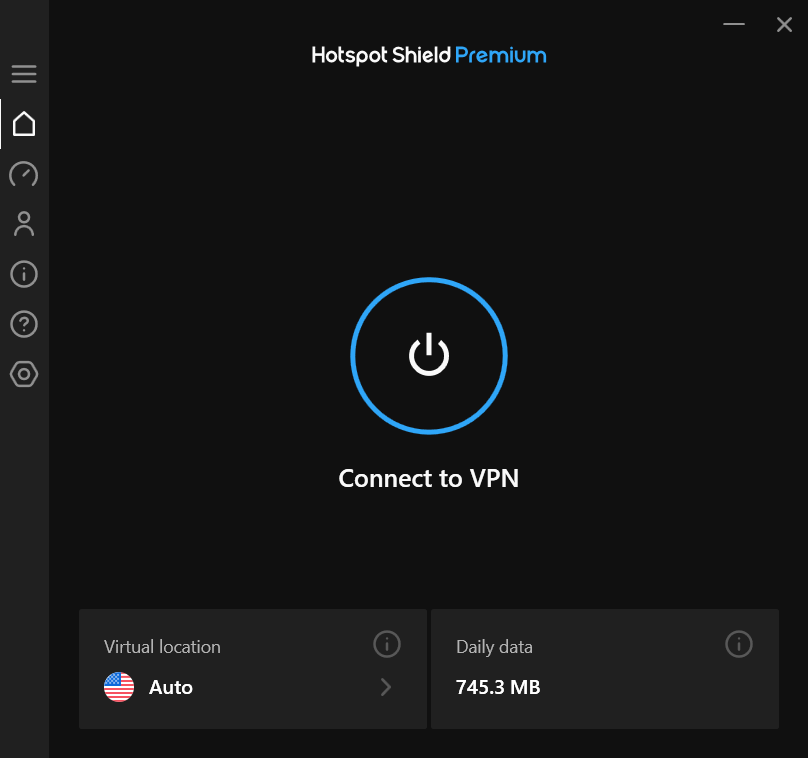
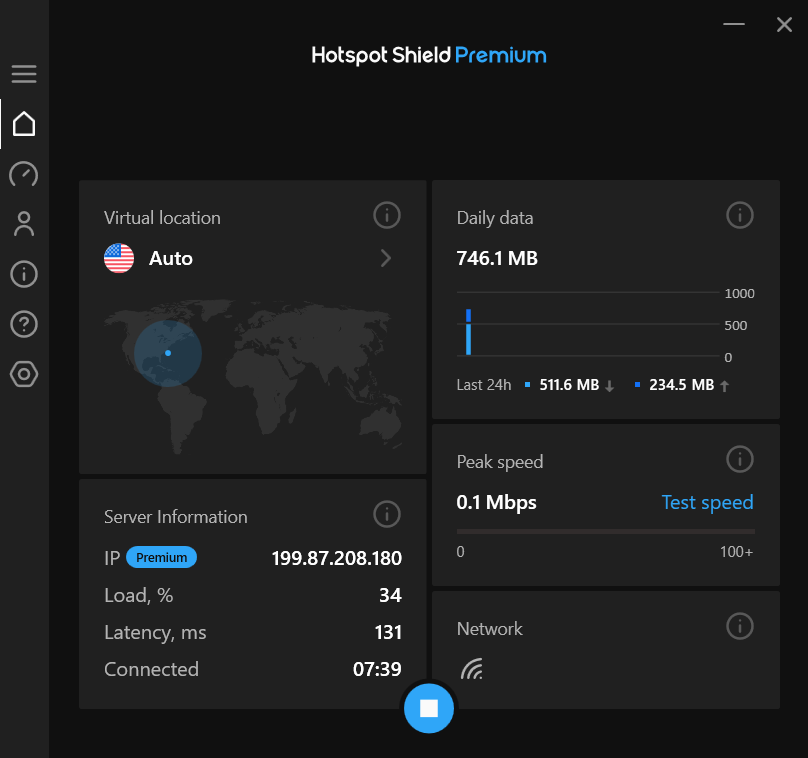
The desktop app shows the current virtual location, VPN IP address, upload and download totals, server load, latency, and connection duration.
The service also supports selected smart televisions, browser extensions, and router configurations. Feature availability differs between devices.
| Platform | Availability |
|---|---|
| Windows | Native desktop app |
| macOS | Native desktop app |
| Android | Phone, tablet, and supported TV app |
| iPhone and iPad | Native mobile app |
| Linux | Supported client with fewer interface features |
| Smart televisions | Selected Android TV and compatible platforms |
| Routers | Support depends on router and configuration |
Is Hotspot Shield easy to use?
Hotspot Shield has one of the simpler VPN interfaces. The main screen centres on a large power button and location selector.
Users do not need to understand protocols or encryption to connect. The automatic settings provide a suitable starting point for ordinary browsing and streaming.
More experienced users may find the settings limited compared with highly configurable services such as Private Internet Access.
Customer support
Premium subscribers receive 24-hour support through chat or email. Free users mainly rely on the online support centre.
The knowledge base includes installation guides, account instructions, protocol explanations, troubleshooting articles, and platform release notes.
Support quality can vary. Customers with urgent problems should collect screenshots, app versions, device details, and error messages before contacting the team.
Is Hotspot Shield safe?
Hotspot Shield uses established encryption, offers a kill switch, supports modern VPN protocols, and passed the supplied DNS and IP leak tests.
The privacy question requires more nuance. The company states that browsing activity cannot be linked to individual users, but it collects more technical and operational information than some privacy-first competitors.
The VPN data policy provides important details that users should review before subscribing, especially if they need the strongest possible anonymity.
Who should choose Hotspot Shield?
Hotspot Shield suits users who prioritise speed, streaming, easy applications, and access to a basic free VPN.
It can also work well for households that need up to 10 connections but do not require advanced options such as traditional multi-hop or port forwarding.
Premium users receive the greatest value when they frequently stream, connect over long distances, or use the VPN across several devices.
Who should avoid Hotspot Shield?
Users who need minimal data collection, open-source protocols only, or frequent public no-logs audits should consider another provider.
It may also disappoint advanced users who want double-VPN routing, port forwarding, extensive split-tunnelling controls, or custom DNS and encryption settings.
Customers should avoid subscribing until they understand the introductory and renewal prices shown at checkout.
Hotspot Shield verdict
Hotspot Shield remains a fast and approachable VPN. Hydra and WireGuard performed well, its applications are easy to navigate, and its streaming support remains a major strength.
The free version provides a useful entry point, although unclear and platform-specific restrictions make it difficult to describe with one universal limit.
Privacy remains the deciding factor. Hotspot Shield offers strong encryption and says it does not associate browsing activity with individuals, but its data collection and limited recurring audit evidence trail privacy-focused rivals. Choose it for speed and simplicity rather than maximum anonymity.
FAQ


Read our disclosure page to find out how can you help VPNCentral sustain the editorial team Read more


Improve this guide




User forum
0 messages